
Cabecera ZIP

Definición
Índice
Estructura del archivo ZIP
Un archivo ZIP se compone de múltiples secciones que definen su organización interna. Estas cabeceras son cruciales para garantizar la integridad y accesibilidad de los datos. Los componentes principales son:
1. Encabezado de archivo local (LFH):
Aparece antes de cada archivo comprimido. Contiene detalles sobre el nombre del archivo, el tipo de compresión (por ejemplo, Deflate, Store), la suma de comprobación CRC-32 y el tamaño comprimido.
2. Datos del fichero:
Los datos comprimidos reales de cada archivo, a continuación del LFH.
3. Descriptor de datos (opcional):
Se utiliza cuando el CRC-32 y la información de tamaño no se conocen hasta después de la compresión.
4. Encabezado de directorio central (CDH):
Situado cerca del final del archivo ZIP. Resume todas las cabeceras de archivos locales, haciendo posible una navegación y extracción rápidas.
5. Fin del registro de directorio central (EOCD):
Marca el final del archivo. Almacena el número total de archivos, el tamaño del directorio central y el offset donde comienza.
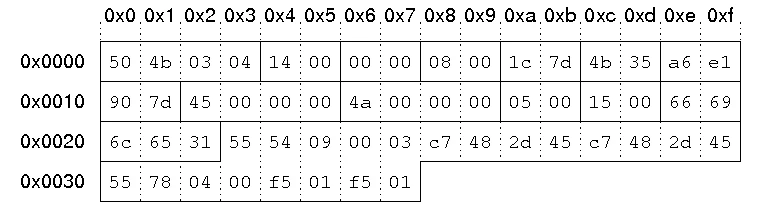
Cada una de estas cabeceras sigue un estricto patrón de bytes definido por Especificación ZIP de PKWARE, empezando por la firma 0x04034b50 (“PK\x03\x04”) para cabeceras de archivos locales.
El papel de la cabecera ZIP
En Cabecera ZIP sirve como hoja de ruta del archivo, permitiendo a las herramientas de descompresión interpretar y restaurar los datos archivados. Sin estas cabeceras, las utilidades ZIP no pueden localizar ni descomprimir correctamente los archivos.
- Identificación del fichero: La cabecera identifica el inicio de cada archivo comprimido.
- Detección de errores: Los valores CRC-32 ayudan a verificar la integridad de los datos.
- Compatibilidad: Herramientas como WinZip, 7-Zip y el Explorador de Windows se basan en estructuras de cabecera coherentes.
- Orientación para la recuperación: Las herramientas de recuperación de datos utilizan la información de cabecera para reconstruir los archivos ZIP dañados.
Firmas comunes del encabezado de archivos ZIP
Tipo de cabecera | Firma hexagonal | Descripción |
Cabecera de archivo local |
| Marca el inicio de una entrada de archivo |
Cabecera del directorio central |
| Lista todas las entradas de archivos |
Fin del directorio central |
| Marca el final del archivo ZIP |
Descriptor de datos |
| Información opcional sobre la suma de comprobación y el tamaño |
Estas firmas permiten a las herramientas forenses localizar estructuras ZIP incluso cuando falta la extensión del archivo o está dañada.
Corrupción del encabezado ZIP: Causas y síntomas
Un encabezado ZIP dañado impide que las utilidades de extracción localicen los archivos correctamente. Las causas típicas son:
- Descargas o copias interrumpidas
- Sectores defectuosos o fallo de hardware
- Proceso de compresión incompleto
- Corrupción del sistema de archivos (por ejemplo, errores FAT32, NTFS)
Síntomas comunes:
- “Errores ”Formato de archivo ZIP no válido
- Fallos de extracción o archivos perdidos
- Archivos de cero bytes a pesar de su gran tamaño real
Cuando la cabecera se pierde o está desalineada, se requiere un análisis hexadecimal manual o un software profesional de recuperación de datos para reconstruir la estructura ZIP.
Recuperar datos de un archivo ZIP dañado
La reparación de un archivo ZIP con daños en la cabecera suele implicar los siguientes pasos:
1. Identificar las firmas de cabecera utilizando un editor hexadecimal o una herramienta forense (50 4B 03 04).
2. Extraer segmentos de datos brutos correspondientes a offsets de archivo conocidos.
3. Reconstruir el directorio central basado en cabeceras de archivo locales válidas.
4. Reconstruir el EOCD con recuentos y desplazamientos de archivos precisos.
Alternativamente, las herramientas automatizadas de recuperación pueden detectar y reconstruir estas cabeceras.
Cuando un daño físico o lógico en el dispositivo de almacenamiento provoca la pérdida del encabezado, un programa de recuperación de archivos como Magic Data Recovery por Amagicsoft puede restaurar primero el archivo ZIP eliminado o incompleto antes de iniciar la reconstrucción.
Análisis de cabeceras ZIP en la recuperación de datos
En la investigación forense digital y la recuperación de datos, el análisis de encabezados se utiliza a menudo para tallar o volver a montar archivos ZIP parcialmente perdidos. Los ingenieros de recuperación buscan la firma “PK\x03\x04” en una imagen de disco sin procesar para identificar grupos de datos comprimidos.
Si el EOCD las herramientas de recuperación pueden recrearlo basándose en las cabeceras de archivos locales disponibles, lo que hace posible una recuperación parcial incluso de unidades formateadas.
Este enfoque es utilizado por profesionales y soluciones de software que cumplen con la documentación de Microsoft y PKWARE, garantizando una restauración precisa de los datos.
Integración con las herramientas de recuperación Amagicsoft
Aunque el software Amagicsoft no modifica directamente las cabeceras ZIP, su avanzado Magic Data Recovery destaca en la localización y restauración de archivos ZIP dañados o eliminados que contienen metadatos de cabecera dañados. Una vez recuperado el archivo, los usuarios pueden utilizar herramientas externas de reparación de ZIP para reconstruir las entradas de directorio que faltan.
Este flujo de trabajo -primero recuperar, luego reparar- garantiza máxima integridad y trazabilidad de los datos, crítico para escenarios de recuperación forense, corporativa o personal.
Buenas prácticas para evitar daños en las cabeceras ZIP
- Comprueba siempre la integridad del soporte de almacenamiento antes de archivar ficheros de gran tamaño.
- Evitar paradas bruscas o expulsiones durante la compresión.
- Conserve varias copias de los archivos importantes.
- Utiliza un software fiable para crear y gestionar archivos ZIP.
- Compruebe periódicamente la accesibilidad de sus archivos.
Conclusión
A Cabecera ZIP es la piedra angular de la estructura de archivos y la organización de datos. Define cómo se almacenan, indexan y verifican los archivos dentro de un contenedor ZIP. Comprender los componentes de las cabeceras, como las cabeceras de archivos locales y las entradas de directorio central, es esencial tanto para la recuperación de archivos como para el análisis forense.
Cuando un encabezado ZIP se corrompe o se pierde, Magic Data Recovery por Amagicsoft puede recuperar los datos de archivo sin procesar de unidades dañadas, garantizando que no se pierda ningún archivo comprimido crítico antes de proceder a su reparación.
👉 Protege tus archivos digitales y restaura archivos ZIP perdidos de forma segura con Magic Data Recovery - un socio de confianza tanto para profesionales como para particulares.
Compatible con Windows 7/8/10/11 y Windows Server
PREGUNTAS FRECUENTES
¿Qué es una cabecera ZIP?
¿Qué ocurre si un archivo ZIP está dañado?
¿Se puede reparar manualmente un archivo ZIP?
¿Cómo puedo identificar un encabezado ZIP en un editor hexadecimal?
¿Qué causa la corrupción del encabezado ZIP?
¿Cómo puedo evitar la pérdida de archivos ZIP?

Vasilii es un especialista en recuperación de datos con unos 10 años de experiencia práctica en este campo. A lo largo de su carrera, ha resuelto con éxito miles de casos complejos relacionados con archivos borrados, unidades formateadas, particiones perdidas y sistemas de archivos RAW. Su experiencia abarca tanto métodos de recuperación manual con herramientas profesionales como editores hexadecimales como soluciones automatizadas avanzadas con software de recuperación. La misión de Vasilii es poner los conocimientos sobre recuperación de datos al alcance tanto de los profesionales informáticos como de los usuarios de a pie, ayudándoles a salvaguardar sus valiosos activos digitales.