
Cómo recuperar datos de disco duro de forma segura sin exponer archivos privados

Perder archivos importantes de su disco duro puede ser estresante, pero puede realizar recuperación segura de datos en casa sin poner en riesgo tu información privada. Esta guía explica paso a paso los métodos, precauciones y herramientas para recuperar archivos perdidos de forma segura y eficaz.
Al mismo tiempo, otra preocupación cobra aún más importancia: Se puede ver el contenido de la recuperación de datos durante determinados procesos. Por ello, los usuarios quieren Recuperación de discos duros soluciones. Afortunadamente, puedes recuperar archivos manteniendo la privacidad.
Compatible con Windows 7/8/10/11 y Windows Server
Índice
Por qué es importante recuperar datos de forma segura
En primer lugar, los dispositivos modernos almacenan información muy personal. En consecuencia, perder datos no sólo supone un inconveniente, sino que también genera estrés emocional. Por eso, La recuperación de datos es vergonzosa para muchas personas.
Además, los usuarios suelen imaginar que otros podrían ver sus archivos. Por ejemplo, las imágenes personales o los documentos confidenciales pueden parecer demasiado delicados para exponerlos. Por ello, aumentan las dudas. Sin embargo, comprender el proceso de recuperación ayuda a reducir este miedo.
¿Se puede ver el contenido de la recuperación de datos durante la recuperación?
En algunos casos, sí, Se puede ver el contenido de la recuperación de datos durante la recuperación. Por ejemplo, los técnicos pueden previsualizar los archivos para confirmar que la restauración se ha realizado correctamente. A continuación, comprueban la integridad de los archivos para garantizar su usabilidad. Por lo tanto, es posible que durante este proceso se abran archivos legibles.
Sin embargo, esta situación cambia cuando utilizas herramientas locales. En ese caso, sigues teniendo el control. En consecuencia, Se puede ver el contenido de la recuperación de datos sólo por ti.
La recuperación de datos es embarazosa por los riesgos para la intimidad
Aunque la recuperación es necesaria, varios riesgos explican por qué la recuperación segura de datos es importante:
Acceso de terceros
Cuando envías un dispositivo a un centro de servicio, otras personas manejan tus datos. Por lo tanto, los archivos sensibles pueden llegar a ser accesibles.
Verificación manual de archivos
A veces, los técnicos abren los expedientes para confirmar los resultados. En consecuencia, Se puede ver el contenido de la recuperación de datos durante la verificación.
Procesamiento en la nube
Algunas herramientas cargan datos en línea. Como resultado, los archivos salen de tu dispositivo, lo que aumenta el riesgo de exposición.
Cómo recuperar datos con Safe Data Recovery
Afortunadamente, puede reducir estos riesgos eligiendo el enfoque adecuado.
Utilizar software de recuperación sin conexión
En primer lugar, seleccione herramientas que se ejecuten localmente. Esto garantiza que Se puede ver el contenido de la recuperación de datos sólo en su propio dispositivo.
Evitar la manipulación externa
A continuación, evita enviar tu dispositivo de almacenamiento a terceros a menos que sea necesario. Así mantendrás el control total.
Deje de utilizar la unidad inmediatamente
Por último, deja de escribir nuevos datos. Como resultado, el éxito de la recuperación mejora mientras que la privacidad permanece protegida.
La mejor opción cuando la recuperación de datos es embarazosa
Para la mayoría de los usuarios, el software de recuperación local ofrece la opción más segura. Una solución eficaz es Magic Data Recovery. Escanea el almacenamiento directamente sin cargar datos. Por lo tanto, La recuperación de datos es vergonzosa ya no se convierte en una barrera, porque tus archivos nunca salen de tu dispositivo.
Además, admite Unidades RAW y sistemas de archivos dañados. Como resultado, la recuperación sigue siendo posible incluso en escenarios complejos.
Magic Data Recovery es una herramienta de recuperación local que te permite recuperar tus datos sin que nadie los vea.
Características:
- Entorno de recuperación local
Sin necesidad de subir datos a la nube. No te preocupes de que otros vean tus archivos.
- Admite la recuperación de unidades borradas, formateadas o inaccesibles.
Admite varios dispositivos de almacenamiento, como unidades USB, Tarjetas SD, y discos duros externos.
- Compatible con Windows
Funciona en Windows 11 / 10 / 8 / 7 / Vista / XP y es fácil de manejar sin conocimientos especializados.
- Recuperación gratuita de hasta 500 MB
Puedes comprobar gratuitamente si tus datos son recuperables, lo que te dará tranquilidad.
- Mucho más asequible que contratar a un especialista local.
Cómo utilizar Magic Data Recovery
1.Descarga e instala Magic Data Recovery
Instálalo en una unidad distinta de la que contiene los datos que quieres recuperar. Para evitar sobrescribir los datos borrados, detenga inmediatamente cualquier nueva escritura en esa unidad.
Compatible con Windows 7/8/10/11 y Windows Server
2.Seleccione la unidad que desea recuperar e inicie el escaneo
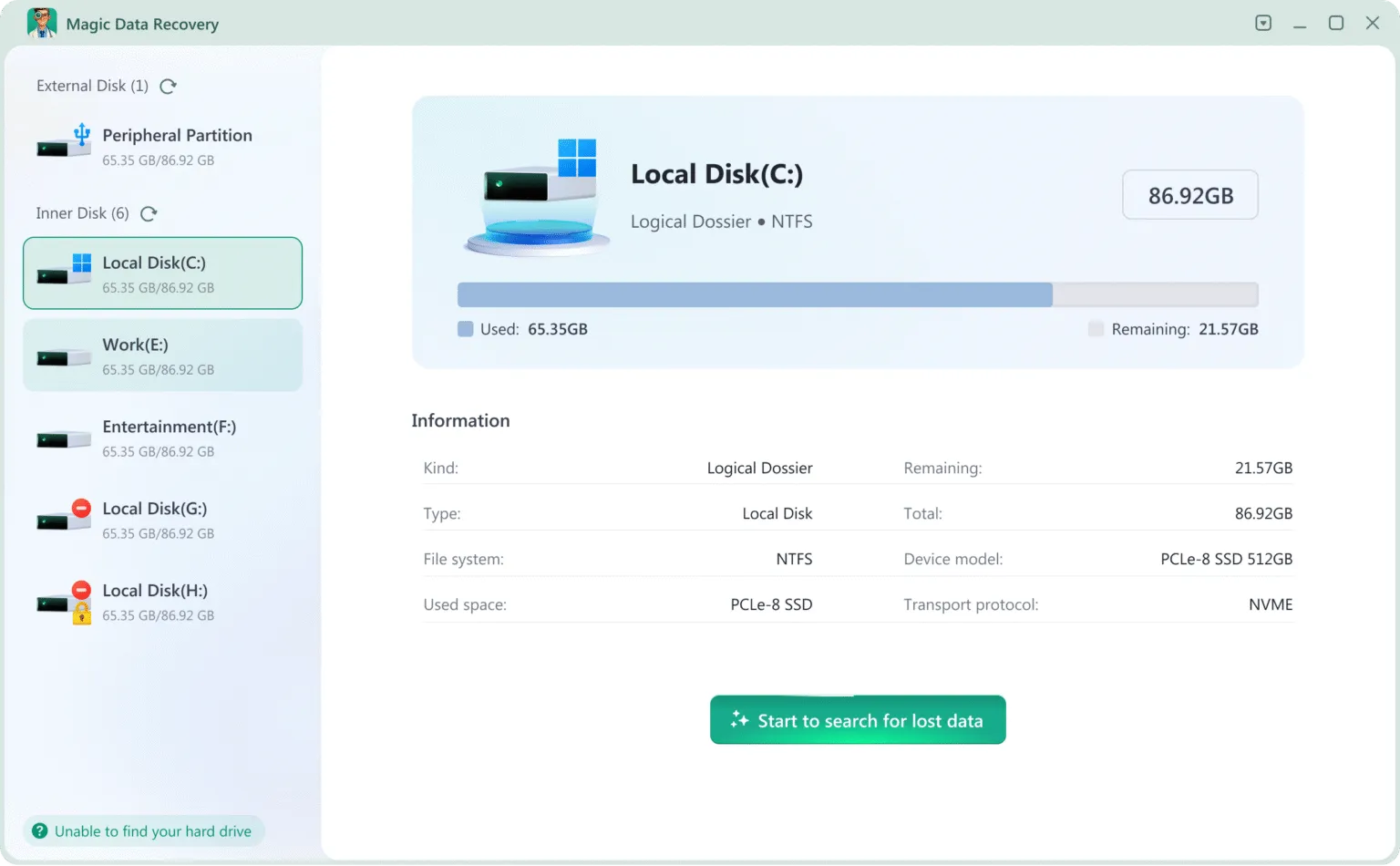
3.Espere a que finalice la exploración
Magic Data Recovery realiza automáticamente un escaneo rápido y un escaneo avanzado para encontrar archivos borrados, incluso de unidades formateadas o dañadas.
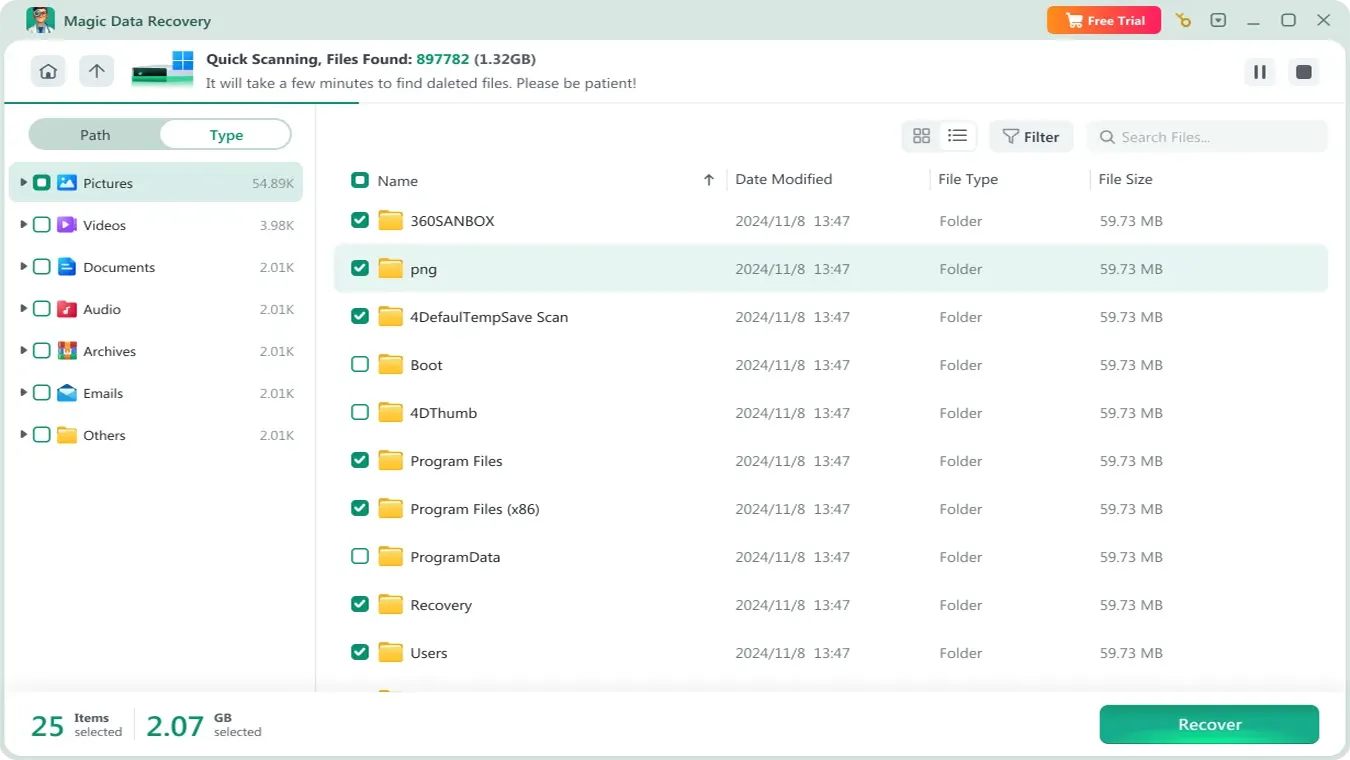
4.Previsualiza los archivos y confirma los que necesitas
Podrás ver una lista de los archivos recuperables. Utiliza la función de vista previa para verificar si son los archivos que necesitas.

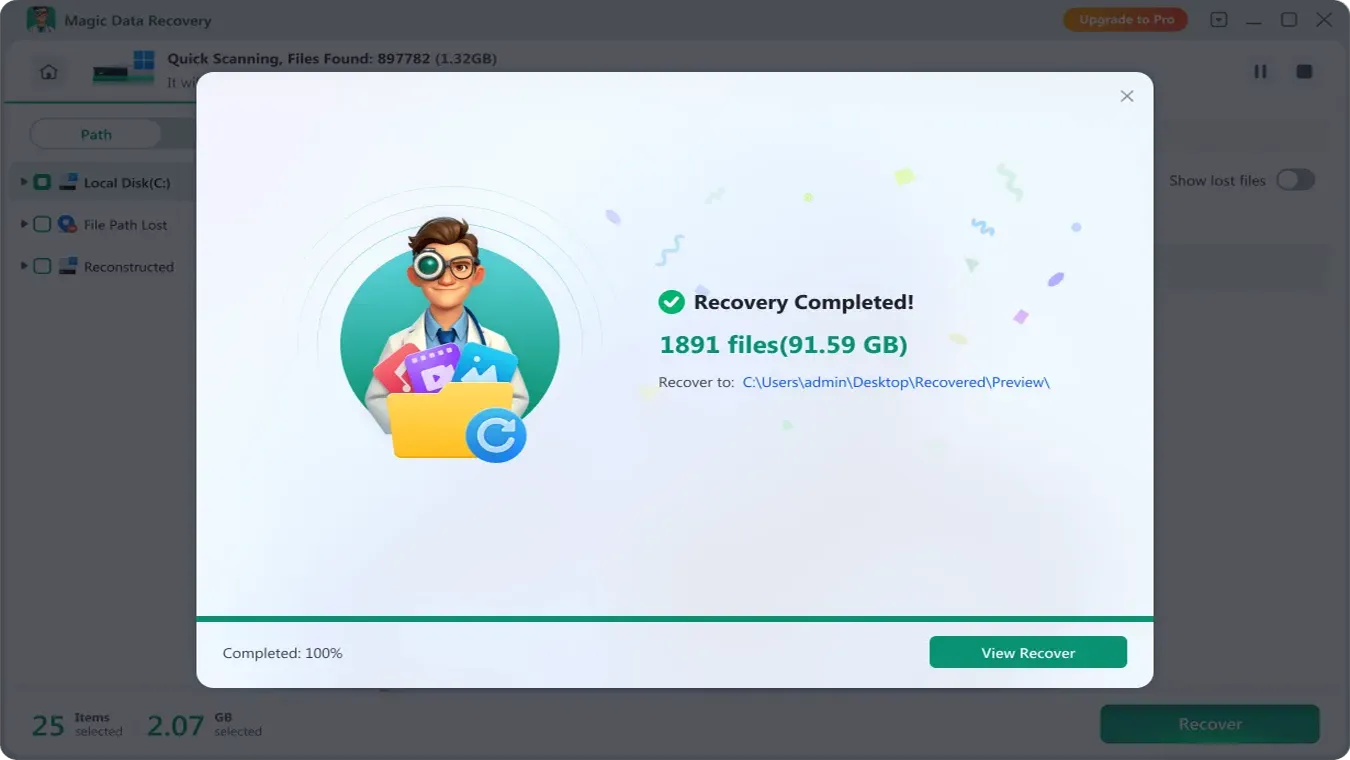
5.Recuperar los archivos
Seleccione los archivos que desea recuperar y especifique una ubicación segura para la recuperación. Ya está. Has recuperado con éxito tus datos privados sin que nadie los vea.
La recuperación de datos es embarazosa: Comparación entre software y servicios
Factor | Servicio de Recuperación | Software de recuperación |
Privacidad | Limitado | Alta |
Acceso a archivos | Posible | Sólo para usuarios |
Riesgo | Más alto | Baja |
Controlar | Bajo | Completo |
Por lo tanto, cuando La recuperación de datos es vergonzosa, ofrece una solución más segura y privada.
Conclusión
En muchas situaciones, La recuperación de datos es vergonzosa, pero retrasar la recuperación a menudo conduce a pérdida permanente de datos. Por lo tanto, es esencial actuar a tiempo.
Realización de recuperación segura de datos le garantiza que podrá recuperar en casa los archivos perdidos de su disco duro al tiempo que protege su privacidad. Si sigue los métodos paso a paso descritos en esta guía y utiliza herramientas de recuperación de confianza, podrá restaurar archivos importantes de forma eficaz, minimizar la pérdida de datos y evitar exponer información confidencial. Tanto si opta por la recuperación casera como por la asistencia profesional, dar prioridad a la seguridad y la privacidad es clave para que el proceso de recuperación de datos tenga éxito.
Al mismo tiempo, la privacidad debe seguir siendo una prioridad. Porque Se puede ver el contenido de la recuperación de datos en algunos Recuperación de discos duros métodos, elegir herramientas offline ofrece una mejor protección. En última instancia, el enfoque más seguro combina una acción rápida con un control total sobre tus datos.
Compatible con Windows 7/8/10/11 y Windows Server
PREGUNTAS FRECUENTES
¿Cómo puedo realizar una recuperación de datos segura en casa?
¿Qué herramientas se recomiendan para recuperar datos de discos duros de forma segura?
¿Puedo recuperar archivos perdidos sin poner en riesgo mi privacidad?
¿Qué pasos hay que seguir para recuperar datos de un disco duro dañado?
¿Cómo evitar errores comunes durante la recuperación segura de datos?
¿Es la recuperación de datos segura "hágalo usted mismo" tan fiable como los servicios profesionales?
¿Cómo recuperar archivos de forma segura si Windows no reconoce la unidad?
¿Qué precauciones debo tomar para proteger los datos privados durante la recuperación?

Vasilii es un especialista en recuperación de datos con unos 10 años de experiencia práctica en este campo. A lo largo de su carrera, ha resuelto con éxito miles de casos complejos relacionados con archivos borrados, unidades formateadas, particiones perdidas y sistemas de archivos RAW. Su experiencia abarca tanto métodos de recuperación manual con herramientas profesionales como editores hexadecimales como soluciones automatizadas avanzadas con software de recuperación. La misión de Vasilii es poner los conocimientos sobre recuperación de datos al alcance tanto de los profesionales informáticos como de los usuarios de a pie, ayudándoles a salvaguardar sus valiosos activos digitales.