
Reseña de iSkysoft Data Recovery y la mejor alternativa
La pérdida de archivos suele producirse sin previo aviso. Es posible que borres una carpeta de trabajo, formatees una memoria USB, pierdas fotos de una tarjeta de memoria o te encuentres con que una partición ya no se abre. En estos momentos, muchos usuarios buscan iSkysoft Data Recovery porque quieren una forma clara de recuperar archivos borrados y evitar una pérdida definitiva.
Este iSkysoft Data Recovery En esta reseña se explica qué puede hacer la herramienta, cuáles son sus posibles limitaciones y cómo elegir un proceso de recuperación más seguro. Además, presenta Magic Data Recovery como una opción práctica para los usuarios de Windows que necesitan un proceso sencillo de análisis, vista previa y recuperación.
Compatible con Windows 7/8/10/11 y Windows Server
Índice
¿Qué es iSkysoft Data Recovery?
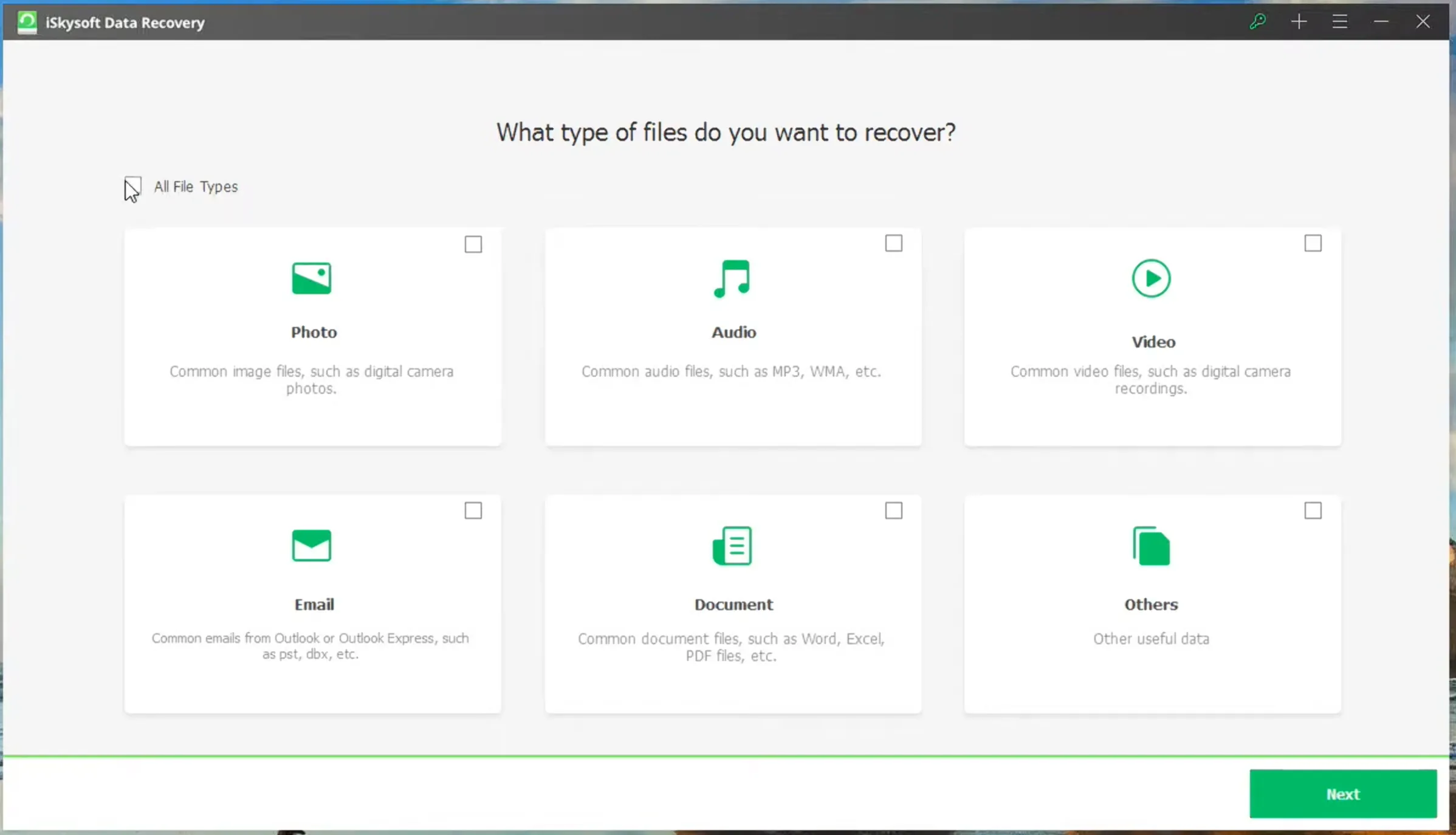
iSkysoft Data Recovery es una herramienta de recuperación de archivos que ayuda a los usuarios a encontrar archivos borrados, formateados o perdidos en dispositivos de almacenamiento habituales. Por lo general, sigue un proceso sencillo: elegir una ubicación, buscar archivos perdidos, previsualizar los resultados y recuperar los datos seleccionados.
Hay un detalle que puede resultar confuso para los usuarios hoy en día. Alrededor de 2020, la línea original de productos de recuperación de iSkysoft parece haberse integrado en el ecosistema Recoverit de Wondershare. Como consecuencia, los usuarios que buscan iSkysoft Data Recovery Es posible que ahora veas Wondershare Recoverit en páginas de descarga, instaladores o materiales de soporte. Por lo tanto, sigue siendo recomendable comparar las funciones, los límites de la versión de prueba, los precios y las alternativas antes de elegir una herramienta de recuperación.
Por ejemplo, es posible que utilices un programa de recuperación tras vaciar la Papelera de reciclaje, formatear una memoria USB por error o perder archivos tras un error del sistema. Sin embargo, ninguna herramienta de recuperación puede solucionar todos los casos. Si los archivos perdidos se sobrescriben con datos nuevos, el programa no podrá recuperarlos de forma fiable.
Clave iSkysoft Data Recovery Características
Una buena software de recuperación de datos para Windows debería cubrir los casos más habituales de pérdida de archivos. En general, este tipo de herramientas se centra en la recuperación de archivos borrados, la recuperación de unidades formateadas y la recuperación de dispositivos de almacenamiento extraíbles.
Recuperación de archivos eliminados
La recuperación de archivos borrados resulta útil cuando eliminas un archivo y, más tarde, te das cuenta de que aún lo necesitas. En muchos casos, los datos del archivo permanecen en la unidad hasta que otros archivos nuevos los sobrescriben. Por ello, actuar con rapidez aumenta las posibilidades de que el software de recuperación localice los datos perdidos.
Recuperación de unidades formateadas
Recuperación de unidades formateadas es importante cuando los usuarios formatear una unidad USB, tarjeta de memoria o partición antes de copiar archivos importantes. Un análisis en profundidad puede detectar rastros de archivos que hayan quedado. Sin embargo, los resultados dependen del tipo de formato, del estado del sistema de archivos y del uso posterior del dispositivo.
Vista previa antes de la recuperación
La vista previa te ayuda a comprobar si un archivo sigue abriéndose correctamente. Por ejemplo, puede que una foto aparezca en los resultados del análisis, pero que la vista previa muestre que está dañada. Por lo tanto, previsualizar los archivos antes de la recuperación te ahorra tiempo y te ayuda a evitar restaurar datos innecesarios.
Ventajas e inconvenientes de iSkysoft Data Recovery
Cada reseña debería incluir tanto las ventajas como las limitaciones. Esta visión equilibrada ayuda a los usuarios a elegir en función de sus necesidades reales, en lugar de basarse únicamente en el nombre del producto.
Pros
El software ofrece un flujo de trabajo sencillo para los principiantes. Además, puede escanear ubicaciones habituales y gestionar casos cotidianos, como el borrado accidental, el formateo y los errores en los dispositivos de almacenamiento. Por otra parte, la función de vista previa permite a los usuarios comprobar los archivos antes de su recuperación.
Contras
Sin embargo, es posible que esta herramienta no sea adecuada para todas las situaciones. La versión de prueba gratuita puede centrarse en el análisis o la vista previa, en lugar de en la recuperación completa. Además, en algunos casos, los resultados del análisis profundo pueden hacer que se pierdan los nombres originales de los archivos. Y lo que es más importante, el software no puede reparar unidades dañadas físicamente, dispositivos que hacen ruido al pulsar ni soportes de almacenamiento que Windows no pueda detectar.
¿Es gratuito iSkysoft Data Recovery?
Muchos usuarios buscan iSkysoft Data Recovery gratis porque quieren saber si pueden recuperar archivos sin tener que pagar. Sin embargo, el producto de recuperación independiente de iSkysoft ya no es la opción de descarga más evidente. Dado que la línea de productos se ha trasladado a Wondershare Recoverit, hoy en día es más probable que los usuarios encuentren Recoverit Free.
Recoverit Free permite recuperar hasta 500 MB de archivos sin coste alguno, lo que puede resultar útil en casos sencillos de eliminación, como la restauración de unos pocos documentos o fotos de pequeño tamaño. Sin embargo, las tareas de recuperación más extensas, la recuperación de unidades formateadas o la recuperación de un gran número de archivos pueden requerir una actualización de pago. Por lo tanto, los usuarios deben comprobar el límite de recuperación gratuito antes de iniciar un análisis de gran envergadura.
Cuándo iSkysoft Data Recovery puede no ser suficiente
Aunque la herramienta puede ayudar a resolver problemas habituales de pérdida de archivos, hay casos que requieren una solución diferente. Por ejemplo, si un SSD usos TRIM, los archivos eliminados pueden desaparecer rápidamente. Si un disco presenta daños físicos, la recuperación mediante software puede aumentar el riesgo. Del mismo modo, si Windows no reconoce el dispositivo en absoluto, es posible que no se inicie un análisis normal.
Además, es posible que los usuarios busquen un flujo de trabajo más moderno y centrado en Windows, una mayor compatibilidad con distintos tipos de archivos o una forma más clara de probar la recuperación antes de confirmarla. En estos casos, Magic Data Recovery merece toda la atención.
La mejor alternativa a iSkysoft Data Recovery: Magic Data Recovery
Si necesitas un iSkysoft Data Recovery alternativa, Magic Data Recovery ofrece una solución práctica para los usuarios de Windows. Se centra en el principal problema que subyace a la mayoría de las búsquedas de recuperación: encontrar archivos perdidos, comprobar si son utilizables y guardarlos en un lugar seguro.
Magic Data Recovery es compatible con una amplia variedad de tipos de archivos, entre los que se incluyen documentos, fotos, vídeos, archivos de audio, archivos comprimidos y otros formatos. Además, funciona con soportes de almacenamiento habituales, como discos duros, SSD, memorias USB, tarjetas de memoria, cámaras y videocámaras.
Esta herramienta resulta útil en muchas situaciones de la vida cotidiana. Por ejemplo, un estudiante puede recuperar un trabajo borrado desde una memoria USB. Un fotógrafo puede recuperar fotos borradas de una tarjeta de memoria. Es posible que un usuario empresarial necesite recuperar documentos tras formatear una partición. En lugar de seguir pasos técnicos complejos, los usuarios pueden seguir un flujo de trabajo directo que consiste en escanear, previsualizar y recuperar.
Cómo utilizar Magic Data Recovery
Tras comparar iSkysoft Data Recovery En comparación con otras herramientas, es posible que prefieras una forma más directa de recuperar archivos borrados, formateados o perdidos. Magic Data Recovery simplifica el proceso, por lo que la mayoría de los usuarios pueden empezar a utilizarlo sin necesidad de tener conocimientos técnicos.
Paso 1: Descargar e instalar Magic Data Recovery
En primer lugar, descarga e instala Magic Data Recovery en una unidad distinta a la afectada. Este método ayuda a evitar que se sobrescriban los datos por error y protege los datos perdidos antes de que comience la recuperación.
Compatible con Windows 7/8/10/11 y Windows Server
Paso 2: Seleccione el Unidad o ubicación que se va a escanear
A continuación, inicia el programa. En la interfaz principal, selecciona la unidad, la partición, la memoria USB, la tarjeta de memoria o la carpeta en la que se perdieron los archivos. A continuación, inicia el análisis.

Paso 3: Buscar archivos perdidos
El programa inicia automáticamente un análisis avanzado. Mientras tanto, va mostrando los archivos recuperables a medida que avanza el análisis, por lo que puedes consultar los resultados sin tener que esperar a que termine por completo.

Paso 4: Vista previa Archivos antes de la recuperación
A continuación, utiliza la función de vista previa para comprobar el contenido de los archivos. Este paso te ayuda a recuperar solo los archivos que realmente necesitas y a evitar guardar resultados dañados o irrelevantes.

Paso 5: Recuperar archivos a una ubicación segura
Por último, selecciona los archivos de destino y guárdalos en otra unidad o dispositivo de almacenamiento. No restaures los datos en la misma ubicación, ya que al hacerlo podrías sobrescribir los archivos recuperables que queden o provocar que se dañen.

iSkysoft Data Recovery frente a Magic Data Recovery
Dado que la línea original de productos de recuperación de iSkysoft se ha integrado en el ecosistema Recoverit de Wondershare, iSkysoft Data Recovery Ya no se ofrece de forma activa como descarga independiente. En la práctica, los usuarios que lo busquen pueden acabar ahora en páginas de Wondershare Recoverit, en páginas antiguas de asistencia técnica de iSkysoft o en sitios web de descarga de terceros. Por lo tanto, conviene compararlo con una herramienta de recuperación disponible actualmente antes de tomar una decisión.
Punto de comparación | iSkysoft Data Recovery | Magic Data Recovery |
Disponibilidad actual | Ya no está disponible como producto independiente | Disponible como herramienta activa de recuperación de datos para Windows |
Situación de la marca | La línea original de productos de recuperación de iSkysoft ha pasado a denominarse Wondershare Recoverit | Ofrecido de forma independiente por Amagicsoft |
Acceso a la descarga | Es posible que se redirija a los usuarios a Wondershare Recoverit o a páginas antiguas de terceros. | Los usuarios pueden descargarlo directamente desde la página oficial de Magic Data Recovery. |
Asistencia técnica para productos | La asistencia técnica independiente de iSkysoft ya no es la vía principal de asistencia; parece que la asistencia se ha trasladado a Recoverit. | Actualmente se ofrece asistencia técnica para los usuarios de Magic Data Recovery |
Lo mejor para | Usuarios que buscan información sobre la antigua herramienta de iSkysoft o que la comparan con Recoverit | Usuarios de Windows que necesitan un flujo de trabajo directo de «escanear, previsualizar y recuperar» |
Flujo de trabajo de recuperación | Flujo de trabajo antiguo al estilo de iSkysoft o basado en Recoverit, dependiendo de la fuente de descarga | Un proceso sencillo: selecciona la ubicación, escanea, previsualiza y recupera |
Situaciones en las que se requiere la recuperación de archivos | Archivos eliminados, unidades formateadas y problemas habituales de almacenamiento | Archivos borrados, unidades formateadas, memorias USB, tarjetas de memoria, discos duros, SSD y mucho más |
Experiencia del usuario | Puede generar confusión, ya que los nombres «iSkysoft» y «Recoverit» aparecen en diferentes páginas. | Más claro para los usuarios que buscan una herramienta de recuperación actualizada con instrucciones directas |
En general, iSkysoft Data Recovery puede que siga apareciendo en reseñas antiguas, páginas de asistencia y resultados de búsqueda. Sin embargo, dado que el producto independiente ya no es la opción más clara para la descarga o la asistencia, es posible que muchos usuarios prefieran una herramienta actual con un proceso de recuperación más directo.
Por este motivo, Magic Data Recovery es la mejor opción práctica si quieres recuperar archivos borrados, formateados o perdidos en Windows sin tener que lidiar con páginas de productos obsoletas o fuentes de descarga poco claras.
Consejos antes de utilizar iSkysoft Data Recovery o cualquier otra herramienta de recuperación
Independientemente de la herramienta que utilices, unos buenos hábitos pueden aumentar tus posibilidades de recuperación. En primer lugar, deja de utilizar el dispositivo afectado de inmediato. A continuación, evita instalar software en la misma ubicación en la que se perdieron los datos. Además, no formatees el dispositivo de nuevo, aunque Windows te lo sugiera.
Tras el análisis, previsualiza los archivos importantes antes de recuperarlos. Por último, guarda los datos recuperados en otra ubicación segura. Estos pasos reducen el riesgo de sobrescritura y ayudan a proteger los datos restantes.
Conclusión
iSkysoft Data Recovery puede ayudar con los problemas habituales recuperación de archivos eliminados necesidades, sobre todo cuando los usuarios actúan con rapidez tras un borrado o un formateo. No obstante, los usuarios deben conocer los límites de la versión de prueba, las restricciones de recuperación y el riesgo de que los datos se sobrescriban antes de confiar en ella.
Para muchos usuarios de Windows, Magic Data Recovery ofrece una solución más clara y práctica. Admite una amplia variedad de situaciones de recuperación, cuenta con un flujo de trabajo sencillo y permite a los usuarios previsualizar los archivos antes de guardarlos. Por lo tanto, si estás comparando iSkysoft Data Recovery Como alternativa moderna, vale la pena probar Magic Data Recovery como solución fiable para recuperar archivos borrados, formateados o perdidos.
Compatible con Windows 7/8/10/11 y Windows Server
Preguntas frecuentes sobre iSkysoft Data Recovery
¿Es seguro el programa iSkysoft Data Recovery?
Puede ser seguro si los usuarios lo descargan de una fuente oficial o de confianza. Sin embargo, evita las versiones pirateadas, las páginas de claves de licencia y los instaladores no oficiales. Estos archivos pueden contener malware o programas no deseados. Para mayor seguridad, analiza las descargas con un programa de seguridad e instala las herramientas de recuperación en una ubicación diferente siempre que sea posible.
¿Es gratuito iSkysoft Data Recovery?
El producto independiente iSkysoft Data Recovery ya no es la principal opción de descarga. Dado que la línea de recuperación se ha integrado en Wondershare Recoverit, los usuarios ahora pueden utilizar Recoverit Free en su lugar. Permite recuperar hasta 500 MB de archivos de forma gratuita, lo que puede ser suficiente para una recuperación sencilla de archivos borrados. Las tareas de recuperación de mayor envergadura requieren una actualización.
¿Puede iSkysoft Data Recovery recuperar archivos borrados de forma definitiva?
Puede recuperar archivos eliminados de forma permanente si no se han sobrescrito con nuevos datos. Cuando se elimina un archivo, el sistema suele marcar el espacio que ocupaba como disponible. Por eso, es importante actuar con rapidez. Deja de utilizar la unidad afectada, ejecuta un análisis, previsualiza los resultados y guarda los archivos recuperados en otra ubicación.
¿Esta herramienta puede recuperar archivos de una unidad formateada?
Puede resultar útil para recuperar datos de una unidad formateada cuando los datos aún se conservan en el soporte de almacenamiento. Sin embargo, un formateo completo, los formateos repetidos o la escritura de nuevos datos pueden reducir las posibilidades de éxito. Para obtener los mejores resultados, deja de utilizar el dispositivo inmediatamente y analízalo antes de guardar cualquier archivo nuevo.
¿Qué ha pasado con iSkysoft Data Recovery?
Alrededor de 2020, la línea original de productos de recuperación de iSkysoft parece haberse integrado en el ecosistema Recoverit de Wondershare. Por eso es posible que los usuarios vean «Wondershare Recoverit» al buscar «iSkysoft Data Recovery». No obstante, antes de elegir una herramienta, conviene comparar las funciones de recuperación, los límites de la versión de prueba gratuita, los dispositivos compatibles y las alternativas disponibles.
¿Cuál es la mejor alternativa a iSkysoft Data Recovery?
Magic Data Recovery es una alternativa práctica para los usuarios de Windows. Es compatible con los dispositivos de almacenamiento más habituales, ofrece un flujo de trabajo sencillo (escaneo, vista previa y recuperación) y ayuda a los usuarios a comprobar los archivos antes de guardarlos. Por lo tanto, es ideal para quienes buscan un proceso de recuperación claro, sin pasos técnicos complicados.
¿Qué debo hacer si no se detecta mi unidad?
En primer lugar, comprueba el cable, el puerto y la herramienta «Administración de discos» de Windows. Además, prueba con otro ordenador si es posible. Si la unidad sigue sin aparecer o emite ruidos extraños, deja de utilizarla. En ese caso, es posible que la recuperación mediante software no sirva de nada, y un servicio profesional de recuperación de datos podría ser una opción más segura.

Vasilii es un especialista en recuperación de datos con unos 10 años de experiencia práctica en este campo. A lo largo de su carrera, ha resuelto con éxito miles de casos complejos relacionados con archivos borrados, unidades formateadas, particiones perdidas y sistemas de archivos RAW. Su experiencia abarca tanto métodos de recuperación manual con herramientas profesionales como editores hexadecimales como soluciones automatizadas avanzadas con software de recuperación. La misión de Vasilii es poner los conocimientos sobre recuperación de datos al alcance tanto de los profesionales informáticos como de los usuarios de a pie, ayudándoles a salvaguardar sus valiosos activos digitales.