
Active Undelete Review: Features, Pricing & Alternatives
Elegir Active Undelete depends on more than its recovery features or price. A tool that works for accidentally deleted files may not be suitable for a missing partition or damaged RAID array. Meanwhile, free recovery limits, licensing costs, and technical complexity can make the decision harder. Understanding these differences helps you avoid paying for features you do not need.
This review examines Active Undelete capabilities, pricing, advantages, and limitations using official product documentation and consistent comparison criteria. We also evaluate alternative recovery options to help you identify the most suitable solution for your situation. For additional recovery methods, explore our Guía para recuperar archivos borrados.
Índice
Quick Verdict: Is Active Undelete Worth Using?
Active Undelete, officially Active@ UNDELETE, is a Windows recovery toolkit developed by LSoft Technologies. It supports deleted-file scanning, formatted-volume recovery, and advanced partition analysis.
However, not everyone needs its higher editions.
Your Priority | Recommended Option | Motivo principal |
Recover ordinary deleted files | Active Undelete Standard | File scanning, filtering, and preview |
Recover missing partitions | Active Undelete Professional | Advanced partition recovery tools |
Reconstruct RAID arrays | Active Undelete Ultimate | Dedicated virtual RAID reconstruction |
Recover common Windows files | Magic Data Recovery | Guided workflow and 500 MB free allowance |
Restore existing backups | Historial de archivos de Windows | No recovery scan required |
Veredicto: Active Undelete is worth considering when you need detailed control over recovery tasks. However, users recovering a few ordinary documents should compare free recovery limits, workflow complexity, and licensing costs before purchasing.
Active Undelete vs. Magic Data Recovery: Key Differences
Both applications support common Windows file recovery scenarios. Nevertheless, their specialist features, licensing conditions, and free recovery limits differ.
Característica | Active Undelete | Magic Data Recovery |
Plataforma | Windows | Windows |
HDD, SSD, USB, tarjeta SD | Soporte | Soporte |
Recuperación de archivos borrados | Sí | Sí |
Formatted-volume recovery | Sí | Sí |
Vista previa del archivo | Supported formats | Supported formats |
Recuperación gratuita | Demo: 1 MB per file | Up to 500 MB total |
Advanced partition recovery | Professional/Ultimate | File recovery from certain logical partition problems |
Reconstrucción RAID | Ultimate edition | No dedicated reconstruction tool |
Bootable recovery | Professional/Ultimate | No dedicated bootable environment documented |
Paid entry price | $19.99 Standard | $49.95 Pro, 1-year offer |
Personal license | Up to 3 PCs advertised; verify EULA | 1 PC for listed Pro plans |
Pricing and specifications checked October 10, 2026. Prices, promotional offers, and licensing conditions may change.
Editorial Disclosure: This article is published by Amagicsoft, the developer of Magic Data Recovery. Both applications are evaluated using the same criteria for compatibility, features, licensing, limitations, and suitability. Neither product receives a higher recovery-performance ranking without supporting test evidence.
How We Evaluated Active Undelete and Its Alternative
A useful recovery software review must distinguish documented capabilities from independently verified recovery performance.
Why These Two Tools Were Selected
This article focuses on Active Undelete because readers searching for the product typically want to understand its features, pricing, limitations, and available alternatives.
Magic Data Recovery was selected because it addresses overlapping Windows deleted-file recovery scenarios while offering a different workflow and licensing model.
Both applications meet these selection criteria:
- Support Windows-based deleted-file recovery.
- Offer scanning and file preview capabilities.
- Publish information about free recovery limits.
- Provide paid recovery functionality.
- Have meaningful differences that affect purchasing decisions.
This is a focused comparison of graphical Windows recovery applications, not a ranking of every recovery tool.
Command-line utilities, macOS-only applications, and specialist hardware recovery services fall outside this comparison. Other Windows applications, including Recuva, Disk Drill, and EaseUS, are covered separately in our free undelete software comparison.
Their exclusion does not imply inferior recovery performance.
Evaluation Method and Evidence Sources
We reviewed official product specifications, recovery documentation, edition differences, and published licensing information.
Our evaluation used six consistent criteria:
Evaluation Criterion | Evidence Examined |
Compatibilidad | Supported operating systems and storage devices |
Recovery capabilities | Deleted files, formatted volumes, partitions, RAID |
Flujo de trabajo | Drive selection, scanning, filtering, preview, recovery |
Edición gratuita | Actual recovery allowance versus free scanning |
Licensing | Prices, supported PCs, duration, update terms |
Limitaciones | Missing features and technical recovery boundaries |
Para Active Undelete, the official website identifies version 26.0.0, released January 30, 2026. Magic Data Recovery’s public product page describes its Windows recovery capabilities but does not clearly identify a specific application build.
This evaluation relies on official documentation rather than measurements from a controlled recovery laboratory.
Consequently, we do not claim that either product achieves a higher recovery rate or faster scan speed.
Recovery Scenarios and Limitations
We evaluated the documented approaches to three distinct data-loss scenarios.
Scenario 1: Permanently Deleted Files
Both applications support scanning accessible Windows volumes for deleted files.
Active Undelete provides file filtering, signature detection, and recovery controls. Meanwhile, Magic Data Recovery offers drive selection, scanning, preview, and file restoration.
However, neither application can reconstruct original data that has already been overwritten.
Scenario 2: Quick-Formatted Volumes
Both products document recovery capabilities for certain formatted-volume scenarios.
A quick format may remove file system references without immediately overwriting every file. Nevertheless, subsequent writes or SSD TRIM may eliminate recoverable content.
A full format and a quick format must not be treated as equivalent recovery scenarios.
Scenario 3: Missing or Damaged Partitions
Active Undelete Professional includes advanced partition recovery tools, while Ultimate adds specialist RAID reconstruction.
Magic Data Recovery can scan for files lost through certain logical partition problems, but it does not document an equivalent specialist partition reconstruction toolkit.
Therefore, Active Undelete offers broader documented functionality for advanced partition analysis.
How Recovery Results Should Be Verified
Finding a file does not guarantee successful recovery.
We distinguish four recovery outcomes:
Stage | Significado |
Found | Software identifies a file record or recognizable content |
Previewable | Software displays readable content for a supported format |
Recuperado | Software exports the selected file |
Intact | The exported file passes content and integrity verification |
For a controlled test using known original files, SHA-256 checksum comparison provides stronger evidence of complete recovery than visual inspection alone.
However, no identical-drive benchmark was conducted for this review. As a result, we cannot report verified recovery counts, checksum results, or comparative success rates.
Evaluation conclusion: Active Undelete provides more documented specialist recovery capabilities, particularly for partition and RAID scenarios. Magic Data Recovery offers an alternative for common Windows file loss. Actual recovery performance remains unranked.
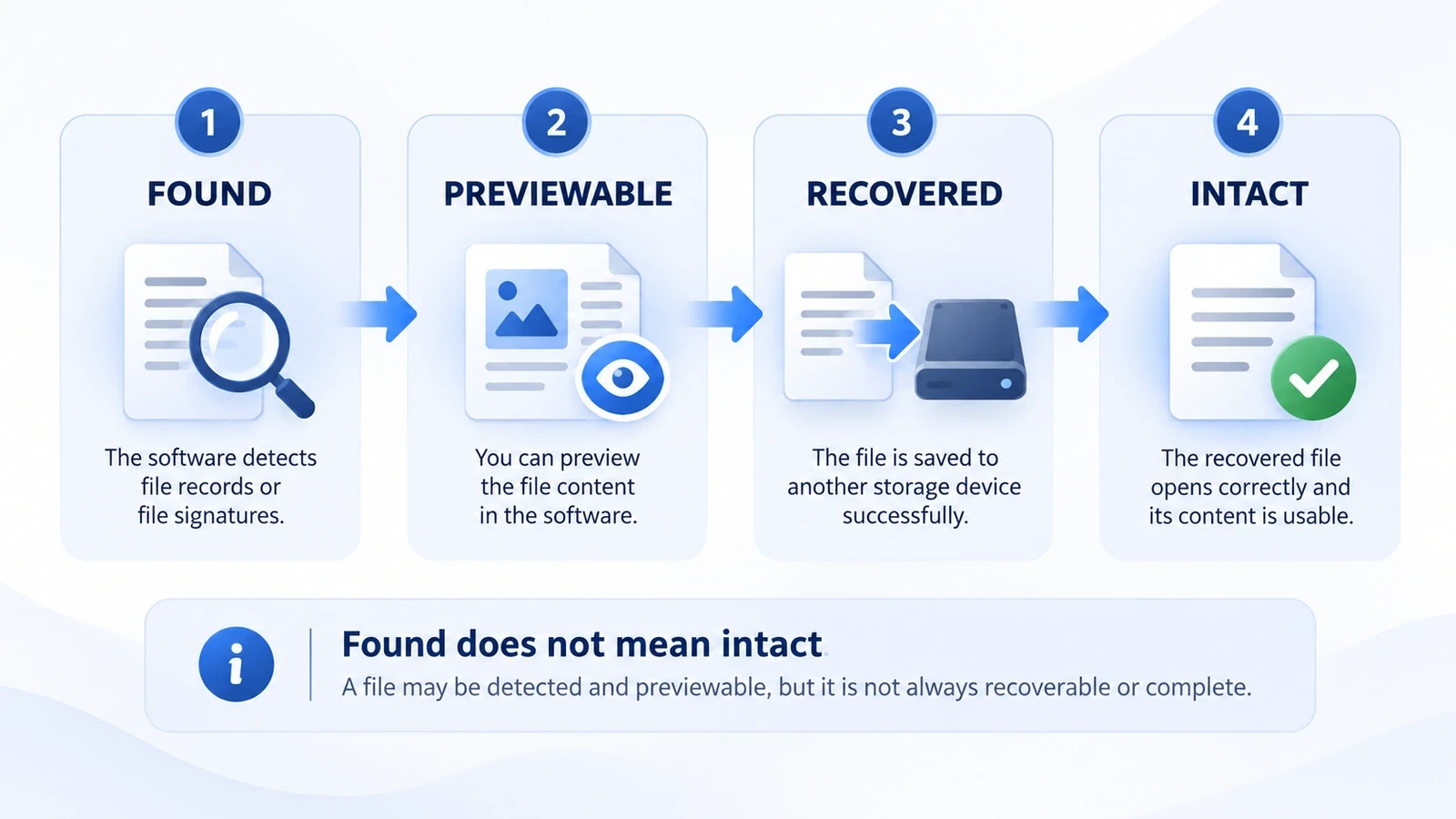
Recovery evaluation stages: Found, Previewable, Recovered, and Intact. This diagram explains verification criteria, not actual benchmark results.
Active Undelete Review: Features, Pros and Cons
Lo mejor para: Windows users who need detailed recovery controls, broad file system support, or advanced partition tools.
Not ideal for: Users who only need existing backups or expect specialist recovery features in the cheapest edition.
What Can Active Undelete Recover?
Según el official Active@ UNDELETE documentation, the software supports:
- Deleted files: Search accessible volumes for recoverable deleted file records.
- Formatted volumes: Locate remaining file information after certain formatting operations.
- Signature recovery: Identify recognizable content when file system metadata is unavailable.
- Partition recovery: Analyze missing or damaged partitions using supported editions.
- RAID reconstruction: Virtually reconstruct supported RAID configurations with Ultimate.
Additionally, the software supports file systems including NTFS, FAT/exFAT, ReFS, HFS+, APFS, Ext2/3/4, and several others.
However, supporting a file system does not mean every deleted file on that system remains recoverable.
Active Undelete Recovery Workflow
For deleted files on an accessible Windows volume:
- Download and install: Obtain Active Undelete from its official website. Install it on a different physical drive from the affected storage.
- Select the affected volume: Choose the disk or partition where the files were originally stored.
- Scan for deleted files: Run the appropriate scan to locate file records and recognizable content.
- Filter and preview: Search by filename, extension, date, or available recovery status.
- Recover files: Export selected files to another physical drive and verify their contents.
En official Active@ UNDELETE user guide provides additional instructions.
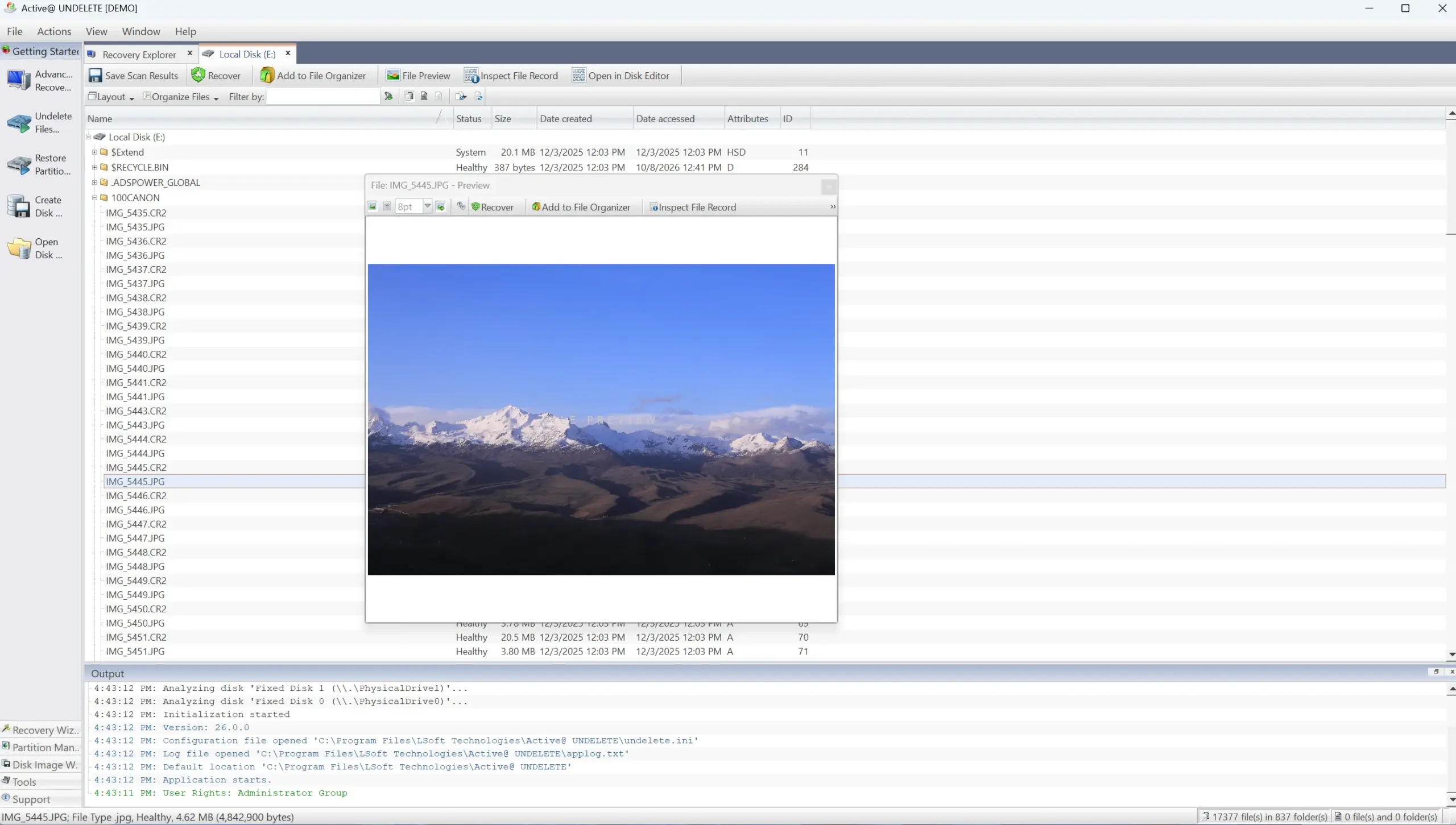
Illustrative Active Undelete-style interface generated for explanation. This is not an actual application screenshot or a measured recovery result.
Active Undelete Pros and Cons
Puntos fuertes | Limitaciones |
Broad file system coverage | Windows-based application |
File filtering and preview | Demo limited to 1 MB per file |
Recuperación basada en firmas | Original filenames may be lost |
Advanced partition recovery tools | Professional edition required |
Reconstrucción RAID | Ultimate edition and technical knowledge required |
Assessment: Active Undelete is a capable option for technically demanding recovery tasks. Its specialist tools provide additional flexibility, although users with basic file deletion problems may not need the higher editions.
Magic Data Recovery Review: Features, Pros and Cons
Lo mejor para: Windows users recovering ordinary deleted documents, photos, videos, and other files from accessible storage.
Not ideal for: Users requiring dedicated RAID reconstruction, bootable recovery environments, or physical disk repair.
Magic Data Recovery, developed by Amagicsoft, provides a guided workflow for common logical data-loss scenarios.
What Can Magic Data Recovery Recover?
According to its official product documentation, the software supports:
- Permanently deleted documents, photographs, and videos.
- Files missing after emptying the Recycle Bin.
- Data lost from USB drives and memory cards.
- Files affected by certain formatting or logical file system problems.
- Recovery from Windows-recognized HDDs and SSDs.
Unlike Recycle Bin restoration or File History, the software scans storage for potentially recoverable file information rather than retrieving an existing backup.
Magic Data Recovery Recovery Workflow
If Windows recovery options and existing backups fail, follow these five steps.
Paso 1: Descargar e instalar Magic Data Recovery
Descargue el programa desde el sitio web oficial. Install it on a different physical drive to avoid overwriting deleted data.
Step 2: Select the Drive Containing the Deleted Files
Launch the application and select the drive or partition where the missing files were originally stored.
Step 3: Scan for Lost or Deleted Files
Start scanning and review the documents, images, videos, and other files that appear in the results.
Paso 4: Vista previa de los archivos antes de la recuperación
Use Preview, where supported, to inspect relevant files. Some damaged or incomplete files may not preview correctly.
Paso 5: Recuperar archivos a una ubicación segura
Select the files, click Recover, and save them to another physical drive. Afterward, verify that the recovered copies open correctly.
Si las opciones de recuperación integradas ya no funcionan, puedes probar Magic Data Recovery antes de que los nuevos datos sobrescriban los archivos eliminados.

Magic Data Recovery Pros and Cons
Puntos fuertes | Limitaciones |
Guided Windows recovery workflow | Windows-based application |
500 MB free recovery allowance | Larger recovery tasks require payment |
Preview for supported file types | Preview does not guarantee intact recovery |
Supports common storage devices | No dedicated RAID reconstruction documented |
Handles common logical data loss | Cannot recover overwritten data or repair physical damage |
Assessment: Magic Data Recovery is worth evaluating for common Windows file-loss situations. However, it does not replace Active Undelete’s specialist partition reconstruction, RAID, or bootable recovery tools.
Active Undelete vs. Magic Data Recovery Pricing and Licensing
Prices are important, but the cheapest edition is not automatically the best value.
Active Undelete Pricing
Según el official pricing page:
Edition | Precio | Objetivo principal |
Demo | Gratis | Limited recovery and evaluation |
Estándar | $19.99 | Deleted files and formatted volumes |
Profesional | $44.95 | Partition recovery and bootable tools |
Ultimate | $79.95 | RAID reconstruction and additional specialist tools |
The demo limits recovery to 1 MB per file. Therefore, a 5 MB photograph exceeds the demo limit even if you need only one image.
The product’s pricing comparison lists personal licensing for up to three PCs, non-commercial use, and one year of free updates and technical support.
However, its published EULA contains older-looking language describing a single-computer license. The pricing comparison also lists a 30-day return policy, while the EULA contains restrictive refund language.
Because these official statements are not fully consistent, confirm the applicable installation and refund terms with LSoft before purchasing.
Magic Data Recovery Pricing
En official Magic Data Recovery pricing page lists:
Edition | Current Price | License Details |
Gratis | $0 | Up to 500 MB recovery |
Pro — 1 Year | $49.95 | 1 PC; one-year license and upgrades |
Pro — Perpetual | $69.95 | 1 PC; perpetual license and lifetime upgrades |
Prices checked October 10, 2026. The paid prices are promotional offers. The displayed regular prices are 69.95 and 99.95, respectively.
The current Amagicsoft pricing page also advertises a 30-day money-back guarantee, subject to the applicable terms.
Which License Offers Better Value?
Active Undelete Standard has a lower initial price, making it attractive for basic deleted-file recovery.
However, its advanced recovery capabilities require Professional or Ultimate.
Magic Data Recovery has a higher listed Pro entry price but provides a 500 MB free recovery allowance. Its perpetual edition includes lifetime upgrades according to the official pricing page.
Therefore, compare the recovery features you need, the number of computers covered, update eligibility, and refund terms before purchasing.
What Community Discussions Reveal About Active Undelete
Official feature lists cannot explain every real-world recovery situation.
A Super User discussion about Active@ UNDELETE describes an SD card folder that appeared in the software even though Windows Explorer could not display it.
The user reported that the folder was available rather than marked as deleted. Community members suggested that file attributes might explain the discrepancy.
However, the discussion did not establish a confirmed diagnosis.
This case highlights an important distinction: a missing file is not always a deleted file.
Before scanning, check whether the problem involves hidden attributes, changed paths, or damaged directory information.
The discussion is useful as a real-world example, but it does not establish recovery performance or reliability across current software versions.
Which Recovery Tool Should You Choose?
The better choice depends on your data-loss scenario, experience, and budget.
Choose Active Undelete for Advanced Recovery Tasks
Considere Active Undelete if you need broad file system support, partition analysis, or specialist RAID tools.
Professional is relevant when a partition disappears or Windows cannot start normally. Meanwhile, Ultimate provides documented RAID reconstruction functions.
However, advanced recovery tools may require technical knowledge. Avoid modifying partition structures before protecting important data.
Choose Magic Data Recovery for Common Windows File Loss
Consider Magic Data Recovery if you accidentally deleted files, emptied the Recycle Bin, or lost data from an accessible USB drive or memory card.
Its guided workflow and free recovery allowance may appeal to users who want to evaluate a Windows recovery application before purchasing.
Nevertheless, it cannot reconstruct overwritten data or repair physically damaged storage.
Choose Windows Recovery Tools When Backups Exist
If File History, Previous Versions, or cloud storage contains an intact copy, restore that copy first.
For more options, see how to recover files from an emptied Recycle Bin.
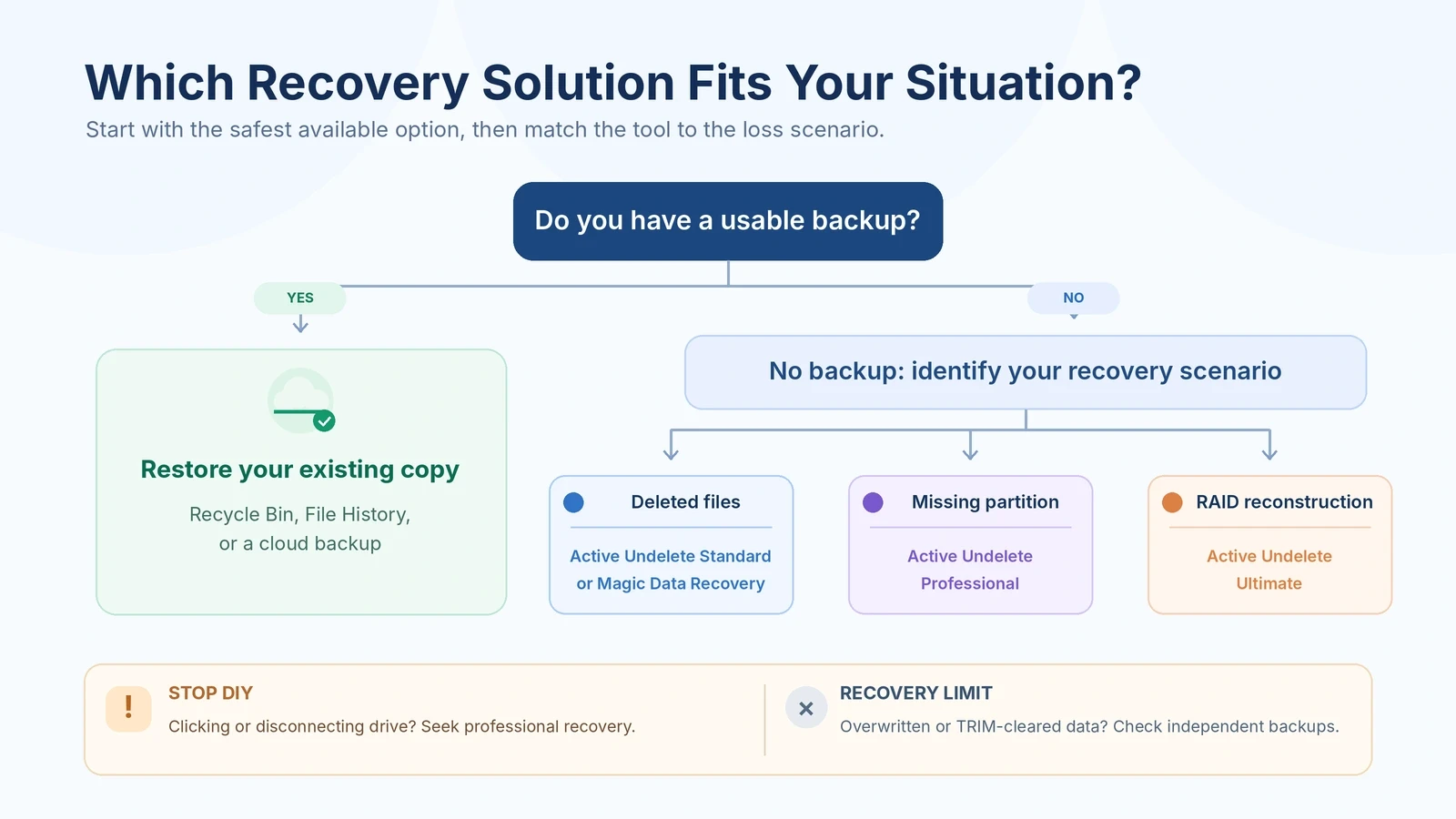
Recovery software selection guide based on documented capabilities and data-loss scenarios.
When You Should Not Buy Any Recovery Software
Neither Active Undelete nor another recovery application can solve every storage problem.
Situación | Acción recomendada |
Files remain in Recycle Bin | Restore them directly |
A reliable backup exists | Restaurar la copia de seguridad |
Files are hidden or moved | Check paths and file attributes |
HDD clicks or disconnects repeatedly | Stop scanning; seek professional assistance |
File contents were overwritten | Check independent backups |
SSD TRIM removed deleted blocks | Software recovery may no longer be possible |
RAID members have physical damage | Avoid rebuilding; consult a specialist |
In addition, file recovery software cannot recreate information from an unsaved document unless a recoverable copy was previously written to storage.
For further technical background, read where deleted files go after deletion.
Before buying: Confirm that the device is stable, the software supports your scenario, and the preview or demo results provide a reasonable basis for proceeding.
Conclusion: Is Active Undelete the Right Choice?
Active Undelete offers deleted-file scanning, broad file system support, and advanced partition and RAID capabilities. Standard suits ordinary recovery tasks, while Professional and Ultimate provide additional tools for complex situations.
However, no single recovery application is best for everyone. If a backup exists, restore it first. For straightforward Windows file loss, Magic Data Recovery offers another guided recovery option with a 500 MB free allowance. For additional recovery methods, visit our Guía para recuperar archivos borrados.
Ultimately, choose software according to your storage problem and licensing needs. Avoid writing new data to the affected drive, and verify recovered files before considering the process complete.
Compatible con Windows 7/8/10/11 y Windows Server
FAQs About Active Undelete
Is Active Undelete free or paid?
Can Active Undelete recover permanently deleted files?
Is Active Undelete better than Magic Data Recovery?
Can Active Undelete recover files from an SSD?
Does Active Undelete support RAID recovery?
Is it safe to install recovery software on the affected drive?
Should I purchase Active Undelete before scanning my files?

Vasilii es un especialista en recuperación de datos con unos 10 años de experiencia práctica en este campo. A lo largo de su carrera, ha resuelto con éxito miles de casos complejos relacionados con archivos borrados, unidades formateadas, particiones perdidas y sistemas de archivos RAW. Su experiencia abarca tanto métodos de recuperación manual con herramientas profesionales como editores hexadecimales como soluciones automatizadas avanzadas con software de recuperación. La misión de Vasilii es poner los conocimientos sobre recuperación de datos al alcance tanto de los profesionales informáticos como de los usuarios de a pie, ayudándoles a salvaguardar sus valiosos activos digitales.