
Recuperare i file eliminati dal Cestino in Windows 10
Accidentalmente svuotare il Cestino può cancellare un documento importante, una foto, un video o un file di lavoro in pochi secondi. Fortunatamente, Windows non cancella sempre immediatamente i dati sottostanti. Pertanto, è ancora possibile Recuperare i file eliminati dal Cestino in Windows 10 se i nuovi dati non hanno sovrascritto lo spazio di archiviazione originale.
Tuttavia, la tempistica è importante quando si Recuperare i file eliminati dal Cestino in Windows 10. Smetti di salvare file o di installare programmi sull'unità interessata. Quindi, scegli l'opzione giusta opzione di recupero dei file cancellati da backup di Windows, archiviazione cloud, recupero file di Windows oppure Magic Data Recovery.
Supporta Windows 7/8/10/11 e Windows Server
Indice dei contenuti
È possibile recuperare i file eliminati dal Cestino in Windows 10?
Sì, è ancora possibile recuperarli. Di solito Windows rimuove il riferimento al file e contrassegna lo spazio occupato come disponibile, anziché cancellarne immediatamente ogni byte. Tuttavia, i download, le installazioni di software, le modifiche e gli aggiornamenti possono sovrascrivere quello spazio.
Anche il tipo di supporto di archiviazione è importante. Un HDD può conservare i dati cancellati fino a quando non vengono sovrascritti da un’altra operazione di scrittura. Al contrario, un SSD può utilizzare la funzione TRIM per liberare i blocchi inutilizzati. Pertanto, nessuna guida seria dovrebbe promettere un recupero garantito.
Cosa fare prima di recuperare i file cancellati dal Cestino in Windows 10
Prima di iniziare Recupero dei file dal Cestino in Windows 10, attenersi alle seguenti precauzioni:
- Interrompere l'utilizzo dell'unità interessata. Evita download, aggiornamenti, modifiche e trasferimenti di file.
- Installa il software di ripristino su un altro dispositivo. Quando possibile, utilizzare un'altra unità fisica.
- Salvare i file recuperati in un'altra posizione. Altrimenti, potresti sovrascrivere altri dati cancellati.
- Non deframmentare l'unità. Potrebbe spostare i dati in uno spazio riutilizzabile.
- Evita di eseguire prima CHKDSK. Ripristina le strutture del file system, non i file cancellati.
- Non provare troppi strumenti. Ogni installazione genera attività sul disco di origine.
Questi passaggi ti garantiscono le migliori possibilità di Recuperare i file eliminati dal Cestino in Windows 10.
I modi migliori per recuperare i file eliminati dal Cestino in Windows 10
Utilizza la tabella qui sotto per scegliere la soluzione più adatta.
Situazione | Il metodo migliore per iniziare |
Il file continua a comparire nel Cestino | Usa Ripristina |
La cronologia dei file contiene una copia precedente | Ripristinare una versione precedente |
OneDrive ha sincronizzato il file | Controlla il Cestino di OneDrive |
Hai svuotato il Cestino e non hai alcun backup | Scansiona con Magic Data Recovery |
Preferisci uno strumento a riga di comando di Microsoft | Utilizzare il recupero file di Windows |
L'unità emette un clic, si disconnette o non viene più rilevata | Fermati e contatta uno specialista del recupero |
Per prima cosa, verifica le opzioni più sicure. Successivamente, esegui la scansione del disco solo se Windows o un backup non riescono a ripristinare il file. Questo ordine ti aiuta a Recuperare i file eliminati dal Cestino in Windows 10 con una minore attività del disco non necessaria.
Prima di utilizzare un software per Recuperare i file eliminati dal Cestino in Windows 10, verifica che gli elementi non compaiano più nel cestino.
Metodo 1: Ripristinare i file ancora presenti nel Cestino
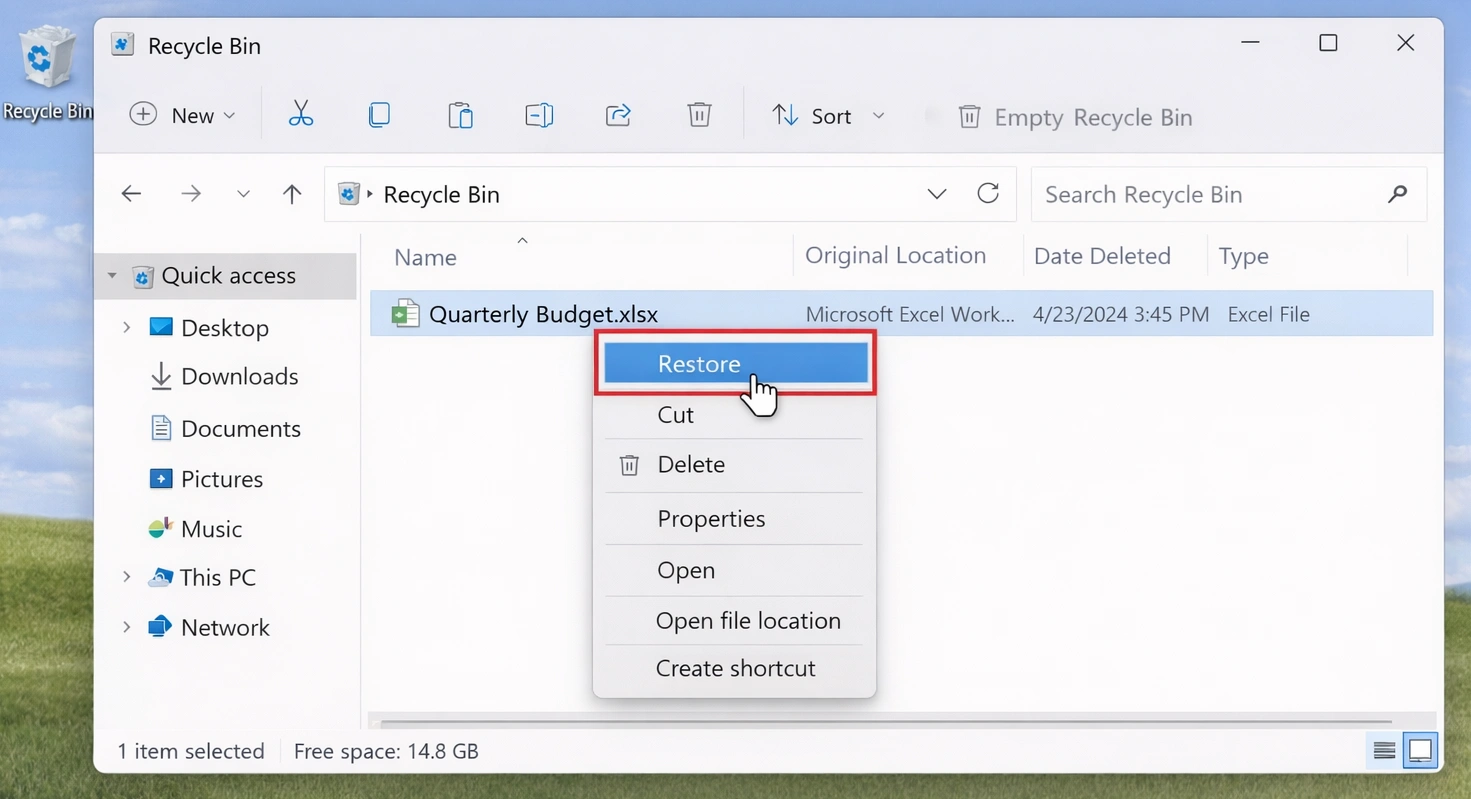
Se il file è ancora presente nel Cestino, ripristinalo prima di provare qualsiasi soluzione avanzata:
- Aperto Cestino dal desktop.
- Cerca il file oppure ordina gli elementi per nome, posizione, data di eliminazione o dimensione.
- Fare clic con il tasto destro del mouse sull'elemento desiderato.
- Selezionare Ripristino.
- Apri la cartella originale e verifica il file.
Windows riporta l'elemento nella posizione precedente. Tuttavia, questo metodo non può Recuperare i file eliminati dal Cestino in Windows 10 dopo aver svuotato il cestino.
Un file può anche evitare il Cestino quando si preme Maiusc+Canc, eliminarlo da determinate posizioni di rete oppure rimuovere un elemento che superi la capacità configurata del Cestino.
Metodo 2: Recuperare i file eliminati dal Cestino in Windows 10 con Magic Data Recovery
Quando il Il Cestino è vuoto e, in assenza di un backup, la scansione del disco diventa la mossa più sensata da compiere. Magic Data Recovery consente agli utenti comuni di eseguire la scansione del disco originale tramite un'interfaccia grafica.
Dopo aver svuotato il Cestino, Windows non mostra più il pulsante "Ripristina". Tuttavia, potrebbero rimanere tracce recuperabili. Pertanto, il software può aiutarti a recuperare i file cancellati tramite la scansione, l'organizzazione, il filtraggio e l'anteprima degli elementi trovati.
Perché utilizzare Magic Data Recovery?
Se avete bisogno di Recuperare i file eliminati dal Cestino in Windows 10 A prescindere dall'utilizzo della riga di comando, Magic Data Recovery offre diversi vantaggi pratici:
- Una semplice procedura di selezione dell'unità e di scansione.
- Filtri per i file che ti aiutano a restringere gli elenchi di risultati più lunghi.
- Supporto in anteprima per la verifica dei contenuti recuperabili.
- Supporto per documenti, foto, video, file audio e archivi di uso comune.
- Un flusso di lavoro visivo che riduce gli errori nella riga di comando.
- Una versione di prova che consente agli utenti di testare alcune funzionalità prima dell'acquisto.
Ad esempio, supponiamo che si cancellino foto in formato JPG e file DOCX, si svuoti il Cestino e ci si accorga che la funzione “Cronologia file” non è mai stata attivata. Windows non può ripristinare un backup che non esiste. Pertanto, la scansione di recupero diventa il passo successivo da compiere.
Magic Data Recovery non garantisce la correttezza di ogni singolo file. Offre invece una procedura più chiara per gli utenti che desiderano ripristinare i file cancellati definitivamente in Windows 10 senza comandi manuali.
Come utilizzare Magic Data Recovery per recuperare i file eliminati dal Cestino
Passo 1: Scaricare e installare Magic Data Recovery
Scarica Magic Data Recovery e installalo su un'unità diversa da quella in cui erano originariamente memorizzati i file cancellati. Questo approccio riduce le nuove operazioni di scrittura nella posizione interessata e contribuisce a proteggere i dati recuperabili.
Supporta Windows 7/8/10/11 e Windows Server
Passo 2: Selezionare l'unità da scansionare
Avvia Magic Data Recovery. Successivamente, seleziona dall'interfaccia principale l'unità che in precedenza conteneva i file cancellati. Quindi, avvia la scansione.

Fase 3: scansione per File Eliminato dal Cestino
Magic Data Recovery avvia automaticamente una scansione avanzata dell'unità selezionata per Recuperare i file eliminati dal Cestino in Windows 10. Nel frattempo, il programma elenca i file recuperabili man mano che la scansione procede. È possibile iniziare a esaminare i risultati prima che la scansione sia terminata. Tuttavia, il completamento della scansione potrebbe rivelare ulteriori file e cartelle.

Fase 4: Anteprima Soppresso File prima del recupero
Successivamente, utilizza la funzione di anteprima per verificare il contenuto del file. Puoi anche filtrare i risultati in base al tipo di file, al nome, alle dimensioni o alla posizione. In questo modo, potrai trovare documenti, foto, video e archivi specifici in modo più efficiente.
L'anteprima dei file ti aiuta a selezionare solo gli elementi che ti servono prima di ripristinarli.

Fase 5: Recupero File in un luogo sicuro
Infine, seleziona i file da recuperare e avvia il processo di recupero. Salva i file su un'unità o in una posizione di archiviazione diversa dall'unità di origine. Il salvataggio dei dati sulla stessa unità potrebbe sovrascrivere altri file recuperabili. Di conseguenza, potresti ridurre la possibilità di recuperare ulteriori dati in un secondo momento.

Metodo 3: Altri modi per recuperare i file eliminati dal Cestino in Windows 10
Magic Data Recovery è adatto agli utenti che preferiscono un'interfaccia visiva rispetto a Recuperare i file eliminati dal Cestino in Windows 10. Tuttavia, Windows e i servizi cloud potrebbero offrire alternative adeguate.
Utilizzare la cronologia dei file o le versioni precedenti
La cronologia dei file può esserti d'aiuto recuperare i file cancellati senza software, ma solo se l'hai attivata prima della cancellazione.
- Aprire Esplora file.
- Vai alla cartella in cui si trovava in precedenza il file.
- Fare clic con il tasto destro del mouse sulla cartella.
- Selezionare Ripristino delle versioni precedenti.
- Scegliere una versione precedente alla cancellazione.
- Aprilo per verificarne il contenuto.
- Selezionare Ripristina su e scegliete un luogo sicuro.
Poiché questo metodo ripristina una copia precedente, non esegue la scansione dello spazio cancellato. Pertanto, spesso fornisce un risultato più pulito rispetto al file carving. Tuttavia, non è di alcun aiuto quando non esiste alcuna versione precedente.
Utilizzare il recupero file di Windows
Microsoft mette a disposizione Windows File Recovery come utility gratuita da riga di comando. È utile per gli utenti esperti Recuperare i file eliminati dal Cestino in Windows 10, ma richiede che le lettere di unità, le modalità, i percorsi e i filtri siano corretti.
Utilizza questa struttura di comando:
winfr unità sorgente: unità destinazione: [/mode] [/switches]
Per i file NTFS cancellati di recente, prova la modalità Normale:
winfr C: E: /regular /n ´Users´{Documenti
Per una ricerca più ampia, prova la modalità "Estesa":
winfr C: E: /extensive /n *.jpg /n *.png /n *.docx
L'unità di origine e quella di destinazione devono essere diverse. Pertanto, non eseguire la scansione dell'unità C: e non salvare i risultati nuovamente su C:.
Windows File Recovery è adatto agli utenti esperti. Magic Data Recovery, invece, offre un modo più intuitivo per Recuperare i file eliminati dal Cestino in Windows 10 perché offre strumenti di scansione visiva, filtraggio e anteprima.
Controlla OneDrive o un altro servizio di backup su cloud
Se OneDrive ha sincronizzato la cartella originale, accedi online e controlla il Cestino. L'eliminazione locale non comporta sempre la rimozione immediata della copia nel cloud.
Inoltre, controlla:
- Cronologia delle versioni di OneDrive.
- Cestino di Google Drive.
- File eliminati da Dropbox.
- Snapshot NAS.
- Sistemi di backup aziendali.
- Copia manuale su un altro disco.
Il ripristino dal cloud spesso garantisce una copia di qualità superiore, poiché evita la scansione dei settori cancellati.
Perché alcuni file potrebbero non finire nel Cestino
Alcuni file non finiscono mai nel Cestino. Ad esempio, la combinazione Shift+Canc li elimina direttamente. Windows potrebbe inoltre ignorare il Cestino quando un file ne supera la capacità, quando si disattiva il Cestino per un'unità o quando il file proviene da determinate posizioni di rete.
Inoltre, i programmi di pulizia potrebbero eliminare direttamente alcuni file. Pertanto, prima di avviare la scansione, controlla l'applicazione originale, l'account cloud e i backup.
A ripristinare i file eliminati con Shift+Canc, smettete di utilizzare l'unità di origine e agite tempestivamente.
Recupero dei file dal Cestino su HDD e SSD
Quando Recuperare i file eliminati dal Cestino in Windows 10 Su un disco rigido, i dati cancellati possono rimanere fino a quando non vengono sovrascritti da altri dati. Pertanto, un intervento tempestivo può migliorare il risultato.
Un SSD funziona in modo diverso. Il comando TRIM indica all'SSD quali blocchi non sono più necessari a Windows, quindi recuperare i file cancellati dall'SSD le situazioni potrebbero diventare più difficili.
Non modificare le impostazioni TRIM a casaccio. È invece consigliabile ridurre l'attività ed eseguire immediatamente una scansione.
Se un'unità emette un clic, si disconnette o scompare da Gestione del disco, o se contiene dati critici, evitate di intervenire da soli e rivolgetevi a uno specialista.
Errori comuni durante il recupero dei dati in Windows 10
A Recuperare i file eliminati dal Cestino in Windows 10 Per stare al sicuro, evita questi errori comuni:
- Installazione di diversi programmi sull'unità interessata.
- Ripristino dei dati recuperati nella stessa fonte.
- Durante la scansione è possibile continuare a utilizzare normalmente il computer.
- Partendo dal presupposto che un'anteprima garantisca un file completo.
- Eseguire gli strumenti di riparazione prima di mettere al sicuro i dati importanti.
- Scansione ripetuta di un'unità fisicamente instabile.
- Affidarsi a un software che promette un recupero garantito.
Una volta completato il ripristino, apri ogni file e verifica il suo contenuto. Inoltre, confronta i documenti importanti, le foto, gli archivi e i video con eventuali copie di backup disponibili.
Conclusione
Inizia con "Ripristina dal Cestino" se il file è ancora presente lì. Successivamente, controlla "Cronologia file", "Versioni precedenti", "OneDrive" e altri backup. Gli utenti esperti possono anche provare "Recupero file di Windows" utilizzando un'unità di destinazione separata.
Tuttavia, se hai svuotato il Cestino, non esiste alcun backup e preferisci una procedura visiva, Magic Data Recovery offre una soluzione pratica soluzione per il recupero dei file cancellati. Ti aiuta a selezionare l'unità interessata, a eseguire la scansione alla ricerca dei dati persi, a filtrare i risultati, a visualizzare in anteprima i file disponibili e a recuperare gli elementi selezionati in una posizione più sicura.
Ma soprattutto, lo strumento affronta il problema senza promettere un successo garantito. Questo equilibrio lo rende una scelta pratica quando è necessario Recuperare i file eliminati dal Cestino in Windows 10.
Il recupero dipende comunque dalla sovrascrittura, dalla funzione TRIM, dalle condizioni dell'unità e dal tempo. Pertanto, è bene iniziare subito e salvare sempre i file recuperati in un'altra posizione.
Supporta Windows 7/8/10/11 e Windows Server
FAQ
È possibile recuperare i file eliminati dal Cestino di Windows 10 dopo averlo svuotato?
Sì, il recupero potrebbe essere ancora possibile, poiché Windows spesso contrassegna lo spazio del file come disponibile invece di cancellarne immediatamente ogni byte. Tuttavia, i nuovi dati potrebbero sovrascrivere quello spazio. Pertanto, smetti di utilizzare l'unità interessata, controlla prima i backup e, se non ne esiste alcuna copia, esegui una scansione di recupero affidabile.
È possibile recuperare file cancellati definitivamente senza utilizzare alcun software?
È possibile recuperare i file cancellati senza ricorrere a software se “Cronologia file”, “Versioni precedenti”, OneDrive, un altro servizio cloud o un backup manuale ne contengono una copia. Queste opzioni consentono di recuperare i file cancellati dal Cestino di Windows 10 senza eseguire la scansione dello spazio libero su disco. Tuttavia, Windows non può ripristinare un backup che non è mai stato creato. In tal caso, Windows File Recovery o un software di recupero dati affidabile potrebbero rappresentare la soluzione più pratica.
Dove finiscono i file dopo che il Cestino è stato svuotato?
Dopo aver svuotato il Cestino, Windows di solito rimuove il riferimento al file e contrassegna lo spazio di archiviazione come riutilizzabile. I dati potrebbero rimanere fino a quando non vengono sovrascritti da un’altra operazione di scrittura. Di conseguenza, il file non viene spostato in una cartella nascosta che si possa semplicemente aprire. È invece necessario un backup o una scansione di ripristino.
È possibile recuperare i file eliminati con Shift+Canc?
A volte. La combinazione Shift+Cancella aggira il Cestino, ma non sempre sovrascrive immediatamente i dati sottostanti. Per prima cosa, controlla la Cronologia file, l'archiviazione cloud e altri backup. Se non esiste alcuna copia, smetti di utilizzare l'unità di origine ed esegui una scansione con Windows File Recovery o uno strumento di recupero grafico affidabile.
È possibile recuperare i file cancellati da un SSD?
È possibile, anche se il recupero dai dati da un SSD può risultare difficile poiché la funzione TRIM potrebbe aver cancellato i blocchi eliminati. L'esito dipende dal tipo di SSD, dalle impostazioni di Windows, dall'attività dell'unità e dal tempo trascorso dalla cancellazione. Pertanto, è consigliabile ridurre immediatamente l'utilizzo dell'unità ed eseguire una scansione il prima possibile. Nessuno strumento di recupero è in grado di ripristinare i dati dopo che l'SSD li ha rimossi o sovrascritti.
Il recupero dei file di Windows è gratuito?
Sì. Microsoft offre Windows File Recovery come utilità gratuita da riga di comando. Tuttavia, è necessario selezionare correttamente origine, destinazione, modalità, percorso e filtri. Inoltre, origine e destinazione devono trovarsi su unità diverse. Gli utenti che preferiscono un'interfaccia grafica potrebbero trovare Magic Data Recovery più facile da utilizzare e da controllare.
Perché uno strumento di recupero individua un file che non si apre?
Una scansione può individuare un nome di file o un frammento di file anche quando nuovi dati hanno sovrascritto parte del contenuto. Inoltre, alcuni risultati potrebbero aver perso la struttura originale delle cartelle o i metadati. Se possibile, visualizza l'anteprima del file, recuperalo su un'altra unità e verificalo con l'applicazione corretta prima di utilizzarlo.

Vasilii è uno specialista del recupero dati con circa 10 anni di esperienza pratica nel settore. Nel corso della sua carriera, ha risolto con successo migliaia di casi complessi riguardanti file cancellati, unità formattate, partizioni perse e file system RAW. La sua esperienza copre sia i metodi di recupero manuale utilizzando strumenti professionali come gli editor esadecimali, sia le soluzioni automatiche avanzate con i software di recupero. La missione di Vasilii è quella di rendere accessibile la conoscenza del recupero dati affidabile sia ai professionisti IT che agli utenti di tutti i giorni, aiutandoli a salvaguardare i loro preziosi beni digitali.