
Windows 10 でごみ箱から削除されたファイルを復元する
偶然 ごみ箱を空にする 重要な文書、写真、動画、または仕事用のファイルを、ほんの数秒で削除してしまうことがあります。幸いなことに、Windows では、削除してもそのデータがすぐに完全に消去されるとは限りません。そのため、まだ Windows 10の「ごみ箱」から削除されたファイルを復元する 新しいデータが元の記憶領域を上書きしていない場合。.
とはいえ、その際にはタイミングが重要ですが、 Windows 10の「ごみ箱」から削除されたファイルを復元する. 問題のあるドライブへのファイルの保存やプログラムのインストールを中止してください。その後、適切な 削除されたファイルの復元オプション Windowsのバックアップ、クラウドストレージ、Windowsファイル復元、または Magic Data Recovery.
Windows 7/8/10/11およびWindows Serverをサポート
目次
Windows 10で、ごみ箱から削除したファイルを復元することはできますか?
はい、まだ復元できる可能性があります。Windowsでは通常、ファイルを即座にバイト単位で消去するのではなく、ファイルへの参照を削除し、その領域を空き領域としてマークします。ただし、ダウンロード、ソフトウェアのインストール、編集、更新などの操作によって、その領域が上書きされてしまう可能性があります。.
ストレージの種類も重要な要素です。HDDの場合、削除されたデータは、別の書き込みによって上書きされるまで残ってしまうことがあります。一方、SSDでは、TRIM機能を使用して未使用のブロックを消去する場合があります。したがって、責任あるガイドであれば、復元を保証するような約束は決してすべきではありません。.
Windows 10で「ごみ箱」から削除したファイルを復元する前にすべきこと
始める前に Windows 10 のごみ箱からの復元, 以下の注意事項に従ってください:
- 影響を受けたドライブの使用を中止する。. ダウンロード、更新、編集、およびファイルの転送は避けてください。.
- リカバリソフトウェアを別の場所にインストールしてください。. 可能な限り、別の物理ドライブを使用してください。.
- 復元したファイルを別の場所に保存します。. そうしないと、削除済みのデータをさらに上書きしてしまう可能性があります。.
- ドライブのデフラグは行わないでください。. データを再利用可能な領域に移動する場合があります。.
- まずCHKDSKを実行しないようにしてください。. 削除されたファイルそのものではなく、ファイルシステムの構造を修復します。.
- 多くのツールをテストしないでください。. インストールを行うたびに、ソースディスクにアクティビティが追加されます。.
これらの手順を踏むことで、あなたが Windows 10の「ごみ箱」から削除されたファイルを復元する.
Windows 10で「ごみ箱」から削除されたファイルを復元する最良の方法
以下の表を参考にして、最適な解決策をお選びください。.
状況 | 最適な最初の方法 |
そのファイルは依然としてごみ箱に表示されています | 「復元」を使用する |
「ファイル履歴」には以前のバージョンが含まれています | 以前のバージョンに戻す |
OneDrive がファイルを同期しました | OneDriveのごみ箱を確認してください |
ごみ箱を空にしてしまい、バックアップもありません | Magic Data Recoveryでスキャン |
Microsoftのコマンドラインツールの方がいいですね | Windowsファイル復元を使用する |
ドライブからカチッという音がしたり、接続が切れたり、表示されなくなったりする | 一旦立ち止まり、復旧の専門家に連絡してください |
まず、最も安全な選択肢を確認してください。その後、Windows やバックアップでファイルを復元できない場合にのみ、ディスクをスキャンしてください。この順序に従うことで、 Windows 10の「ごみ箱」から削除されたファイルを復元する ドライブの不要な動作を削減します。.
ソフトウェアを使用する前に Windows 10の「ごみ箱」から削除されたファイルを復元する, 、ゴミ箱にその項目が表示されなくなったことを確認してください。.
方法 1:ごみ箱に残っているファイルを復元する
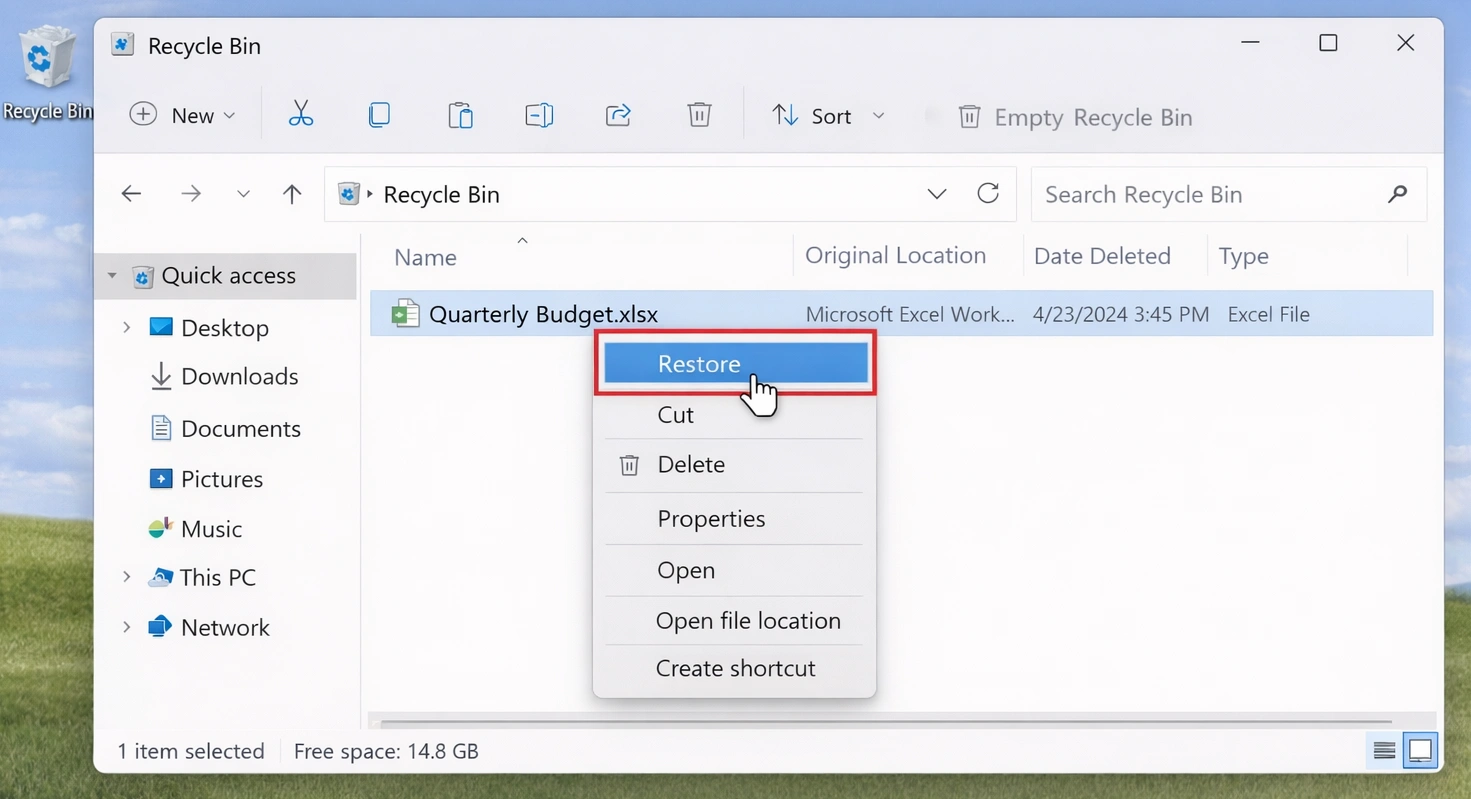
ファイルがまだごみ箱に表示されている場合は、高度な解決策を試す前に、そのファイルを復元してください:
- オープン ごみ箱 デスクトップから。.
- ファイルを検索したり、名前、場所、削除日、サイズで項目を並べ替えたりできます。.
- 目的の項目を右クリックします。.
- 選択 リストア.
- 元のフォルダを開き、ファイルを確認してください。.
Windows はその項目を元の場所に戻します。ただし、この方法では Windows 10の「ごみ箱」から削除されたファイルを復元する ゴミ箱を空にした後。.
また、次のキーを押すと、ファイルがごみ箱を経由せずに削除される場合があります。 Shift+削除, 、特定のネットワーク上の場所からそれを削除したり、設定されたごみ箱の容量を超えている項目を削除したりします。.
方法 2:Magic Data Recovery を使用して Windows 10 のごみ箱から削除されたファイルを復元する
そのとき ごみ箱は空です バックアップが存在しない場合、ディスクスキャンを行うのが次にとるべき現実的な手段となります。. Magic Data Recovery 一般ユーザーがグラフィカルインターフェースを通じて元のドライブをスキャンできるようにします。.
ごみ箱を空にすると、Windows には「復元」ボタンが表示されなくなります。しかし、復元可能な痕跡が残っている場合があります。そのため、このソフトウェアを使用すれば、検出された項目をスキャン、整理、フィルタリング、プレビューすることで、削除されたファイルを復元することができます。.
Magic Data Recoveryを使う理由
必要な場合 Windows 10の「ごみ箱」から削除されたファイルを復元する コマンドライン操作が不要な点において、Magic Data Recoveryにはいくつかの実用的な利点があります:
- ドライブの選択とスキャンが簡単に行えるプロセスです。.
- 膨大な検索結果リストを絞り込むのに役立つファイルフィルター。.
- 復元可能なコンテンツを確認するためのプレビュー機能。.
- 一般的な文書、写真、動画、音声ファイル、およびアーカイブファイルに対応しています。.
- コマンドラインでのミスを減らす視覚的なワークフロー。.
- 購入前に、限定的な復元機能を試用できるトライアル版。.
たとえば、JPG形式の写真やDOCXファイルを削除し、ごみ箱を空にした後、ファイル履歴が有効になっていなかったことに気づいたとします。Windowsでは、存在しないバックアップを復元することはできません。したがって、次の適切な手順として、復元スキャンを実行することになります。.
Magic Data Recoveryは、すべてのファイルを保証するものではありません。その代わり、次のような希望を持つユーザーに対して、より明確なプロセスを提供しています。 Windows 10で完全に削除されたファイルを復元する 手動での操作を必要とせずに。.
Magic Data Recovery を使用して、ごみ箱から削除されたファイルを復元する方法
ステップ1: Magic Data Recoveryのダウンロードとインストール
Magic Data Recoveryをダウンロードし、削除されたファイルが元々保存されていたドライブとは別のドライブにインストールしてください。この方法により、影響を受けた場所への新たな書き込みが抑えられ、復元可能なデータの保護につながります。.
Windows 7/8/10/11およびWindows Serverをサポート
ステップ2: 選択 スキャンするドライブ
Magic Data Recoveryを起動します。次に、メイン画面から、削除されたファイルが保存されていたドライブを選択します。その後、スキャンを開始します。.

ステップ3:スキャン ファイル ごみ箱から削除しました
Magic Data Recoveryは、選択されたドライブに対して「詳細スキャン」を自動的に開始し、 Windows 10の「ごみ箱」から削除されたファイルを復元する. 一方、このプログラムでは、スキャンが進むにつれて復元可能なファイルが一覧表示されます。スキャンが完了する前に結果の確認を開始することができます。ただし、スキャンを完了させると、さらに多くのファイルやフォルダが見つかる場合があります。.

ステップ4:プレビュー 削除 復旧前のファイル
次に、プレビュー機能を使ってファイルの内容を確認します。また、ファイルの種類、名前、サイズ、保存場所などで検索結果を絞り込むこともできます。その結果、特定の文書、写真、動画、アーカイブファイルを、より効率的に見つけることができます。.
ファイルをプレビューすることで、復元する前に必要なアイテムだけを選択することができます。.

ステップ5:回復 ファイル 安全な場所へ
最後に、対象ファイルを選択して復元を開始します。復元したデータは、元のソースドライブではなく、別のドライブまたは保存先に保存してください。同じドライブにデータを保存すると、復元可能な他のファイルが上書きされてしまう可能性があります。その結果、後でさらにデータを復元できる可能性が低くなってしまう恐れがあります。.

方法 3:Windows 10 でごみ箱から削除されたファイルを復元するその他の方法
Magic Data Recoveryは、以下の操作に視覚的なインターフェースを好むユーザーに適しています。 Windows 10の「ごみ箱」から削除されたファイルを復元する. 。ただし、Windows やクラウドサービスには、適切な代替手段があるかもしれません。.
ファイル履歴または旧バージョンを使用する
「ファイル履歴」は次のような場合に役立ちます ソフトウェアを使わずに削除されたファイルを復元する, 、ただし、削除前にその機能を有効にしていた場合に限ります。.
- ファイルエクスプローラを開く。.
- そのファイルが以前入っていたフォルダに移動してください。.
- フォルダを右クリックします。.
- 選択 旧バージョンの復元.
- 削除前のバージョンを選ぶ。.
- 開いて中身を確かめてください。.
- 選択 復元先 そして、安全な場所を選んでください。.
この方法は以前のコピーを復元するものであるため、削除された領域をスキャンしません。そのため、ファイルカービングよりもクリーンな結果が得られることがよくあります。ただし、以前のバージョンが存在しない場合は役に立ちません。.
Windowsファイル復元を使用する
マイクロソフトは、無料のコマンドラインユーティリティとして「Windows File Recovery」を提供しています。これは、技術に詳しいユーザーにとって役立つツールです。 Windows 10の「ごみ箱」から削除されたファイルを復元する, 、ただし、正しいドライブ文字、モード、パス、およびフィルターを指定する必要があります。.
次のコマンド構文を使用してください:
winfr source-drive: destination-drive:[モード] [/スイッチ]
最近削除されたNTFSファイルの場合は、「通常モード」を試してみてください:
winfr C: E: /regular /n \Users\Documents
より広範囲に検索したい場合は、「詳細検索モード」をお試しください:
winfr C: E: /extensive /n *.jpg /n *.png /n *.docx
ソースと宛先は異なるドライブを使用する必要があります。したがって、C: ドライブをスキャンして、その結果を C: ドライブに保存することは避けてください。.
「Windows File Recovery」は、技術に詳しいユーザーに適しています。一方、「Magic Data Recovery」は、より手軽に利用できる方法を提供しています。 Windows 10の「ごみ箱」から削除されたファイルを復元する 視覚的なスキャン、フィルタリング、およびプレビューのツールが提供されているためです。.
OneDrive または他のクラウドバックアップを確認してください
OneDrive が元のフォルダを同期している場合は、オンラインでサインインして、そのフォルダのごみ箱を確認してください。ローカルで削除しても、クラウド上のコピーがすぐに削除されるとは限りません。.
また、以下も確認してください:
- OneDrive のバージョン履歴。.
- Google ドライブのゴミ箱。.
- Dropboxで削除されたファイル。.
- NASのスナップショット。.
- 企業のバックアップシステム。.
- 別のディスクに手動でコピーします。.
クラウド復元では、削除されたセクタのスキャンを回避できるため、多くの場合、最高品質のコピーが得られます。.
ファイルがごみ箱を経由せずに削除されてしまう理由
一部のファイルは、ごみ箱に入らないことがあります。たとえば、Shift キーを押しながら Delete キーを押すと、ファイルは直接削除されます。また、ファイルがごみ箱の容量を超えている場合、ドライブのごみ箱を無効にしている場合、またはファイルが特定のネットワーク上の場所から取得された場合などには、Windows がごみ箱を経由せずに削除を行うことがあります。.
また、クリーンアップユーティリティによっては、ファイルを直接削除してしまう場合があります。そのため、スキャンを行う前に、元のアプリケーション、クラウドアカウント、およびバックアップを確認してください。.
へ Shiftキーを押しながら削除したファイルを復元する, 、ソースドライブの使用を中止し、速やかに対応してください。.
HDDとSSDの「ごみ箱」データ復元
いつ Windows 10の「ごみ箱」から削除されたファイルを復元する HDD上では、削除されたデータは、別のデータが上書きされるまで残っている場合があります。そのため、早急に対処することで、結果が改善される可能性があります。.
SSDの動作は異なります。TRIMは、Windowsがもはや必要としないブロックをSSDに通知するため、 SSDから削除されたファイルを復元する 状況はさらに厳しくなる可能性があります。.
TRIMの設定を安易に変更しないでください。その代わりに、使用頻度を減らし、速やかにスキャンを行ってください。.
ドライブからカチッという音がしたり、接続が切れたり、表示されなくなったりした場合は ディスク管理, 、あるいは重要なデータが含まれている場合は、自分で修理しようとするのをやめ、専門家に連絡してください。.
Windows 10のデータ復旧でよくある間違い
へ Windows 10の「ごみ箱」から削除されたファイルを復元する 安全に利用するためには、次のようなよくある間違いを避けてください:
- 問題のあるドライブにいくつかのプログラムをインストールしています。.
- 復元したデータを元のソースに復元する。.
- スキャン中も通常通りコンピュータを使用できます。.
- プレビューがあれば、ファイルが完全であることが保証されると仮定する。.
- 重要なデータを保護する前に、修復ツールを実行する。.
- 物理的に不安定なドライブを繰り返しスキャンしています。.
- 「確実な復元」を謳うソフトウェアを信用すること。.
復元が完了したら、各ファイルを開いて内容を確認してください。また、重要な文書、写真、アーカイブ、動画については、手元にあるバックアップと照らし合わせて確認してください。.
まとめ
ファイルがまだごみ箱にある場合は、まず「ごみ箱からの復元」を試してください。次に、「ファイル履歴」、「以前のバージョン」、「OneDrive」、その他のバックアップを確認してください。技術に詳しいユーザーは、別の保存先ドライブを使用して「Windows ファイル復元」を試すこともできます。.
ただし、ごみ箱を空にしてしまい、バックアップも残っておらず、視覚的な操作を好む場合は、, Magic Data Recovery 実用的な 削除ファイル復元ソリューション. このツールを使えば、影響を受けたドライブの選択、失われたデータのスキャン、検索結果の絞り込み、復元可能なファイルのプレビュー、そして選択したアイテムをより安全な場所への復元を行うことができます。.
何よりも重要なのは、このツールが「成功を保証する」と謳うことなく、問題に対処している点です。そのバランスのおかげで、次のような場面において実用的な選択肢となっています。 Windows 10の「ごみ箱」から削除されたファイルを復元する.
復元は、上書きの有無、TRIM、ドライブの状態、および所要時間によって結果が左右されます。そのため、速やかに作業を開始し、復元したファイルは必ず別の場所に保存してください。.
Windows 7/8/10/11およびWindows Serverをサポート
よくある質問
Windows 10で、ごみ箱を空にした後に削除されたファイルを復元することはできますか?
はい、Windowsは通常、ファイル領域を即座にバイト単位で消去するのではなく、「空き領域」としてマークするため、復元が可能である場合があります。ただし、新しいデータがその領域を上書きしてしまう可能性があります。したがって、問題のドライブの使用を中止し、まずバックアップを確認してください。バックアップが存在しない場合は、信頼できる復元スキャンを実行してください。.
ソフトウェアを使わずに、完全に削除されたファイルを復元することはできますか?
「ファイル履歴」、「以前のバージョン」、「OneDrive」、その他のクラウドサービス、または手動バックアップにコピーが残っている場合は、ソフトウェアを使わずに削除されたファイルを復元できます。これらの方法を使えば、空き容量をスキャンすることなく、Windows 10の「ごみ箱」から削除されたファイルを復元できる場合があります。ただし、作成したことのないバックアップをWindowsで復元することはできません。 その場合は、「Windows ファイル復元」や信頼できるデータ復元ソフトウェアが、次なる実用的な選択肢となるでしょう。.
ごみ箱を空にした後、ファイルはどこへ行くのでしょうか?
ごみ箱を空にすると、通常、Windows はそのファイルへの参照を削除し、その保存領域を再利用可能としてマークします。データ自体は、別の書き込みによって上書きされるまでは残っている可能性があります。そのため、そのファイルは、単に開くことのできる隠しフォルダには移動しません。代わりに、バックアップや復元スキャンが必要になります。.
Shiftキーを押しながら削除したファイルは復元できますか?
場合によります。Shift+Delete キーを押すとごみ箱を経由せずに削除されますが、必ずしも直ちに元のデータが上書きされるわけではありません。まず、「ファイル履歴」、クラウドストレージ、その他のバックアップを確認してください。コピーが見つからない場合は、対象のドライブの使用を中止し、「Windows ファイル復元」または信頼性の高いグラフィカルな復元ツールを使用してスキャンを行ってください。.
SSDから削除したファイルを復元することはできますか?
可能性はありますが、TRIMによって削除されたブロックが消去されてしまうため、SSDからのデータ復旧は困難な場合があります。復旧の成否は、SSDの種類、Windowsの設定、ドライブの使用状況、および削除からの経過時間によって異なります。そのため、直ちに使用を控え、速やかにスキャンを行ってください。SSDがデータを削除または上書きしてしまった後は、いかなる復旧ツールでもデータを復元することはできません。.
Windowsのファイル復元は無料ですか?
はい。マイクロソフトは、無料のコマンドラインユーティリティとして「Windows File Recovery」を提供しています。ただし、正しいソース、宛先、モード、パス、およびフィルターを選択する必要があります。また、ソースと宛先は異なるドライブである必要があります。視覚的な操作画面を好むユーザーにとっては、Magic Data Recoveryの方が操作や確認がしやすいかもしれません。.
なぜ復元ツールは、開くことができないファイルを検出してしまうのでしょうか?
スキャンでは、新しいデータによって内容の一部が上書きされていても、ファイル名やファイルの断片が見つかる場合があります。また、検索結果によっては、元のフォルダ構造やメタデータが失われている場合もあります。可能であればファイルをプレビューし、別のドライブに復元してから、適切なアプリケーションで動作確認を行ってから、そのファイルを信頼するようにしてください。.

バシリイは、この分野で約10年の実務経験を持つデータ復元のスペシャリストです。そのキャリアを通じて、彼は削除されたファイル、フォーマットされたドライブ、失われたパーティション、RAWファイルシステムを含む何千もの複雑なケースの解決に成功してきました。彼の専門知識は、16進エディタなどの専門ツールを使用した手動復元方法と、復元ソフトウェアを使用した高度な自動化ソリューションの両方をカバーしています。バシリの使命は、信頼できるデータ復元知識をITプロフェッショナルと一般ユーザーの双方が利用できるようにし、貴重なデジタル資産を保護できるようにすることです。.