
Recensione del recupero dati DMDE: La migliore alternativa facile
Ricerca di Recupero dati DMDE per ripristinare i vostri file? La perdita di dati colpisce senza preavviso. Che si tratti di un disco rigido danneggiato, di una scheda SD formattata o di una una partizione eliminata accidentalmente, Il panico è reale. Nella ricerca di una soluzione, è probabile che vi siate imbattuti in DM Disk Editor e software di recupero dati. È un nome spesso citato nei forum tecnici.
Tuttavia, molti utenti si trovano bloccati dopo averlo scaricato. Perché? Perché DM Disk Editor e software di recupero dati è stato costruito per gli esperti di recupero dati, non per l'utente medio del computer. La sua interfaccia è complessa e una mossa sbagliata potrebbe danneggiare ulteriormente i vostri dati.
Se siete alla ricerca di potenti funzionalità di recupero, ma desiderate un'esperienza più sicura e moderna, avete bisogno di un sistema di recupero affidabile. Alternativa DMDE. In questo articolo, analizzeremo i pro e i contro di DM Disk Editor e software di recupero dati e vi presentiamo Magic Data Recovery-Uno strumento che combina profondità di recupero di livello professionale con semplici passaggi.
Supporta Windows 7/8/10/11 e Windows Server
Vi chiedete se i vostri file possono essere recuperati? Scoprire in pochi secondi con il nostro controllo rapido qui sotto.
Valutazione del recupero dati
Rispondete a 3 rapide domande per valutare le vostre possibilità di recupero
Indice dei contenuti
Che cosa è DM Disk Editor e software di recupero dati? (E perché spaventa i principianti)
DMDE è un potente strumento che funziona come editor di dischi e software di recupero dati. È in grado di scavare in profondità nel file system per ricostruire tabelle di partizione rotte e recuperare i file persi.
Tuttavia, DM Disk Editor e software di recupero dati ha uno svantaggio significativo: Usabilità.
Quando si apre DM Disk Editor e software di recupero dati, Si viene accolti da una finestra piena di codici esadecimali, cluster e gergo tecnico. Manca la modalità “Wizard” che la maggior parte degli utenti moderni si aspetta.
- Rischio elevato: Essendo un “Editor di dischi”, consente di riscrivere i dati sul disco. Se non si sa esattamente cosa si sta facendo, si rischia di sovrascrivere gli stessi file che si sta cercando di salvare.
- Nessuna anteprima visiva: A differenza degli strumenti moderni, DM Disk Editor e software di recupero dati rende difficile l'anteprima di foto o documenti prima di recuperarli. Spesso è necessario recuperare prima il file per vedere se funziona.
Se non si è un professionista dell'IT, la curva di apprendimento per DM Disk Editor e software di recupero dati è troppo ripida. Per questo motivo molti utenti cercano immediatamente un Alternativa DMDE che offre la stessa potenza senza il mal di testa.
La migliore alternativa a DMDE: Magic Data Recovery
Se volete recuperare i vostri dati in modo sicuro senza bisogno di una laurea in informatica, Magic Data Recovery è la scelta migliore. È stato progettato per risolvere gli esatti punti dolenti che DM Disk Editor e software di recupero dati Gli utenti devono affrontare il problema.
Magic Data Recovery utilizza algoritmi di scansione avanzati simili a quelli degli strumenti forensi professionali, ma nasconde questa complessità dietro un'interfaccia bella e pulita. Supporta recupero da HDD, SSD, unità USB e schede di memoria, gestendo ogni tipo di problema, dall'eliminazione accidentale al danneggiamento grave.

DMDE vs. Magic Data Recovery: in sintesi
Per aiutarvi a decidere, facciamo un confronto DM Disk Editor e software di recupero dati direttamente con Magic Data Recovery.
Caratteristica | DM Disk Editor e software di recupero dati | Magic Data Recovery |
Pubblico di riferimento | Esperti IT e ingegneri forensi | Utenti generici e professionisti |
Interfaccia (UI) | Complesso, pesante per il testo, obsoleto | Moderno, grafico, intuitivo |
Facilità d'uso | Basso (Curva di apprendimento ripida) | Alto (Processo guidato da un mago) |
Sicurezza dei dati | Rischio di sovrascrittura accidentale (modalità Editor) | 100% Sicuro (Operazioni di sola lettura) |
Anteprima del file | Limitato | Anteprima completa (Foto, documenti, audio) |
Come mostra la tabella, mentre DM Disk Editor e software di recupero dati è uno strumento robusto per la modifica dei dischi, Magic Data Recovery è la soluzione dedicata e sicura per recuperare rapidamente i vostri file.
Passo dopo passo: Recuperare i dati con questa alternativa a DMDE
Uno dei maggiori vantaggi di questo Alternativa DMDE è la velocità con cui si può iniziare. Sia che stiate eseguendo il ripristino del disco rigido su una partizione danneggiata, sia che abbiate bisogno di un ripristino della scheda SD per un dispositivo che si è rotto. è diventato illeggibile o formattati, Magic Data Recovery gestisce questi scenari complessi senza alcuno sforzo. Non è necessario leggere un manuale o conoscere i file system per risolvere i problemi. errori del disco o annullare una formattazione accidentale.
Ecco come recuperare i file persi in semplici passi:
Passo 1: Scaricare e installare
Scaricate il software dal sito ufficiale.
Supporta Windows 7/8/10/11 e Windows Server
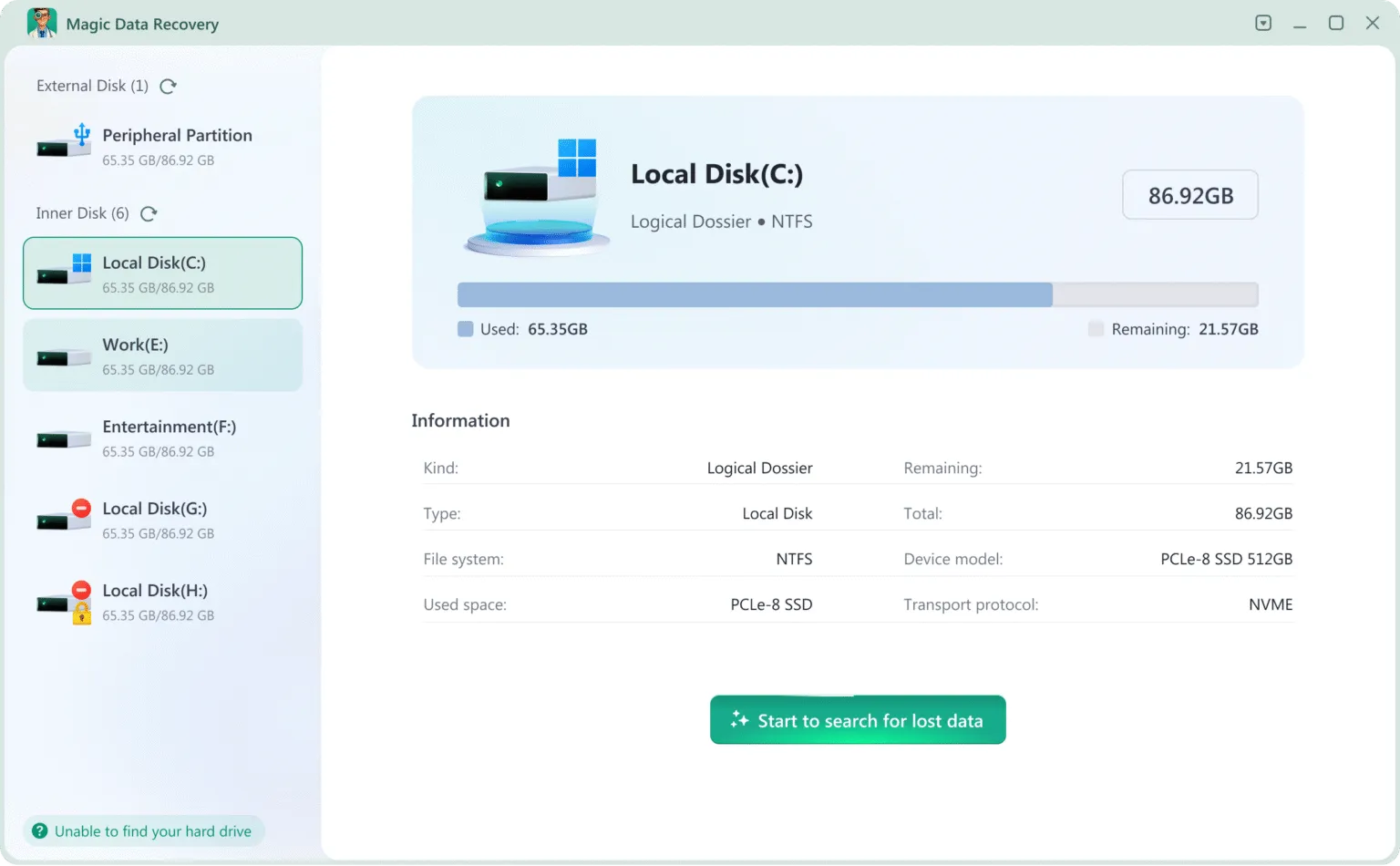
Fase 2: selezionare l'unità e procedere alla scansione
Avviare il software. Verrà visualizzato un elenco chiaro di tutte le unità collegate.
Fase 3: Attendere il completamento della scansione
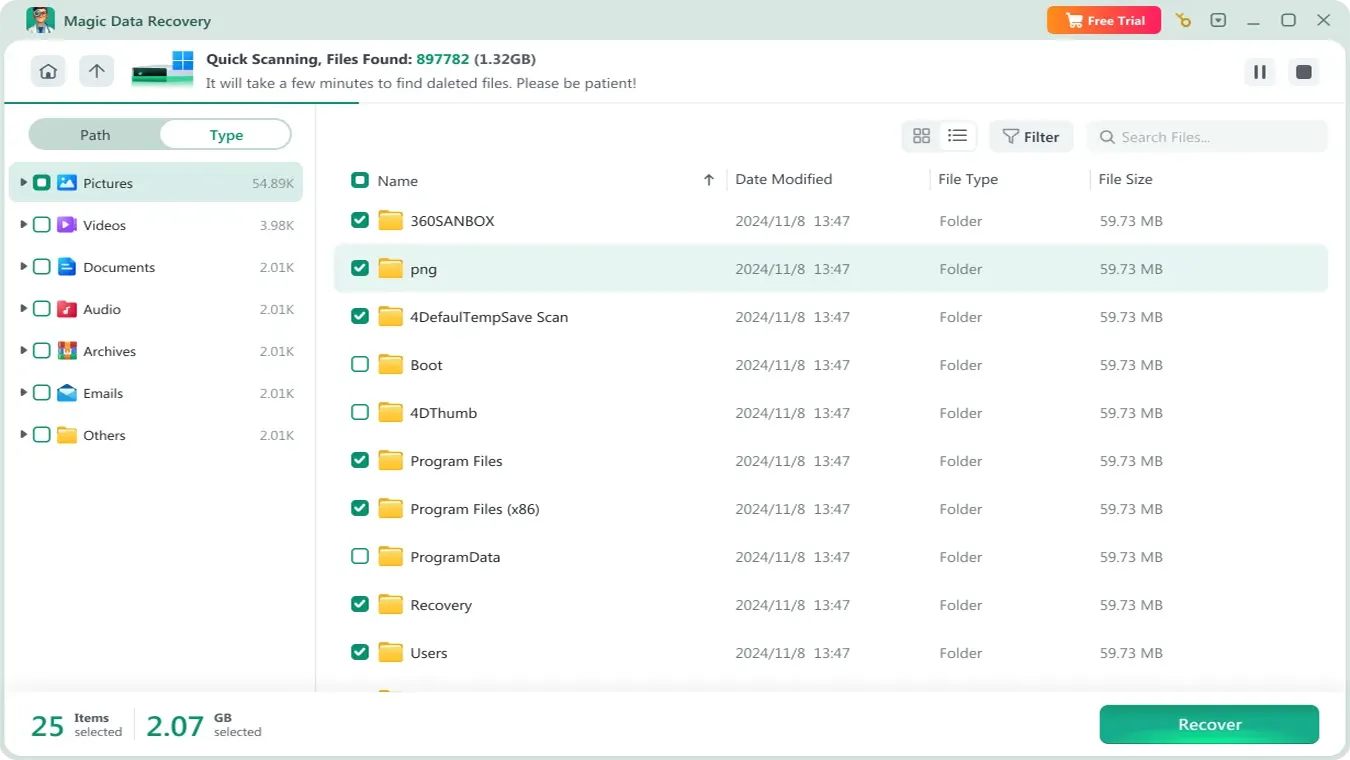
Dopo la scansione, verranno elencati tutti i file presenti nell'unità.
Fase 4: Anteprima dei file
È possibile visualizzare l'anteprima dei file e confermare se si tratta di quelli necessari.

Passo 5: Recupero dei dati
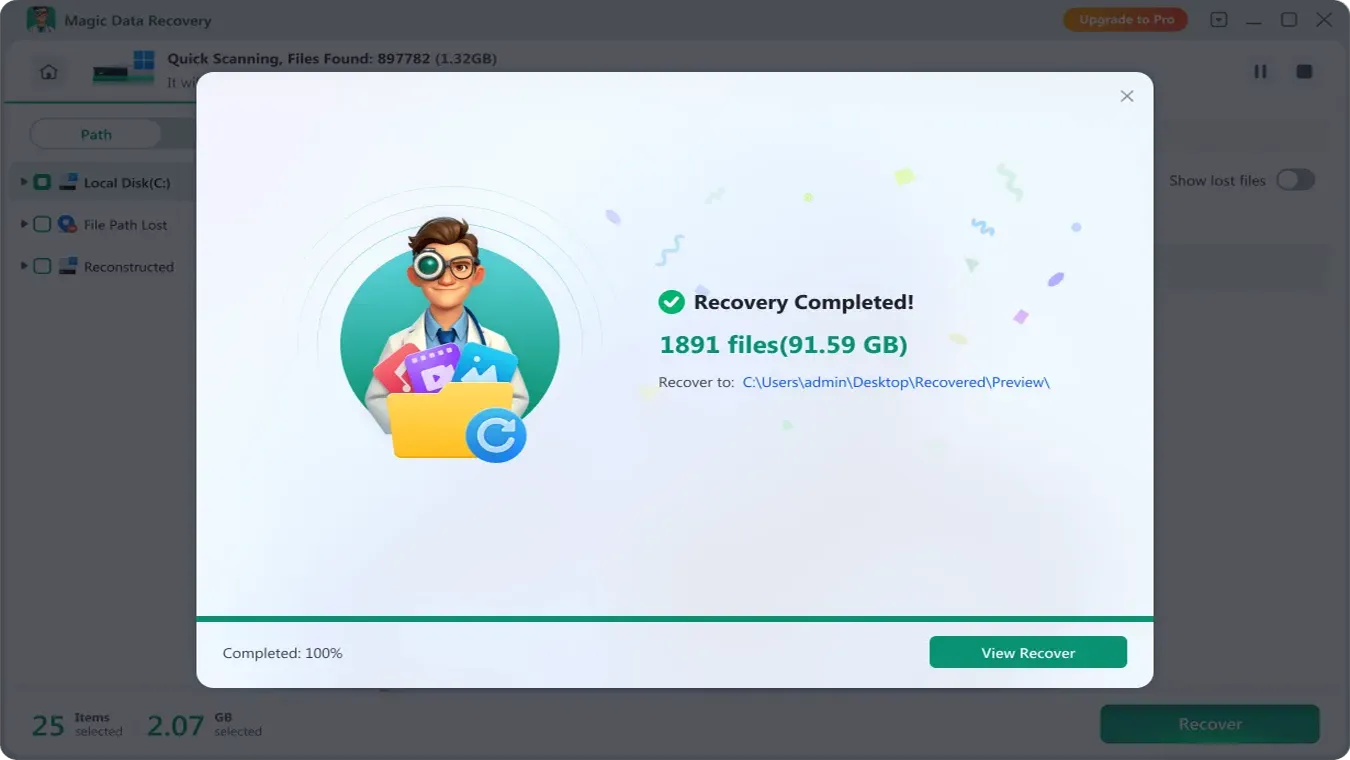
Selezionate i file necessari e recuperateli su un'altra unità.
Suggerimenti: NON salvare i file nell'unità originale nel caso in cui i file persi vengano danneggiati.
Conclusione
DMDE è innegabilmente una leggenda nella comunità tecnica, efficace per coloro che comprendono le complessità dei settori del disco e della modifica esadecimale. Tuttavia, per 99% degli utenti, è eccessivo e troppo complicato. Il rischio di un uso improprio DM Disk Editor e software di recupero dati e corrompere permanentemente l'unità è un pericolo reale per i principianti.
Non giocate con i vostri preziosi dati. Se avete bisogno di una soluzione potente, sicura e incredibilmente facile da usare, Magic Data Recovery è il massimo Alternativa DMDE. Offre la tranquillità necessaria in caso di perdita di dati. Scaricare Magic Data Recovery gratis e scansionate subito la vostra unità per vedere esattamente cosa è possibile recuperare prima di pagare un centesimo.
Supporta Windows 7/8/10/11 e Windows Server
Domande frequenti per il recupero dei dati DMDE
DM Disk Editor and Data Recovery Software è sicuro da usare?
Il software è completamente gratuito?
Qual è la migliore alternativa a DMDE?
Perché l'interfaccia DMDE è così complicata?
È possibile visualizzare un'anteprima dei file prima del ripristino?
L'Magic Data Recovery supporta le unità formattate?
Quanto dura una scansione?

Vasilii è uno specialista del recupero dati con circa 10 anni di esperienza pratica nel settore. Nel corso della sua carriera, ha risolto con successo migliaia di casi complessi riguardanti file cancellati, unità formattate, partizioni perse e file system RAW. La sua esperienza copre sia i metodi di recupero manuale utilizzando strumenti professionali come gli editor esadecimali, sia le soluzioni automatiche avanzate con i software di recupero. La missione di Vasilii è quella di rendere accessibile la conoscenza del recupero dati affidabile sia ai professionisti IT che agli utenti di tutti i giorni, aiutandoli a salvaguardare i loro preziosi beni digitali.