
Recuperación urgente de datos: ¿Servicio local o software?

Cuando se pierden repentinamente datos importantes, como fotos, archivos de trabajo y vídeos, muchas personas sienten la urgencia de “¡recuperarlos inmediatamente!”. Al mismo tiempo, suele haber un sentimiento de preocupación por la privacidad, temiendo que otros puedan ver sus datos. De hecho, al solicitar la recuperación a un servicio profesional, existe la posibilidad de que un tercero acceda a sus datos, lo que puede hacer que algunos usuarios se sientan “avergonzados” o “incómodos.”
En este artículo, compararemos los servicios profesionales con las opciones de autorrecuperación mediante software y presentaremos Magic Data Recovery, un software que le permite recuperar sus datos de forma segura y rápida, incluso sin conocimientos técnicos.
Compatible con Windows 7/8/10/11 y Windows Server
Índice
La realidad y los precios de los servicios exprés de recuperación de datos
Recuperación urgente de datos se refiere a los servicios que dan prioridad a la recuperación y el análisis de datos, lo que le permite restaurar datos del disco duro en tan solo unas horas o incluso el mismo día.
Por ejemplo, servicios profesionales como “Express Data Recovery” pueden analizar y recuperar datos de discos duros, unidades SSD, unidades USB, etc., ya sea visitando al proveedor de servicios o enviando su dispositivo por correo.
Sin embargo, los daños físicos (por ejemplo, fallos del motor, quemaduras de PCB) suelen requerir operaciones especializadas en salas blancas, que pueden costar decenas de miles de yenes.
Por otro lado, los daños lógicos (por ejemplo, borrado accidental, errores de formato o problemas de reconocimiento) pueden resolverse rápidamente utilizando el software adecuado, como Magic Data Recovery.
Comparación de tiempo y costes: Proveedores de servicios frente a software
La siguiente tabla compara el servicio de recuperación de datos exprés y el software de recuperación Magic Data Recovery. Si no está seguro de qué opción elegir, consulte lo siguiente:
| Comparación de artículos | Servicio exprés de recuperación de datos | Magic Data Recovery (Software) |
|---|---|---|
| Cuestiones subvencionadas | Fallos físicos y lógicos | Principalmente fallos lógicos (por ejemplo, borrado, formateo, RAW) |
| Tiempo de recuperación | De unas horas a 1 día (in situ) | De unos minutos a unas horas (en casa) |
| Coste | ¥30,000 - ¥150,000 | ¥7.278 (1 año de licencia, antes de impuestos), Versión permanente aprox. ¥10.192 (antes de impuestos) |
| Conocimientos necesarios | Personal profesional necesario | Interfaz fácil de usar con guía para principiantes |
| Tasa de éxito | Alta (incluidos los fallos físicos) | Alta (Especializada para fallos lógicos) |
| Facilidad de uso | Requiere entrega de dispositivo o correo | Recuperación inmediata en casa |
| Costes | ★★★☆☆ | ★★★★★ |
Resumen:
Para daños físicos como ruidos anormales o fallos de hardware → Utilice Servicios de recuperación rápida de datos.
Para problemas lógicos como archivos eliminados, unidades formateadas, o errores de reconocimiento → Utilice Magic Data Recovery para una recuperación rápida.
Pasos para una recuperación de datos segura según las directrices oficiales de Microsoft
Según La documentación oficial de Microsoft, cuando se borra o formatea una unidad, los datos no se borran inmediatamente. En su lugar, los datos permanecen en la unidad hasta que se sobrescriben. Esto significa que tomar medidas rápidas antes de que los datos se sobrescriban es fundamental para el éxito de la recuperación de datos.
Basándose en este principio, Magic Data Recovery minimiza el tiempo necesario para iniciar la exploración, lo que le permite empezar a recuperar datos inmediatamente después de borrarlos o formatearlos. Esto la convierte en la herramienta más eficaz para la recuperación exprés de datos.
Herramienta recomendada para la recuperación de datos Express: Magic Data Recovery
Magic Data Recovery es un software de recuperación de datos exprés fácil de usar, incluso para principiantes.
Características principales:
Exploración inmediata: Inicia el escaneo en cuanto conectes el dispositivo.
Amplia compatibilidad de dispositivos: Compatible con discos duros HDD, SSD, USB, tarjetas SD, discos duros externos y más.
Sistemas de archivos compatibles: Compatible con los principales formatos, incluidos NTFS, FAT, exFAT, ReFS, etc.
Vista previa de archivos: Previsualice los archivos antes de la recuperación, evitando recuperaciones innecesarias.
Interfaz de usuario guiada: Pasos sencillos y fáciles de seguir para principiantes.
Cómo utilizar Magic Data Recovery para recuperar tus datos de forma segura
Si se siente avergonzado por la recuperación de datos o cree que hacerlo usted mismo puede ser difícil, Magic Data Recovery es la solución más segura y sencilla.
He aquí cómo utilizarlo:
1. Descargar e instalar
Descarga Magic Data Recovery desde el sitio oficial e instálalo en tu PC.
Compatible con Windows 7/8/10/11 y Windows Server
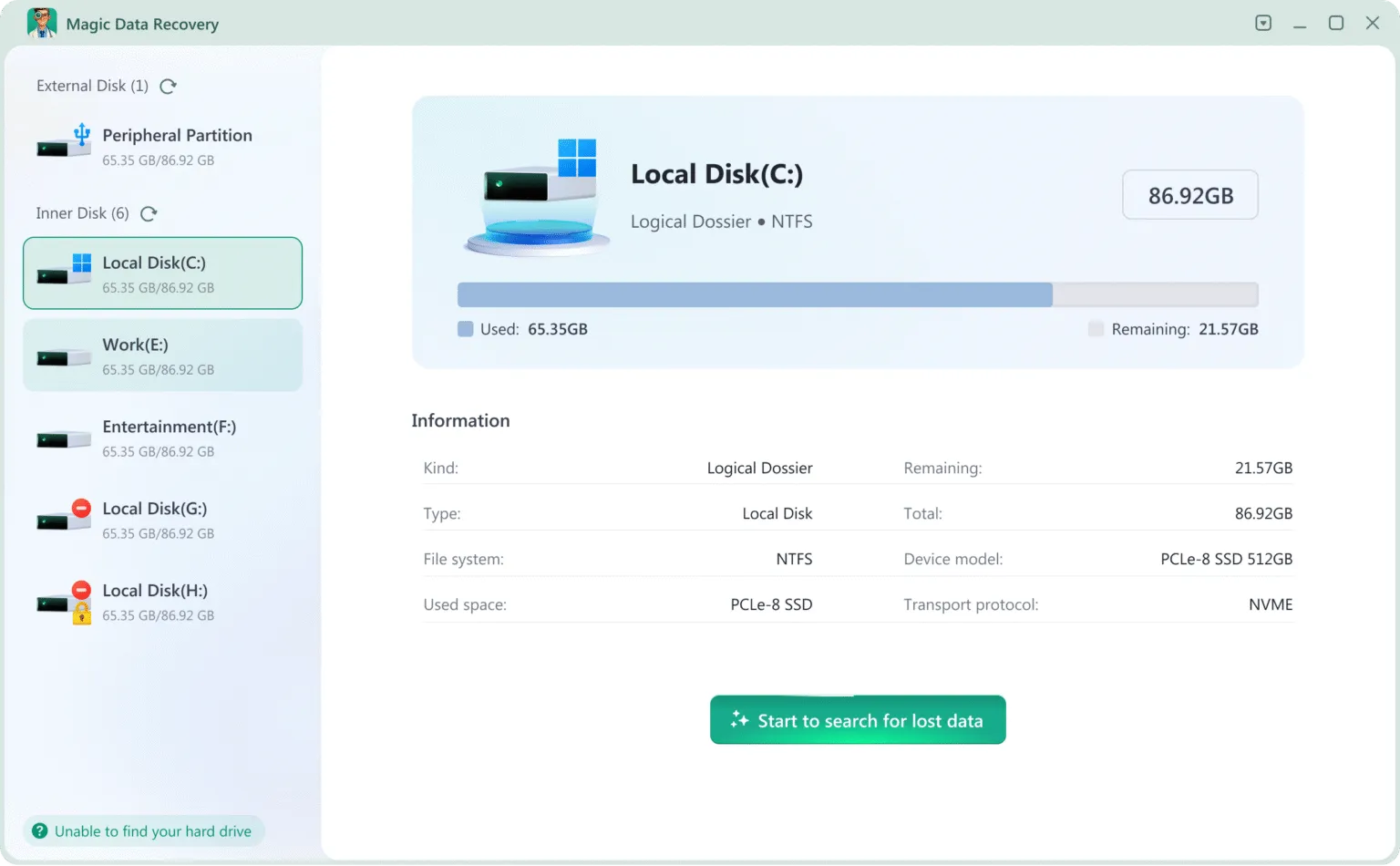
2.Seleccione la unidad que desea recuperar
Una vez iniciado, se mostrarán todas las unidades conectadas (HDD, SSD, USB, tarjetas SD, etc.).
Seleccione la unidad que desea recuperar y haga clic en Buscar datos perdidos.
3. Espere a que finalice la exploración
Magic Data Recovery escaneará automáticamente la unidad y listará todos los archivos recuperables. Absténgase de utilizar el dispositivo durante el proceso de escaneado.
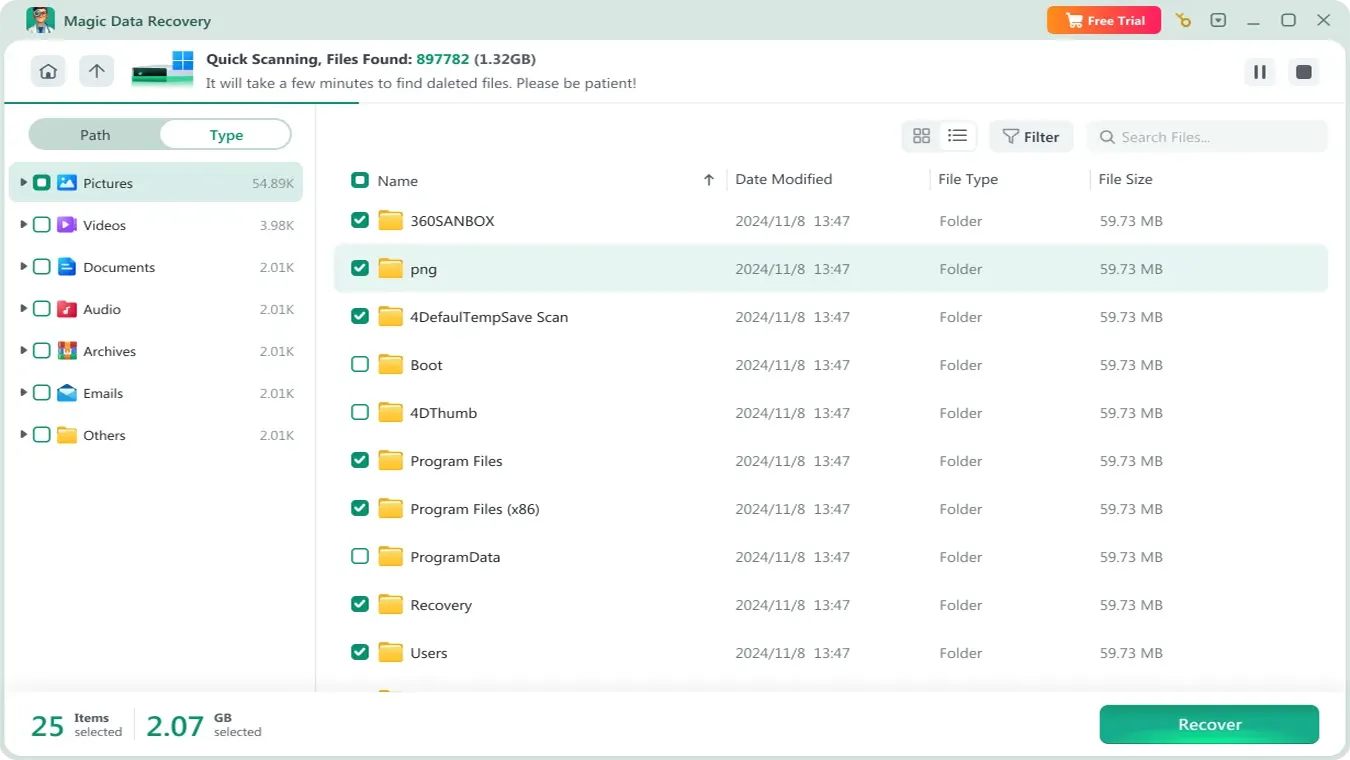
4. Previsualizar y confirmar archivos
Puedes previsualizar los archivos detectados por el software. Elija sólo los archivos necesarios para recuperar.

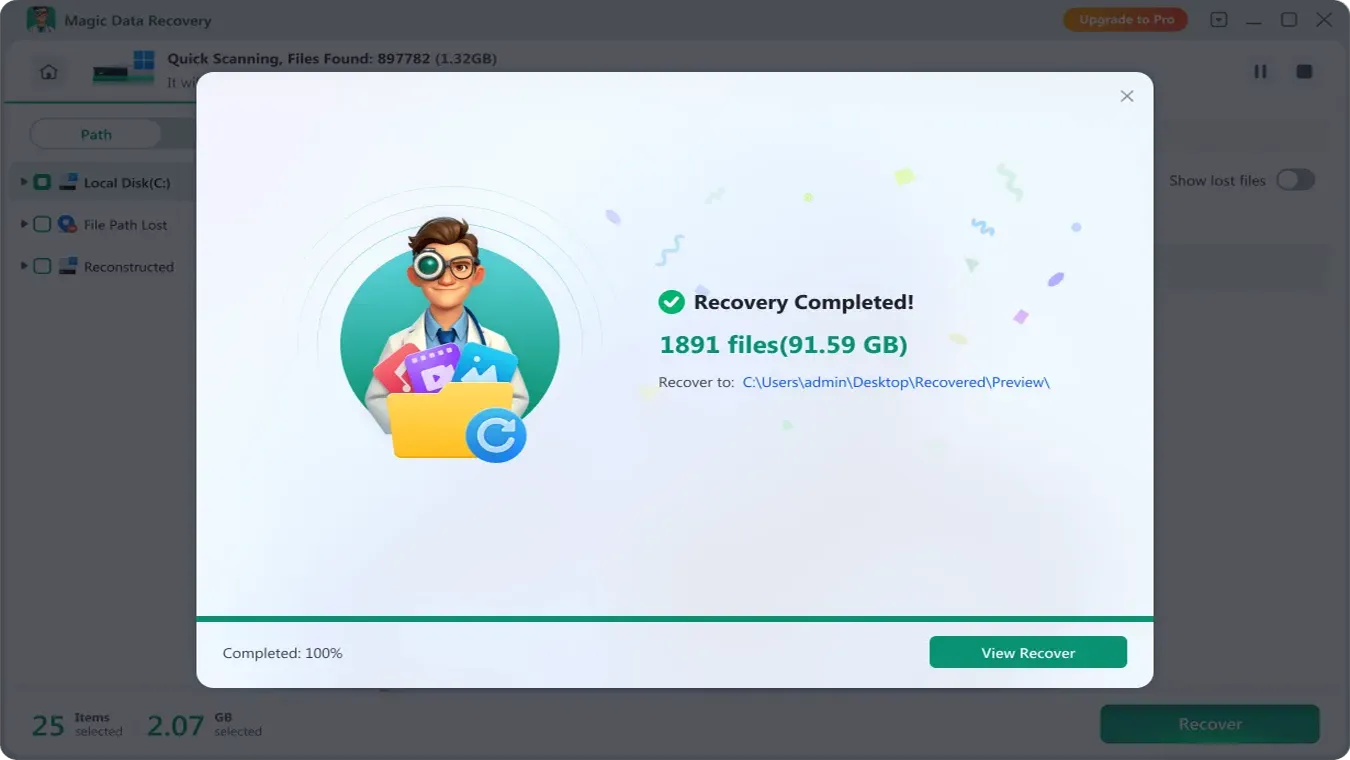
5. Guardar archivos recuperados
Guarde los archivos recuperados en una unidad diferente para evitar sobrescribir los datos originales.
También puede ver la guía en vídeo aquí:
Conclusión
En situaciones urgentes de pérdida de datos, es importante recuperarlos de la forma más rápida, segura y privada posible. Mientras que los servicios exprés de recuperación de datos son ideales para daños físicos, Magic Data Recovery es la mejor solución para fallos lógicos como borrados o formateos. Como se ha demostrado, Magic Data Recovery es sencillo de utilizar, con una interfaz fácil de usar, y se adhiere a los principios de recuperación de datos de Microsoft, garantizando tanto la seguridad como la eficacia.
Antes de preocuparse de que la recuperación de datos exprés sea su única opción, pruebe Magic Data Recovery para disfrutar de una experiencia de recuperación de datos eficaz, segura y privada en casa.
Compatible con Windows 7/8/10/11 y Windows Server
PREGUNTAS FRECUENTES
¿Cuánto cuesta la recuperación exprés de datos?
¿Puedo realizar la recuperación exprés de datos por mi cuenta?
¿Cuál es la diferencia entre Express Data Recovery Services y Magic Data Recovery?

Vasilii es un especialista en recuperación de datos con unos 10 años de experiencia práctica en este campo. A lo largo de su carrera, ha resuelto con éxito miles de casos complejos relacionados con archivos borrados, unidades formateadas, particiones perdidas y sistemas de archivos RAW. Su experiencia abarca tanto métodos de recuperación manual con herramientas profesionales como editores hexadecimales como soluciones automatizadas avanzadas con software de recuperación. La misión de Vasilii es poner los conocimientos sobre recuperación de datos al alcance tanto de los profesionales informáticos como de los usuarios de a pie, ayudándoles a salvaguardar sus valiosos activos digitales.