
Come trovare il codice prodotto di Windows 10 Pro: 7 metodi affidabili
Need to find your Windows 10 Pro product key before reinstalling Windows, replacing a hard drive, or moving your license? First, check Settings > Update & Security > Activation. If Windows says it is activated with a digital license, you may not need to enter a product key when reinstalling the same Windows edition on the same computer.
To retrieve a stored 25-character Windows 10 Pro product key, you can use PowerShell, Command Prompt, the Windows Registry, your original purchase records, or Magic Recovery Key. Magic Recovery Key is particularly useful when manual commands return a blank result or when you need to recuperare le informazioni sulla licenza from an old or non-bootable Windows drive.
Supporta Windows 7/8/10/11 e Windows Server
Risposta rapida:
The best method depends on your license type. Use PowerShell or CMD to check for an OEM key embedded in the PC firmware. Check your purchase email or packaging for a retail key. If Windows uses a digital license, a visible product key may not exist. For an old or inaccessible drive, scan it with Magic Recovery Key before formatting or reinstalling Windows.
2026 Update:
Microsoft ended standard support for Windows 10 on October 14, 2025. Windows 10 computers still work, but they no longer receive regular security fixes unless they qualify for an extended update program. Recovering your license information remains useful when reinstalling Windows, upgrading hardware, or moving to a supported Windows version.
Indice dei contenuti
Perché vi serve il codice prodotto di Windows 10 Pro
Before trying to recover a key, check whether your computer uses a product key or a digital license.
A Windows 10 Pro product key is a 25-character code in the following format:
XXXXX-XXXXX-XXXXX-XXXXX-XXXXX
A digital license activates Windows through Microsoft’s activation servers without requiring you to enter or view a traditional key. To check your activation type, open Start > Settings > Update & Security > Activation.
You may see one of these messages:
- Windows is activated with a digital license.
- Windows is activated with a digital license linked to your Microsoft account.
- Windows is activated using your organization’s activation service.
- Windows is not activated.
If your Windows 10 Pro installation is activated with a digital license, reinstalling the same edition on the same hardware will normally reactivate after the computer connects to the internet. A recoverable product key is more important when you purchased a retail license, plan to replace major hardware, or need to keep a license record before migration.
Why Is My Windows 10 Pro Product Key Not Showing?
A command may return a blank result for several legitimate reasons:
- Windows is activated with a digital license.
- The computer does not have an OEM key embedded in its firmware.
- The license is managed through KMS or volume activation.
- The installed edition does not match the original firmware key.
- The Registry contains only a generic installation key.
- The original activation information was removed or replaced.
- The key is stored in purchase records rather than on the computer.
Check the Activation page before assuming that the key has been lost.
Metodo 1: Recuperare immediatamente il codice prodotto con Magic Recovery Key
Il più veloce e affidabile modo per trovare il codice prodotto di Windows 10 Pro è utilizzando Magic Recovery Key - un programma di ricerca automatica di chiavi di prodotto progettato per recuperare le informazioni di licenza perse o nascoste dal sistema o dalle unità esterne.
Come funziona:
1. Scaricare e installare Magic Recovery Key da Amagicsoft.com.
Supporta Windows 7/8/10/11 e Windows Server
2. Fare clic sulla scheda “Chiavi di registro” in “Locale”.

3. Nel pannello di destra, visualizzate le chiavi di registro delle applicazioni. Magic Recovery Key visualizzerà tutte le chiavi del software installato. Selezionare e copiare i numeri di serie desiderati. Inoltre, è possibile fare clic su “Copia” o “Risparmiare” per comodità.
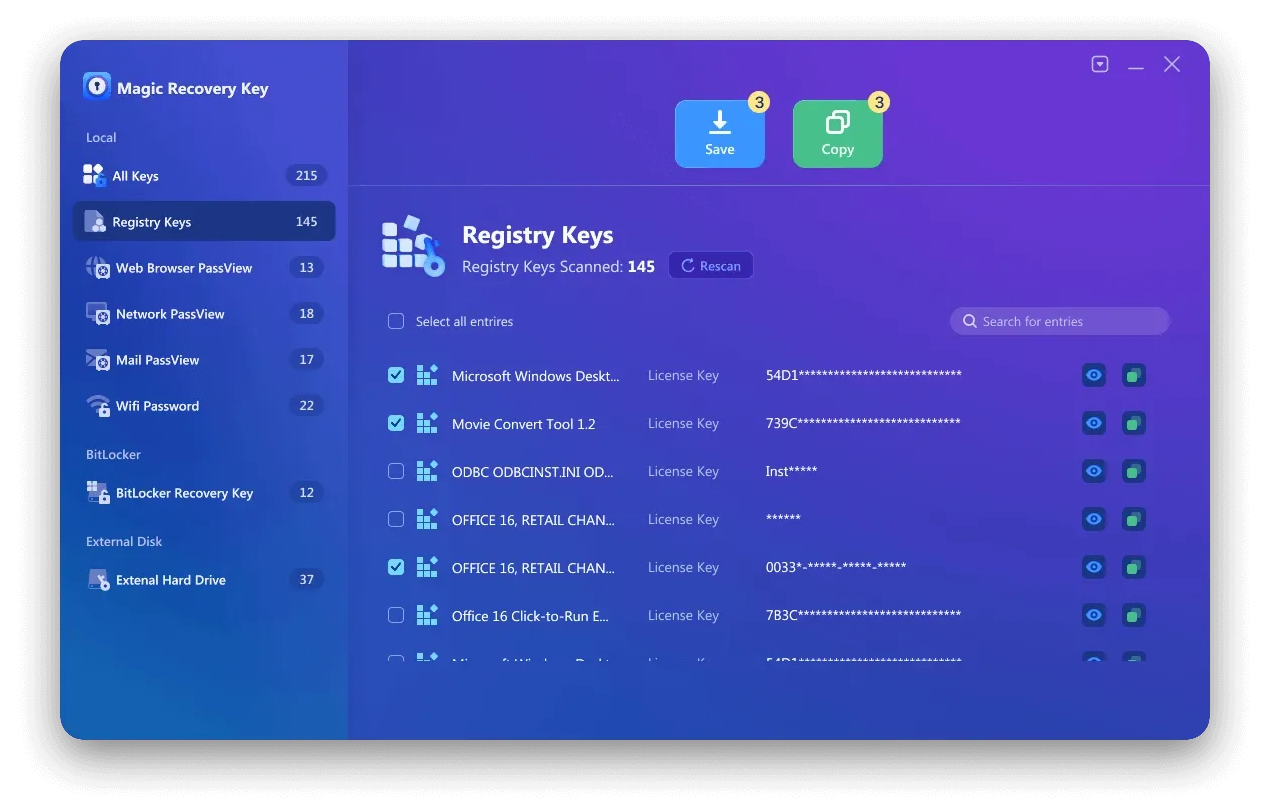
This method is suitable for users who want to back up Windows, Office, Adobe, SQL Server, and other supported software keys without manually searching multiple system locations.
Method 2: Find the Windows 10 Pro Product Key with PowerShell
PowerShell is the preferred built-in method for checking whether your computer has an OEM product key embedded in its BIOS or UEFI firmware.
- Fare clic con il tasto destro del mouse sul pulsante Start.
- Select Windows PowerShell (Admin) or Terminal (Admin).
- Enter the following command: (Get-CimInstance -Query ‘Select * from SoftwareLicensingService’).OA3xOriginalProductKey
- Premere Invio.
If a firmware-embedded key exists, PowerShell will display the 25-character key. If the result is blank, your computer may use a digital license, retail license, volume license, or another activation method. A blank result does not necessarily mean that Windows is unlicensed.
Method 3: Find the Windows 10 Pro Product Key Using CMD
Command Prompt can also retrieve an OEM key embedded in the device firmware.
- Type cmd in the Windows search box.
- Right-click Command Prompt and select Run as administrator.
- Enter: wmic path SoftwareLicensingService get OA3xOriginalProductKey
- Premere Invio.
This command does not reveal every type of Windows 10 Pro license. It mainly checks for the original OEM key stored in the device firmware. If no key appears, continue with the other methods below.
Note: WMIC has been deprecated by Microsoft. It remains available on many Windows 10 installations, but PowerShell should be presented as the primary command-line method.
Method 4: Check the Windows Registry
You can inspect the Windows Registry for a stored backup key:
- Premi i tasti Windows + R.
- Type regedit and press Enter.
- Navigate to: HKEY_LOCAL_MACHINE\SOFTWARE\Microsoft\Windows NT\CurrentVersion\SoftwareProtectionPlatform
- Find BackupProductKeyDefault.
Important: The value displayed here may be a backup, default, or generic installation key rather than the unique key that activated your Windows 10 Pro license. Do not assume that it can activate another computer.
Method 5: Check Your Purchase Records
The correct location depends on how Windows 10 Pro was purchased:
- New computer: Check the PC packaging, documentation, firmware, or Certificate of Authenticity.
- Physical retail copy: Look for the card or label inside the Windows box.
- Digital retail copy: Search the purchase confirmation email or the retailer’s digital locker.
- Microsoft purchase: Review the confirmation email and Microsoft account order history.
- Organization license: Contact your IT administrator or check the organization’s volume licensing records.
Method 6: Check Your Microsoft Account and Digital License
A Microsoft account may show that a device is associated with your account, but it does not always display the full 25-character product key.
Open Settings > Update & Security > Activation. If the page says that Windows is activated with a digital license linked to your Microsoft account, keep that account linked before reinstalling Windows or making a major hardware change.
After a motherboard replacement or another significant hardware change, use the Activation Troubleshooter and select “I changed hardware on this device recently.”
Method 7: Recover a Windows Key from an Old or Non-Bootable Drive
If the original Windows installation no longer starts, avoid formatting the old drive before checking it.
Connect the old system drive to a working Windows computer using a compatible enclosure or adapter. Open Magic Recovery Key, select the connected drive, and scan the old Windows installation for stored license information.
Recovery availability depends on the license type and whether usable activation data remains on the drive. A digital license tied to Microsoft’s servers may not appear as a traditional 25-character key.
Backup e protezione del codice prodotto
Una volta trovato il codice prodotto di Windows 10 Pro, assicuratevi di eseguire un backup sicuro:
Salvatela in un gestore di password criptate.
Scrivetelo e conservatelo in modo sicuro
Conservate una copia utilizzando la funzione “Esportazione” dell'Magic Recovery Key.
In questo modo, anche dopo la reinstallazione di Windows o la sostituzione dell'hardware, è possibile riattivare facilmente il sistema.
Conclusione
There is no single method that retrieves every Windows 10 Pro product key. PowerShell and CMD mainly identify firmware-embedded OEM keys, while the Registry may show only a generic or backup value. Retail keys are more likely to be found in purchase emails, packaging, or order records, and digital licenses may reactivate Windows without displaying a traditional key.
When manual methods fail—or when the original Windows installation is on an old or non-bootable drive—Magic Recovery Key provides a practical way to scan, review, and back up stored Windows and software license information before reinstalling or replacing the system.
Supporta Windows 7/8/10/11 e Windows Server
Domande frequenti (FAQ)
Where can I find my Windows 10 Pro product key?
How do I find my Windows 10 Pro product key using PowerShell?
Why does CMD show a blank Windows 10 product key?
Can I find my Windows 10 Pro product key in my Microsoft account?
Do I need a product key to reinstall Windows 10 Pro?
Is BackupProductKeyDefault my real Windows activation key?
Can I transfer my Windows 10 Pro product key to another computer?
Can Magic Recovery Key recover a key from a non-bootable computer?

Erin Smith è riconosciuta come una delle scrittrici più professionali di Amagicsoft. Negli ultimi 10 anni ha continuamente affinato le sue capacità di scrittura e ha aiutato milioni di lettori a risolvere i loro problemi tecnologici.