
Recuperación de fotos borradas: cómo recuperar fotos borradas en Windows

Recuperación de fotos borradas A menudo es posible recuperar las fotos cuando se borran accidentalmente de un ordenador con Windows, una tarjeta SD, una memoria USB o un disco duro externo. En la mayoría de los casos, al borrar una foto se elimina su referencia en el sistema de archivos, en lugar de borrar inmediatamente los datos subyacentes. La recuperación sigue siendo posible hasta que nuevos datos sobrescriban ese mismo espacio de almacenamiento.
Deja de utilizar el dispositivo afectado en cuanto te des cuenta de la pérdida. No hagas nuevas fotos en la tarjeta SD, no copies archivos en la unidad ni instales software de recuperación en la misma ubicación. En esta guía se explica cómo recuperar fotos borradas mediante la Papelera de reciclaje, los servicios en la nube, las copias de seguridad de Windows, las versiones anteriores y Magic Data Recovery.
Para conocer otros casos de pérdida de fotografías, visita nuestra Recuperación de fotos guía.
Compatible con Windows 7/8/10/11 y Windows Server
Índice
¿Se pueden recuperar las fotos borradas?
Sí, las fotos borradas suelen poder recuperarse si sus datos no se han sobrescrito. Empieza por mirar en la Papelera de reciclaje, la papelera de la nube y las copias de seguridad existentes. Si las fotos se han borrado de forma definitiva, se han eliminado de una tarjeta SD o se han perdido tras formatear, analiza el dispositivo de almacenamiento original con un programa de recuperación de fotos.
Las posibilidades de recuperación suelen ser mayores en discos duros (HDD), tarjetas SD y memorias USB que no se hayan reutilizado. La recuperación de un SSD puede resultar más difícil, ya que la función TRIM puede borrar automáticamente los bloques de almacenamiento eliminados.
| Situación de pérdida de fotografías | Primera medida recomendada | Probabilidad de recuperación |
|---|---|---|
| Eliminados recientemente en Windows | Comprueba la Papelera de reciclaje | Alta |
| Eliminado de OneDrive | Comprueba la papelera de reciclaje de OneDrive | Por encima del periodo de retención |
| Mayús + Supr | Analiza la unidad original | Depende de si se sobrescribe |
| Borrado de una tarjeta SD | Deja de usar la tarjeta y escanéala | A menudo es una buena opción, si no se reutiliza |
| Tarjeta o unidad formateada rápidamente | Ejecutar un escaneado en profundidad | Posible |
| Eliminado de un SSD | Deja de utilizarlo inmediatamente | Puede reducirse mediante TRIM |
| Dispositivo con daños físicos | Ponte en contacto con un servicio de asistencia en carretera | Es posible que el software no sea adecuado |
¿Por qué se borran las fotos o dejan de estar disponibles?
Las fotos pueden desaparecer por diferentes motivos, y la causa determina cuál es el método de recuperación más adecuado:
- Borrado accidental: Las fotos se eliminan con las teclas «Suprimir» y «Mayús + Suprimir», o vaciando la Papelera de reciclaje.
- Formateo de una tarjeta SD o una unidad de almacenamiento: Un formateo rápido elimina los registros del sistema de archivos, pero es posible que algunos datos de las fotos permanezcan hasta que se sobrescriban.
- Corrupción del sistema de archivos: Una expulsión incorrecta, una pérdida de alimentación o errores de escritura pueden hacer que una tarjeta o una unidad aparezcan como «RAW» o resulten ilegibles.
- Particiones que faltan: Los daños en la tabla de particiones pueden provocar que desaparezca toda una carpeta de fotos o un volumen completo.
- Malware: Algunos programas maliciosos borran archivos, mientras que el ransomware los cifra. Los programas de recuperación no pueden descifrar las fotos cifradas por el ransomware.
- Fallo de hardware: Si el disco duro hace ruido, el dispositivo de almacenamiento está desconectado o la tarjeta de memoria está dañada, es posible que sea necesario recurrir a un servicio profesional de recuperación de datos.
No formatees, inicialices ni ejecutes CHKDSK en un dispositivo en el que falten fotos antes de intentar recuperarlas.
Cómo recuperar fotos borradas en Windows
Método 1: Recuperar fotos eliminadas de la Papelera de reciclaje
Las fotos que se borran de una unidad interna de Windows suelen pasar a la Papelera de reciclaje, a menos que hayas utilizado la combinación de teclas Mayús + Supr o hayas vaciado la papelera.
- Abre la papelera de reciclaje.
- Busca la foto eliminada por nombre, fecha o tipo de archivo.
- Haz clic con el botón derecho del ratón en la foto.
- Seleccione Restaurar.
Windows devuelve la foto a su carpeta original. Si la foto no está en la Papelera de reciclaje, sigue con el siguiente método.
Método 2: Comprueba la papelera de reciclaje de OneDrive u otra cuenta de almacenamiento en la nube
Si tu carpeta «Imágenes» o «Escritorio» estaba sincronizada con OneDrive, Google Drive o Dropbox, es posible que la foto eliminada siga estando disponible en la papelera de reciclaje en línea de ese servicio. Inicia sesión a través de la página web oficial, abre la sección «Papelera de reciclaje» o «Archivos eliminados», selecciona la foto y restáurala.
La papelera de la nube tiene un periodo de retención limitado, así que revísala lo antes posible.
Método 3: Recuperar fotos desde el historial de archivos o versiones anteriores
El Historial de archivos de Windows puede restaurar una copia anterior de una carpeta si la protección de copia de seguridad estaba activada antes de que se eliminaran las fotos.
- Abre la carpeta en la que estaban guardadas las fotos.
- Haga clic con el botón derecho en la carpeta y seleccione Propiedades.
- Abra el Versiones anteriores ficha.
- Seleccione una versión disponible.
- Haga clic en Abrir para comprobar su contenido y, a continuación, selecciona Restaurar.
Este método solo funciona si se ha configurado previamente el Historial de archivos, los puntos de restauración u otro sistema de copia de seguridad.
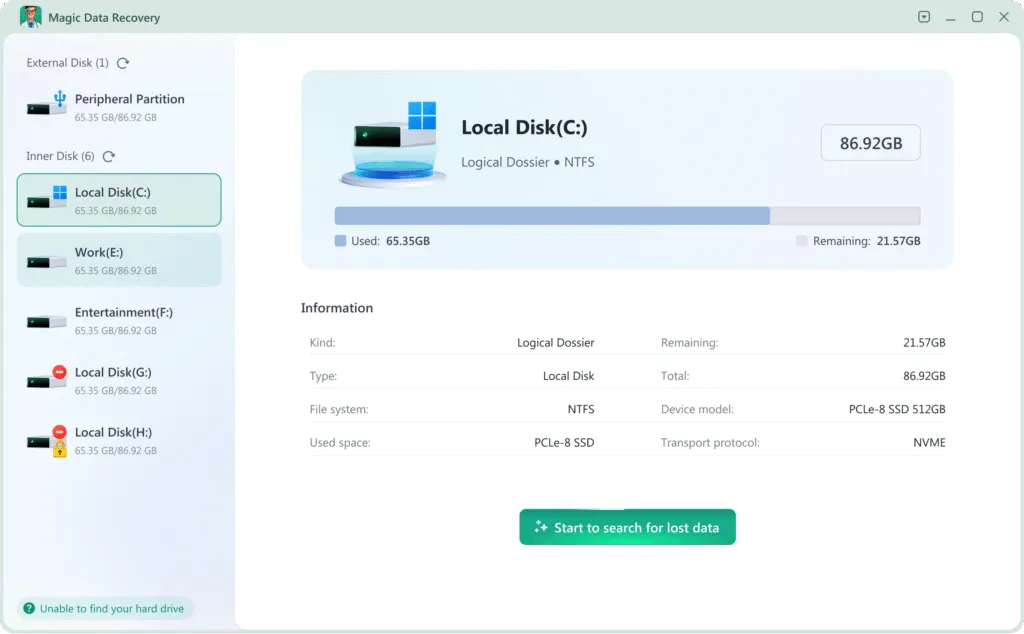
Método 4: Recuperar fotos eliminadas de forma definitiva con Magic Data Recovery
Si las fotos ya no se encuentran en la Papelera de reciclaje ni en las copias de seguridad, analiza el dispositivo de almacenamiento original con Magic Data Recovery. El software permite recuperar fotos borradas de unidades de Windows, discos duros externos, memorias USB, tarjetas SD y otros dispositivos de almacenamiento detectables.
Instala el programa en una unidad distinta a la que contiene las fotos eliminadas. Si lo instalas en la unidad afectada, podrías sobrescribir datos recuperables.
Siguiendo estos pasos tendrá la mejor oportunidad de recuperar fotos borradas utilizando Magic Data Recovery:
1. Descargar e instalar con seguridad: Descargar e instalar Magic Data Recovery en un unidad diferente que el que se está recuperando. De este modo se evita sobrescribir los archivos perdidos.
Compatible con Windows 7/8/10/11 y Windows Server


Método 5: Contactar con un servicio de recuperación profesional
Deja de utilizar el software y ponte en contacto con un servicio profesional de recuperación si el dispositivo de almacenamiento emite ruidos como chasquidos o chirridos, se desconecta repetidamente, no se detecta en la BIOS ni en «Administración de discos», o ha sufrido daños por agua, fuego o golpes. Encender repetidamente un dispositivo que presenta daños físicos puede reducir las posibilidades de que la recuperación tenga éxito.
Reflexiones finales
A menudo es posible recuperar fotos borradas, pero el método adecuado depende de dónde estuvieran almacenadas y de cómo se hayan perdido. Empieza por la Papelera de reciclaje, la papelera de la nube, el Historial de archivos y las copias de seguridad existentes. Si estas opciones no dan resultado, analiza el dispositivo original antes de que nuevos datos sobrescriban las fotos borradas.
Magic Data Recovery Puede escanear unidades de Windows, tarjetas SD, dispositivos USB y dispositivos de almacenamiento externos en busca de imágenes borradas o perdidas. Previsualiza primero las fotos recuperables y guarda los archivos seleccionados en otra unidad.
Para conocer más situaciones en las que se pueden perder fotos y obtener consejos sobre cómo recuperarlas, visita nuestra Recuperación de fotos página.
Compatible con Windows 7/8/10/11 y Windows Server
Preguntas frecuentes
¿Se pueden recuperar las fotos borradas permanentemente?
¿Puedo recuperar fotos borradas hace meses?
¿Cómo puedo recuperar fotos borradas sin necesidad de utilizar ningún programa?
¿Se pueden recuperar las fotos borradas de una tarjeta SD?
¿Se pueden recuperar las fotos después de formatear una tarjeta SD?
¿Por qué algunas fotos recuperadas están dañadas?
¿Se pueden recuperar las fotos borradas de un SSD?
¿Dónde debo guardar las fotos recuperadas?

Erin Smith es reconocida como una de las redactoras más profesionales de Amagicsoft. Ha perfeccionado continuamente sus habilidades de escritura durante los últimos 10 años y ha ayudado a millones de lectores a resolver sus problemas tecnológicos.