
Come recuperare i dati da una scheda SD formattata in modo sicuro
Formattazione di una scheda SD può far sparire in pochi secondi foto, video, documenti e file di lavoro di grande valore. Fortunatamente, imparare Come recuperare i dati da una scheda SD formattata potrebbe aiutarti a recuperare quei file prima che vengano sovrascritti da nuovi dati. In molti casi, una formattazione rapida rimuove i record del file system anziché cancellare immediatamente il contenuto originale. Pertanto, avviando il Recupero della scheda SD Avviare la procedura il prima possibile può aumentare le possibilità di recuperare i dati rimanenti.
Questa guida spiega Come recuperare i dati da una scheda SD formattata su Windows e Android. La guida tratta diversi scenari di formattazione, i limiti di spazio di archiviazione su Android, gli errori più comuni durante il recupero dei dati e una soluzione sicura passo dopo passo. Imparerai inoltre quando Magic Data Recovery può aiutare con Recupero della scheda SD formattata e quando la crittografia, i danni fisici o la sovrascrittura dei dati potrebbero limitare i risultati. Sebbene nessun software sia in grado di ripristinare tutti i file sovrascritti o cancellati in modo sicuro, il metodo di recupero adeguato può impedire un’ulteriore perdita di dati e aiutarti a recuperare in modo sicuro i file accessibili.
Supporta Windows 7/8/10/11 e Windows Server
Indice dei contenuti
Cosa fare prima di recuperare i dati da una scheda SD formattata
Prima di tentare Come recuperare i dati da una scheda SD formattata, interrompi qualsiasi operazione che possa scrivere nuove informazioni sulla scheda. Nuove foto, download, file delle app e operazioni di riparazione potrebbero sovrascrivere i dati recuperabili.
Per prima cosa, rimuovi la scheda dal telefono, dalla fotocamera, dal drone o dalla dashcam. Successivamente, annulla qualsiasi richiesta di formattarla nuovamente. Inoltre, non Esegui CHKDSK oppure installare un software di recupero sulla scheda interessata.
Seguite queste regole:
- Interrompere immediatamente l'utilizzo della scheda SD.
- Utilizza un lettore di carte affidabile.
- Eseguire una scansione prima di provare gli strumenti di riparazione.
- Installa il software su un'altra unità.
- Salva i file recuperati in un'altra posizione.
- Interrompere l'uso se la scheda si surriscalda o si scollega ripetutamente.
Di conseguenza, il primo passo per Come recuperare i dati da una scheda SD formattata impedisce che il contenuto venga sovrascritto ulteriormente.
È possibile recuperare i dati da una scheda SD formattata?
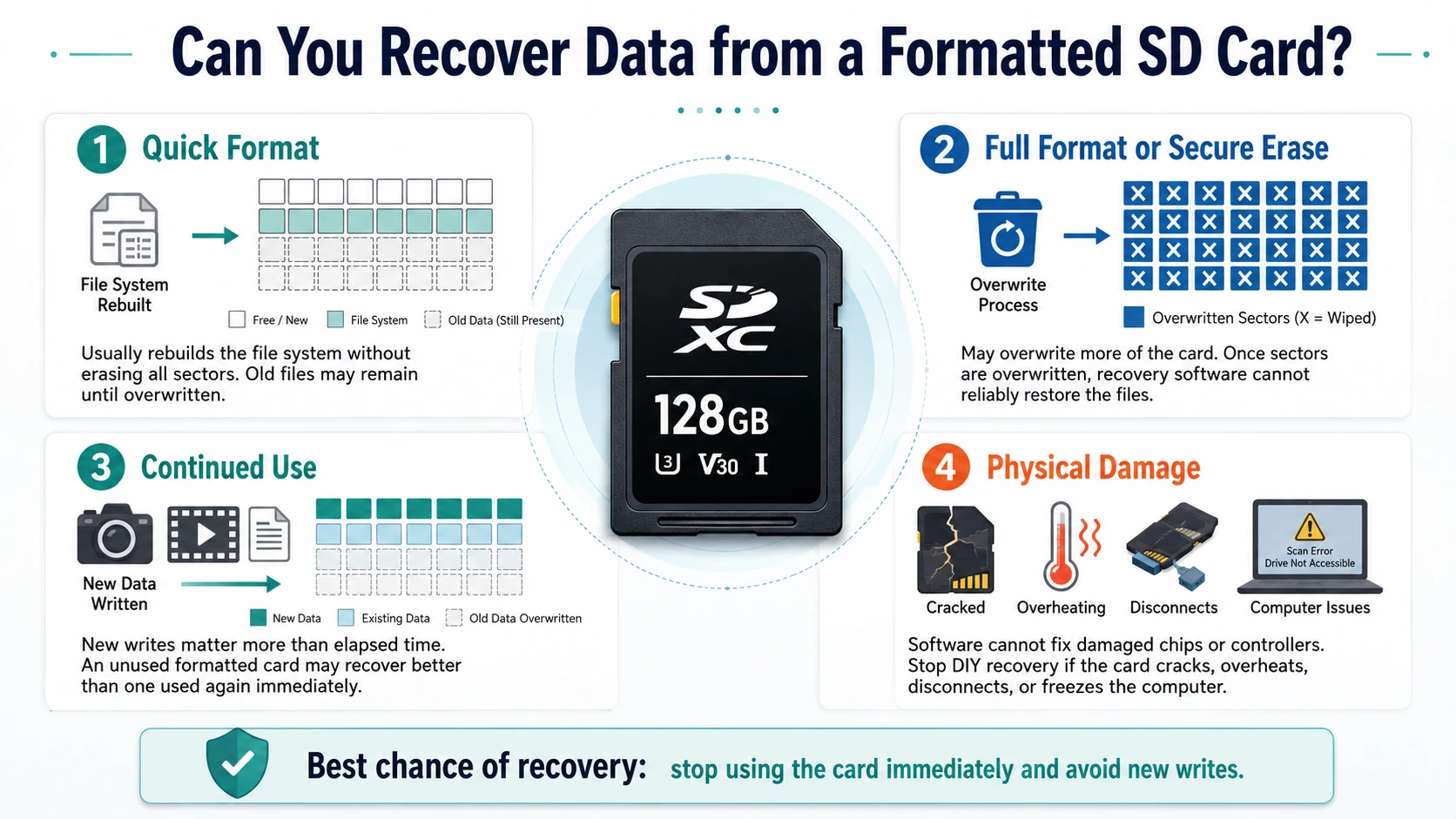
Una risposta attendibile a Come recuperare i dati da una scheda SD formattata dipende dal tipo di formato, dall'uso successivo, dalla crittografia e dalle condizioni fisiche.
Formato rapido
A formato rapido di solito ricostruisce il file system senza sovrascrivere ogni settore di memoria. Di conseguenza, i vecchi file potrebbero rimanere fino a quando non vengono sostituiti da nuovi dati.
Formattazione completa o cancellazione sicura
A formato completo potrebbe sovrascrivere una porzione più ampia della scheda. Allo stesso modo, gli strumenti di cancellazione sicura sostituiscono intenzionalmente i dati memorizzati. Una volta che un altro processo ha sovrascritto i settori originali, il software non è in grado di ricrearli in modo affidabile.
Uso prolungato e danni fisici
Quando si valuta Come recuperare i dati da una scheda SD formattata, il tempo trascorso conta meno rispetto alle nuove operazioni di scrittura. Ad esempio, una scheda inutilizzata formattata un mese fa potrebbe offrire risultati migliori rispetto a una scheda riempita con nuovi video subito dopo.
Inoltre, il software non è in grado di riparare chip di memoria o controller danneggiati. Pertanto, interrompi il recupero fai-da-te se la scheda si rompe, si surriscalda, scompare durante la scansione o blocca il computer.
Individuare cosa è stato formattato prima di scegliere una soluzione
Prima di scegliere Come recuperare i dati da una scheda SD formattata, identificare il tipo di archiviazione.
Scheda SD rimovibile
Le schede delle fotocamere e le schede microSD standard utilizzano solitamente il file system FAT32 o exFAT. Spesso Windows è in grado di leggerle tramite un lettore, anche quando Esplora file mostra un'unità vuota.
Dispositivi di archiviazione portatili Android
Una scheda Android portatile funziona come un normale supporto rimovibile. Pertanto, rimuovila dal telefono e esegui la scansione su Windows.
Memoria interna o espandibile di Android
Android è in grado di crittografare una scheda e associarla a un unico telefono. Di conseguenza, un computer può rilevare la scheda ma non è in grado di leggere i file in essa contenuti senza il dispositivo originale e le informazioni di crittografia.
Ripristino delle impostazioni di fabbrica di uno smartphone Android
Il ripristino delle impostazioni di fabbrica riguarda la memoria flash interna e non la scheda rimovibile. Pertanto, gli utenti che cercano ripristinare un telefono Android formattato Dovresti controllare prima i backup su cloud e su dispositivo.
Come recuperare i dati da una scheda SD formattata con Magic Data Recovery
Per i supporti rimovibili rilevabili da Windows, Magic Data Recovery offre una procedura diretta per Come recuperare i dati da una scheda SD formattata. Esegue la scansione della scheda, elenca i file recuperabili, offre filtri e anteprime e salva i dati recuperati in un'altra posizione.
Perché l'Magic Data Recovery si adatta a questo scenario
La formattazione spesso cancella la struttura originale delle cartelle. Magic Data Recovery risolve questo problema cercando i record dei file persi e i contenuti riconoscibili, invece di modificare la scheda.
I vantaggi principali includono:
- Supporto per schede SD, schede microSD, chiavette USB e dispositivi di archiviazione esterni
- Recupero di foto, video, documenti, file archiviati e file audio comuni
- Filtri per tipo di file, percorso, nome e dimensione
- Anteprima dei file prima del recupero
- Una procedura guidata per utenti non esperti di tecnologia
- Ripristino in una posizione separata
Rispetto a CHKDSK o a una nuova formattazione, questo metodo è più affidabile perché si concentra sull’individuazione dei file. Inoltre, le anteprime aiutano gli utenti a evitare di ripristinare risultati non necessari.
Fase 1: Collegare la scheda SD
Rimuovi la scheda e collegala a un lettore affidabile. Se Windows ti chiede di formattarla, annulla la richiesta. Quindi, verifica la sua capacità e la lettera dell'unità.
Fase 2: Installare Magic Data Recovery altrove
Scaricare Magic Data Recovery da Amagicsoft. Installalo sul disco interno del computer o su un altro disco funzionante. In caso contrario, i file di installazione potrebbero sovrascrivere i dati presenti sulla scheda.
Supporta Windows 7/8/10/11 e Windows Server
Fase 3: Selezionare e scansionare la carta
Apri il programma e identifica la scheda in base alla capacità, alla lettera di unità e al nome del dispositivo. Successivamente, avvia la scansione ed evita di utilizzare la scheda.
Attendi il completamento della scansione. Anche se i primi risultati potrebbero apparire rapidamente, una scansione completa può individuare altri file dopo che la formattazione ha eliminato le cartelle originali.

Fase 4: Filtro e anteprima dei file
Filtra i risultati per tipo, dimensione, data, percorso o nome. Ad esempio, i fotografi possono concentrarsi sui file JPG, PNG, CR2 o NEF, mentre chi lavora in ufficio può cercare file DOCX, XLSX, PDF e ZIP.
Quindi, se possibile, visualizza in anteprima i file importanti. Questo passaggio aiuta a escludere gli elementi danneggiati o irrilevanti.

Passo 5: Recuperare i file in un'altra unità
Salva i file selezionati sul computer, su un SSD esterno o su un altro dispositivo funzionante. Non ripristinarli mai sulla scheda originale.
Infine, apri alcune delle foto, dei documenti e dei video recuperati. Verifica che i video più lunghi vengano riprodotti oltre i primi secondi. Questa verifica completa Come recuperare i dati da una scheda SD formattata in modo sicuro.

Come recuperare i dati da una scheda SD formattata su uno smartphone Android
Gli utenti che cercano Come recuperare i dati da una scheda SD formattata su un telefono Android Bisognerebbe innanzitutto verificare se Android ha utilizzato la scheda come memoria portatile o interna.
Per i dispositivi di archiviazione portatili, smontare la scheda in modo sicuro, estrarla e collegarla a Windows. Quindi, eseguire una scansione con Magic Data Recovery e salvare i risultati altrove.
Questo metodo riduce il numero di nuove operazioni di scrittura, poiché Android potrebbe creare file di cache, miniature e cartelle delle app. Pertanto, la scansione tramite computer offre spesso una soluzione più sicura per Come recuperare i dati da una scheda SD formattata piuttosto che installare un'app mobile.
Quando si segue Come recuperare i dati da una scheda SD formattata Su Android, le app potrebbero rilevare immagini memorizzate nella cache o file multimediali in numero limitato. Tuttavia, le autorizzazioni di archiviazione limitano l'accesso approfondito, mentre l'installazione delle app potrebbe sovrascrivere i dati. Nel contempo, l'archiviazione adottabile utilizza una crittografia legata al dispositivo, pertanto i normali software Windows potrebbero non essere in grado di recuperare file utilizzabili.
Come recuperare i dati cancellati da un telefono Android
La frase Come recuperare i dati cancellati da un telefono Android spesso si riferisce al ripristino delle impostazioni di fabbrica. In tal caso, è consigliabile iniziare con i backup anziché con il software presente sulla scheda rimovibile.
Controlla Google Foto, Google Drive, Google Contatti, i servizi cloud dei produttori, i backup delle app di messaggistica e i backup effettuati in precedenza sul computer. Inoltre, verifica Samsung Smart Switch, OneDrive, Dropbox o servizi simili.
Magic Data Recovery funziona al meglio con dispositivi di archiviazione che Windows rileva come unità, comprese le schede SD rimovibili e le chiavette USB. Non va considerato un metodo garantito per aggirare la crittografia di Android. Questa precisazione aiuta gli utenti che cercano ripristinare un telefono Android formattato scegli una soluzione realistica.
Metodi che non consentono il recupero dei dati da una scheda SD formattata
Una guida affidabile a Come recuperare i dati da una scheda SD formattata deve spiegare quali metodi comunemente utilizzati non funzionano.
CHKDSK
CHKDSK verifica e corregge gli errori del file system. Tuttavia, non esegue la stessa scansione approfondita dei software di recupero dati e potrebbe modificare i metadati.
ATTRIBUTO
ATTRIBUTO rivela i file nascosti da attributi o da malware. Pertanto, non è in grado di ripristinare i dati cancellati dalla formattazione.
Formattazione (di nuovo)
Un secondo formato non annulla il primo. Al contrario, modifica il file system e potrebbe rimuovere metadati utili.
Comandi "Copia" e "Sposta"
Questi comandi gestiscono solo i file che il sistema operativo è in grado di identificare. Non sono in grado di eseguire la scansione dello spazio non allocato né di ricostruire i record formattati.
Fattori che influenzano i risultati del recupero
Per capire Come recuperare i dati da una scheda SD formattata, si prega di prendere visione delle seguenti condizioni:
- Tipo di formato
- Nuovi dati inseriti successivamente
- Foto o video frammentati
- Settori danneggiati o lettori instabili
- Crittografia Android
- Tipo di file e danneggiamento delle cartelle
- Destinazione di ripristino
Ad esempio, una scheda di una fotocamera non utilizzata dopo una formattazione rapida offre condizioni migliori rispetto a una scheda di una dashcam che ha registrato ore di filmati recenti. Tuttavia, nessuno strumento affidabile dovrebbe promettere risultati identici per ogni scheda.
Errori comuni e consigli per evitarli
Quando si segue Come recuperare i dati da una scheda SD formattata, evita di utilizzare la scheda, di installarvi software, di salvarvi file o di eseguire prima strumenti di riparazione. Inoltre, non effettuare il root su uno smartphone Android senza averne compreso i rischi.
Dopo aver completato Come recuperare i dati da una scheda SD formattata, crea una procedura di backup. Innanzitutto, conserva una copia operativa. Poi, salva un’altra copia su un disco esterno. Infine, utilizza un servizio di archiviazione cloud per i file insostituibili. Inoltre, verifica i backup prima di formattare e sostituisci le schede che presentano errori frequenti.
Conclusione: come recuperare i dati da una scheda SD formattata
Il processo più sicuro per Come recuperare i dati da una scheda SD formattata Inizia sospendendo completamente l'uso della scheda. Successivamente, verifica se il problema riguarda una memoria rimovibile, una memoria portatile Android, una memoria crittografata adottabile o la memoria interna del telefono.
Per una scheda rimovibile che Windows sia in grado di rilevare, Magic Data Recovery offre una soluzione pratica Soluzione di recupero della scheda SD. Esegue la scansione alla ricerca di file persi, offre filtri e anteprime e ripristina i dati selezionati in un'altra posizione. Inoltre, evita i rischi legati a una nuova formattazione o all'esecuzione prematura di comandi di riparazione.
Nessun software è in grado di recuperare dati completamente sovrascritti o cancellati in modo sicuro. Tuttavia, un intervento tempestivo, una scheda sorgente protetta e una scansione accurata conferiscono a Magic Data Recovery un ruolo fondamentale nel Come recuperare i dati da una scheda SD formattata.
Supporta Windows 7/8/10/11 e Windows Server
FAQ
È possibile recuperare i dati da una scheda SD dopo la formattazione?
Sì, il recupero potrebbe essere possibile dopo una formattazione rapida, a condizione che la scheda rimanga leggibile e che nessun nuovo dato abbia sovrascritto i file originali. Innanzitutto, smetti di usarla. Quindi, collegala a un computer ed esegui una scansione completa. Salva tutti i file recuperati su un’altra unità, anziché sulla scheda SD originale.
È possibile recuperare i dati da una scheda SD formattata senza un computer?
Un'app mobile può recuperare immagini memorizzate nella cache o file multimediali in quantità limitata, ma di solito ha un accesso allo spazio di archiviazione più limitato rispetto a un software per computer desktop. Pertanto, un computer Windows e un lettore affidabile rappresentano un approccio più sicuro per le schede rimovibili. Questo metodo riduce inoltre il rischio che il telefono sovrascriva i dati con file della cache o dell'app.
Come posso recuperare i dati da una scheda SD formattata su Android?
Per recuperare una scheda SD formattata su un telefono Android, verifica innanzitutto che Android abbia utilizzato la scheda come memoria rimovibile. Rimuovila, collegala a Windows ed esegui una scansione con Magic Data Recovery. Tuttavia, questo metodo potrebbe non funzionare se Android ha crittografato la scheda come memoria interna o adottabile.
È possibile recuperare i file dopo una formattazione completa?
Il recupero dipende dal fatto che la formattazione completa abbia sovrascritto o meno i settori di memoria originali. Se la sovrascrittura è avvenuta, il software non è in grado di ricostruire in modo affidabile i file mancanti. Tuttavia, smetti di utilizzare la scheda ed esegui un'analisi accurata prima di provare a utilizzare comandi di riparazione, creare partizioni o formattare nuovamente il dispositivo di archiviazione.
Magic Data Recovery è in grado di recuperare i dati da una scheda microSD formattata?
Magic Data Recovery è in grado di eseguire la scansione di una scheda microSD formattata quando Windows la rileva tramite un lettore compatibile. Può individuare foto, video, documenti e archivi comuni. Tuttavia, i risultati dipendono da eventuali sovrascritture successive, dalla crittografia, da danni fisici, dalla frammentazione dei file, dallo stato di salute della scheda e dal tipo di formattazione utilizzato.
Perché i miei video recuperati sono danneggiati?
I video di grandi dimensioni occupano spesso diverse aree di archiviazione non contigue. Se dei nuovi dati sovrascrivono una sezione, il video recuperato potrebbe bloccarsi, presentare salti o non aprirsi. Pertanto, è necessario completare la scansione, recuperare tutti i file video disponibili e verificare ciascun risultato con più di un lettore multimediale prima di scartarlo.
È possibile ripristinare un telefono Android dopo averlo riportato alle impostazioni di fabbrica?
Il ripristino delle impostazioni di fabbrica di solito impedisce l'accesso ai dati utente crittografati sui moderni telefoni Android, quindi il recupero diretto potrebbe risultare molto limitato. Per prima cosa, controlla i backup su Google, quelli del produttore, quelli delle app di messaggistica, quelli sul cloud e quelli sul computer. Magic Data Recovery è compatibile con le schede SD rimovibili e altri dispositivi di archiviazione che Windows è in grado di rilevare come unità.

Vasilii è uno specialista del recupero dati con circa 10 anni di esperienza pratica nel settore. Nel corso della sua carriera, ha risolto con successo migliaia di casi complessi riguardanti file cancellati, unità formattate, partizioni perse e file system RAW. La sua esperienza copre sia i metodi di recupero manuale utilizzando strumenti professionali come gli editor esadecimali, sia le soluzioni automatiche avanzate con i software di recupero. La missione di Vasilii è quella di rendere accessibile la conoscenza del recupero dati affidabile sia ai professionisti IT che agli utenti di tutti i giorni, aiutandoli a salvaguardare i loro preziosi beni digitali.