
Recuperare i file eliminati del cestino: Guida completa per Windows
I file eliminati per sbaglio dal Cestino?
Sia che i file siano ancora nel cestino, sia che lo abbiate già svuotato, esistono diversi modi per Recuperare i file eliminati del Cestino in Windows.
Nella maggior parte dei casi, i file eliminati non vengono cancellati immediatamente in modo permanente. Al contrario, Windows contrassegna lo spazio di archiviazione come disponibile, il che significa che il recupero è ancora possibile prima che i dati vengano sovrascritti.
Questa guida completa vi mostra come Recuperare i file eliminati del Cestino in scenari reali. Imparerete a ripristinare un'icona del Cestino mancante, a capire dove vanno a finire i file eliminati e a recuperare i dati anche dopo aver svuotato il Cestino. Quando gli strumenti integrati di Windows non sono di aiuto, questa guida introduce anche un metodo affidabile Soluzione di recupero del cestino—Magic Data Recovery-Sulla base dell'esperienza pratica di utilizzo.
Supporta Windows 7/8/10/11 e Windows Server
Vi chiedete se i vostri file possono essere recuperati? Scoprire in pochi secondi con il nostro controllo rapido qui sotto.
Valutazione del recupero dati
Rispondete a 3 rapide domande per valutare le vostre possibilità di recupero
Indice dei contenuti
Capire cosa significa realmente “file del cestino eliminati”.
Prima di tentare il recupero, è necessario capire cosa significa “cancellato” in Windows. Molti utenti pensano che Windows gestisca tutte le cancellazioni allo stesso modo, ma questo presupposto spesso porta a degli errori.
Le situazioni più comuni includono:
- L'icona del Cestino scompare dal desktop.
- Windows invia i file eliminati al Cestino
- Gli utenti svuotano il Cestino manualmente
- Gli utenti eliminano in modo permanente i file utilizzando Maiuscolo + Canc
Ogni scenario richiede una soluzione diversa. Se si identifica prima la situazione corretta, si riduce il rischio di perdita inutile di dati.
Cestino mancante dal desktop? Ripristinare prima il Cestino eliminato sul desktop
Se non si riesce a trovare l'icona del Cestino, è possibile che i file siano ancora presenti nel sistema. In molti casi, il problema riguarda solo la visualizzazione del desktop e non i dati stessi.
Perché il cestino scompare dal desktop?
I rapporti degli utenti e la documentazione di supporto di Windows indicano diverse cause comuni:
- Gli utenti nascondono accidentalmente le icone del desktop
- Modifica delle impostazioni di personalizzazione di Windows
- Gli strumenti di pulizia o di ottimizzazione di terze parti modificano le icone del sistema
In queste situazioni, Windows non elimina alcun file.
Come ripristinare il cestino sul desktop (passo dopo passo)
1. Aprire Impostazioni in Windows
2. Andare a Personalizzazione > Temi
3. Fare clic su Impostazioni dell'icona del desktop
4. Selezionare Cestino
5. Fare clic su Applicare, allora OK
Dopo aver completato questi passaggi, Windows visualizza immediatamente l'icona del Cestino.
Chiarimento importante:
Il ripristino dell'icona non consente di recuperare i file eliminati. Se il Cestino è già stato svuotato, è necessario un altro metodo di recupero dei file eliminati, che verrà illustrato nelle prossime sezioni.
È possibile recuperare i file eliminati dal cestino?
Sì, ma il risultato dipende dal modo in cui Windows ha rimosso i file.
Ecco una rapida sintesi:
- File ancora presenti nel cestino → Facile da ripristinare
- Cestino svuotato → Il ripristino può ancora funzionare
- File eliminati in modo permanente → Il recupero dipende dall'attività del disco
Quando si comprendono queste differenze, si evita di perdere tempo e di intraprendere azioni rischiose.
Come recuperare i file eliminati dal Cestino
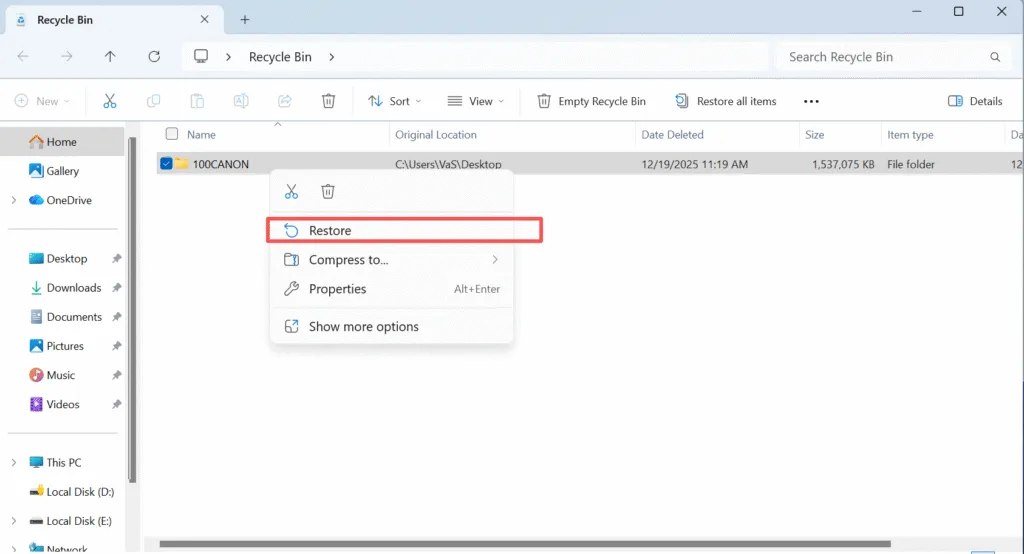
Se non è stato svuotato il Cestino:
1. Aprire il Cestino
2. Individuare il file eliminato
3. Fare clic con il tasto destro del mouse sul file e selezionare Ripristino
Windows riporta il file nella sua posizione originale.
Limitazione:
Questo metodo non funziona se avete già svuotato il Cestino.
Cosa succede quando il cestino viene svuotato?
Quando si svuota il Cestino, Windows rimuove i riferimenti ai file dal file system, ma non cancella immediatamente i dati effettivi. Al contrario, Windows contrassegna lo spazio occupato sul disco come disponibile per il riutilizzo.
Dal punto di vista del recupero dei dati:
- Windows non distrugge i file all'istante
- I nuovi dati possono sovrascrivere i contenuti originali in qualsiasi momento
Questo comportamento spiega perché un'azione rapida con uno strumento di recupero dedicato migliora significativamente il successo del recupero.
Come recuperare i file eliminati dal cestino con Magic Data Recovery
Quando Windows non consente più di accedere ai file eliminati, è necessario uno strumento di recupero professionale. In questa situazione, Magic Data Recovery è una soluzione pratica per scenari reali di perdita di dati, piuttosto che un semplice componente aggiuntivo di marketing.
Perché Magic Data Recovery funziona per il recupero del cestino
Basato sull'uso reale e sul comportamento tecnico, Magic Data Recovery risolve diversi problemi fondamentali:
- Recupera i file dopo che gli utenti hanno svuotato il Cestino.
- Esegue la scansione dello spazio di archiviazione sia a livello di file system che di settore.
- Consente agli utenti di visualizzare l'anteprima dei file prima del recupero
- Riduce al minimo il rischio di sovrascrivere i dati recuperabili.
Queste caratteristiche lo rendono un'opzione affidabile quando gli strumenti di Windows falliscono.
Come utilizzare Magic Data Recovery per recuperare i file del cestino eliminati
Passo 1: Scaricare e installare il software in modo sicuro
Scaricare Magic Data Recovery e installarlo su un'unità diversa da quella eliminata. In questo modo si riduce il rischio di sovrascrivere i dati eliminati durante l'installazione.
Supporta Windows 7/8/10/11 e Windows Server
Fase 2: selezionare l'unità originale da scansionare
Avviare il programma e scegliere il disco rigido o la partizione in cui erano originariamente memorizzati i file eliminati. Quindi avviare la scansione.

Fase 3: Attendere il completamento della scansione
Il software esegue automaticamente una scansione avanzata. Man mano che procede, le cartelle e i file eliminati appaiono nei risultati.

Passo 4: Anteprima dei file eliminati prima del recupero
L'anteprima dei file consente di confermare che sono intatti e rilevanti. Questa fase evita il ripristino di dati danneggiati o non necessari.

Passo 5: Recuperare i file in una posizione sicura
Selezionare i file richiesti e ripristinarli su un'unità esterna o su un altro disco interno. Evitare di ripristinare i dati sulla stessa unità.

Perché i file eliminati possono ancora essere recuperati
Quando i file vengono eliminati in Windows, il sistema non cancella immediatamente i dati effettivi. Al contrario, rimuove il puntatore nel file system e segna lo spazio come riutilizzabile.
I dati originali rimangono sul disco fino a quando non vengono sovrascritti da nuovi dati, motivo per cui gli strumenti di recupero possono ancora recuperare i file eliminati.
Errori comuni che riducono il successo del recupero
In base a casi reali di recupero, le seguenti azioni portano spesso al fallimento:
- Continuare a utilizzare pesantemente l'unità interessata
- Installazione del software di recupero sullo stesso disco
- Esecuzione ripetuta di più strumenti di recupero
- Reinstallazione di Windows prima del ripristino
Evitare questi errori migliora notevolmente i risultati.
Conclusione
Il recupero dei file persi è possibile in molte situazioni, ma il successo dipende dalla comprensione di ciò che è realmente accaduto ai dati. Il ripristino di un'icona mancante risolve i problemi visivi, mentre i file svuotati o eliminati in modo permanente richiedono un'analisi più approfondita. Metodi di recupero del cestino.
Per gli utenti che devono affrontare gravi perdite di dati, Magic Data Recovery offre una soluzione equilibrata: scansione avanzata, funzionalità di anteprima e recupero controllato senza inutili complessità. Se siete alla ricerca di un modo efficace e pratico di Recuperare i file eliminati del Cestino, è una soluzione che vale la pena di prendere in considerazione.
Supporta Windows 7/8/10/11 e Windows Server
Domande frequenti sul recupero dei file eliminati del cestino
È possibile recuperare i file eliminati dal Cestino dopo averlo svuotato?
Dove vanno a finire i file eliminati dal Cestino?
Come si ripristinano i file che sono ancora nel Cestino?
Perché non riesco a trovare i file eliminati nel Cestino?
Qual è il modo migliore per recuperare i file eliminati in modo permanente in Windows?
È possibile recuperare i file cancellati senza utilizzare un software?
Windows dispone di strumenti integrati per il recupero del Cestino?
Come si può aumentare la percentuale di successo del recupero dei file?

Vasilii è uno specialista del recupero dati con circa 10 anni di esperienza pratica nel settore. Nel corso della sua carriera, ha risolto con successo migliaia di casi complessi riguardanti file cancellati, unità formattate, partizioni perse e file system RAW. La sua esperienza copre sia i metodi di recupero manuale utilizzando strumenti professionali come gli editor esadecimali, sia le soluzioni automatiche avanzate con i software di recupero. La missione di Vasilii è quella di rendere accessibile la conoscenza del recupero dati affidabile sia ai professionisti IT che agli utenti di tutti i giorni, aiutandoli a salvaguardare i loro preziosi beni digitali.