
Hard Drive Deleted Files Recovery Guide
Accidentally deleting important files from a hard drive is one of the most common and stressful data‑loss scenarios. Many users assume that once files are deleted, or even permanently deleted, the data is gone forever. In reality, hard drive deleted files recovery is often possible if the right steps are taken early.
This guide explains what actually happens when files are deleted, which recovery methods are genuinely worth trying first, and when specialized deleted file recovery solution become necessary. By understanding these options, you can make informed decisions instead of risking further data loss. Later in the article, we will also explain why tools like Magic Data Recovery can be useful in specific situations.
Supports Windows 7/8/10/11 and Windows Server
Wondering if your files can be recovered? Find out in seconds with our quick check below.
Data Recovery Assessment
Answer 3 quick questions to estimate your recovery chances
Table of Contents
Can You Recover Hard Drive Deleted Files?
Yes, in many cases, hard drive deleted files recovery is possible. When you delete a file, the operating system usually removes its reference from the file table but does not erase the actual data.The data remains on the disk until new information overwrites it.
However, recovery success depends on several factors:
- How much the hard drive has been used since deletion
- Whether the drive was formatted
- The type of file system (NTFS, FAT32, exFAT)
- Whether the data blocks have been overwritten
Understanding these factors helps determine whether hard disk data recovery is realistic or already compromised.
What to Do Immediately After Files Are Deleted
Your actions immediately after data loss can significantly affect recovery success. Based on real‑world recovery scenarios, the following steps are considered best practice:
- Stop using the affected hard drive immediately
- Do not install new programs on the same drive
- Avoid copying or downloading files to that disk
- Disconnect the drive safely if possible
These steps prevent overwriting, which is the most common reason hard drive deleted files recovery fails.
Manual Methods to Recover Hard Disk Deleted Files
Before turning to specialized software, it is reasonable to try built‑in options. These methods work best for recent or non‑permanent deletions.
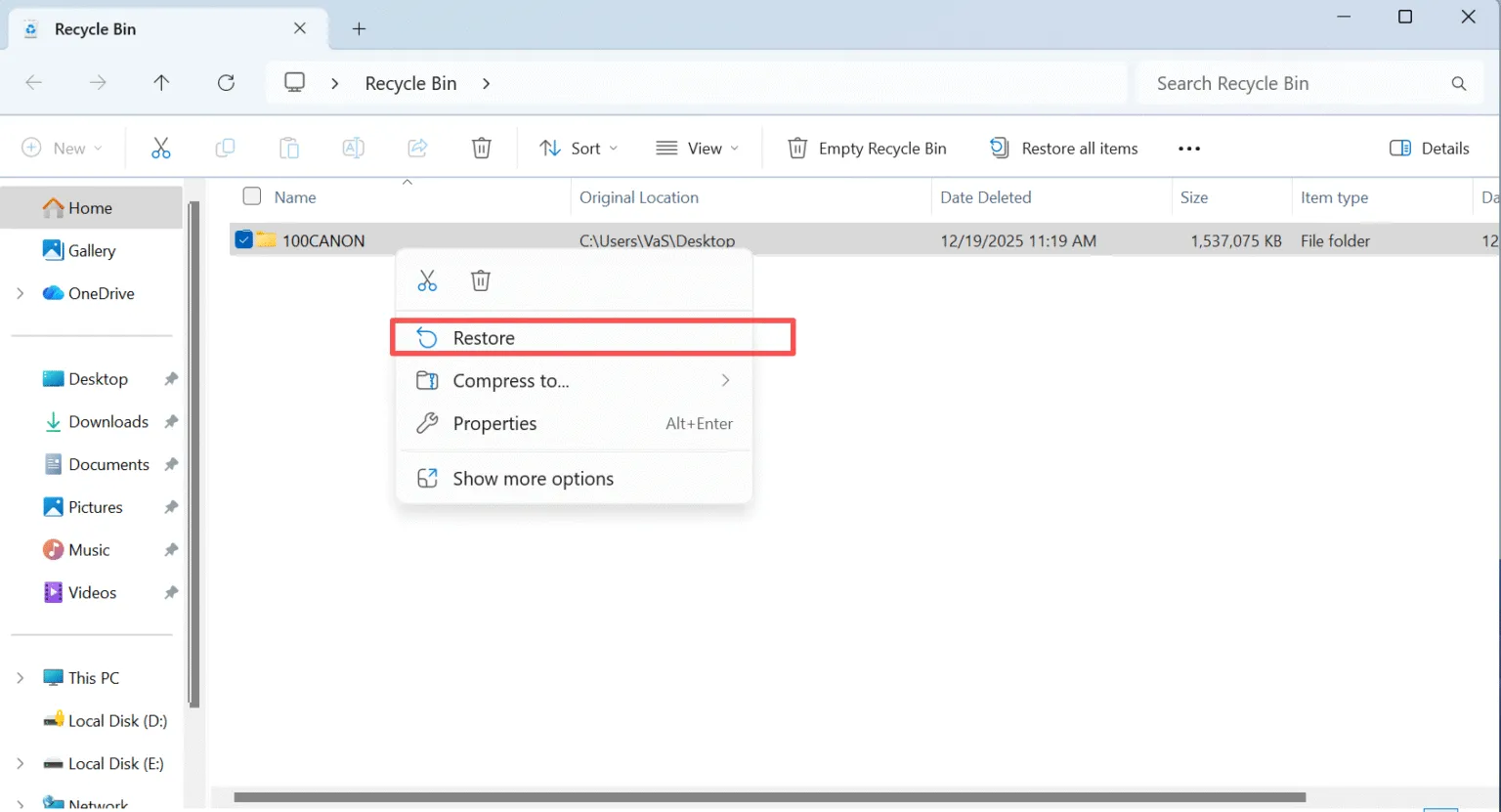
Check the Recycle Bin or Trash
If files were deleted normally, they may still be in the Recycle Bin or Trash. Restoring them from there is fast and risk‑free.
1. Open the Recycle Bin
2. Locate the deleted Excel file
3. Right-click and choose Restore
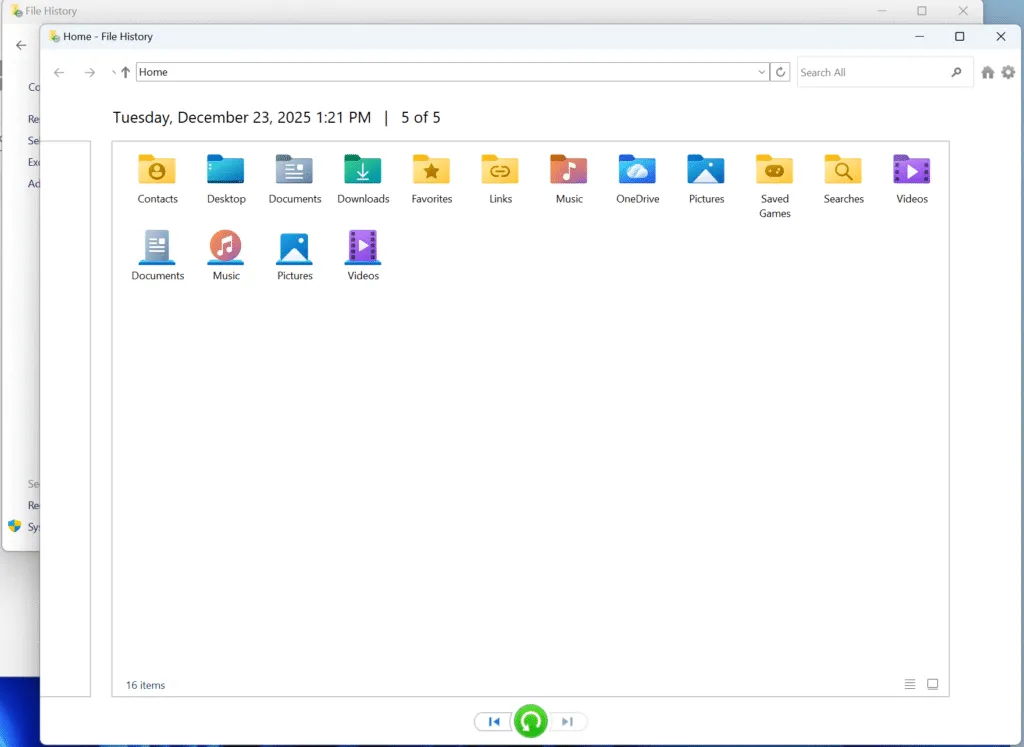
Recover Hard Disk Deleted Files from Backup or File History
Use System Restore or Previous Versions
On Windows systems, previous versions may exist if restore points (System–About–System Protection) were active. While limited, this method can help recover certain documents without additional tools.

When Manual Method Is Not Enough to Recover Hard Drive Deleted Files
In real‑world scenarios, manual solutions often fail. For instance, they rarely work after permanent deletion, disk formatting, or partition corruption. They also struggle with RAW or inaccessible drives.
In these situations, deeper disk‑level scanning becomes necessary. As a result, users often rely on professional‑grade recovery tools like Magic Data Recovery, which analyze raw disk sectors instead of file system records.
How Magic Data Recovery Helps Recover Hard Disk Deleted Files
When manual options are exhausted, Magic Data Recovery offers a structured and safer way to approach hard drive deleted files recovery.
Core Problems It Solves
- Recovers permanently deleted files from hard drives
- Scans formatted or corrupted partitions
- Supports NTFS, FAT32, exFAT, HFS, ext file systems
Why It Is More Reliable Than Basic Tools
Unlike system utilities, Magic Data Recovery performs read‑only scans. This approach minimizes the risk of overwriting recoverable data while locating lost files based on file signatures and disk structure.
Steps to Recover Hard Drive Deleted Files with Magic Data Recovery
1. Download and Install the Software Safely
Download Magic Data Recovery from the official website and install it on a drive different from the one where files were deleted. Installing recovery software on the affected hard drive may overwrite deleted data, which can permanently reduce recovery chances.
Supports Windows 7/8/10/11 and Windows Server
2. Select the Original Drive to Scan
Launch the program and select the hard drive or partition where the deleted files were originally stored. After selecting the correct location, start the scan.

3. Wait for the Scan to Complete
Magic Data Recovery automatically performs an advanced scan that searches for deleted files and lost folders at the disk level. As the scan progresses, recoverable items will gradually appear in the results. For better accuracy, it is recommended to allow the scan to finish completely.

4. Preview Deleted Files Before Recovery
Before restoring any data, use the preview feature to verify file integrity and relevance. Previewing helps confirm whether documents, photos, or videos are still usable, which avoids restoring corrupted or unnecessary files during hard disk data recovery operations.

5. Recover Files to a Safe Location
Select the files you need and recover them to another storage device or a different internal disk. Avoid saving recovered data back to the original drive, as doing so may overwrite other recoverable files and reduce overall recovery success.

Common Mistakes That Reduce Recovery Success
Based on industry experience, these mistakes frequently reduce recovery rates:
- Continuing to use the affected hard drive
- Reinstalling the operating system
- Running multiple recovery tools on the same disk
Avoiding these actions improves the chances of successful hard disk data recovery.
Conclusion
Recovering deleted files from a hard drive is often possible, but success depends on timing and correct actions. Starting with manual recovery methods helps minimize risk. When those options fail, dedicated tools become a practical solution for hard drive deleted files recovery.
Magic Data Recovery stands out by offering read‑only scanning, broad file system support, and a recovery process designed around real‑world data loss scenarios. For users facing complex deletion or formatting issues, it provides a balanced option between safety and effectiveness. If you are looking for a more efficient solution after manual recovery fails, you may consider trying Magic Data Recovery.
Supports Windows 7/8/10/11 and Windows Server
FAQs About Hard Drive Deleted Files Recovery
How to recover permanently deleted files from a hard disk?
Can you retrieve deleted data from a hard drive?
Can you recover permanently deleted drive files?
How to recover deleted files from harddrive?
Can I still recover permanently deleted files?
What is the completely free hard drive recovery software?
How do professionals recover data from a hard drive?
Can a hard drive be permanently erased?

Vasilii is a data recovery specialist with around 10 years of hands-on experience in the field. Throughout his career, he has successfully solved thousands of complex cases involving deleted files, formatted drives, lost partitions, and RAW file systems. His expertise covers both manual recovery methods using professional tools like hex editors and advanced automated solutions with recovery software. Vasilii's mission is to make reliable data recovery knowledge accessible to both IT professionals and everyday users, helping them safeguard their valuable digital assets.