
Was ist TRIM?
Inhaltsübersicht
So funktioniert TRIM
Wenn eine Datei gelöscht wird Auf einem System ohne diese Funktion entfernt das Betriebssystem in der Regel nur den Verweis auf das Dateisystem. Der zugrunde liegende Flash-Speicher enthält immer noch die ursprünglichen Daten, und das SSD erkennt diesen Speicherplatz nicht als wiederverwendbar an. Mit der Zeit erhöht dieses Verhalten die Schreibverstärkung, verringert die Leistung und beschleunigt die Abnutzung des Flash-Speichers.
Wenn die Unterstützung aktiviert ist, benachrichtigt das Betriebssystem das SSD aktiv, wenn Dateien gelöscht werden, Volumes formatiert, oder Speicherplatz frei wird. In diesen Meldungen werden die logischen Blockadressen angegeben, die keine gültigen Daten mehr enthalten. Der SSD-Controller kann dann diese Blöcke während der Leerlaufzeiten löschen, so dass sie für zukünftige Schreibvorgänge bereit sind. Offizielle Hinweise von Microsoft und großen SSD-Anbietern bestätigen, dass dieser Ansatz die anhaltende Schreibgeschwindigkeit verbessert und gleichzeitig unnötige Löschzyklen reduziert.
Warum TRIM für die langfristige Leistung wichtig ist
Diese Funktion spielt eine wesentliche Rolle bei der Aufrechterhaltung der SSD-Effizienz im Laufe der Zeit:
Stabile Schreibleistung: Vorgelöschte Blöcke ermöglichen das sofortige Schreiben von Daten.
Geringere Schreibverstärkung: Es finden weniger interne Kopier- und Löschvorgänge statt.
Verbesserte Haltbarkeit: Geringere Belastung der NAND-Flash-Zellen verlängert die Nutzungsdauer.
Konsistente Benutzererfahrung: Der Leistungsabfall im Laufe der Zeit wird minimiert.
Die meisten modernen Betriebssysteme aktivieren diese Funktion automatisch, wenn sie eine kompatible SSD erkennen.
TRIM im Vergleich zur Garbage Collection
Obwohl diese Mechanismen oft zusammen erwähnt werden, dienen sie unterschiedlichen Zwecken:
TRIM-Befehle: Anweisungen, die vom Betriebssystem gesendet werden, um unbenutzte Blöcke anzuzeigen.
Müllabfuhr: Ein interner SSD-Prozess, der Daten konsolidiert und Blöcke löscht.
Genaue Blockinformationen ermöglichen einen effizienteren Betrieb der Garbage Collection. Ohne sie muss der Controller ableiten, welche Blöcke sicher zu löschen sind, was mehr Ressourcen und Zeit verbraucht.
System- und Gerätekompatibilität
Die Unterstützung hängt von mehreren Faktoren ab:
- Speicher-Hardware: Die meisten SATA- und NVMe-SSDs unterstützen diesen Befehlssatz.
- Betriebssysteme: Windows 7 und höher, moderne Linux-Distributionen und macOS bieten native Unterstützung.
- Dateisysteme: NTFS, ext4, APFS und andere moderne Formate sind kompatibel.
- Verbindungsmethoden: SATA- und NVMe-Verbindungen verarbeiten Befehle zuverlässig, während einige USB-Adapter und ältere RAID-Controller sie blockieren können.
Überprüfen des TRIM-Status in Windows
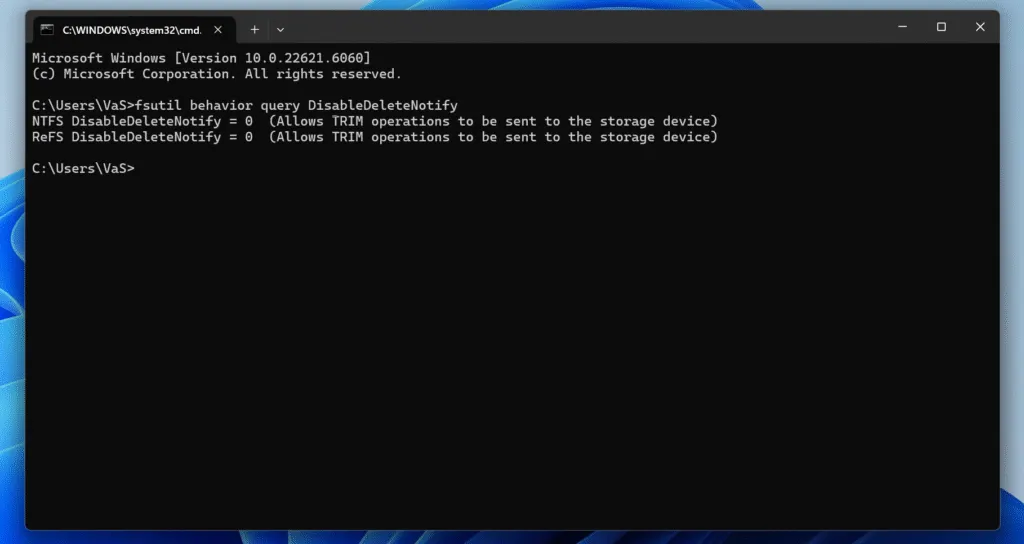
Wenn Sie Windows verwenden, ist die Überprüfung des TRIM-Status ganz einfach:
1. Öffnen Sie Eingabeaufforderung als Administrator.
2. Geben Sie den folgenden Befehl ein:
fsutil-Verhaltensabfrage DisableDeleteNotify
3. Interpretieren Sie das Ergebnis:
DisableDeleteNotify = 0→ Die Funktion ist aktiv.DisableDeleteNotify = 1→ Die Funktion ist ausgeschaltet.
Auswirkungen auf die Datenwiederherstellung
Vom Standpunkt der Wiederherstellung aus gesehen, bringt dieses Verhalten wichtige Einschränkungen mit sich. Sobald Blöcke als unbenutzt markiert und intern gelöscht werden, werden die ursprünglichen Daten physisch entfernt. Daraus folgt:
- Gelöschte Dateien können innerhalb kurzer Zeit nicht mehr wiederhergestellt werden.
- Herkömmliche Scans von nicht zugewiesenem Speicherplatz schlagen oft fehl, nachdem eine interne Bereinigung stattgefunden hat.
- Eine schnelle Reaktion nach einer versehentlichen Löschung ist entscheidend.
Dieses Ergebnis spiegelt eine Designentscheidung wider, die sich auf Leistung und Sicherheit konzentriert und nicht auf einen Defekt. Professionelle Werkzeuge wie Magic Data Recovery führen Nur-Lese-Scans durch und können wiederherstellbare Daten identifizieren, bevor die interne Bereinigung abgeschlossen ist. Sofortiges Handeln erhöht die Erfolgswahrscheinlichkeit.
TRIM in RAID- und virtuellen Umgebungen
Das Verhalten variiert bei erweiterten Speicherkonfigurationen:
RAID 0/1: Viele moderne Software-RAID-Lösungen geben Befehle korrekt weiter.
Hardware-RAID: Ältere Steuergeräte blockieren sie häufig.
Virtuelle Maschinen: Die Pass-Through-Unterstützung hängt vom Hypervisor und der Konfiguration ab.
Administratoren sollten die Unterstützung überprüfen, wenn konsistente Leistung und Langlebigkeit der SSD Priorität haben.
Überlegungen zu Sicherheit und Datenschutz
Durch die Verringerung der Wahrscheinlichkeit, dass gelöschte Daten zugänglich bleiben, erhöht diese Technologie die Datensicherheit. Dieselbe Eigenschaft schränkt auch die Wiederherstellung nach einer versehentlichen Löschung ein, was regelmäßige Backups sowohl für Privatpersonen als auch für Unternehmen unerlässlich macht.
Bewährte Praktiken
- Zuverlässige Backups vor dem Formatierung oder groß angelegte Löschungen.
- Vermeiden Sie es, diese Funktion zu deaktivieren, es sei denn, es besteht eine spezielle forensische oder Legacy-Anforderung.
- Verwenden Sie nach einem versehentlichen Datenverlust sofort eine professionelle Wiederherstellungssoftware.
- Bestätigen Sie die Kompatibilität bei der Verwendung von externen Gehäusen oder RAID-Systemen.
Schlussfolgerung
Unterstützt Windows 7/8/10/11 und Windows Server
FAQs
Was ist TRIM auf einer SSD?
Ist es sinnvoll, eine SSD zu TRIMen?
Soll ich TRIM aktivieren oder nicht?
Wie oft sollten Sie eine SSD TRIMen?
Was passiert, wenn man eine SSD nicht TRIMt?
Wofür wird TRIM verwendet?
Wie hoch ist die durchschnittliche Lebensdauer einer SSD?
Werden mit SSD TRIM Daten gelöscht?

Vasilii ist ein Datenrettungsspezialist mit rund 10 Jahren praktischer Erfahrung in diesem Bereich. Im Laufe seiner Karriere hat er Tausende von komplexen Fällen mit gelöschten Dateien, formatierten Laufwerken, verlorenen Partitionen und RAW-Dateisystemen erfolgreich gelöst. Sein Fachwissen umfasst sowohl manuelle Wiederherstellungsmethoden mit professionellen Tools wie Hex-Editoren als auch fortschrittliche automatische Lösungen mit Wiederherstellungssoftware. Vasilii hat es sich zur Aufgabe gemacht, zuverlässiges Wissen zur Datenwiederherstellung sowohl IT-Fachleuten als auch normalen Nutzern zugänglich zu machen und ihnen dabei zu helfen, ihre wertvollen digitalen Ressourcen zu schützen.