
What Is exFAT File System
The exFAT file system is a practical choice when you need to store large files on removable storage and use the same drive across different operating systems. It avoids FAT32’s 4 GB-per-file limit while keeping a simpler structure than NTFS. As a result, exFAT is common on USB flash drives, SDXC cards, external hard drives, and portable SSDs.
However, exFAT is not ideal for every storage task. It lacks some NTFS features, including journaling and advanced permissions. This guide explains what is exFAT, how it works, exFAT compatibility, exFAT vs FAT32, exFAT vs NTFS, and what to do if files disappear.
Table of Contents
Purpose and Design Philosophy of exFAT File System
exFAT was introduced to address a specific problem: traditional FAT file systems were simple and widely compatible, but increasingly unsuitable for modern storage demands. FAT32 cannot store files larger than 4 GB, which makes it impractical for high-resolution video, disk images, or system backups.
Unlike NTFS, which includes journaling, access control lists, and complex metadata structures, exFAT is intentionally lightweight. It removes legacy constraints while avoiding the overhead that can reduce performance on removable or flash-based storage.
Microsoft officially documents exFAT as a file system optimized for flash memory devices, where minimizing write amplification and metadata complexity is critical for both speed and device longevity.
exFAT File System at a Glance
Feature | exFAT |
Full name | extensible File Allocation Table |
Developed by | Microsoft |
Best for | Removable storage and large cross-platform files |
FAT32 4 GB file limit | No |
Journaling | No |
Windows support | Yes |
macOS support | Yes |
Modern Linux support | Yes |
Common devices | USB drives, SDXC cards, external HDDs, portable SSDs |
Best system-drive choice | Usually no |
In short, the exFAT file system works best when portability and large-file support matter more than advanced file-system features.
Key Technical Characteristics of exFAT File System
- Maximum file size: Up to 16 EB (theoretical limit)
- Maximum volume size: Up to 128 PB (implementation-dependent)
- No journaling: Improves performance but reduces crash resilience
- Cluster size: Supports large, configurable cluster sizes for efficient large-file storage
- Bitmap allocation: Improves space tracking and reduces FAT scanning overhead
These features allow exFAT to handle modern workloads—such as 4K/8K video files and large archives—without the compatibility issues of NTFS or the file size restrictions of FAT32.
exFAT vs FAT32 vs NTFS: Which Is Best?
Choosing between exFAT vs FAT32 and exFAT vs NTFS depends on file size, device support, and operating-system requirements.
Feature | FAT32 | exFAT | NTFS |
Files over 4 GB | No | Yes | Yes |
Windows read/write | Yes | Yes | Yes |
macOS read/write | Yes | Yes | Native write support is more limited |
Modern Linux support | Yes | Yes | Yes |
Journaling | No | No | Yes |
NTFS-style permissions | No | No | Yes |
Older-device compatibility | Very strong | Varies | More limited |
Cross-platform large files | Poor | Strong | Less convenient for Mac write access |
Windows system drive | No | No | Best choice |
Microsoft’s Windows documentation also distinguishes exFAT from NTFS in areas such as journaling, links, security, and other file-system functions.
Apple likewise notes that ExFAT is a Windows-compatible format, while macOS may read NTFS drives without providing the same native write capability.
exFAT vs FAT32
Choose FAT32 when maximum compatibility with older hardware matters and every file stays below 4 GB.
Choose exFAT when you need large-file support and the target devices support it.
For example, FAT32 may still make sense for an older car stereo or television. However, a modern portable drive containing large videos will usually work better with exFAT.
exFAT vs NTFS
Choose NTFS for Windows system disks, internal Windows-focused drives, permissions, and journaling.
Choose exFAT for removable storage that needs easy read/write access across Windows and macOS.
In simple terms, NTFS offers more advanced features, while exFAT focuses more on portability.
When Should You Use the exFAT File System?
The exFAT file system is a good choice when:
- You need to transfer files larger than 4 GB.
- You move a portable SSD between Windows and macOS.
- You use an SDXC card in a device that officially supports exFAT.
- You store large videos, archives, project files, or backups.
- You do not need NTFS permissions or journaling.
For example, a videographer may use a portable SSD to move high-resolution footage between a Windows workstation and a MacBook.
FAT32 may fail because of the 4 GB limit. Meanwhile, NTFS can make native Mac write access less convenient. In that situation, exFAT provides a practical solution.
Another common example involves a large USB flash drive used for ISO files or video archives. If individual files exceed 4 GB, choosing FAT32 would create an unnecessary limitation.
Data Loss Risks in exFAT File System
Although exFAT is efficient, it lacks journaling, which means it does not maintain a transactional record of file system changes. As a result, it is more vulnerable to corruption caused by:
- Unsafe device removal
- Power loss during write operations
- File system conversion or formatting errors
- Logical corruption of allocation tables
The good news is that exFAT’s relatively simple metadata structure often makes data recovery feasible, provided the storage device has not been overwritten.
How exFAT File System Stores and Loses Files
exFAT uses a combination of allocation tables and bitmaps to track used and free clusters. When a file is deleted, its directory entry is marked as unused, but the underlying data clusters remain intact until overwritten.
This behavior means deleted files are not immediately destroyed. From a forensic and recovery perspective, this allows read-only scanning tools like Magic Data Recovery to recover data if cluster chains are still intact.
How to Format a Drive as exFAT
Formatting changes the file system and can erase access to existing data, so back up important files first.
How to Format exFAT in Windows
- Connect the target USB drive, SD card, or external disk.
- Open File Explorer.
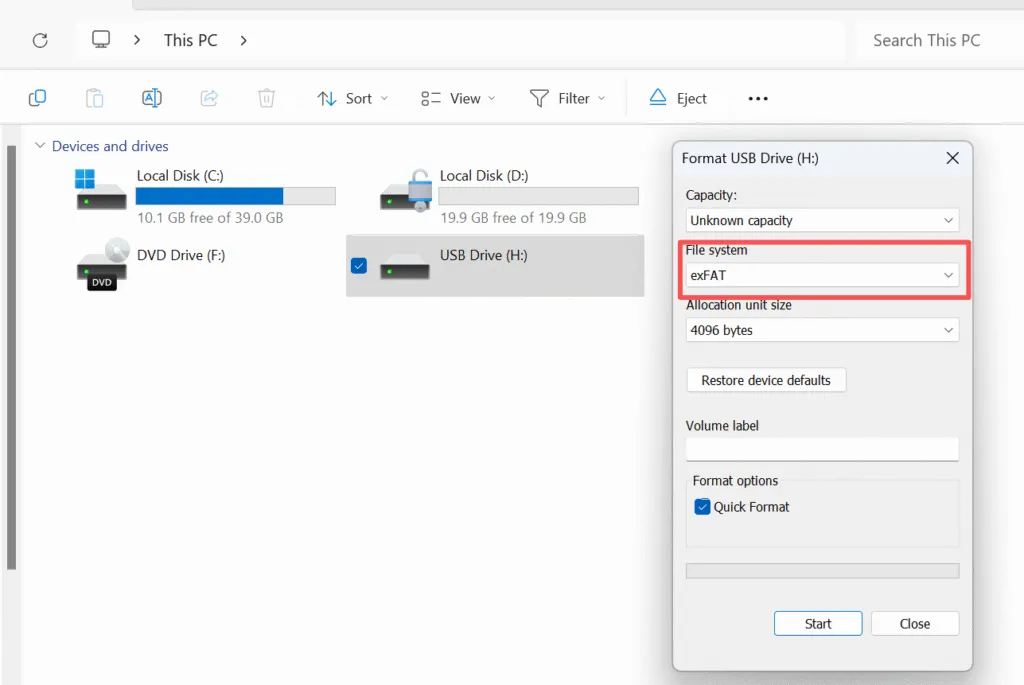
- Right-click the correct drive and select Format.
- Choose exFAT under File system.
- Keep the default allocation unit size unless you have a specific requirement.
- Click Start and confirm.
Windows supports exFAT through its standard formatting tools. Microsoft also recommends default allocation settings for general-purpose formatting unless a particular workload requires another value.
Always double-check the drive letter before clicking Start. Formatting the wrong drive can lead to serious data loss.
How to Format exFAT on macOS
- Open Disk Utility.
- Select the correct drive or volume.
- Click Erase.
- Choose exFAT.
- Select the appropriate partition scheme.
- Confirm the erase process.
Apple officially provides ExFAT as an option in Disk Utility for storage that needs Windows compatibility.
What Causes exFAT Data Loss?
An exFAT drive can lose access to files because of:
- Accidental deletion
- Quick formatting
- Unsafe drive removal
- Power loss during a write operation
- Damaged file-system metadata
- Lost or inaccessible partitions
- Malware or software errors
- Physical storage failure
A common mistake is continuing to copy files to the drive after data disappears.
New writes may overwrite storage areas that still contain recoverable file data. Therefore, stop using the affected device as soon as possible when important files go missing.
How to Recover Data from an exFAT Drive
If data is lost from an exFAT-formatted device, do not panic. In many cases, recovery is possible if you act quickly.
Step-by-step approach:
1. Stop using the device immediately
Continued use increases the risk of overwriting recoverable data.
2. Connect the device in read-only mode if possible
Avoid file system repairs or formatting prompts from the operating system.
3. Scan with a professional recovery tool
Tools like Magic Data Recovery are designed to analyze exFAT allocation tables and reconstruct deleted files safely without modifying the original media.
4. Preview recoverable files
File preview helps verify data integrity before restoration.
5. Recover to a different storage location
Never restore files back to the same exFAT device.
This logical, controlled process maximizes recovery success while minimizing further risk.
Professional Perspective
From a data recovery standpoint, exFAT is easier to analyze than NTFS but more vulnerable to abrupt interruptions due to its lack of journaling. This trade-off is intentional and acceptable for portable storage, provided users maintain backups and follow safe removal practices.
When failures do occur, professional-grade recovery software that operates in read-only mode is essential. Magic Data Recovery is positioned as a reliable, non-destructive solution for scanning exFAT volumes and restoring lost data safely.
Conclusion
The exFAT file system is one of the best choices for modern removable storage when you need large-file support and convenient Windows/macOS compatibility.
It works especially well for USB drives, SDXC cards, external HDDs, and portable SSDs.
Use NTFS for Windows system drives, FAT32 for older-device compatibility, and exFAT when portability and large files are the priority.
If an exFAT drive has already lost files because of deletion, formatting, or file-system errors, stop writing new data to it.
Magic Data Recovery is worth considering because it supports exFAT, provides read-only scanning and file preview, and follows a straightforward scan-preview-recover workflow.
If you are looking for a more efficient solution for logical exFAT data loss, you can try Magic Data Recovery and scan the affected drive first to see what files remain recoverable.
Supports Windows 7/8/10/11 and Windows Server
FAQ: exFAT File System
Is exFAT a good file system?
Is exFAT better than NTFS?
What is the exFAT file system used for?
Is exFAT the same as FAT32?
What is the disadvantage of exFAT?
Is exFAT ok for Windows?
Is exFAT good for SSD?
Is it safe to change exFAT to NTFS?

Vasilii is a data recovery specialist with around 10 years of hands-on experience in the field. Throughout his career, he has successfully solved thousands of complex cases involving deleted files, formatted drives, lost partitions, and RAW file systems. His expertise covers both manual recovery methods using professional tools like hex editors and advanced automated solutions with recovery software. Vasilii's mission is to make reliable data recovery knowledge accessible to both IT professionals and everyday users, helping them safeguard their valuable digital assets.