
Come trovare il codice prodotto di Adobe Photoshop
Devi trovare il tuo Codice prodotto di Adobe Photoshop prima di reinstallare Photoshop o di trasferirlo su un altro computer? Innanzitutto, verifica quale versione di Photoshop possiedi. Le edizioni precedenti con licenza perpetua, come Photoshop CS6, utilizzano un numero di serie di 24 cifre, mentre le attuali versioni Creative Cloud vengono generalmente attivate effettuando l'accesso al proprio account Adobe e potrebbero non memorizzare un codice prodotto tradizionale sul PC.
Se possiedi una licenza di Photoshop di vecchia generazione acquistata legalmente, questa guida spiega come recuperare il numero di serie dal tuo account Adobe, dal Registro di sistema di Windows o tramite Magic Recovery Key. Puoi anche consultare il nostro Guida al recupero della chiave di licenza per ulteriori metodi per recuperare le informazioni di attivazione memorizzate da un sistema Windows installato.
Supporta Windows 7/8/10/11 e Windows Server
Risposta rapida: Photoshop CS6 e altre edizioni precedenti con licenza perpetua potrebbero utilizzare un numero di serie di 24 cifre. Le attuali versioni di Photoshop Creative Cloud vengono normalmente attivate tramite un account Adobe e di solito non dispongono di un codice prodotto tradizionale da recuperare.
Indice dei contenuti
Che cos'è il codice prodotto di Adobe Photoshop?
Il codice prodotto di Adobe Photoshop, noto anche come numero di serie di Photoshop, è un codice di attivazione univoco utilizzato per verificare una licenza legittima di Adobe Photoshop. Conferma che il software è stato acquistato legalmente e consente agli utenti di installare, attivare e utilizzare Photoshop senza restrizioni.
Per le versioni precedenti di Adobe Photoshop, come Photoshop CS, CS2, CS3, CS4, CS5 e CS6, è necessario un codice prodotto durante l'installazione. Questo numero di serie è solitamente un codice alfanumerico di 24 cifre e può essere memorizzato sul computer dopo l'attivazione, il che rende possibile trovare o recuperare il codice prodotto di Photoshop in un secondo momento utilizzando strumenti di recupero specializzati.
Al contrario, la maggior parte delle versioni moderne di Photoshop sono distribuite tramite Adobe Creative Cloud e non utilizzano un codice prodotto tradizionale. Invece di inserire un numero di serie, gli utenti attivano Photoshop accedendo con il proprio ID Adobe. In questo caso, la licenza di Photoshop è collegata all'account dell'utente piuttosto che a una chiave di prodotto locale, quindi potrebbe non esserci alcun numero di serie da trovare sul sistema.
A causa di questa differenza, molti utenti cercano come trovare un codice prodotto di Photoshop ma non riescono a trovarlo. Prima di tentare qualsiasi metodo di recupero, è essenziale identificare se la versione di Photoshop in uso utilizza un numero di serie o un'attivazione basata sull'account.
Capire le diverse versioni di Photoshop e i tipi di chiave di prodotto
Adobe Photoshop è stato rilasciato con diversi modelli di licenza nel corso degli anni e ogni versione gestisce l'attivazione in modo diverso. Prima di cercare di trovare o recuperare un codice prodotto, è fondamentale conoscere la versione di Photoshop in uso.
Le versioni di Photoshop CS e CS6 utilizzano una licenza perpetua e richiedono un numero di serie per l'attivazione. Questi codici prodotto sono solitamente memorizzati localmente sul sistema dopo l'installazione, il che significa che spesso possono essere recuperati utilizzando un software di recupero dei codici prodotto o controllando i registri di sistema.
Le versioni di Photoshop Creative Cloud, invece, sono basate su abbonamento e vengono attivate tramite un ID Adobe. Queste versioni non si basano su un codice prodotto tradizionale. Se l'utente accede con l'account Adobe corretto e ha un abbonamento attivo, Photoshop viene attivato automaticamente.
Se non si è sicuri della versione in uso, controllare il numero di versione di Photoshop o i dettagli del proprio account Adobe può aiutare a determinare se il metodo di recupero del codice prodotto è adatto alla propria situazione.
Metodo 1. Trovare il codice prodotto di Adobe Photoshop tramite Magic Recovery Key
Il modo più semplice ed efficiente per ottenere il codice prodotto di Adobe Photoshop è quello di utilizzare Magic Recovery Key. Questo strumento consente di recuperare la chiave in pochi e semplici passaggi. Non solo è in grado di ottenere le chiavi Adobe, ma supporta anche l'estrazione di chiavi da vari software attivati sul computer, tra cui Windows e Office.
Scaricate Magic Recovery Key dal pulsante sottostante:
Supporta Windows 7/8/10/11 e Windows Server
Dopo aver installato ed eseguito l'Magic Recovery Key, fare clic sul pulsante Chiavi di registro sotto la scheda Locale.

Nel pannello di destra, visualizzate le chiavi di registro delle applicazioni. Magic Recovery Key visualizzerà tutte le chiavi del software installato. Selezionare e copiare i numeri di serie desiderati. È anche possibile fare clic su Copia o Risparmiare per comodità.
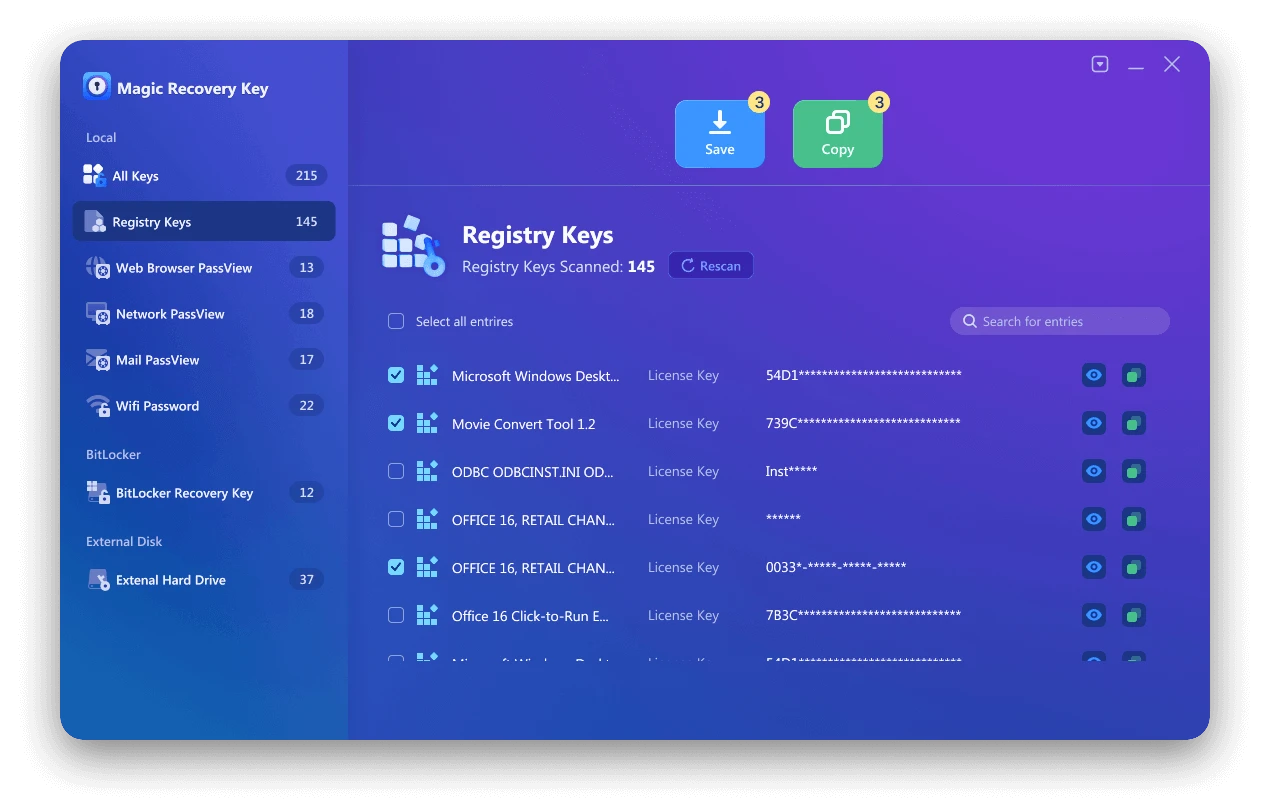
È inoltre possibile salvare l'account e la password della pagina Web, la password Wifi e la password dell'account di rete, chiave bitlocker recoevery con Magic Recovery Key o trovare la chiave di licenza del sistema Windows, trovare la chiave di licenza di Microsoft Office.
Metodo 2. Trovare il codice prodotto di Photoshop nel Registro di sistema
È anche possibile cercare il codice prodotto di Photoshop nel Registro di sistema. Tuttavia, è importante prestare attenzione quando si lavora con il Registro di sistema, poiché le modifiche errate possono causare errori di sistema. Questo metodo non è consigliato ai principianti.

Passi per Adobe Photoshop 9.0 (applicabile ad altre versioni):
1. Premere Windows + R per aprire la finestra di dialogo Esegui.
2. Digitare “regedit” e fare clic su OK.
3. Confermare “Sì” se richiesto.
4. Quando si apre l'Editor del Registro di sistema, passare a HKEY_LOCAL_MACHINE > SOFTWARE > Adobe Photoshop > Adobe Photoshop Acrobat > 9.0 > Registration o HKEY_LOCAL_MACHINE > SOFTWARE > Wow6432Node > Adobe Photoshop > Adobe Photoshop Acrobat > 9.0 > Registration.
5. Nel pannello di destra, cercate un file denominato “SERIAL”.
Metodo 3. Trovare il numero di serie di Adobe Photoshop da Adobe.com
1. Accedere al sito sito ufficiale di Adobe.
2. Andate alla sezione Prodotti. Alla voce Prodotti registrati, troverete il numero di serie delle applicazioni Adobe Photoshop.
3. Copiate il numero di serie e utilizzatelo per attivare Adobe Photoshop.
È legale recuperare un codice prodotto di Photoshop?
Il recupero di un codice prodotto di Photoshop è legale solo se il software è stato legittimamente acquistato e attivato sul computer. Gli strumenti di recupero dei codici prodotto si limitano a recuperare le informazioni di licenza esistenti memorizzate sul sistema locale; non generano, non craccano e non bypassano i meccanismi di attivazione di Adobe.
L'uso di chiavi di prodotto non autorizzate o pirata viola i termini di servizio di Adobe e può comportare la disattivazione del software o la sospensione dell'account. Per questo motivo, si raccomanda vivamente di utilizzare gli strumenti di recupero solo per i software di proprietà legale.
Se non si riesce a verificare la licenza o a recuperare il codice prodotto, l'opzione più sicura e affidabile è contattare l'assistenza Adobe con la prova d'acquisto.
Suggerimenti per evitare di perdere la licenza di Photoshop in futuro
Per evitare problemi di licenza in futuro, si consiglia di eseguire il backup del codice prodotto o delle informazioni sulla licenza di Photoshop subito dopo l'installazione. Per le versioni precedenti di Photoshop, è possibile esportare il codice prodotto recuperato in un file sicuro o memorizzarlo in un gestore di password affidabile.
Gli utenti di Creative Cloud devono assicurarsi che l'indirizzo e-mail del proprio account Adobe rimanga attivo e accessibile, poiché tutti i dettagli di abbonamento e attivazione sono legati all'account. Conservare le e-mail di conferma dell'acquisto e le fatture può anche aiutare a recuperare le informazioni sulle licenze, se necessario.
Il backup regolare dei dati delle licenze può far risparmiare tempo e prevenire problemi di attivazione quando si reinstalla Photoshop o si passa a un nuovo computer.
Conclusione
Con i tre metodi descritti sopra, dovreste essere in grado di trovare il codice prodotto di Adobe Photoshop senza problemi. Sia che preferiate il comodo strumento di terze parti o i canali ufficiali e la ricerca interna al sistema, c'è un'opzione per voi. Durante l'operazione, se utilizzate uno strumento di terze parti, assicuratevi di scaricarlo da una fonte legittima. Se operate nel Registro di sistema, siate estremamente cauti. Vi auguriamo di riuscire ad attivare Adobe Photoshop e di iniziare il vostro viaggio creativo nel design! Se avete altre domande su trovare le chiavi del software, Non esitate a continuare a seguirci per ulteriori soluzioni. È possibile scaricare Magic Recovery Key di seguito.
Supporta Windows 7/8/10/11 e Windows Server
Domande frequenti
Come posso trovare il codice prodotto di Adobe Photoshop?
Cosa succede se il mio numero di serie di Adobe Photoshop è scomparso?
È possibile utilizzare un software per recuperare il codice prodotto di Photoshop?
Adobe Photoshop utilizza ancora un codice prodotto?
Perché non riesco a trovare il codice prodotto di Photoshop sul mio computer?
È possibile recuperare un codice prodotto di Photoshop dopo aver reinstallato Windows?
È sicuro utilizzare uno strumento di recupero del codice prodotto per Photoshop?
Cosa devo fare se la mia licenza di Photoshop non è più valida?

Erin Smith è riconosciuta come una delle scrittrici più professionali di Amagicsoft. Negli ultimi 10 anni ha continuamente affinato le sue capacità di scrittura e ha aiutato milioni di lettori a risolvere i loro problemi tecnologici.