콘텐츠로 건너뛰기
아매직소프트 로고 아이콘
  • 홈
  • 제품
    • Magic Data Recovery
    • Magic Recovery Key
  • 스토어
  • 블로그
  • 자세히 보기
    • 아마직소프트 소개
    • 문의하기
    • 개인정보 보호정책
    • 약관
    • 라이선스 계약
    • 환불 정책
  • 한국어
    • English
    • 日本語
    • Deutsch
    • Français
    • Español
    • Italiano
    • 繁體中文
Wiki

파일 및 파일 시스템 이해

2026년 1월 1일 Vasilii 아직 댓글이 없습니다
파일 및 파일 시스템 이해

When a drive suddenly becomes 액세스 불가, corrupted, or unreadable, the root cause is often related to the file and file system rather than the data blocks. Don’t panic—the good news is that most situations are 논리적 문제, not physical, and can be understood and resolved with the right approach.

In practice, this article explains how files are organized on disk, how storage structures work together, the major storage formats in use, and practical methods to fix logical disk errors without risking further data loss.

목차

What Is a File?

A 파일 is a structured collection of data stored on a storage device. From the operating system’s perspective, a file is not just raw data—it includes 메타데이터 such as:

  • File name
  • Size
  • Creation and modification timestamps
  • Access permissions
  • Physical location on the disk

As a result, modern operating systems do not directly manage raw disk sectors. Instead, they rely on the file system to map files to physical storage locations efficiently and safely.

What Is a File System?

A logical storage framework controls how files are stored, organized, retrieved, and managed on a storage device. It defines:

  • How data blocks are allocated
  • How directories are structured
  • How file metadata is recorded
  • How free and used space is tracked

Common file systems such as NTFS, FAT32, exFAT, 및 EXT4 follow strict structural rules defined by operating system standards. For example, Microsoft’s NTFS relies on the 마스터 파일 테이블(MFT) to track every file and directory on the volume.

Without a functioning storage structure, data may still exist on the disk, but the operating system cannot interpret it.

File System vs. Filing System

Although often confused, these terms serve different purposes:

  • File system: A technical, operating-system-level structure that manages digital data on storage media. In computing, this technical term is the correct and precise term.
  • Filing system: A broader organizational method, which may include physical or digital classification systems used by humans or businesses.

Common Types of File Systems

Different operating systems and storage scenarios require different storage formats.

1. FAT32

  • Widely compatible
  • Limited file size (4 GB maximum)
  • Minimal fault tolerance


2. exFAT

  • Designed for flash storage
  • Supports large files
  • Common on SD cards and USB drives


3. NTFS

  • Default for modern Windows systems
  • Supports permissions, journaling, and encryption
  • Highly resilient against corruption


4. EXT4

  • Standard for Linux systems
  • Efficient and stable
  • Strong journaling support

Each file system balances performance, compatibility, and data integrity differently.

How Disk Structures Organize Data

Modern storage formats rely on internal structures to organize data. The most common include:

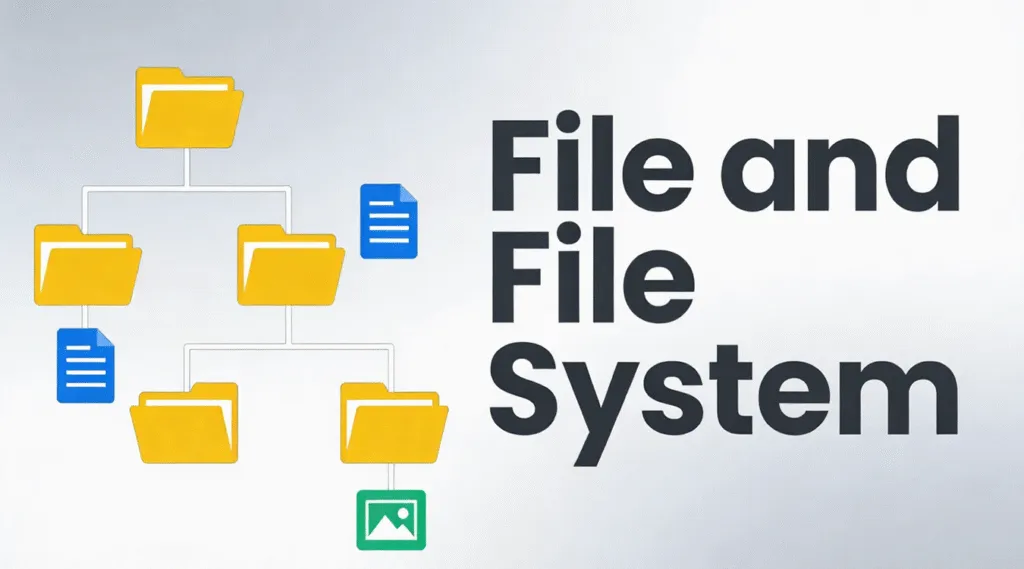
1. Hierarchical structure – Files arranged in directories and subdirectories

2. Flat structure – Minimal organization, used in simple systems

3. Indexed structure – Uses indexes to locate files quickly

4. Linked structure – Data blocks linked sequentially

5. Journaling structure – Tracks changes before committing them, reducing corruption risk

Modern file systems like NTFS and EXT4 primarily use hierarchical and journaling structures for reliability.

How to Check Disk Structure Integrity

If a drive behaves abnormally, checking the disk structure is the first safe step.

1. 열기 이 PC

2. Right-click the drive

3. 3. 속성 → 도구 → 확인

Alternatively, use Command Prompt:

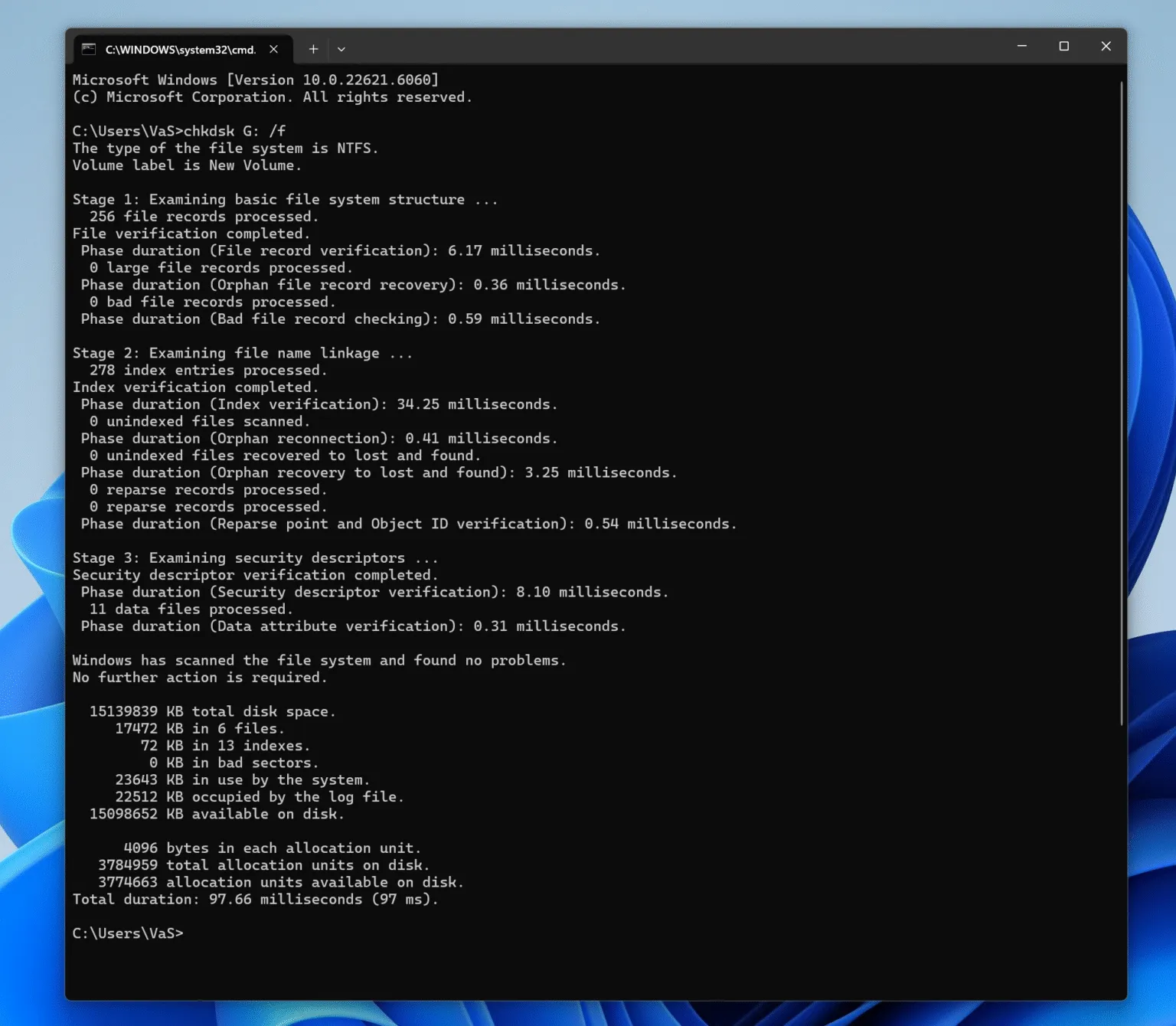
chkdsk X: /f

(Replace X with the drive letter.)

This scans the logical structure for errors without modifying file content unless necessary.

fix file and file system with chkdsk

How to Fix Logical Disk Errors Safely

Logical disk errors typically occur due to improper ejection, power loss, or interrupted write operations. Follow a structured approach:

Step 1: Stop Using the Affected Drive

Continued use may overwrite recoverable data.


Step 2: Identify the File System State

If the drive appears as RAW, the file structure metadata is damaged, but data often remains intact.


Step 3: Attempt Logical Repair

Use built-in tools like CHKDSK for minor issues.


Step 4: Recover Data Before Repair (Recommended)

다음과 같은 전문 도구 Magic Data Recovery scan storage in read-only mode, locate disk structure records, and extract files safely—even when the underlying storage structure is corrupted or unrecognized.

This approach minimizes risk and preserves data integrity before any repair or reformatting.

Why Storage Structure Knowledge Matters for Recovery

Understanding how file systems work explains why data is often not permanently lost after 삭제, 서식 지정, 또는 부패. In many cases:

  • File entries are removed
  • Data blocks remain untouched
  • Recovery is possible until overwritten

This is why professional recovery software focuses on interpreting disk structure records rather than guessing raw data.

결론

Logical disk issues are common, manageable, and often reversible. With a clear understanding of file organization on disk and a careful recovery-first approach, you can restore access to your data safely and efficiently. Download Magic Data Recovery to scan and recover files from damaged or corrupted file systems in a secure, read-only environment.

Magic Data Recovery 다운로드

Windows 7/8/10/11 및 Windows Server 지원

자주 묻는 질문

1.What is a file and file system?

A file is a unit of stored data, while a file system is the structure that organizes, manages, and locates those files on a storage device.

2.What is a file and filing system?

A file system is a technical storage structure, while a filing system refers to a broader organizational method, often used in administrative or physical contexts.

3.What are the four types of file systems?

Common examples include FAT32, exFAT, NTFS, and EXT4.

4.Is it a file system or filesystem?

Both are correct, but “file system” is more widely used in technical documentation.

5.How do I check my file system?

Use built-in disk checking tools such as CHKDSK on Windows or equivalent utilities on other systems.

6.What are the 5 file structures?

Hierarchical, flat, indexed, linked, and journaling file structures.

7.How to solve file system error?

Stop using the drive, diagnose the file system state, recover data first with a professional tool like Magic Data Recovery, then perform repairs if needed.
  • WiKi
Vasilii

바실리는 이 분야에서 약 10년간 실무 경험을 쌓은 데이터 복구 전문가입니다. 그는 경력 전반에 걸쳐 삭제된 파일, 포맷된 드라이브, 손실된 파티션 및 RAW 파일 시스템과 관련된 수천 건의 복잡한 사례를 성공적으로 해결했습니다. 그의 전문 지식은 헥스 에디터와 같은 전문 도구를 사용한 수동 복구 방법과 복구 소프트웨어를 사용한 고급 자동화 솔루션을 모두 다룹니다. 바실리의 사명은 IT 전문가와 일반 사용자 모두에게 신뢰할 수 있는 데이터 복구 지식을 제공하여 소중한 디지털 자산을 보호할 수 있도록 돕는 것입니다.

글 탐색

이전 게시물

검색

카테고리

  • 비트 로커 복구
  • 삭제된 파일 복구
  • 디스크 문제 수정
  • 문서 복구
  • 포맷 파일 복구
  • 하드 드라이브 복구
  • 라이선스 키 복구
  • 손실된 파일 복구
  • 메모리 카드 복구
  • 뉴스
  • 비밀번호 복구
  • 사진 복구
  • SSD 복구
  • USB 드라이브 복구
  • 사용자 가이드
  • 비디오 복구
  • Wiki
  • Windows 문제 수정

최근 게시물

  • 파일 및 파일 시스템 이해
    파일 및 파일 시스템 이해
  • 포맷된 하드 드라이브에서 데이터 복구
    포맷된 하드 드라이브에서 데이터를 복구하는 7가지 방법
  • 플래시 드라이브에서 삭제된 파일 복구
    플래시 드라이브에서 삭제된 파일을 복구하는 가장 좋은 방법(2026 가이드)

태그

CHKDSK 및 디스크 도구 디스크 복구 오류 문제 해결 방법 Magic Data Recovery Magic Recovery Key WiKi

관련 게시물

SanDisk 드라이브가 인식되지 않는 원인 및 입증된 수정 사항
디스크 문제 수정, Wiki

SanDisk 드라이브가 인식되지 않나요? 원인 및 수정

2025년 12월 31일 Vasilii SanDisk Drive Not Recognized? Causes and Fixes에 댓글 닫힘

SanDisk 드라이브가 컴퓨터에서 인식되지 않으면, 특히 중요한 파일이 장치에 있을 때는 실망스럽고 걱정스러운 일이 될 수 있습니다. SanDisk USB 플래시 드라이브, SD 카드, 외장 하드 드라이브 중 어떤 것을 사용하든 감지 문제는 명확한 경고 없이 갑자기 나타나는 경우가 많습니다. 다행히도 대부분의 SanDisk 인식 문제는 [...]에서 비롯됩니다.

Seagate 외장 하드 드라이브가 인식되지 않는 문제 해결
디스크 문제 수정

Seagate 외장 하드 드라이브가 인식되지 않는 문제 해결

2025년 12월 31일 Vasilii Fix Seagate External Hard Drive Not Recognized Issue에 댓글 닫힘

Seagate 외장 하드 드라이브가 인식되지 않으면 일반적으로 운영 체제에서 장치를 제대로 감지하거나 액세스할 수 없다는 의미입니다. 드라이브가 물리적으로 연결되어 있어도 파일 탐색기, 디스크 관리 또는 장치 관리자에 나타나지 않을 수 있습니다. 이런 상황은 당연히 스트레스가 될 수 있습니다. 하지만 당황하지 마세요. 대부분의 경우 데이터는 [...]에 있습니다.

NTFS 마스터 파일 테이블(MFT) 이해하기
Wiki

NTFS 마스터 파일 테이블(MFT) 이해하기

2025년 12월 30일 Vasilii Understanding the NTFS Master File Table (MFT)에 댓글 닫힘

NTFS MFT(마스터 파일 테이블)는 Windows 운영 체제의 기본 파일 시스템인 NTFS(신기술 파일 시스템)의 핵심 구성 요소입니다. NTFS의 중추 역할을 하며 디스크의 파일 및 디렉터리에 대한 필수 정보를 저장합니다. MFT에는 파일 이름, 크기, 생성 날짜, 위치 등의 메타데이터가 포함되어 있습니다.

아매직소프트 로고 아이콘

당사의 비전은 사용자에게 최고 수준의 제품과 서비스를 제공하는 세계적으로 유명한 소프트웨어 브랜드 및 서비스 제공업체가 되는 것입니다.

제품
  • Magic Data Recovery
  • Magic Recovery Key
정책
  • 약관
  • 개인정보 보호정책
  • 환불 정책
  • 라이선스 계약
회사
  • 아마직소프트 소개
  • 문의하기
  • 스토어
팔로우하기

저작권 © 2025 아마직소프트. 모든 권리 보유.

  • 약관
  • 개인정보 보호정책