
Hard Drive Failure Rates in 2025–2026: Statistics, Trends
Hard drive failure rates remain one of the most critical reliability metrics for both personal users and enterprise environments. Despite advances in storage technology, traditional hard disk drives (HDDs) still experience mechanical wear, electronic degradation, and unexpected failures over time.
Understanding the failure rate of hard drives helps users estimate risk, plan backups, and take preventive action before permanent data loss occurs. In this article, we analyze hard disk drive failure rates using real-world 2025 data, explain what those numbers actually mean, and provide a data-driven outlook for 2026 based on laboratory observations.
Table of Contents
What Are Hard Drive Failure Rates?
Understanding Annualized Failure Rate (AFR)
The most commonly used metric for evaluating hard drive reliability is the Annualized Failure Rate (AFR). AFR represents the percentage of drives that are expected to fail within one year of continuous operation.
A simplified AFR formula is:
AFR = (Number of Failed Drives ÷ Total Drive Days) × 365 × 100
For example, an AFR of 1.5% means that approximately 15 out of every 1,000 drives are expected to fail within a year under similar conditions.
Why AFR Matters
- It allows direct comparison between different drive models
- It reflects real operational risk rather than theoretical lifespan
- It is widely used in data centers and reliability studies
For users searching for hard drive failure rates, AFR is the most practical indicator of real-world reliability.
Hard Drive Failure Rates in 2025: Real-World Data Overview
Enterprise-Scale Statistics (Industry Benchmarks)
Large-scale datasets published in 2025 show that modern HDD failure rates remain relatively stable but are not negligible.
Key industry observations from 2025:
Metric | Value |
Average lifetime AFR | ~1.3%–1.5% |
Quarterly AFR fluctuation | 1.4%–1.6% |
High-risk outlier models | 4%–6% AFR |
Primary failure window | Years 2–4 |
These figures confirm that even new or mid-life drives carry measurable risk.
Capacity and Age Trends
Failure rates are not evenly distributed across all drives.
Observed trends include:
- Higher-capacity drives (20TB+) show slightly higher early AFR
- Drives under heavy workload fail sooner than idle consumer drives
- Aging drives experience a sharp AFR increase after year three
Suggested Chart:
Bar Chart – AFR by Drive Age (Year 1 to Year 5)
- Year 1: ~0.9%
- Year 2: ~1.2%
- Year 3: ~1.6%
- Year 4: ~2.3%
- Year 5: ~3.1%
This aging curve explains why failure rate of hard drives rises rapidly over time.
Consumer Hard Drive Failure Patterns
While enterprise data reflects controlled environments, consumer drives often face additional stress factors.
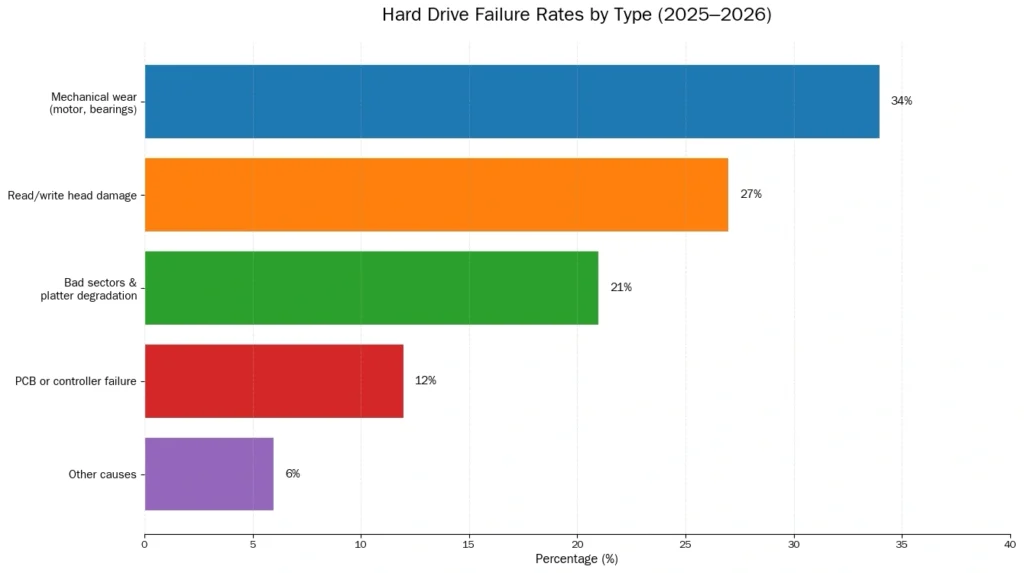
Common Failure Categories (2025 Observations)
Based on 2025 Amagicsoft laboratory analysis of returned HDDs:
Why Hard Drives Fail: Key Contributing Factors
Mechanical Wear
HDDs rely on spinning platters and moving heads. Continuous operation gradually degrades these components, increasing failure probability.
Environmental Stress
- Excessive heat
- Vibration or physical shock
- Inconsistent power supply
Silent Degradation
Some drives fail without warning. Others show early indicators through SMART errors, slow access times, or repeated recalibration noises.
These factors directly influence hard disk drive failure rates across all usage scenarios.
Predicting Hard Drive Failure Rates for 2026
Methodology
The following projection is based on aggregated 2025 data from Amagicsoft laboratory testing, covering January–December 2025. Data includes:
- Consumer HDD diagnostics
- Enterprise drive scans
- Failure classification and timeline tracking
2026 Failure Rate Forecast
Metric | Projected Value |
Average AFR | 1.4%–1.6% |
Consumer HDD AFR | ~1.5% |
Aging drives (3+ years) | 2.5%+ |
High-capacity models | Slight upward trend |
Key insight:
Hard drive failure rates are expected to remain stable overall, but individual risk increases sharply with drive age and workload.
Warning Signs of an Impending Hard Drive Failure
Recognizing early symptoms can significantly reduce data loss risk.
Common Signs Include:
- Clicking, grinding, or repeated seeking noises
- Noticeably slower file access or boot times
- Files becoming corrupted or unreadable
- System freezes during disk operations
- SMART warnings or read errors
Once these symptoms appear, the probability of failure increases rapidly.
What to Do Before a Hard Drive Fails Completely
When a drive shows signs of failure, time becomes the most critical factor.
Early Data Rescue Recommendation
If your hard drive is:
- Making unusual noises
- Becoming extremely slow
- Still detectable by Disk Management or BIOS
You should attempt data rescue immediately.
Magic Data Recovery is designed for these scenarios:
- It can scan unstable drives before total failure
- It works even when the disk is still recognized but unreliable
- Early recovery significantly improves success rates
Delaying action often turns recoverable data into permanent loss. If you have the disk issue, please download Magic Data Recovery to scan files.
Supports Windows 7/8/10/11 and Windows Server
Conclusion
Hard drive failure rates in 2025 confirm a consistent reality: HDDs remain vulnerable to mechanical failure despite technological improvements. With average AFRs around 1.4%–1.5%, failure is not rare—especially as drives age.
By understanding hard drive failure rates, recognizing early warning signs, and acting quickly when problems appear, users can dramatically reduce the risk of irreversible data loss.
FAQs
How often does a hard drive fail?
What is the life expectancy of a hard drive?
Which is more likely to fail, SSD or HDD?
Are hard drives still worth it in 2025?
What is the lifespan of SSD vs HDD?
Is it worth fixing a hard drive?
Can HDD last 100 years?
What are the signs of HDD failure?

Jason has over 15 years of hands-on experience in the computer data security industry. He specializes in data recovery, backup and restoration, and file repair technologies, and has helped millions of users worldwide resolve complex data loss and security issues.