
Recuperare i file eliminati dal cestino dopo il suo svuotamento: guida 2026
Hai svuotato il Cestino e poi ti sei reso conto che quei file ti servono ancora? Niente panico. In molti casi, puoi ancora recuperare i file cancellati dal Cestino dopo averlo svuotato, a condizione che i dati originali non siano stati sovrascritti da nuovi file.
Quando si svuota il Cestino, Windows di solito rimuove i riferimenti ai file invece di cancellare immediatamente i dati effettivi dal disco. Ciò significa che i file eliminati potrebbero continuare a esistere sul disco per un periodo di tempo limitato. L’importante è agire rapidamente, evitare di salvare nuovi file sullo stesso disco e scegliere il giusto metodo di recupero dei file cancellati a seconda che tu disponga o meno di un backup.
Questa guida illustra cinque modi pratici per recuperare i file dopo aver svuotato il Cestino su Windows 11 e Windows 10. Che tu voglia ripristinare i file da Cronologia file, utilizzare le versioni precedenti, provare il ripristino file di Windows, controllare i backup su cloud o eseguire una scansione dell'unità con Magic Data Recovery, qui di seguito puoi trovare una soluzione adeguata.
Supporta Windows 7/8/10/11 e Windows Server
⚠️ AVVISO CRITICO: Nel momento in cui ci si accorge che mancano dei dati, interrompere immediatamente l'utilizzo del computer. Non scaricate video di grandi dimensioni, non installate nuovi giochi e non salvate nuovi documenti Word. Ogni nuovo file scritto sul disco rigido rischia di sovrascrivere i dati invisibili che si sta cercando di salvare.
Indice dei contenuti
È possibile recuperare i file cancellati dal Cestino dopo averlo svuotato?
Sì, è possibile recuperare i file dopo aver svuotato il Cestino, ma il successo dipende da diversi fattori.
Quando un file è eliminati dal Cestino, Windows contrassegna lo spazio su disco come disponibile per nuovi dati. Il contenuto del file potrebbe rimanere sull'unità fino a quando tale spazio non verrà riutilizzato. Se nuovi dati sovrascrivono la stessa area, il file potrebbe risultare parzialmente danneggiato o irrimediabilmente irrecuperabile.
Le probabilità di guarigione sono solitamente maggiori quando:
- La cancellazione è avvenuta di recente.
- Non hai salvato molti file nuovi sullo stesso disco.
- I file sono stati cancellati da un HDD.
- I file erano salvati su un disco esterno, una chiavetta USB o una scheda di memoria.
- Si avvia immediatamente la scansione del disco.
Le tue possibilità di guarigione potrebbero essere inferiori nei seguenti casi:
- I file cancellati erano memorizzati su un SSD con TRIM abilitato.
- Hai installato nuovi programmi dopo aver svuotato il Cestino.
- Hai scaricato file di grandi dimensioni sullo stesso disco.
- L'unità è stata formattata o è stata sottoposta a un uso intensivo dopo la cancellazione.
La regola più importante è semplice: smettete immediatamente di utilizzare l'unità interessata.
Metodo 1. Recuperare i file cancellati dal Cestino svuotato con Magic Data Recovery
Per 90% degli utenti, il Cestino è l'ultima linea di difesa. Una volta svuotato, è probabile che non si abbia più un backup a portata di mano. È qui che si rende necessario un software specializzato.
Raccomandiamo Magic Data Recovery come soluzione principale. A differenza degli strumenti di base per la cancellazione, Magic Data Recovery è stato progettato con un algoritmo di scansione profonda appositamente studiato per gestire scenari di cancellazione “permanente”. Ricostruisce i file in base alle loro firme binarie, rendendo così possibile recuperare i file cancellati dal cestino dopo averlo svuotato con un alto tasso di successo.
Perché Magic Data Recovery è la soluzione migliore:
- Non è necessario alcun backup: Funziona direttamente sull'unità, recuperando i dati di cui non è mai stato eseguito il backup.
- Tecnologia di anteprima visiva: È possibile visualizzare foto, leggere documenti e riprodurre file audio. prima di recupero. In questo modo non si perde tempo a recuperare i file danneggiati.
- Supporto per tutti gli scenari: Sia che abbiate svuotato il cestino, formattato l'unità o subito un attacco di virus, gestisce tutto.
Guida al recupero passo dopo passo
Seguite questi passi precisi per massimizzare le vostre possibilità:
Passo 1: Download e installazione: Scaricate Magic Data Recovery dal sito ufficiale di Amagicsoft.
Supporta Windows 7/8/10/11 e Windows Server
Un consiglio da professionista: Installare il software su un'unità USB esterna o su una partizione diversa (come D:) per evitare di sovrascrivere i dati che si desidera salvare sull'unità C:.
Fase 2: selezionare la sorgente di destinazione: Avviare l'applicazione. Verrà visualizzata un'interfaccia pulita e facile da usare che mostra tutte le unità collegate. Poiché il Cestino è una cartella di sistema, è necessario selezionare la cartella Unità di sistema (di solito C:) oppure cercare un collegamento specifico “Cestino”, se disponibile nella dashboard.

Fase 3: avviare la scansione: Fare clic sul pulsante “Cerca i dati persi”. Il software eseguirà due passaggi:
- Scansione rapida: Trova file eliminati di recente con i nomi dei file intatti.
- Scansione profonda: Esamina l'unità settore per settore per recuperare i file cancellati dal cestino dopo averlo svuotato che hanno perso le intestazioni dei file. Questa operazione richiede più tempo, ma consente di trovare un numero significativamente maggiore di dati.



Metodo 2: Utilizzare la Cronologia file di Windows per ripristinare i dati (è necessario un backup)
Se siete tra gli utenti prudenti che hanno abilitato le funzioni di backup di Windows prima dell'incidente, potreste essere in grado di recuperare i file cancellati dal cestino dopo averlo svuotato gratuitamente utilizzando File History.
Nota: Questa caratteristica è spesso disattivato per impostazione predefinita in Windows 10 e 11. Se non è stato impostato in precedenza, passare al Metodo 1.
Passi per il ripristino:
- Aprire il Pannello di controllo: Premete il tasto Windows, digitate “Pannello di controllo” e premete Invio.
- Cronologia dei file di accesso: Andare a Sistema e sicurezza > Storia del file.
- Ripristino dei file: Fare clic sul link “Ripristina file personali”.”
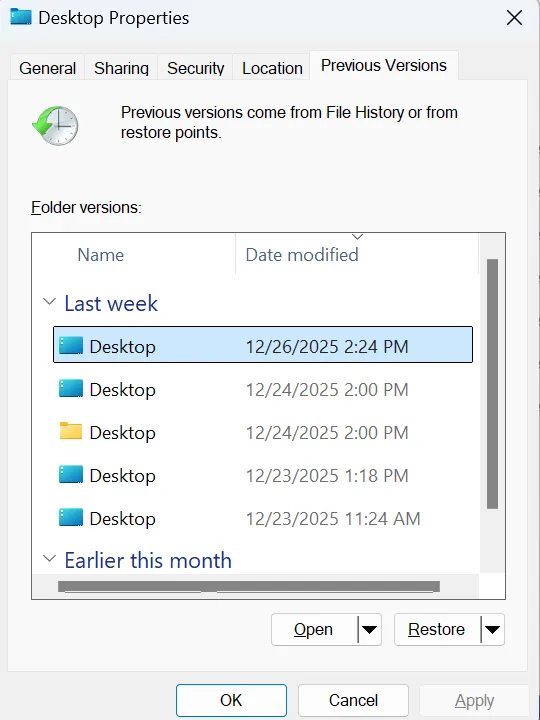
- Viaggio nel tempo: Verrà visualizzata una finestra che mostra la cronologia del backup. Usare i tasti freccia per scorrere indietro fino a una data prima avete cancellato i file.
- Recuperare: Navigare fino alla posizione originale del file (ad esempio, la cartella “Documenti”). Selezionare il file e fare clic sul pulsante verde “Ripristina” per rimetterlo a posto.
Pur essendo efficace, questo metodo si basa interamente sulle azioni passate. Non può aiutarvi recuperare i file cancellati dal cestino dopo averlo svuotato se non è stata scattata alcuna istantanea prima dell'eliminazione.
Metodo 3: Recuperare i file eliminati dal cestino dopo averlo svuotato usando il prompt dei comandi
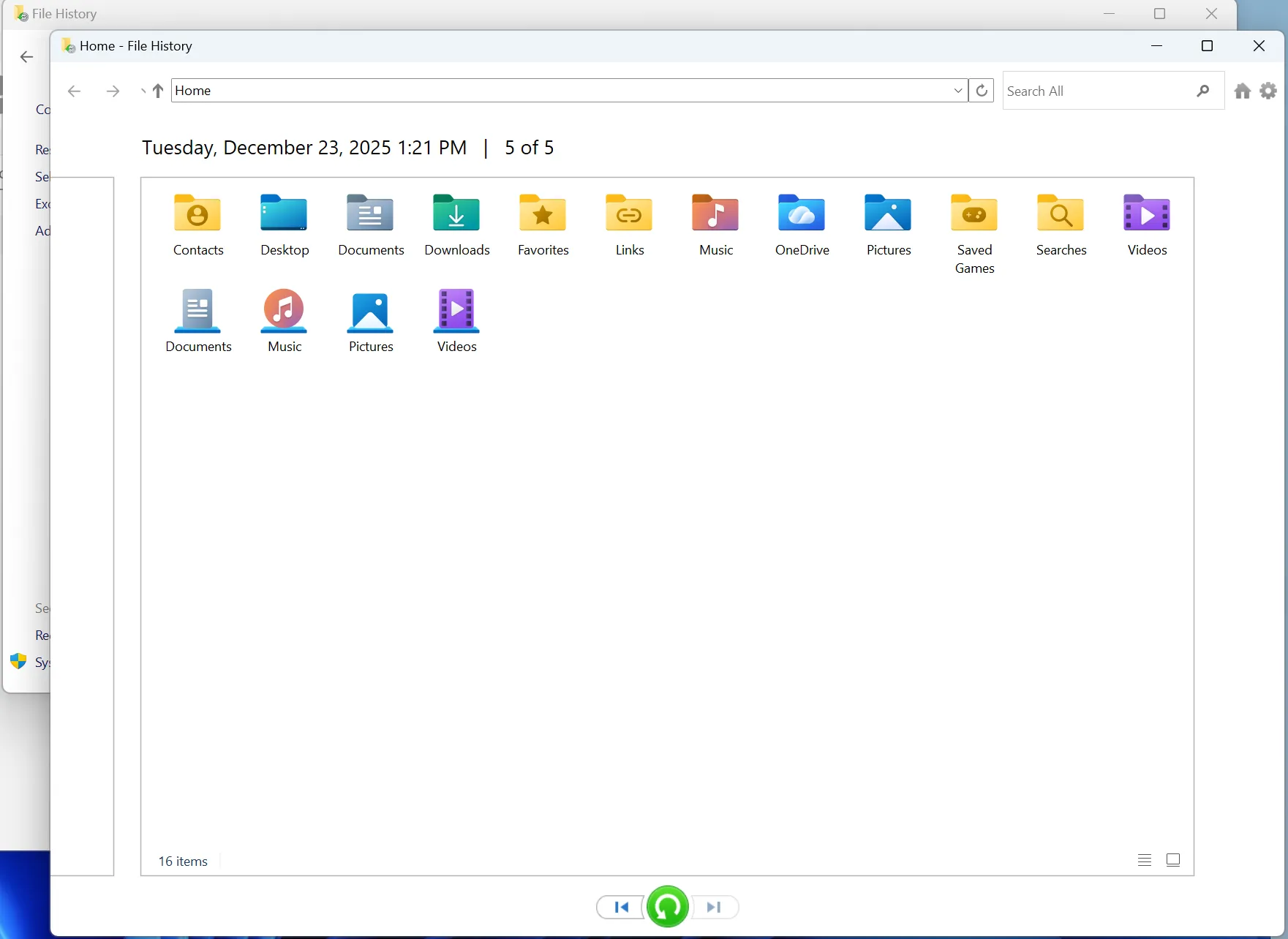
Per gli utenti avanzati che si trovano a proprio agio con le interfacce testuali, Microsoft mette a disposizione un'utilità a riga di comando chiamata Recupero file di Windows. Si tratta di uno strumento gratuito, ma manca della facilità d'uso grafica e delle funzioni di sicurezza (come le anteprime) presenti in Magic Data Recovery.
Prerequisito: È necessario disporre di Windows 10 versione 2004 o successiva.
Come si usa:
- Installare: Andate sul Microsoft Store e cercate “Windows File Recovery”. Installare l'applicazione.
- Lancio: Premete il tasto Windows, digitate “Windows File Recovery” e selezionate “Esegui come amministratore”.”
- Digitare il comando: È necessario costruire un comando specifico. La sintassi è
winfr unità sorgente: unità destinazione: [/mode] [/switches].- Esempio: Se si vuole recuperare i file cancellati dal cestino dopo averlo svuotato (in particolare i file PDF) dall'unità C: e salvarli nell'unità E:, si digita:
winfr C: E: /regular /n ´Users\YourName\Documents\*.pdf
- Esempio: Se si vuole recuperare i file cancellati dal cestino dopo averlo svuotato (in particolare i file PDF) dall'unità C: e salvarli nell'unità E:, si digita:
- Eseguire: Premere “Y” per confermare e attendere il completamento del processo.
I rischi della linea di comando:
- Visibilità zero: Si lavora alla cieca. Non potete vedere se il file è di 1KB o di 1GB, o se è danneggiato.
- Complessità: Un solo errore di battitura nel percorso del file significa che il processo fallisce.
- Nessuna organizzazione: I file recuperati vengono spesso riversati in un'unica cartella, perdendo la loro struttura originale.
Metodo 4: Ripristino delle versioni precedenti di file o cartelle
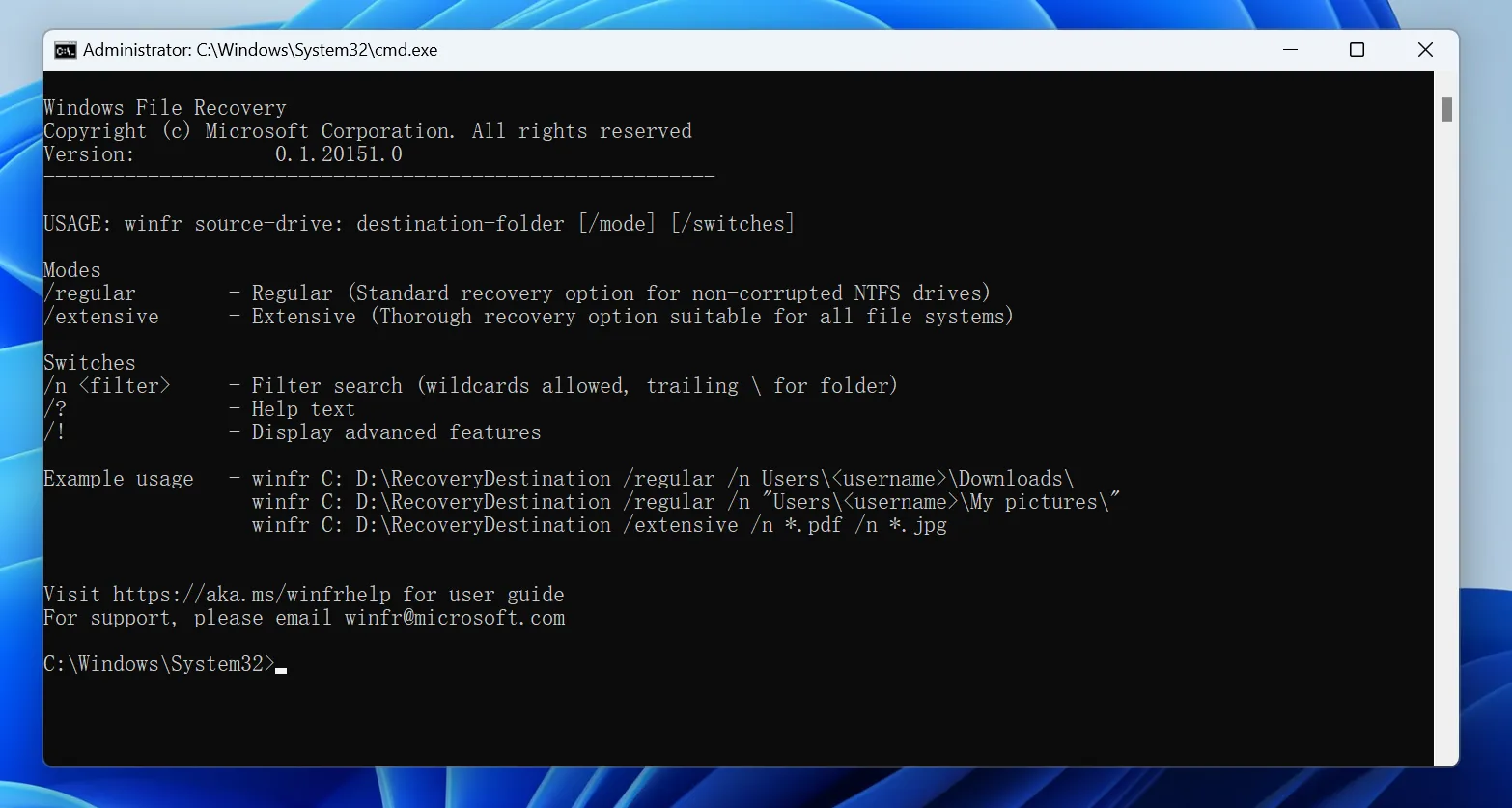
"Versioni precedenti" è un'altra funzionalità di Windows che potrebbe esserti d'aiuto recuperare i file dopo aver svuotato il Cestino. Utilizza i punti di ripristino, la Cronologia file o le istantanee di backup per ripristinare versioni precedenti delle cartelle.
Questo metodo è utile quando si ricorda la cartella originale in cui erano archiviati i file eliminati.
Procedura per ripristinare le versioni precedenti
Passaggio 1. Aprire Esplora file
Vai alla cartella in cui erano originariamente salvati i file eliminati.
Ad esempio:
- Desktop
- Documenti
- Immagini
- Scaricamento
- Una cartella di progetto
- Una cartella su un'unità esterna
Passaggio 2. Aprire le proprietà della cartella
Fare clic con il tasto destro del mouse sulla cartella e selezionare Proprietà.
Fase 3. Verifica delle versioni precedenti
Vai al sito Versioni precedenti scheda. Se Windows dispone di versioni disponibili, queste verranno elencate in quella scheda.
Passaggio 4. Anteprima o ripristino
Seleziona una versione precedente alla cancellazione. Puoi cliccare su Aperto per controllarne prima il contenuto, oppure clicca su Ripristino per recuperare la cartella.
Avvertenza importante
Presta attenzione quando utilizzi il pulsante "Ripristina", poiché potrebbe sovrascrivere la versione corrente della cartella. Se hai dei dubbi, apri prima la versione precedente e copia manualmente i file che ti servono in un'altra posizione sicura.
Scenari comuni: Perché si sono persi i dati
Capire come avviene la perdita di dati può aiutarvi a prevenirla in futuro. Ecco gli scenari in cui potrebbe essere necessario recuperare i file cancellati dal cestino dopo averlo svuotato:
- Il “Maiuscolo + Canc” Errore: Tenendo premuto il tasto Shift durante l'eliminazione, il cestino viene completamente bypassato e i file vengono immediatamente contrassegnati come “definitivamente” eliminati.
- Capacità del cestino superata: Se il cestino è pieno, Windows elimina automaticamente i file più vecchi per fare spazio a quelli nuovi senza chiedere conferma.
- Malware o virus: Il software dannoso può svuotare il cestino o nascondere i file senza il vostro permesso.
- Utilità di pulizia del disco: L'esecuzione di strumenti di pulizia automatizzati spesso fa scaricare il Cestino silenziosamente in background.
In tutti questi casi, le opzioni di ripristino native di Windows di solito falliscono, rendendo essenziale uno strumento professionale come Magic Data Recovery.
Conclusione
Se hai svuotato il Cestino per sbaglio, hai comunque diverse possibilità per recuperare i file eliminati. Se disponi di un backup, prova innanzitutto a utilizzare Cronologia file, Versioni precedenti o Backup di Windows. Se non è disponibile alcun backup, utilizza il Recupero file di Windows o uno strumento di recupero professionale.
Per la maggior parte degli utenti, Magic Data Recovery è l'opzione più semplice perché consente di eseguire la scansione dell'unità, visualizzare i file recuperabili e visualizzarne l'anteprima prima del recupero. Per ottenere il miglior risultato possibile, smetti immediatamente di utilizzare l'unità interessata e salva i file recuperati in una posizione diversa.
Prima inizi il recupero, maggiori saranno le tue possibilità di recuperare i file cancellati.
Supporta Windows 7/8/10/11 e Windows Server
Domande frequenti
Dove vanno a finire i file eliminati definitivamente dopo il cestino?
È possibile recuperare i file eliminati in modo permanente?
I file vengono eliminati quando si svuota il cestino?
Come recuperare i file eliminati che non sono finiti nel cestino?
Come si recuperano i file eliminati dal Cestino svuotato?
I file eliminati in modo permanente vengono effettivamente cancellati?
La frase "I file eliminati in modo permanente non possono essere recuperati" è vera o falsa?
Dove vanno a finire i file eliminati definitivamente in Windows 10?

Erin Smith è riconosciuta come una delle scrittrici più professionali di Amagicsoft. Negli ultimi 10 anni ha continuamente affinato le sue capacità di scrittura e ha aiutato milioni di lettori a risolvere i loro problemi tecnologici.