
Come recuperare i file eliminati di recente: Metodi semplici

L'eliminazione accidentale di file importanti è una situazione che quasi tutti gli utenti di computer hanno affrontato. Sia che abbiate svuotato il Cestino troppo velocemente, sia che abbiate premuto il tasto Maiuscolo + Canc, o perso i file da un HDD esterno, la necessità di recupero completo dei file eliminati di recente è molto comune.
Questa guida spiega come recuperare i file cancellati di recente da Windows 11/10, dal Cestino, dalla Cronologia file, da unità esterne, da chiavette USB, da HDD, da SSD e dal cloud. Imparerai inoltre a capire quando gli strumenti integrati in Windows sono sufficienti e quando è necessario ricorrere a software professionali per il recupero dei dati, come Magic Data Recovery è una scelta migliore. La buona notizia è che i file cancellati non vanno persi per sempre immediatamente. Con il giusto metodi di recupero dei file cancellati, spesso è possibile ripristinarli completamente.
Supporta Windows 7/8/10/11 e Windows Server
Indice dei contenuti
Perché i file eliminati di recente possono essere completamente recuperati
Quando si elimina un file, il sistema operativo non lo cancella immediatamente. Al contrario, si limita a contrassegnare lo spazio su disco come “disponibile”. I dati effettivi del file rimangono sul disco rigido finché non vengono sovrascritti da nuovi dati.
Questo spiega perché recupero completo dei file eliminati di recente è tecnicamente possibile. Se si agisce rapidamente, il software di recupero può scansionare l'unità, identificare le voci dei file eliminati e ricostruirli. Utilizzando un metodo corretto di recupero dei file eliminati, nella maggior parte dei casi è possibile recuperare i file.
Secondo la panoramica tecnica NTFS di Microsoft, i file system NTFS e FAT32 mantengono le voci delle directory anche dopo l'eliminazione, rendendo possibile il recupero se non vengono sovrascritte.
Guida rapida: come scegliere il metodo di ripristino più adatto
Utilizza questa tabella per scegliere il metodo più adatto alla tua situazione.
Situazione dei file cancellati | Il miglior metodo di recupero | Possibilità di recupero |
Eliminato con il tasto Canc | Cestino | Alto |
L'ho appena cancellato pochi secondi fa | Ctrl + Z o Annulla eliminazione | Alto |
Eliminato da una cartella con la Cronologia file attivata | Cronologia dei file o versioni precedenti | Alto |
Eliminato con Shift + Canc | Software di recupero dati | Medio-Alto |
Eliminato dopo aver svuotato il Cestino | Software di recupero dati | Medio |
Cancellati dall'hard disk esterno o dalla chiavetta USB | Software di recupero dati | Medio-Alto |
Eliminato dall'SSD | Ripristina immediatamente; interessato da TRIM | Incerto |
Eliminati da OneDrive, Google Drive o Dropbox | Cestino cloud o Cestino | Elevato se ancora entro il periodo di conservazione |
Prima di riprenderti: fai prima queste 3 cose
Prima di provare qualsiasi metodo di ripristino, segui queste importanti regole.
1. Interrompere l'utilizzo dell'unità interessata
Se hai cancellato dei file dall'unità D, smetti di salvare qualsiasi cosa su tale unità. Se hai cancellato dei file da una chiavetta USB, smetti di utilizzare quella chiavetta. I nuovi dati potrebbero sovrascrivere il file cancellato e rendere impossibile il recupero completo.
2. Non installare il software di ripristino sulla stessa unità
Se i file cancellati si trovavano sull'unità C, non installare alcun software di recupero su tale unità, a meno che non si abbia altra scelta. L'installazione di un nuovo software potrebbe sovrascrivere i file cancellati.
L'opzione più sicura è quella di installare lo strumento di ripristino su un'altra unità oppure utilizzare un altro computer per creare un ambiente di ripristino.
3. Recuperare i file in una posizione diversa
Durante il processo di recupero, non ripristinare mai i file recuperati sullo stesso disco. Salvarli su un altro disco interno, su un disco rigido esterno o su una chiavetta USB per evitare di sovrascrivere i dati recuperabili.
Come recuperare i file eliminati di recente?
Metodo 1: Recuperare i file eliminati di recente dal cestino
Ideale per: file eliminati con il tasto Canc
Difficoltà: Facile
Probabilità di recupero: alta
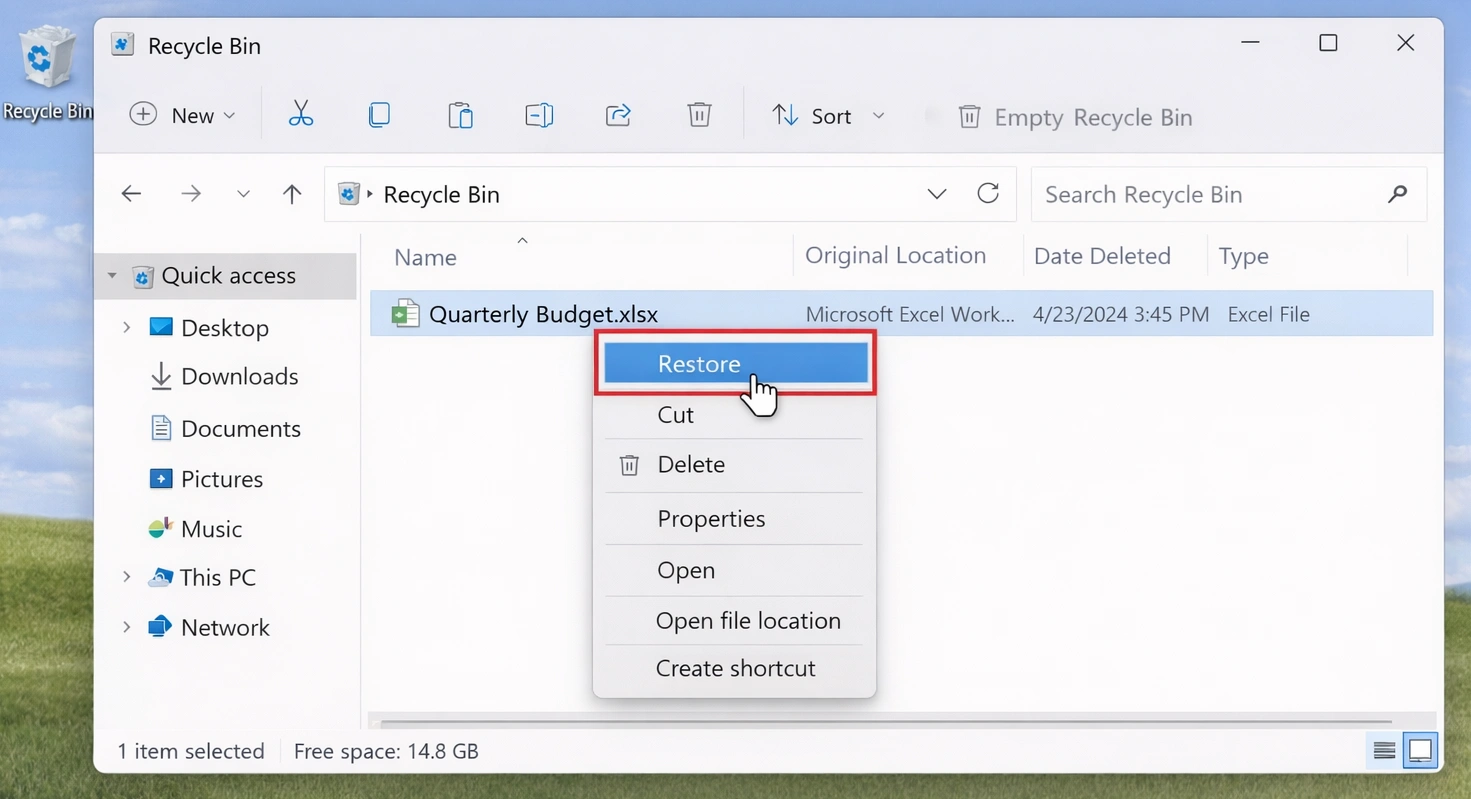
Il Cestino è il primo posto da controllare quando si eliminano dei file da un computer Windows. Se hai eliminato un file premendo il tasto Canc o utilizzando l'opzione "Elimina" dal menu contestuale, il file potrebbe trovarsi ancora nel Cestino.
Procedura per ripristinare i file dal Cestino
- Fai doppio clic sull'icona del Cestino sul desktop.
- Cerca il file eliminato in base al nome, al tipo di file o alla data di eliminazione.
- Fare clic con il pulsante destro del mouse sul file che si desidera ripristinare.
- Selezionare Ripristino.
- Il file tornerà nella sua cartella originale.
Metodo 2: Utilizzare Ctrl + Z o "Annulla eliminazione"
Ideale per: file cancellati pochi secondi fa
Difficoltà: Molto facile
Probabilità di recupero: alta
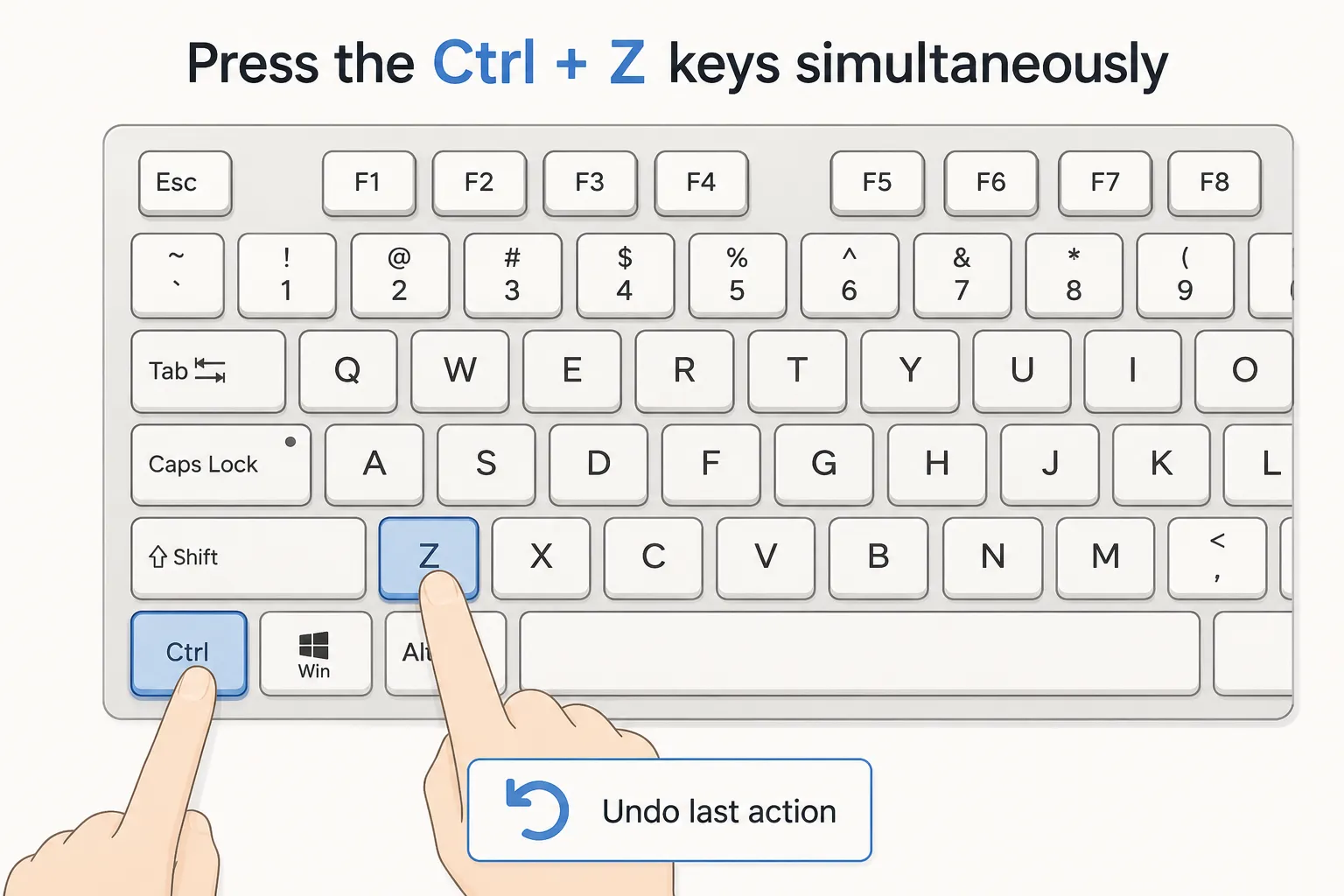
Se hai appena eliminato un file e non hai eseguito molte operazioni in seguito, Windows potrebbe consentirti di annullare immediatamente l'eliminazione.
Procedura per ripristinare un file cancellato
- Apri la cartella in cui è stato eliminato il file.
- Premi Ctrl + Z sulla tastiera.
- Verifica se il file cancellato viene ripristinato.
- È anche possibile fare clic con il tasto destro del mouse all'interno della cartella e selezionare "Annulla eliminazione", se l'opzione è disponibile.
Questo metodo è semplice, ma funziona solo subito dopo la cancellazione. Se hai riavviato il computer, chiuso Esplora file o eseguito numerose operazioni sui file, questa opzione potrebbe non essere più disponibile.
Metodo 3: Ripristinare i file eliminati di recente dalla Cronologia file o dalle versioni precedenti
Ideale per: gli utenti che hanno attivato le funzionalità di backup di Windows
Difficoltà: da facile a media
Probabilità di recupero: elevata, se è presente un backup
Windows dispone di funzioni di backup integrate che potrebbero aiutarti a ripristinare i file cancellati. Se le opzioni "Cronologia file" o "Versioni precedenti" erano attivate prima della cancellazione del file, potresti riuscire a recuperare una copia precedente.
Opzione A: Ripristino da Cronologia file
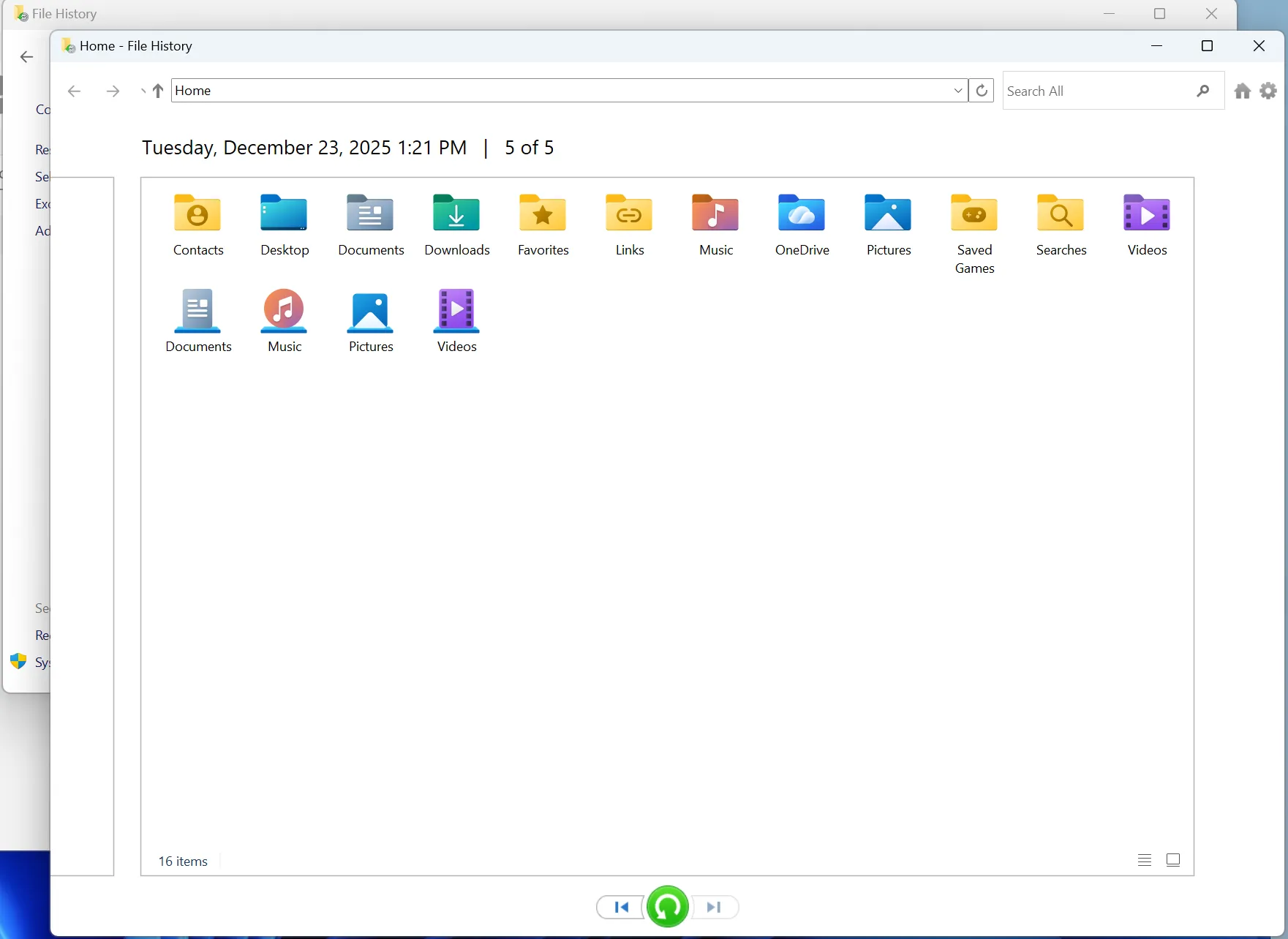
- Apri la cartella in cui era originariamente salvato il file eliminato.
- Cerca “Ripristina i tuoi file con Cronologia file” nella funzione di ricerca di Windows.
- Apri Cronologia file.
- Sfoglia le versioni di backup disponibili.
- Seleziona il file o la cartella che desideri recuperare.
- Fai clic sul pulsante "Ripristina".
Opzione B: Ripristina versioni precedenti
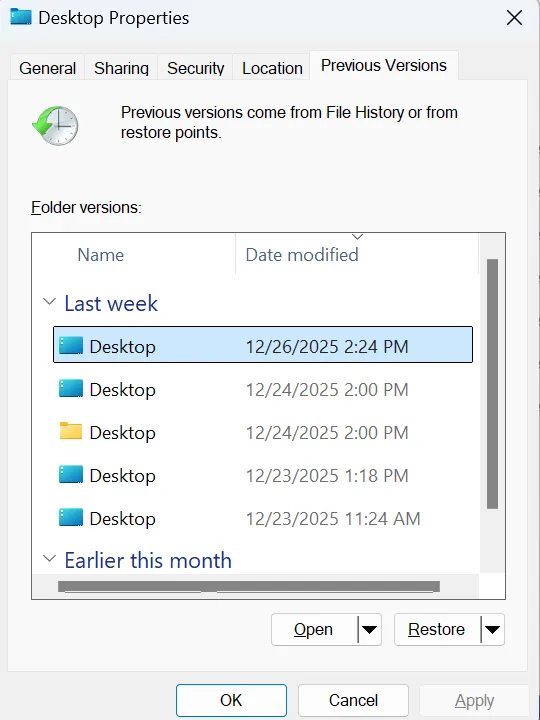
- Fare clic con il tasto destro del mouse sulla cartella in cui era archiviato il file eliminato.
- Selezionare Proprietà.
- Aprire la scheda Versioni precedenti.
- Scegli una versione creata prima della cancellazione.
- Fai clic su "Apri" per visualizzarne l'anteprima oppure su "Ripristina" per recuperarlo.
Nota importante
Questo metodo funziona solo se Windows aveva già creato un backup o un punto di ripristino. Se la funzione "Cronologia file" non era attiva prima dell'eliminazione, questo metodo potrebbe non riuscire a individuare il file mancante.
Metodo 4: Recuperare i file cancellati di recente con Magic Data Recovery
Ideale per: file cancellati che non si trovano nel Cestino, file cancellati con Shift+Canc, Cestino svuotato, unità esterne, chiavette USB, recupero dati da HDD
Difficoltà: Facile
Probabilità di recupero: da media ad alta, a seconda dello stato di sovrascrittura
Magic Data Recovery è uno strumento professionale per il recupero dei dati, progettato per recuperare file cancellati, persi, formattati o inaccessibili da diversi dispositivi di archiviazione. È indicato nei casi in cui i metodi integrati in Windows non riescano a individuare i file cancellati.
Procedura per recuperare i file cancellati di recente con Magic Data Recovery
2.Scaricare e installare. Portare il software sul PC Windows. <NON installare il software nell'unità in cui si trovano i file persi.
Supporta Windows 7/8/10/11 e Windows Server
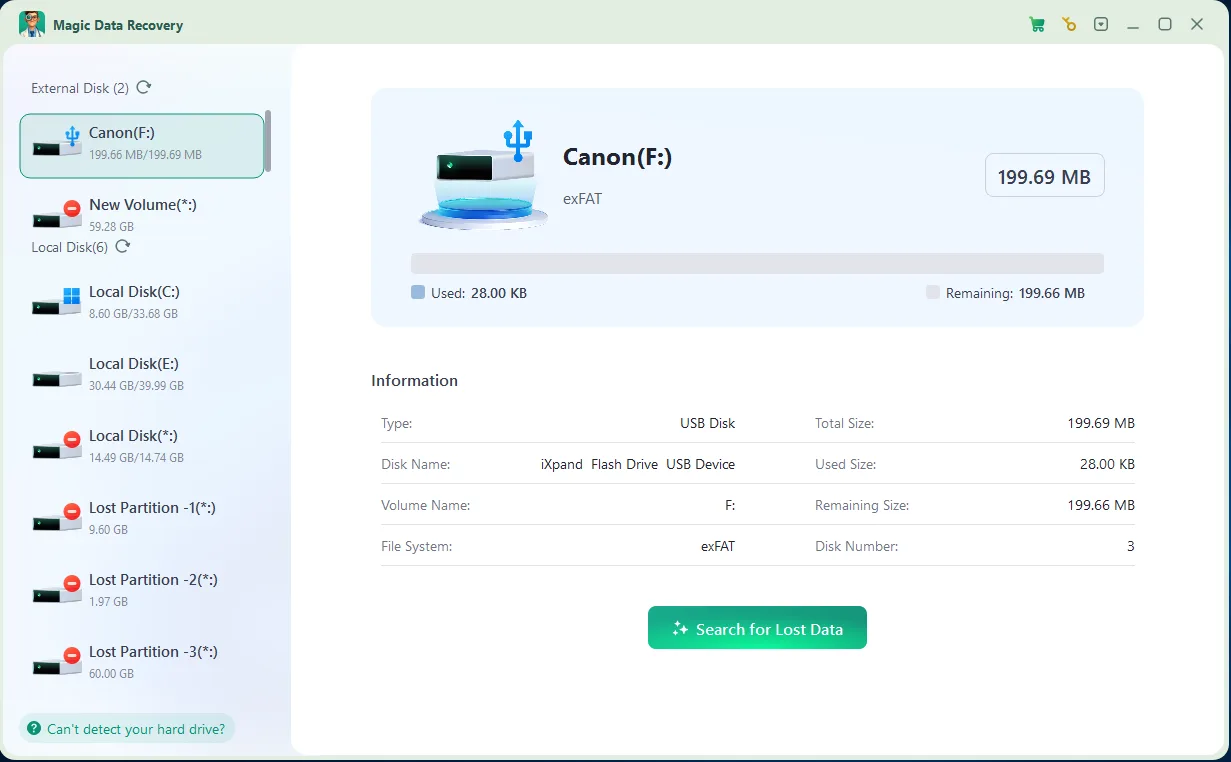
4.Anteprima e recupero: Una volta completata la scansione, sarà possibile visualizzare l'anteprima dei file recuperabili. Questo assicura che non vengano ripristinati quelli sbagliati e aiuta a recuperare esattamente ciò che serve. Ripristina sempre i file su un'altra unità per evitare di sovrascrivere i dati rimanenti.

HDD vs SSD: perché il recupero completo è diverso
Il tipo di dispositivo di archiviazione influisce notevolmente sul recupero dei file cancellati.
Recupero HDD
Su un disco rigido tradizionale, i file cancellati spesso rimangono sul disco finché non vengono sovrascritti da nuovi dati. Ciò significa che i file cancellati di recente da un HDD hanno solitamente maggiori possibilità di essere recuperati integralmente.
Se smetti di usare il HDD Se lo si esegue immediatamente e lo si analizza con un software di recupero dati, la percentuale di successo può essere elevata.
Recupero SSD
SSD il recupero è più complicato a causa di TRIM. La funzione TRIM aiuta gli SSD a gestire i dati cancellati e a mantenere le prestazioni, ma può anche rendere più difficile, se non impossibile, il recupero dei file cancellati.
Se TRIM ha già cancellato i dati eliminati, il software di recupero potrebbe non essere in grado di ripristinare completamente il file.
Ciò non significa che il recupero dei dati da un SSD sia sempre impossibile. Tuttavia, se i file cancellati erano memorizzati su un SSD, è necessario agire rapidamente ed evitare di scrivere nuovi dati sull'unità.
Conclusione
I file cancellati di recente non sempre scompaiono per sempre. Se agisci rapidamente e scegli il metodo di recupero giusto, potresti riuscire a recuperare i file cancellati completamente. Inizia dai metodi più semplici: Cestino, Ctrl + Z o Cronologia file. Se queste opzioni non funzionano, prova un software di recupero professionale come Magic Data Recovery. Per ottenere i migliori risultati nel recupero completo dei file cancellati di recente, è bene ricordare tre regole: smettere di utilizzare l'unità interessata, non installare software sulla stessa unità e recuperare i file in una posizione diversa.
Supporta Windows 7/8/10/11 e Windows Server
FAQ
È possibile recuperare completamente i file cancellati di recente?
Dove finiscono i file eliminati di recente su Windows?
Come posso recuperare i file cancellati con Shift + Canc?
È possibile recuperare i file cancellati di recente dopo aver svuotato il Cestino?
È possibile recuperare i file cancellati di recente da un SSD?
Perché alcuni file recuperati risultano danneggiati o impossibili da aprire?
Qual è il modo più sicuro per recuperare i file cancellati di recente?

Vasilii è uno specialista del recupero dati con circa 10 anni di esperienza pratica nel settore. Nel corso della sua carriera, ha risolto con successo migliaia di casi complessi riguardanti file cancellati, unità formattate, partizioni perse e file system RAW. La sua esperienza copre sia i metodi di recupero manuale utilizzando strumenti professionali come gli editor esadecimali, sia le soluzioni automatiche avanzate con i software di recupero. La missione di Vasilii è quella di rendere accessibile la conoscenza del recupero dati affidabile sia ai professionisti IT che agli utenti di tutti i giorni, aiutandoli a salvaguardare i loro preziosi beni digitali.