
Key Recovery Solution - Recover Lost Keys and Credentials
Key recovery is the process of retrieving important digital keys and stored credentials from a Windows computer. These may include Windows and software product keys, BitLocker recovery keys, browser passwords, network credentials, mail account details, and Wi-Fi passwords. When this information is no longer easy to find, the right recovery method can help users restore access and back up critical details before system changes make recovery harder.
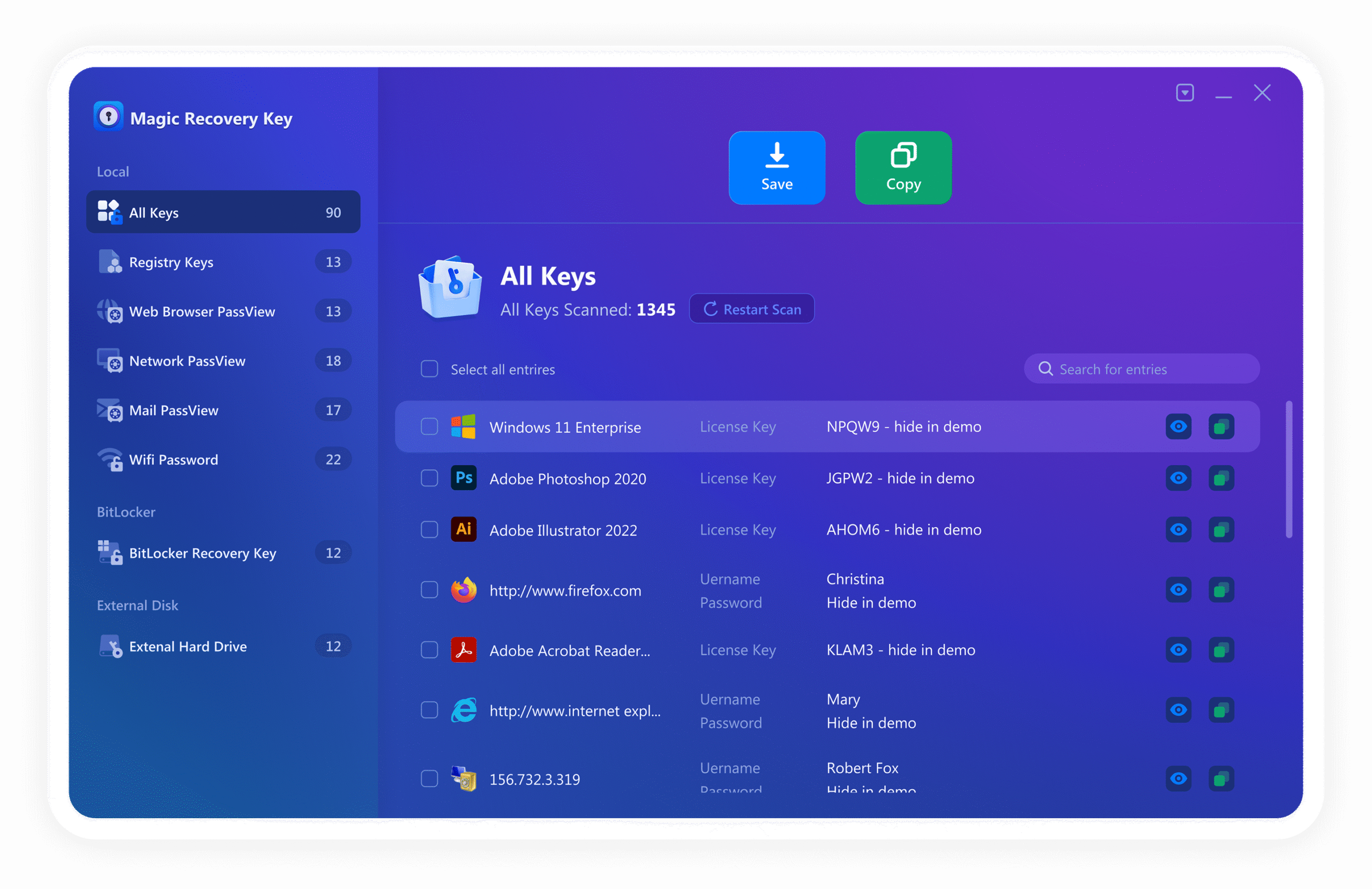
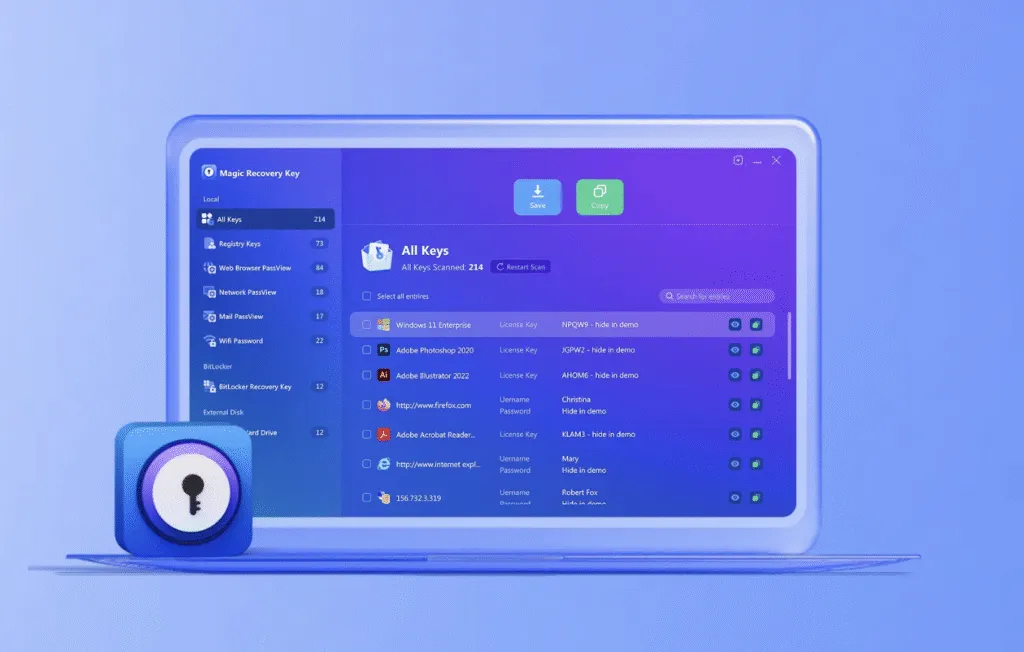
With Magic Recovery Key, users can quickly recover product keys, passwords, and other stored recovery details from the current system or an external hard drive.
What Is Key Recovery?
Key recovery refers to the method of locating and extracting stored product keys, recovery keys, usernames, passwords, and related account information from a Windows computer. This information may belong to the operating system, installed software, encrypted drives, browsers, mail clients, Wi-Fi connections, or network resources. When the original records are missing or the computer is difficult to access, a dedicated key recovery tool can help recover this information directly from the system.
Key recovery is commonly used for:
- Recover Windows and software product keys
- Retrieve BitLocker recovery keys
- Restore saved browser passwords
- Find network and Wi-Fi credentials
- Recover mail account login details
Common Key Recovery Scenarios
Key loss can happen in many different ways, from simple forgetfulness to system changes and startup problems. Understanding the most common key recovery scenarios helps users identify the right solution more quickly.
License Key Recovery
Retrieve Windows, Windows Server, Office, Adobe, SQL Server, and other software product keys before reinstalling the system or moving to another computer.
BitLocker Recovery
Find the recovery key needed to unlock a BitLocker-protected drive when the computer requests verification during startup or after system changes.

Password Recovery
Recover saved browser passwords, network account details, mail account information, and Wi-Fi passwords stored on the current computer.
System and Information Supported by Magic Recovery Key
Key loss can affect many kinds of stored information across Windows systems. Magic Recovery Key is designed to help users retrieve several important categories of keys and credentials from supported Windows environments. It supports Windows 7/8/8.1/10/11, Windows Server 2003/2008/2008 R2/2012/2012 R2/2016/2019, and Windows Small Business Server 2003/2008/2011.
Windows and Server Product Keys
Recover activation information for Windows and Windows Server systems.
Office and Software License Keys
Retrieve license information for Office, Adobe, and over 10,000 software programs.
BitLocker Recovery Keys
Locate the key ID and recovery key used to unlock an encrypted drive.
Saved Browser and Mail Credentials
Find saved usernames, passwords, bookmarks, and mail account details stored on the system.
Network and Wi-Fi Information
Recover network account details and Wi-Fi password information saved on the current computer.
External Hard Drive Recovery
Extract keys and credential information from an external hard drive connected from a non-bootable computer.
Recoverable Key and Credential Types
Different recovery situations may involve different kinds of digital information. Magic Recovery Key is designed to support a range of key and credential types, helping users restore critical activation and access details from Windows systems.
Product Keys
Windows keys, software serial numbers, product IDs, and license information stored in the current system.
Recovery Keys
BitLocker recovery information used to unlock encrypted drives.
Browser Credentials
Saved website usernames and passwords stored in web browsers.
Mail Account Information
Logged-in mailbox addresses and saved account passwords.
Network and Wi-Fi Credentials
Network drive account details and Wi-Fi passwords stored on the computer.
External Drive Data
Software keys and selected credential information extracted from a connected external disk.
Professional Key Recovery Software: Magic Recovery Key
Magic Recovery Key is a practical Windows tool designed to retrieve product keys, recovery keys, usernames, and passwords from supported systems. It combines several recovery functions in one interface, making it easier to locate and back up important information before reinstalling software, unlocking a protected drive, or migrating to another device.
- Retrieve Windows and software product keys
- Recover BitLocker recovery keys
- Find browser, network, mail, and Wi-Fi credentials
- Search and copy information after scanning
- Extract data from an external hard drive in non-bootable PC scenarios
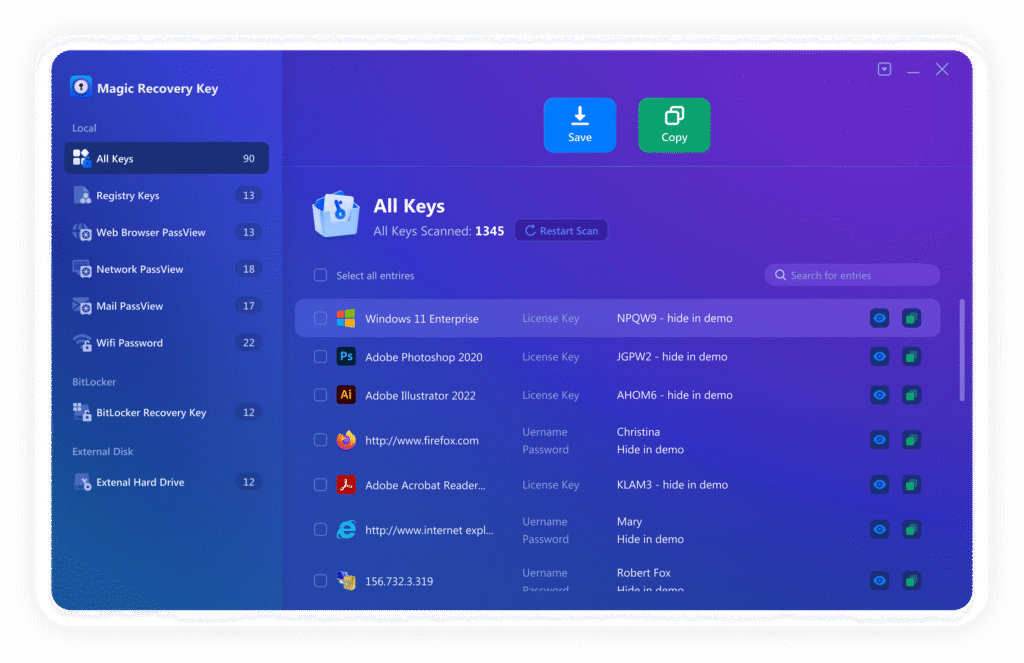
Steps to Recover Keys and Credentials
Recovering stored key and credential information is often straightforward when users choose the correct feature and save the results promptly. Magic Recovery Key simplifies the process into clear steps.
Step 1: Download and Install Magic Recovery Key
First, download Magic Recovery Key from the official website and complete the installation. Then launch the program on the current Windows computer.

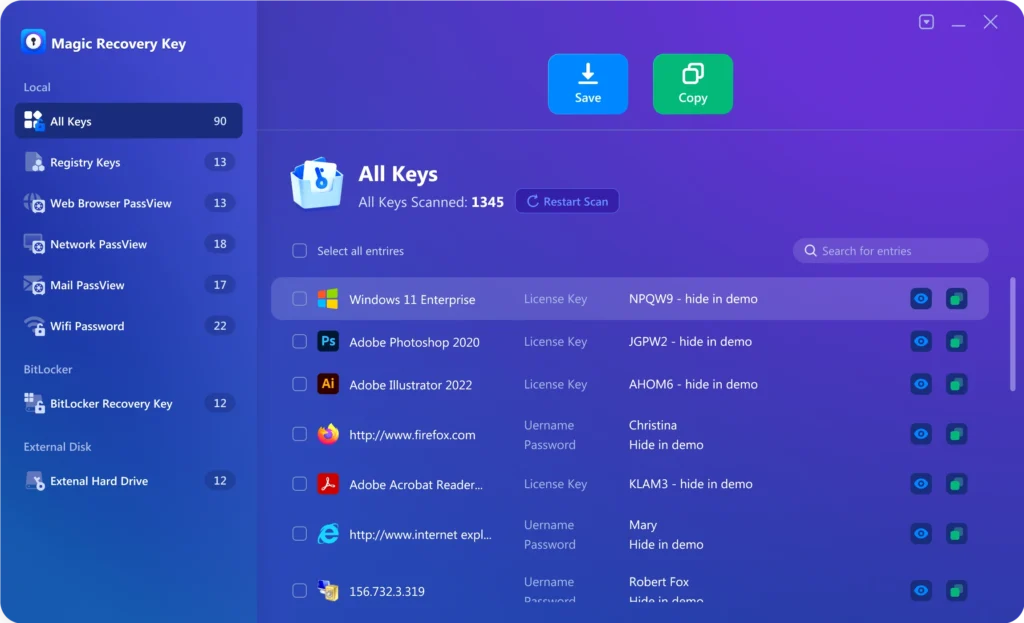
Step 2: Select the Recovery Feature
After opening the program, choose the feature that matches your goal, such as Registry Keys, Web Browser PassView, Network PassView, Mail PassView, Wifi Password, BitLocker Recovery Key, or External Hard Drive.
Step 3: Scan for Stored Information
Start the scan and let the program search for the stored key, password, or credential information. Depending on the selected feature, you can search the results by product name, website, username, IP address, or account details.
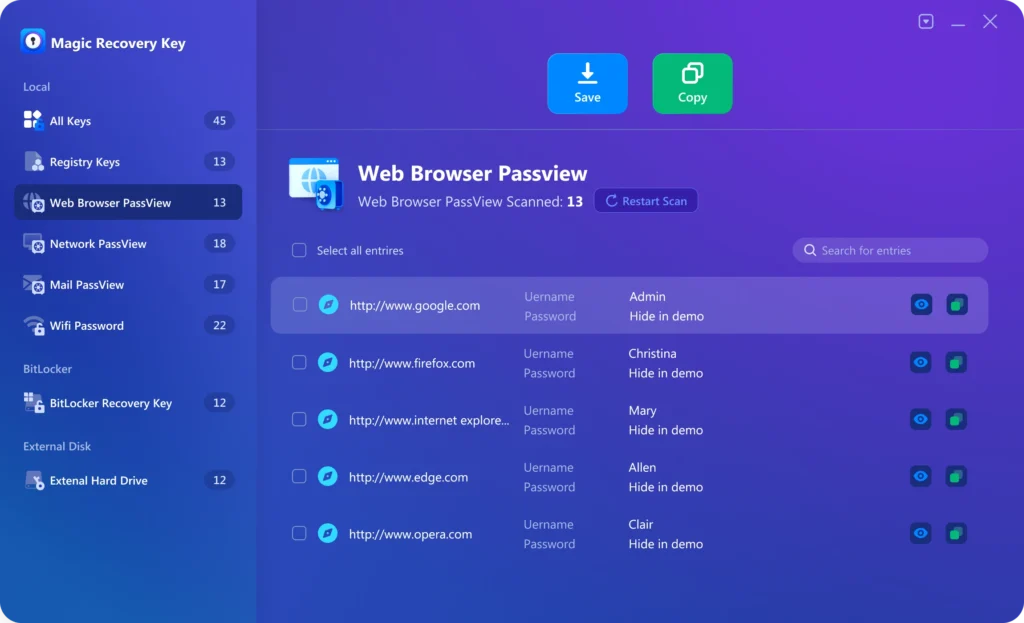

Step 4: Review the Results
Once the scan finishes, review the discovered information and confirm which records you want to keep.
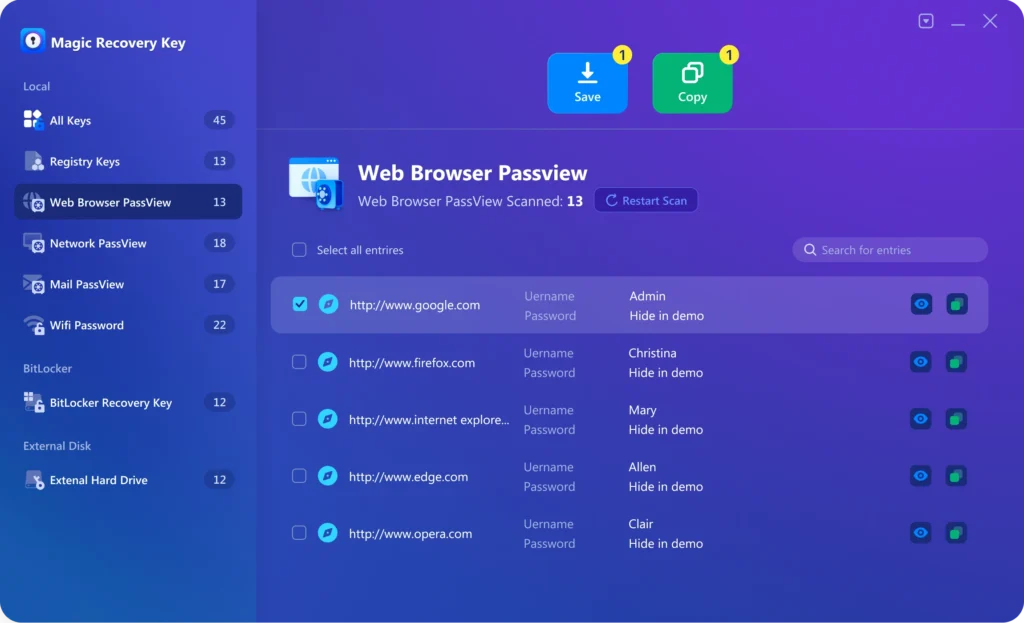
Step 5: Copy or Save the Information
Finally, copy or save the results to a secure location for future activation, login, or recovery use.
Tips to Successfully Restore Keys and Credentials
Here are some practical tips that can improve the chance of successful key recovery.
Back Up Information Before System Changes
Before reinstalling Windows, replacing hardware, or moving to another device, retrieve and save important keys and credentials first.
Use the Matching Recovery Feature
Choose the correct function for the type of information you need, such as product keys, BitLocker keys, browser passwords, or Wi-Fi details.
Save Results Outside the Original System
Store recovered information in a separate safe location whenever possible. This helps keep it available during future reinstallations or troubleshooting.
Frequently Asked Questions
Key recovery often raises specific questions about product keys, recovery keys, passwords, and system access. The answers below help clarify the recovery process.
It can recover product keys, BitLocker recovery information, browser passwords, network credentials, mail account details, Wi-Fi passwords, and selected information from an external hard drive.
No. Besides software license information, it also includes features for passwords, network credentials, Wi-Fi details, and BitLocker recovery keys.
Yes. The External Hard Drive feature is intended for cases where the original computer cannot start and its disk must be connected to another working PC.
Yes. The user guide says it supports Windows 7/8/8.1/10/11 and multiple Windows Server versions.
Yes. The guide repeatedly states that after scanning, users can copy or save the recovered information.
The product page and guide both describe it as an intuitive tool with a straightforward interface and feature-based workflow.

Magic Recovery Key
Reliable and Practical Key Recovery Software
Losing important keys or credentials does not always mean losing access forever. With Magic Recovery Key, users gain a dependable key recovery solution for retrieving software product keys, BitLocker recovery keys, saved passwords, and other important credentials from Windows systems. Download Magic Recovery Key today and recover your key information safely, quickly, and efficiently.