
Hard Drive Solutions
Hard drive is one of the most widely used storage devices for keeping important files, documents, photos, videos, and system data. Whether you rely on an internal hard disk in your computer or an external drive for backup, HDDs remain essential for both personal and professional data storage.
If you need to restore lost files, you can get started with Magic Data Recovery to scan and recover your HDD data quickly.
What Is a Hard Drive?
A hard drive (also called a hard disk drive or HDD) is a storage device used to save digital information such as operating systems, applications, and personal files.
Hard drives are commonly found in:
- Desktop and laptop computers
- External storage devices
- Servers and workstations
- Backup and archive systems
- Internal Hard Drives – installed inside a computer
- External Hard Drives – portable drives connected via USB or other interfaces

Common Hard Drive Data Loss Scenarios
HDD data loss can occur suddenly due to system errors, accidental actions, or unexpected hardware and power-related issues. Below are some of the most common scenarios.

Accidental File Deletion
Important files may be removed by mistake and remain recoverable until new data overwrites the drive.

Drive Formatting Errors
Formatting a hard drive can erase file access instantly, even though the original data may still exist.

File System Corruption
Corrupted file systems can make a hard drive unreadable, preventing access to stored documents and media.

Operating System Crashes
System failures or crashes may lead to missing files, inaccessible partitions, or sudden data loss.

Virus or Malware Attacks
Malicious software can delete, encrypt, or damage hard drive data, causing unexpected file disappearance.

Power Failure Shutdowns
Sudden power loss or improper shutdowns may interrupt disk operations and result in corrupted or lost files.
Can Data Be Recovered from a HDD?
Yes — in most situations, data can be recovered from a hard drive. When files are deleted or a drive is formatted, the data often remains on the disk until it is overwritten by new information. For logical issues like deletion, formatting, or corruption, data recovery software is often an effective solution.
- How long ago the data was lost
- Whether new files were written to the drive
- The type of damage (logical vs. physical)
- The overall health and condition of the hard drive
- Whether the drive is still detectable by the operating system

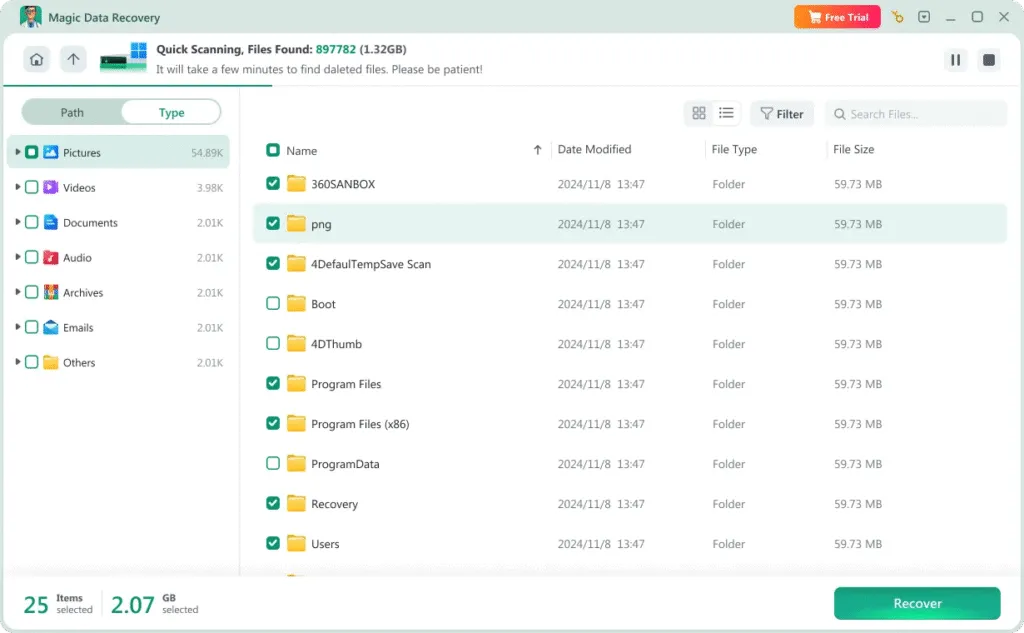
Recover Hard Drive Data with Magic Data Recovery
Magic Data Recovery is designed to help users restore lost files from both internal and external hard drives. It supports recovery in situations such as:
- Deleted files and folders
- Formatted hard drives
- Corrupted or inaccessible partitions
- Hard drives showing errors or missing data
How to Recover Files from a Hard Disk Drive
Recovering lost files from a hard drive doesn’t have to be difficult. With Magic Data Recovery, you can restore deleted or missing data in just a few simple steps:
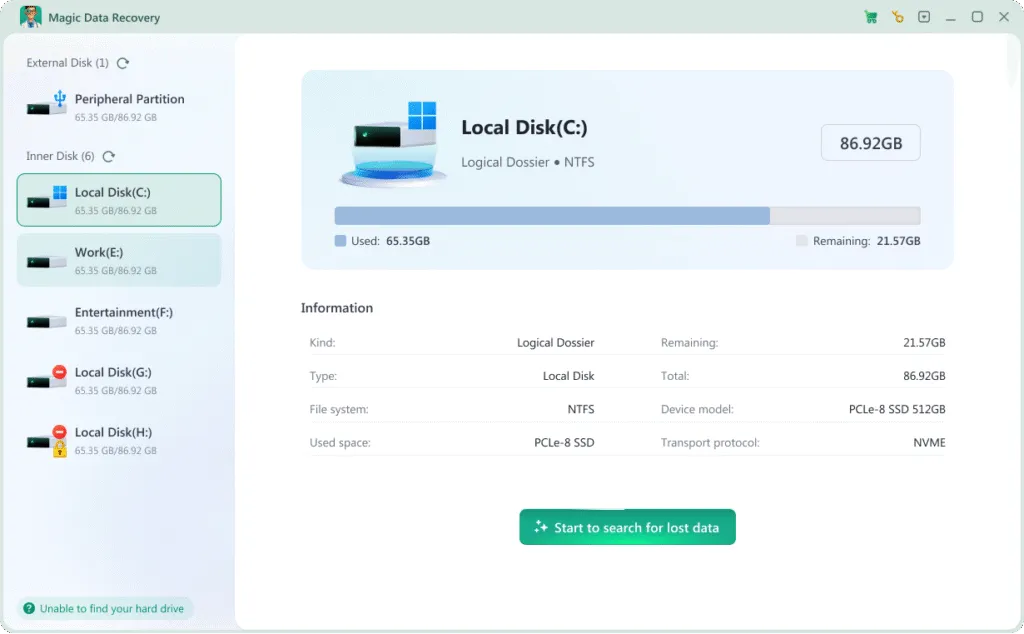
Step 1: Download and Install Magic Data Recovery
Download Magic Data Recovery from the official website and install it on a healthy storage device. Avoid installing it on the hard drive where data was lost.
Step 2: Select the Hard Drive to Scan
Launch the software and choose the affected internal or external drive. Start the scan to search for deleted, formatted, or inaccessible files.

Step 3: Preview Recoverable Files
After the scan finishes, browse through the results and preview files to confirm they can be recovered properly before restoring them.
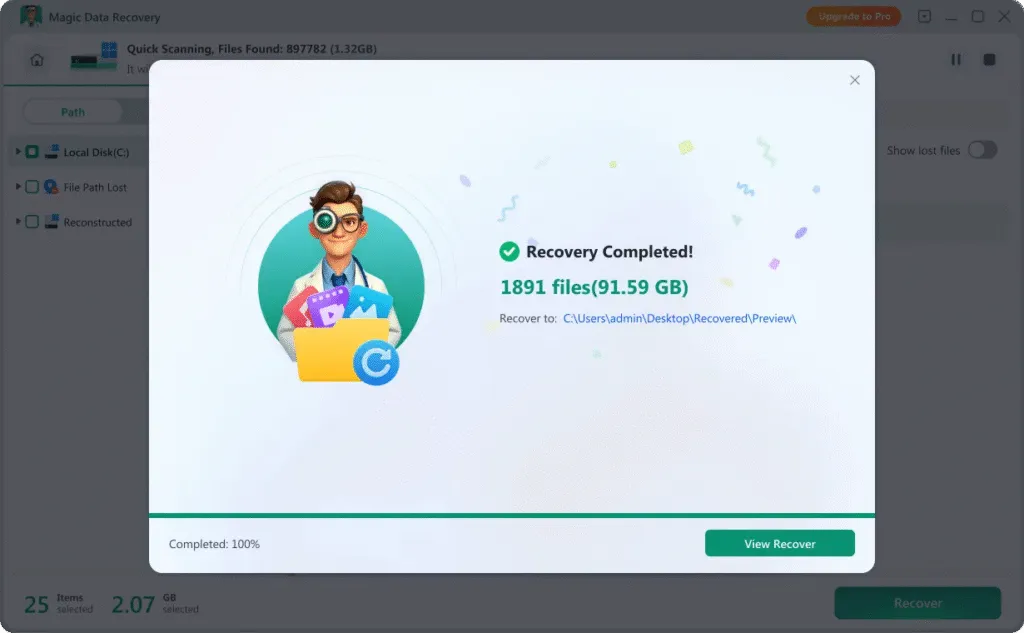
Step 4: Recover Files to a Safe Location
Select the files you want to recover and save them to a different drive or external storage device to prevent overwriting existing data.
Tips to Improve Hard Drive Recovery Success
To increase the chance of successful HDD data recovery, it is important to take the right steps immediately after formatting.
Stop Using the Lost Data Drive
Avoid writing new data to the lost data drive. Continued use may overwrite existing data and reduce formatted hard drive recovery success.
Create a Disk Image if Necessary
Creating a sector-by-sector disk image can preserve the formatted state and allow safer recovery attempts.
Avoid Repeated Formatting
Multiple formatting operations reduce the effectiveness of hard drive recovery format techniques.
Protect Against Disk Corruption
System errors and malware can trigger RAW states. Keeping your system protected helps prevent hard drive recovery scenarios.
Handle External Storage Carefully
Safely eject external drives to reduce file system damage that may require sd format recovery.
Complete Disk Operations Properly
Interrupting disk operations or power loss during using may cause severe file system damage. Always allow processes to finish completely.
Frequently Asked Questions
Find answers to common questions about hard drive data recovery, including recovery possibilities, safety concerns, and what to do when files are lost or inaccessible.

Magic Data Recovery
Reliable and powerful data recovery software
Recover lost data effortlessly with Magic Data Recovery. Continuous improvements and new features help ensure safe and secure hard drive recovery.
Related Guides
Discover step-by-step guides and practical solutions for common hard drive problems, including drive detection issues, corruption, formatting errors, and data recovery.
This article introduces you 3 ways to recover data from Seagate drives.It helps you recover deleted, formatted …
Unrecognized HDD recovery guide: detect physical or logical errors and recover data safely with right approaches …
Learn how hard drive recovery after format works, when data is recoverable, and how to safely recover files using …
Looking for the best data recovery for Windows? Compare top tools, free limits, real use cases, and see a reliable …
Learn how to check a hard drive for bad sectors using built-in tools and disk utilities. Discover symptoms, fixes, and …