
Como recuperar arquivos excluídos recentemente: Métodos fáceis

A exclusão acidental de arquivos importantes é uma situação que quase todos os usuários de computador já enfrentaram. Se você esvaziou a Lixeira muito rapidamente, pressionou Shift + Delete, ou arquivos perdidos de um HDD externo, a necessidade de recuperação completa de arquivos excluídos recentemente é muito comum.
Este guia explica como recuperar arquivos excluídos recentemente do Windows 11/10, da Lixeira, do Histórico de Arquivos, de unidades externas, pen drives, HDDs, SSDs e do armazenamento em nuvem. Você também aprenderá quando as ferramentas integradas do Windows são suficientes e quando é necessário recorrer a softwares profissionais de recuperação de dados, como Magic Data Recovery é a melhor opção. A boa notícia é que os arquivos excluídos não se perdem para sempre imediatamente. Com o método certo métodos de recuperação de arquivos excluídos, Em geral, você pode restaurá-los totalmente.
Compatível com Windows 7/8/10/11 e Windows Server
Índice
Por que os arquivos excluídos recentemente podem ser completamente recuperados
Quando você exclui um arquivo, o sistema operacional não o apaga imediatamente. Em vez disso, ele apenas marca o espaço em disco como “disponível”. Os dados reais do arquivo permanecem no disco rígido até serem substituídos por novos dados.
Isso explica por que recuperação completa de arquivos excluídos recentemente é tecnicamente possível. Se você agir rapidamente, o software de recuperação poderá examinar a unidade, identificar entradas de arquivos excluídos e reconstruí-los. O uso de um método correto de recuperação de arquivos excluídos normalmente pode recuperar os arquivos na maioria dos casos.
De acordo com a visão técnica do NTFS da Microsoft, os sistemas de arquivos NTFS e FAT32 mantêm as entradas de diretório mesmo após a exclusão, o que possibilita a recuperação, a menos que sejam substituídas.
Guia rápido: Como escolher o método de recuperação certo
Use esta tabela para escolher o melhor método de acordo com a sua situação.
Situação dos arquivos excluídos | Melhor método de recuperação | Chance de recuperação |
Excluído com a tecla Delete | Lixeira | Alta |
Acabei de excluir há alguns segundos | Ctrl + Z ou Desfazer exclusão | Alta |
Excluído de uma pasta com o Histórico de Arquivos ativado | Histórico de arquivos ou versões anteriores | Alta |
Excluído com Shift + Delete | Software de recuperação de dados | Médio a alto |
Excluído após esvaziar a Lixeira | Software de recuperação de dados | Médio |
Excluído de um disco rígido externo ou pen drive | Software de recuperação de dados | Médio a alto |
Excluído do SSD | Recuperar imediatamente; afetado pelo TRIM | Incerto |
Excluído do OneDrive, do Google Drive ou do Dropbox | Lixeira na nuvem ou Lixeira | Alto, se ainda estiver dentro do período de retenção |
Antes de se recuperar: faça estas três coisas primeiro
Antes de tentar qualquer método de recuperação, siga estas regras importantes.
1. Pare de usar a unidade afetada
Se você excluiu arquivos da unidade D, pare de salvar qualquer coisa nessa unidade. Se você excluiu arquivos de um pen drive, pare de usar esse pen drive. Novos dados podem sobrescrever o arquivo excluído e tornar impossível a recuperação completa.
2. Não instale o software de recuperação na mesma unidade
Se os arquivos excluídos estavam na unidade C, não instale nenhum software de recuperação nessa unidade, a menos que não tenha outra opção. A instalação de um novo software pode sobrescrever os arquivos excluídos.
A opção mais segura é instalar a ferramenta de recuperação em outra unidade ou usar outro computador para criar um ambiente de recuperação.
3. Recuperar arquivos para um local diferente
Nunca restaure os arquivos recuperados na mesma unidade durante o processo de recuperação. Salve-os em outra unidade interna, em um disco rígido externo ou em uma unidade USB para evitar sobrescrever os dados recuperáveis.
Como recuperar arquivos excluídos recentemente?
Método 1: Recuperar arquivos excluídos recentemente da Lixeira
Ideal para: Arquivos excluídos com a tecla Delete
Dificuldade: Fácil
Chance de recuperação: Alta
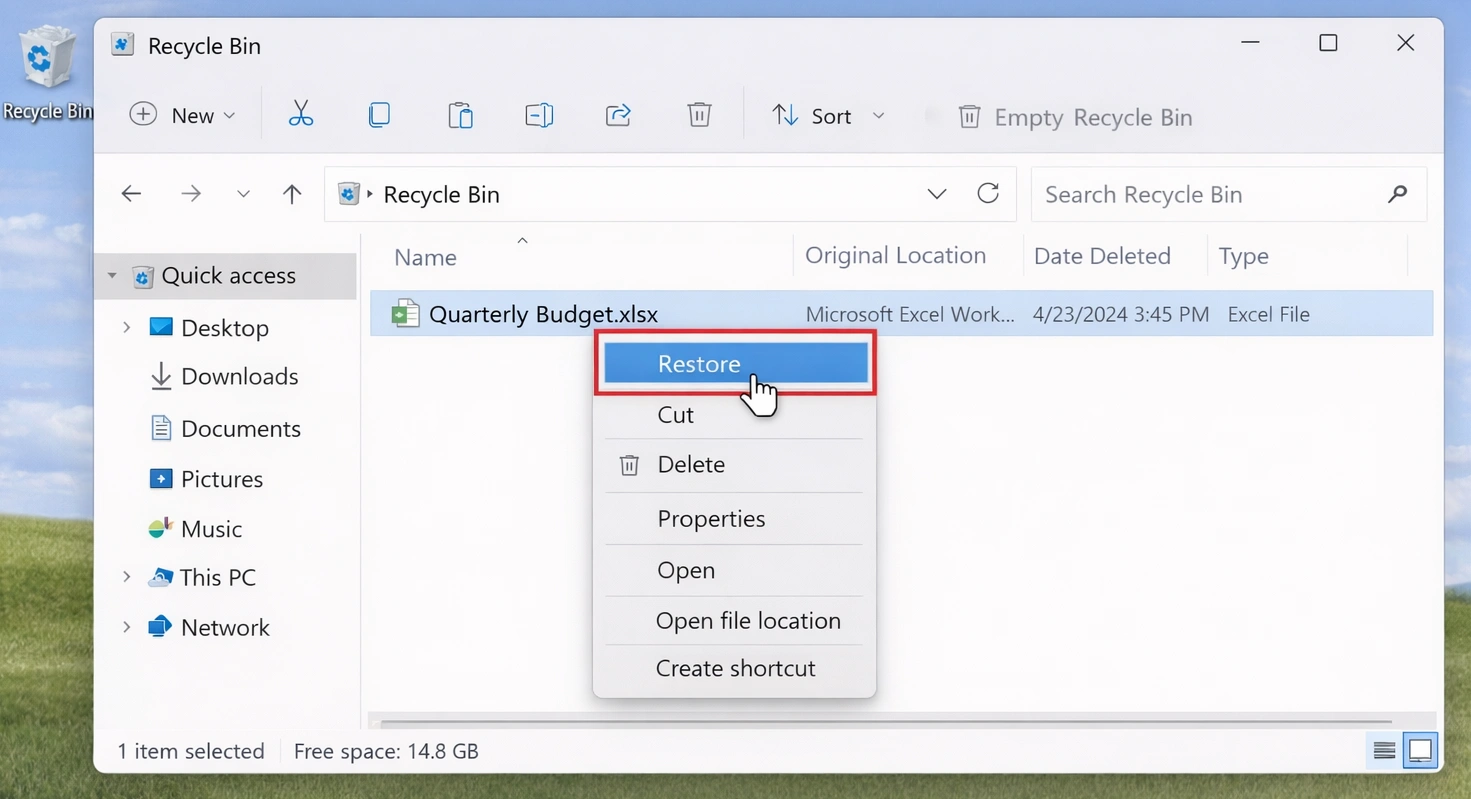
A Lixeira é o primeiro lugar a ser verificado quando arquivos são excluídos de um computador com Windows. Se você excluiu um arquivo pressionando a tecla Delete ou usando a opção “Excluir” do menu do botão direito do mouse, o arquivo ainda pode estar na Lixeira.
Passos para recuperar arquivos da Lixeira
- Clique duas vezes no ícone da Lixeira na sua área de trabalho.
- Pesquise o arquivo excluído por nome, tipo de arquivo ou data de exclusão.
- Clique com o botão direito do mouse no arquivo que deseja restaurar.
- Selecione Restore (Restaurar).
- O arquivo retornará à sua pasta original.
Método 2: Use Ctrl + Z ou a opção “Desfazer exclusão”
Ideal para: Arquivos excluídos há poucos segundos
Dificuldade: Muito fácil
Chance de recuperação: Alta
Se você acabou de excluir um arquivo e não realizou muitas ações depois disso, o Windows pode permitir que você desfaça a exclusão imediatamente.
Passos para reverter a exclusão de um arquivo
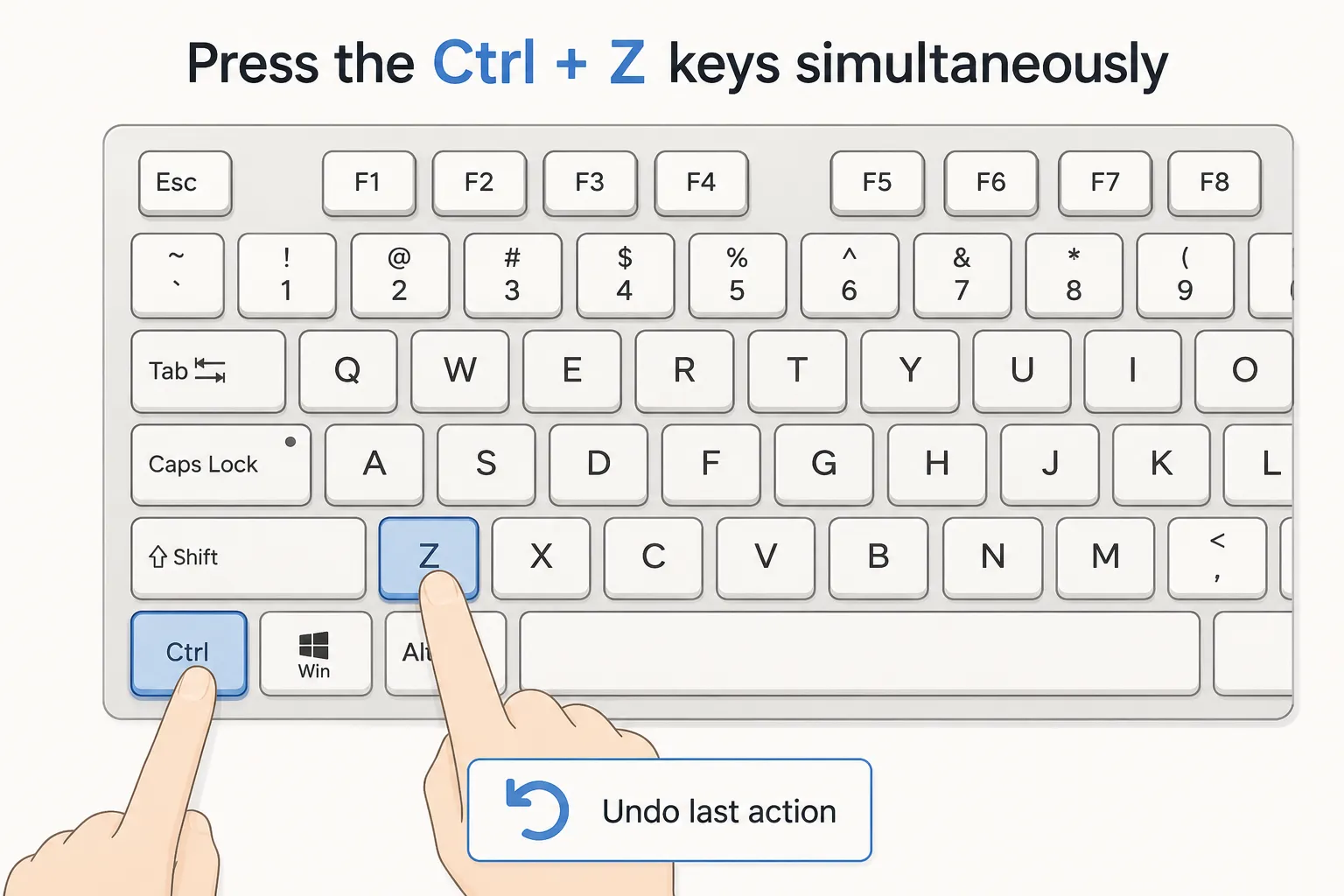
- Abra a pasta onde o arquivo foi excluído.
- Pressione Ctrl + Z no teclado.
- Verifique se o arquivo excluído reaparece.
- Você também pode clicar com o botão direito do mouse dentro da pasta e selecionar “Desfazer exclusão”, caso essa opção apareça.
Esse método é simples, mas só funciona logo após a exclusão. Se você reiniciou o computador, fechou o Explorador de Arquivos ou realizou muitas operações com arquivos, essa opção pode não estar mais disponível.
Método 3: Restaurar arquivos excluídos recentemente a partir do Histórico de Arquivos ou de versões anteriores
Ideal para: Usuários que ativaram os recursos de backup do Windows
Dificuldade: Fácil a média
Chance de recuperação: Alta, caso exista um backup
O Windows possui recursos integrados de backup que podem ajudar a restaurar arquivos excluídos. Se o “Histórico de Arquivos” ou as “Versões Anteriores” estivessem ativados antes da exclusão do arquivo, talvez seja possível recuperar uma cópia anterior.
Opção A: Restaurar a partir do Histórico de Arquivos
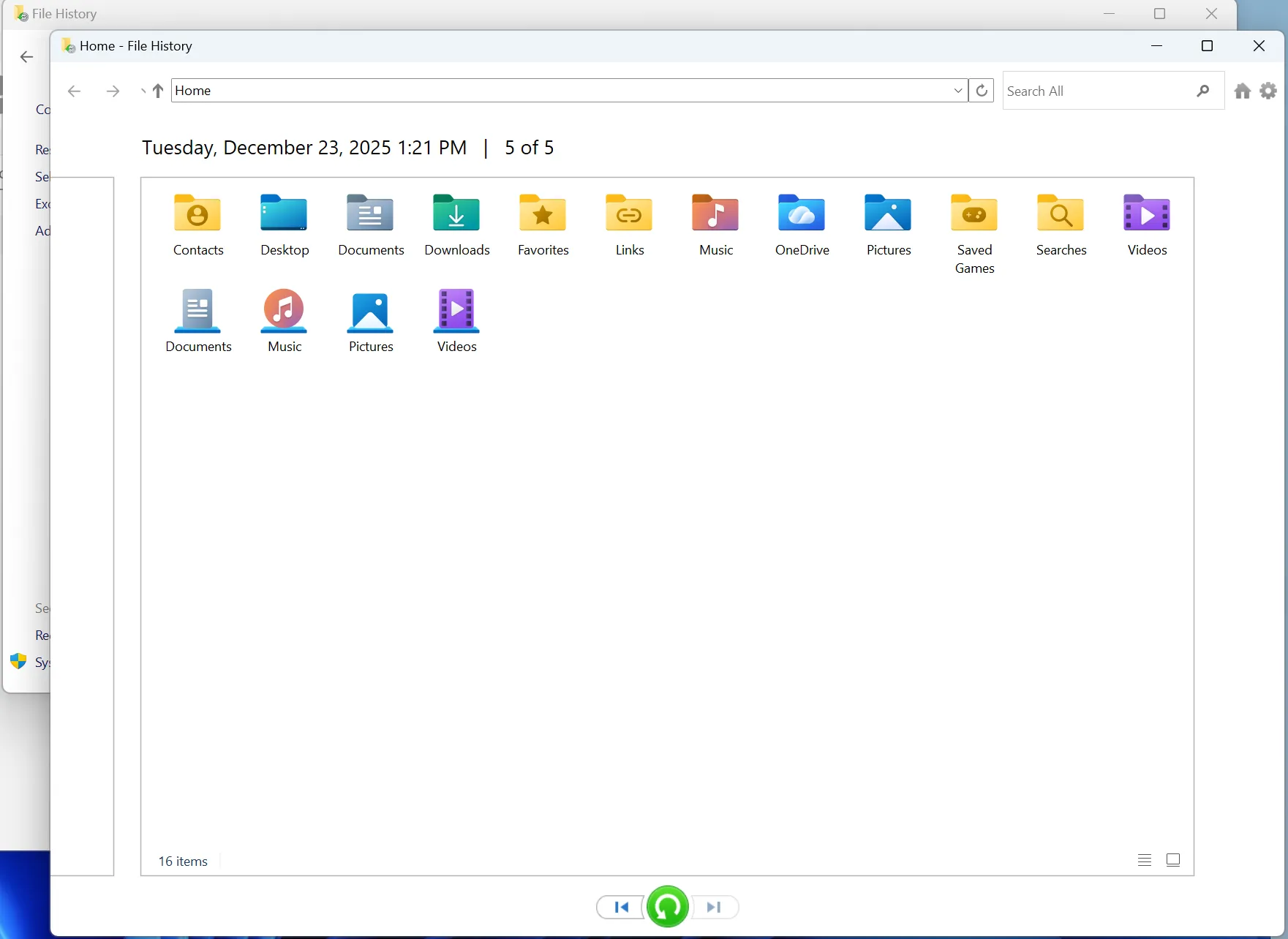
- Abra a pasta onde o arquivo excluído estava armazenado originalmente.
- Pesquise “Restaurar seus arquivos com o Histórico de Arquivos” na Pesquisa do Windows.
- Abra o Histórico de Arquivos.
- Navegue pelas versões de backup disponíveis.
- Selecione o arquivo ou a pasta que você deseja recuperar.
- Clique no botão “Restaurar”.
Opção B: Restaurar versões anteriores
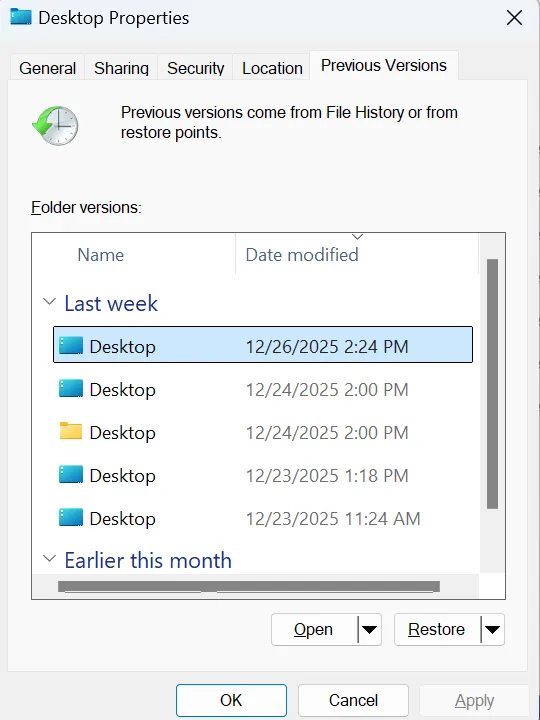
- Clique com o botão direito do mouse na pasta onde o arquivo excluído estava armazenado.
- Selecione Propriedades.
- Abra a guia Versões anteriores.
- Escolha uma versão criada antes da exclusão.
- Clique em “Abrir” para visualizar ou em “Restaurar” para recuperá-lo.
Observação importante
Esse método só funciona se o Windows já tiver criado um ponto de backup ou de restauração. Se o Histórico de Arquivos não estivesse ativado antes da exclusão, esse método pode não localizar o arquivo perdido.
Método 4: Recuperar arquivos excluídos recentemente com o Magic Data Recovery
Ideal para: Arquivos excluídos que não aparecem na Lixeira, arquivos excluídos com a tecla Shift pressionada, Lixeira esvaziada, unidades externas, pen drives, recuperação de disco rígido
Dificuldade: Fácil
Chance de recuperação: média a alta, dependendo do status de sobrescrita
O Magic Data Recovery é uma ferramenta profissional de recuperação de dados projetada para recuperar arquivos excluídos, perdidos, formatados ou inacessíveis de diversos dispositivos de armazenamento. É indicada para casos em que os métodos integrados do Windows não conseguem localizar seus arquivos excluídos.
Passos para recuperar arquivos excluídos recentemente com o Magic Data Recovery
2.Baixe e instale. Obtenha o software em seu PC com Windows. NÃO instale o software na unidade em que os arquivos perdidos estão localizados.
Compatível com Windows 7/8/10/11 e Windows Server
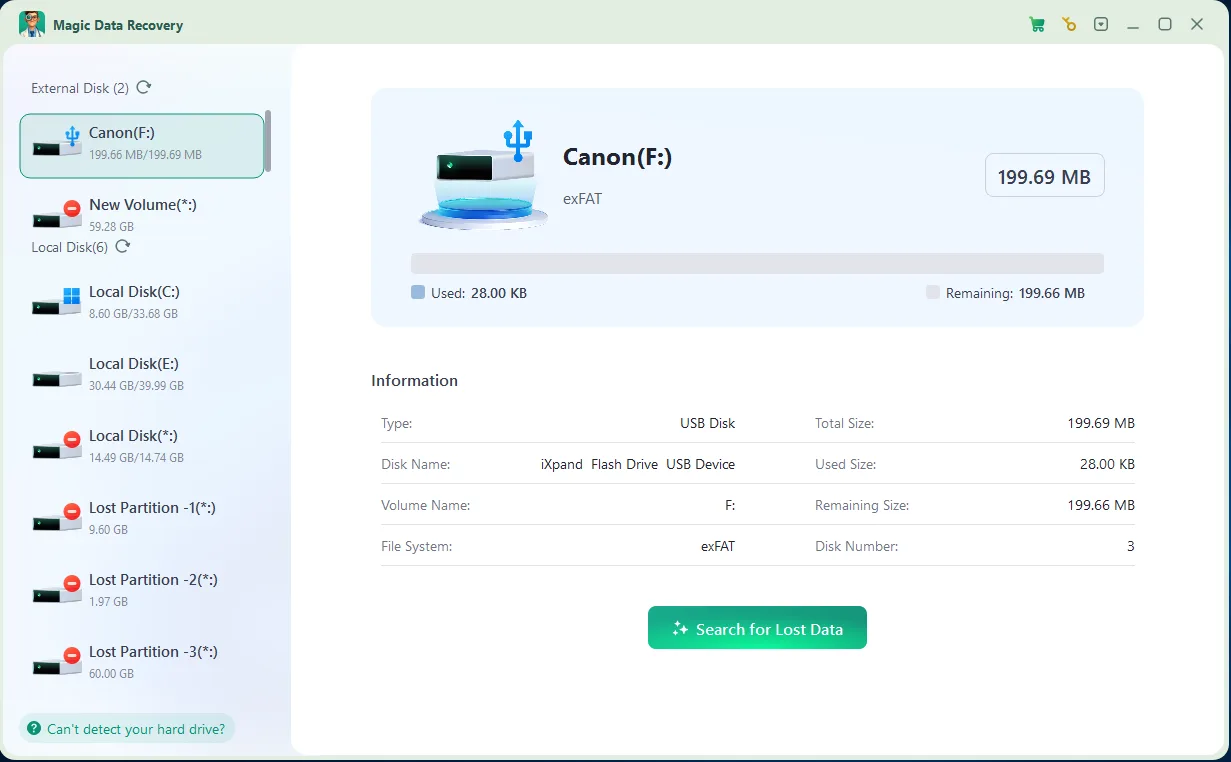
4.Preview and Recover: Após a conclusão da verificação, você poderá visualizar os arquivos recuperáveis. Isso garante que você não restaure os arquivos errados e o ajuda a recuperar exatamente o que precisa. Sempre recupere os arquivos em uma unidade diferente para evitar sobrescrever os dados restantes.

HDD x SSD: Por que a recuperação completa é diferente
O tipo de dispositivo de armazenamento tem grande influência na recuperação de arquivos excluídos.
Recuperação de HDD
Em um disco rígido tradicional, os arquivos excluídos geralmente permanecem no disco até que novos dados os sobrescrevam. Isso significa que os arquivos excluídos recentemente de um HDD costumam ter mais chances de serem recuperados na íntegra.
Se você deixar de usar o HDD se for recuperado imediatamente e verificado com um software de recuperação, a taxa de sucesso pode ser alta.
Recuperação de SSD
SSD a recuperação é mais complicada devido a TRIM. O TRIM ajuda os SSDs a gerenciar dados excluídos e a manter o desempenho, mas também pode tornar a recuperação de arquivos excluídos mais difícil ou impossível.
Se o TRIM já tiver apagado os dados excluídos, o software de recuperação pode não conseguir restaurar o arquivo completamente.
Isso não significa que a recuperação de arquivos em um SSD seja sempre impossível. Mas, se seus arquivos excluídos estavam armazenados em um SSD, você deve agir rapidamente e evitar gravar novos dados na unidade.
Conclusão
Os arquivos excluídos recentemente nem sempre desaparecem para sempre. Se você agir rapidamente e escolher o método de recuperação correto, talvez consiga recuperar arquivos excluídos completamente. Comece pelos métodos mais simples: Lixeira, Ctrl + Z ou Histórico de Arquivos. Se essas opções não funcionarem, tente um software profissional de recuperação, como Magic Data Recovery. Para obter os melhores resultados na recuperação completa de arquivos excluídos recentemente, lembre-se de três regras: pare de usar a unidade afetada, não instale programas nessa mesma unidade e recupere os arquivos em um local diferente.
Compatível com Windows 7/8/10/11 e Windows Server
PERGUNTAS FREQUENTES
É possível recuperar totalmente os arquivos excluídos recentemente?
Para onde vão os arquivos excluídos recentemente no Windows?
Como posso recuperar arquivos excluídos com a combinação de teclas Shift + Delete?
É possível recuperar arquivos excluídos recentemente depois de esvaziar a Lixeira?
É possível recuperar arquivos excluídos recentemente de um SSD?
Por que alguns arquivos recuperados estão corrompidos ou não podem ser abertos?
Qual é a maneira mais segura de recuperar arquivos excluídos recentemente?

Vasilii é um especialista em recuperação de dados com cerca de 10 anos de experiência prática na área. Ao longo de sua carreira, ele resolveu com sucesso milhares de casos complexos envolvendo arquivos excluídos, unidades formatadas, partições perdidas e sistemas de arquivos RAW. Sua experiência abrange métodos de recuperação manual usando ferramentas profissionais, como editores hexadecimais, e soluções automatizadas avançadas com software de recuperação. A missão do Vasilii é tornar o conhecimento confiável sobre recuperação de dados acessível tanto para profissionais de TI quanto para usuários comuns, ajudando-os a proteger seus valiosos ativos digitais.