
Como recuperar arquivos de um cartão SD corrompido
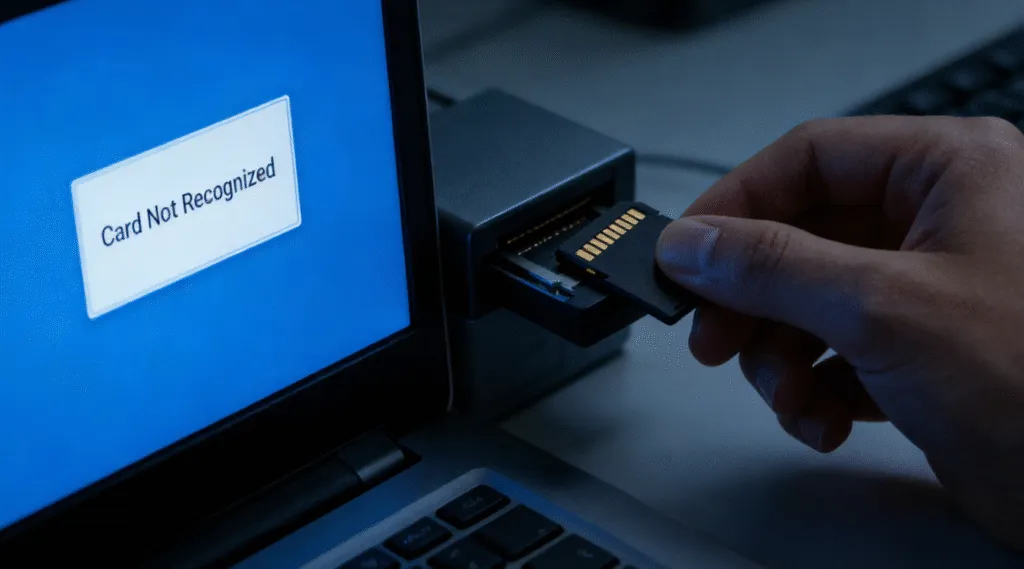
Um cartão SD pode ficar corrompido sem aviso prévio. Sua câmera pode exibir repentinamente uma mensagem de erro no cartão, o Windows pode solicitar que você formate o cartão, ou fotos e vídeos importantes podem desaparecer, mesmo que o cartão ainda mostre espaço ocupado.
A boa notícia é que muitas vezes você pode recuperar arquivos de um cartão SD corrompido se o chip de memória ainda estiver fisicamente funcional e os dados perdidos não tiverem sido sobrescritos.
No entanto, a ordem em que você realiza essas ações é importante. Formatar o cartão, salvar novos arquivos nele ou executar comandos de reparo imediatamente pode alterar o sistema de arquivos e tornar a recuperação de alguns arquivos mais difícil.
A abordagem mais segura é simples: pare de usar o cartão SD, recupere primeiro os arquivos importantes e só repare ou formate o cartão depois que seus dados estiverem armazenados com segurança em outro lugar.
Neste guia, você aprenderá como recuperar arquivos de um cartão SD corrompido usando quatro métodos práticos, incluindo softwares de recuperação de dados como Magic Data Recovery, comandos do CMD, como CHKDSK e ATTRIB, Recuperação de Arquivos do Windows, backups e serviços profissionais Serviços de recuperação de cartões SD.
Compatível com Windows 7/8/10/11 e Windows Server
Está se perguntando se seus arquivos podem ser recuperados? Saiba mais em segundos com nossa verificação rápida abaixo.
Avaliação da recuperação de dados
Responda a 3 perguntas rápidas para estimar suas chances de recuperação
Índice
Resposta rápida: Como recuperar arquivos de um cartão SD corrompido?
Sim, muitas vezes é possível recuperar um cartão SD corrompido, especialmente quando o problema é causado por corrupção lógica, e não por dano físico.
Use a tabela abaixo para escolher a primeira medida mais segura para a sua situação:
A situação do seu cartão SD | Melhor Primeira Ação | Por que |
O cartão SD foi detectado, mas faltam arquivos | Faça uma varredura com um software de recuperação de dados | Os arquivos perdidos podem ainda estar no cartão |
O Windows solicita que você formate o cartão | Não formate; recupere os arquivos primeiro | A formatação altera a estrutura do sistema de arquivos |
O cartão SD aparece como RAW | Recupere os dados antes de tentar fazer reparos | Normalmente, o Windows não consegue acessar um sistema de arquivos RAW |
Os arquivos desapareceram, mas o espaço ocupado permanece | Experimente o comando ATTRIB ou um software de recuperação | Os arquivos podem ser ocultados em vez de excluídos |
O cartão SD possui uma letra de unidade e apresenta pequenos erros no sistema de arquivos | Recupere os dados importantes primeiro e, depois, considere executar o CHKDSK | O CHKDSK repara o sistema de arquivos sem precisar desligar o computador |
Os arquivos foram excluídos ou o cartão foi formatado | Use um software de recuperação ou o Recuperação de Arquivos do Windows | O CHKDSK não é, em primeiro lugar, uma ferramenta de recuperação de arquivos excluídos |
O cartão SD não é reconhecido em nenhum computador ou dispositivo | Tente usar outro leitor, outra porta ou outro computador; depois, considere recorrer a um serviço profissional de recuperação | A placa pode apresentar danos físicos ou no controlador |
Importante: Não salve novos arquivos no cartão SD corrompido. Novos dados podem sobrescrever os arquivos recuperáveis e reduzir suas chances de uma recuperação bem-sucedida.
O que significa quando um cartão SD está corrompido?
Corrupção do cartão SD geralmente se refere a danos lógicos em vez de falha física. Os dados ainda existem, mas o sistema não consegue lê-los corretamente.
Os sintomas comuns incluem:
- “Você precisa formatar o disco antes de poder usá-lo.”
- O cartão SD é exibido como RAW no Gerenciamento de disco.
- Os arquivos aparecem com nomes estranhos ou não podem ser abertos.
- O cartão foi detectado, mas está inacessível.
Em cenários práticos de recuperação, a corrupção geralmente ocorre devido à ejeção inadequada, interrupção de energia, infecção por vírus ou erros no sistema de arquivos. É importante entender essa distinção porque a corrupção lógica geralmente pode ser recuperada com soluções corretas para cartões SD, enquanto os danos físicos não podem.
É possível recuperar arquivos de um cartão SD corrompido?
Em muitos casos, sim. Suas chances de recuperar arquivos de um cartão SD corrompido geralmente são maiores quando:
- O Windows ainda reconhece o cartão SD.
- A placa aparece no Gerenciamento de Discos.
- O cartão tem uma capacidade reconhecível.
- O Windows solicita que você formate o disco.
- O cartão aparece como RAW.
- Os arquivos desapareceram após um erro ou uma interrupção inesperada.
- O cartão foi formatado acidentalmente, mas não foi muito usado.
A recuperação se torna mais difícil quando:
- O cartão não é detectado em nenhum dispositivo.
- A placa fica conectando e desconectando repetidamente.
- A placa fica excepcionalmente quente.
- O cartão está rachado, amassado, queimado ou com danos físicos.
- Grandes quantidades de novos dados foram gravadas após a perda dos arquivos originais.
O fator mais importante é saber se os dados originais ainda existem e não foram sobrescritos.
É por isso que você deve parar de usar o cartão SD assim que perceber que ele está corrompido ou que houve perda de dados.
Importante: Recupere os arquivos antes de reparar o cartão SD
Um dos erros mais comuns é tentar reparar um cartão SD corrompido antes de recuperar arquivos importantes.
Isso é arriscado, pois as operações de reparo podem alterar o sistema de arquivos original.
Por exemplo, CHKDSK foi projetado para verificar se há erros no sistema de arquivos de um volume e, quando usado com parâmetros de reparo, corrigir esses erros diretamente no dispositivo de origem. Isso pode ser útil quando sua prioridade é tornar um cartão acessível novamente, mas não é o mesmo que preservar o estado original de todos os arquivos perdidos ou danificados.
Para fotos, vídeos, documentos ou arquivos de trabalho importantes, siga esta ordem:
- Pare de usar o cartão SD imediatamente.
- Não formate o cartão, mesmo que o Windows peça para você fazer isso.
- Recupere arquivos importantes em outra unidade.
- Verifique se os arquivos recuperados podem ser abertos.
- Só então repare ou reformate o cartão SD, caso pretenda reutilizá-lo.
Aviso: Nunca recupere arquivos para o mesmo cartão SD corrompido. Sempre salve os dados recuperados em outro dispositivo de armazenamento físico.
Como recuperar arquivos de um cartão SD corrompido usando o CMD
O método mais comumente associado ao CMD é o Comando CHKDSK. Embora seja popular, nem sempre é seguro.
Quando o CMD funciona e quando não funciona
A recuperação baseada em CMD pode funcionar se:
- O sistema de arquivos tem pequenas erros lógicos.
- O cartão SD ainda tem uma letra de unidade reconhecível.
O CMD deve ser evitado se:
- O card é exibido como RAW.
- Os arquivos já estão faltando.
- Os dados são essenciais e insubstituíveis.
Passo a passo: Usando o CHKDSK em um cartão SD corrompido
1. Insira o cartão SD em seu computador.
2. Abra o prompt de comando como administrador.
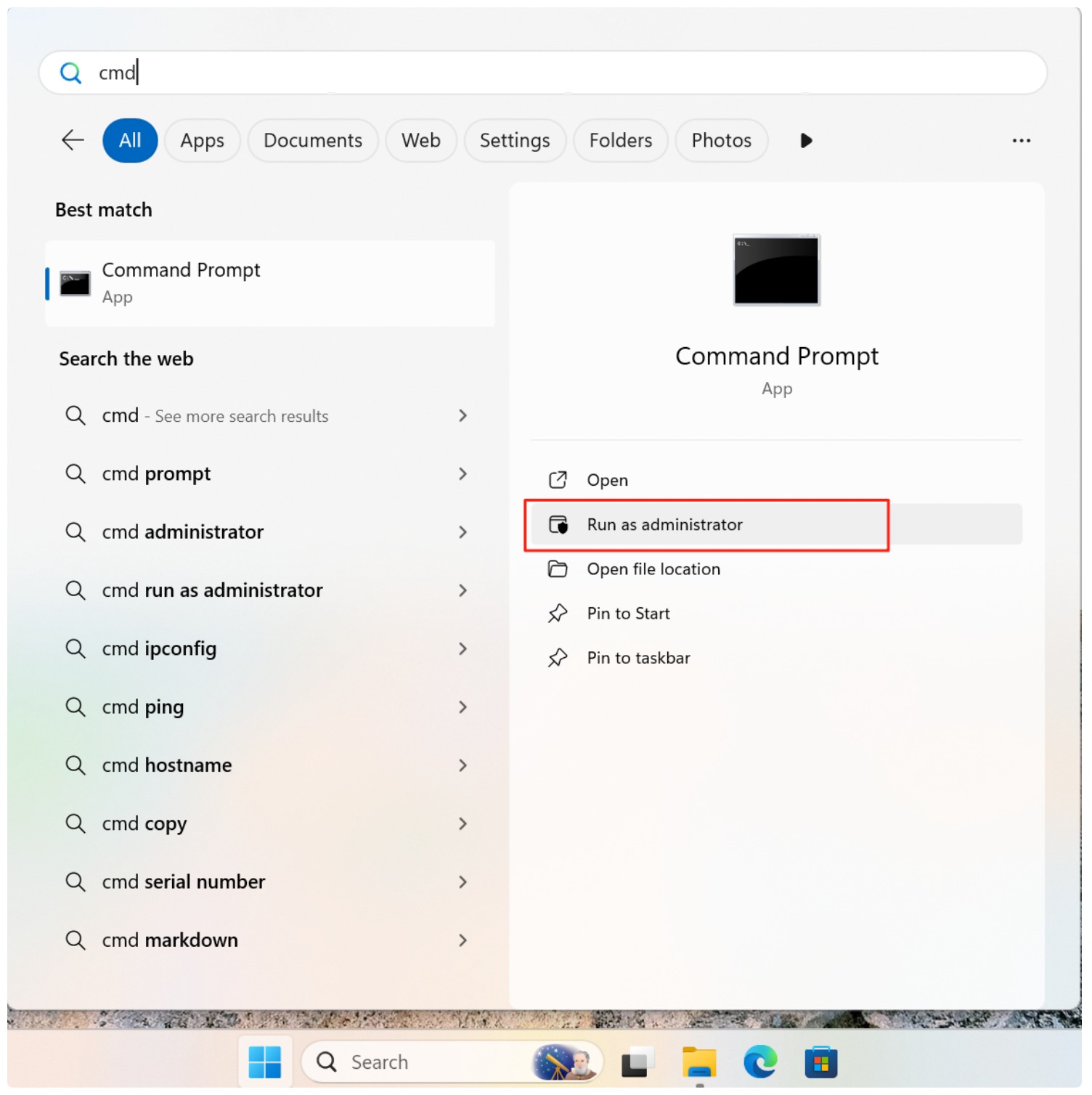
3. Digite o comando:
chkdsk X: /f /r
Substitua X pela letra da unidade do cartão SD.

4. Pressione Enter e aguarde a conclusão do processo.
Se CHKDSK Se a recuperação for bem-sucedida, os arquivos recuperados poderão aparecer em uma pasta FOUND. No entanto, os nomes e as estruturas dos arquivos geralmente são perdidos. Em muitos casos, os usuários descobrem que o CHKDSK remove as entradas corrompidas em vez de restaurá-las.
É por isso que o CMD deve ser tratado como uma ferramenta de reparo, não como uma solução primária de recuperação de dados.
Melhor maneira de recuperar arquivos de um cartão SD corrompido com segurança
Para os usuários que desejam maximizar o sucesso da recuperação e minimizar os riscos, o software de recuperação dedicado é a abordagem preferida.
Por que o Magic Data Recovery é uma opção mais segura
Magic Data Recovery foi projetado especificamente para cenários em que os usuários precisam recuperar arquivos de um cartão SD corrompido sem alterar os dados originais.
As principais vantagens incluem:
- Varredura somente de leitura que evita a substituição de arquivos.
- Suporte a sistemas de arquivos corrompidos e RAW.
- Visualização do arquivo antes da recuperação para verificar os resultados.
- Compatibilidade com sistemas Windows.
Cenário de uso no mundo real
Um caso comum envolve um cartão SD de uma câmera que, de repente, aparece como ilegível. Em vez de executar o CMD, os usuários examinam o cartão com o Magic Data Recovery, visualizam as fotos e os vídeos e os recuperam em uma unidade separada. Somente depois de confirmar a recuperação bem-sucedida, eles formatam o cartão SD para reutilização.
Como usar o Magic Data Recovery
1. Instale o Magic Data Recovery em uma unidade diferente.
Compatível com Windows 7/8/10/11 e Windows Server
2. Conecte o cartão SD corrompido e inicie uma verificação.
Quando você executa o Magic Data Recovery, ele mostra todos os dispositivos conectados ao computador, inclusive o cartão SD corrompido.

3. Aguarde até que a verificação seja concluída.
O Magic Data Recovery executa o Advanced Scan automaticamente. Ele mostrará todos os arquivos encontrados no cartão SD após a verificação.

4. Visualizar arquivos.
Você pode visualizar o conteúdo do arquivo antes de recuperar os dados, o que ajuda a confirmar se são os arquivos que você está procurando.

5. Recupere os dados em outra unidade.
Selecione os dados necessários e recupere-os em um local seguro. NÃO formatar ou salvar os dados no cartão SD original.

CMD x Software de Recuperação de Dados: Qual você deve usar?
A escolha certa depende do que realmente aconteceu com o cartão SD.
Método | Melhor para | Limitação principal |
CHKDSK | Reparo de sistemas de arquivos reconhecíveis com erros lógicos | Altera o sistema de arquivos de origem e não é, essencialmente, uma ferramenta de recuperação de arquivos excluídos |
ATRIB | Exibindo arquivos ocultos por atributos alterados | Não é possível recuperar arquivos que foram realmente excluídos ou sobrescritos |
Recuperação de arquivos do Windows | Recuperação por linha de comando de determinados arquivos perdidos ou excluídos | É um método mais técnico e pode não funcionar em todos os casos de corrupção de dados |
Software de recuperação de dados | Verificação de cartões corrompidos, no formato RAW, formatados ou inacessíveis em busca de arquivos recuperáveis | A recuperação depende do estado do cartão e se os dados foram sobrescritos |
Serviço profissional | Danos físicos ou cartas que não podem ser detectadas | Geralmente mais caro |
Para arquivos importantes, o princípio geral mais seguro é: Recuperar primeiro. Reparar depois.
E se o software de recuperação e o CMD falharem?
Se nem o software de recuperação nem o CMD conseguirem acessar o cartão SD, verifique primeiro se o Windows consegue detectar o dispositivo.
Experimente:
- Reconectando o cartão.
- Usando outro leitor de cartão SD.
- Vou tentar outra porta USB.
- Testando outro computador.
- Verificando o Gerenciamento de Discos.
Se o cartão estiver visível em Gerenciamento de disco mas, mesmo que estejam inacessíveis no Explorador de Arquivos, ainda pode ser possível recuperá-los.
Se o cartão não aparecer em lugar nenhum, pode haver um problema com:
- O chip de memória.
- O controlador.
- Conexões elétricas.
- Estrutura física do cartão.
Nessa situação, o software não consegue consertar o próprio hardware.
No caso de dados insubstituíveis, interrompa novas tentativas e considere recorrer a um serviço profissional de recuperação.
Conclusão
Recuperação de dados de um cartão de memória danificado requer paciência e a abordagem correta. Embora as ferramentas de CMD possam reparar os sistemas de arquivos, elas geralmente oferecem risco de perda de dados. Para recuperar arquivos de um cartão SD corrompido com segurança, usando uma solução dedicada como Magic Data Recovery oferece melhor controle, maiores taxas de sucesso e menos surpresas. Escolher o método de recuperação correto primeiro faz a diferença entre uma restauração bem-sucedida e uma perda permanente.
Compatível com Windows 7/8/10/11 e Windows Server
PERGUNTAS FREQUENTES
Posso recuperar dados de um cartão SD corrompido gratuitamente?
É possível recuperar arquivos de um cartão SD que não é formatado?
Por que meu computador diz que o cartão SD está corrompido e não pode ser lido?
Posso recuperar fotos de um cartão SD fisicamente quebrado?
Como faço para corrigir um cartão SD RAW sem perder dados?
O CHKDSK exclui arquivos em um cartão SD corrompido?
Como posso evitar a corrupção do cartão SD no futuro?

Vasilii é um especialista em recuperação de dados com cerca de 10 anos de experiência prática na área. Ao longo de sua carreira, ele resolveu com sucesso milhares de casos complexos envolvendo arquivos excluídos, unidades formatadas, partições perdidas e sistemas de arquivos RAW. Sua experiência abrange métodos de recuperação manual usando ferramentas profissionais, como editores hexadecimais, e soluções automatizadas avançadas com software de recuperação. A missão do Vasilii é tornar o conhecimento confiável sobre recuperação de dados acessível tanto para profissionais de TI quanto para usuários comuns, ajudando-os a proteger seus valiosos ativos digitais.