
Digital Forensics

Digital forensics is the scientific process of identifying, collecting, examining, analyzing, and reporting electronic data while preserving its integrity. It is used when information stored on computers, phones, storage devices, networks, or cloud systems may help explain an event.
In simple terms, digital forensics does more than find files. It tries to establish what happened, where the evidence came from, whether it changed, and whether another investigator could verify the same findings.
NIST defines digital forensics around the identification, collection, examination, and analysis of data while maintaining information integrity and a strict chain of custody.
Although digital forensics and deleted file recovery sometimes overlap, they serve different purposes. Data recovery focuses mainly on restoring lost information, while forensic work focuses on preserving, examining, and interpreting evidence within its original context.
Table of Contents
Digital Forensics Quick Facts
Item | Explanation |
Category | Forensic science / digital investigation |
Main Purpose | Collect and analyze digital evidence without unnecessarily altering it |
Common Sources | Computers, HDDs, SSDs, phones, USB drives, networks, cloud systems |
Typical Process | Collection → Examination → Analysis → Reporting |
Key Principles | Evidence integrity, chain of custody, repeatability, documentation |
Related Terms | Computer forensics, incident response, data recovery, eDiscovery |
Common Tools | Imaging tools, write blockers, artifact analyzers, memory tools |
Main Limitation | Evidence may become unavailable after overwriting, encryption, physical damage, or other changes |
The important point is that digital forensics is a process rather than one particular piece of software.
Digital Forensics Explained in Plain English
A useful way to understand the basics of digital forensics is to think about the difference between finding information and proving where that information came from.
Imagine that an important Word document disappears from a company computer.
A normal user may ask:
Can I get the document back?
A forensic investigator asks additional questions:
- When was the document created?
- When was it last modified?
- Was it deleted?
- Which account accessed it?
- Was it copied to another device?
- Are there other traces of the file?
- Has the original storage device changed since the incident?
- Can another examiner reproduce the result?
Therefore, file recovery may form part of an investigation, but it does not represent the entire digital forensics process.
The same principle applies to browser history, email, system logs, USB activity, cloud records, malware traces, and other digital evidence.
How Does Digital Forensics Work?
NIST SP 800-86 describes a four-phase forensic process: collection, examination, analysis, and reporting.
The exact workflow varies according to the investigation, but this model provides a useful foundation for understanding how digital forensics works.
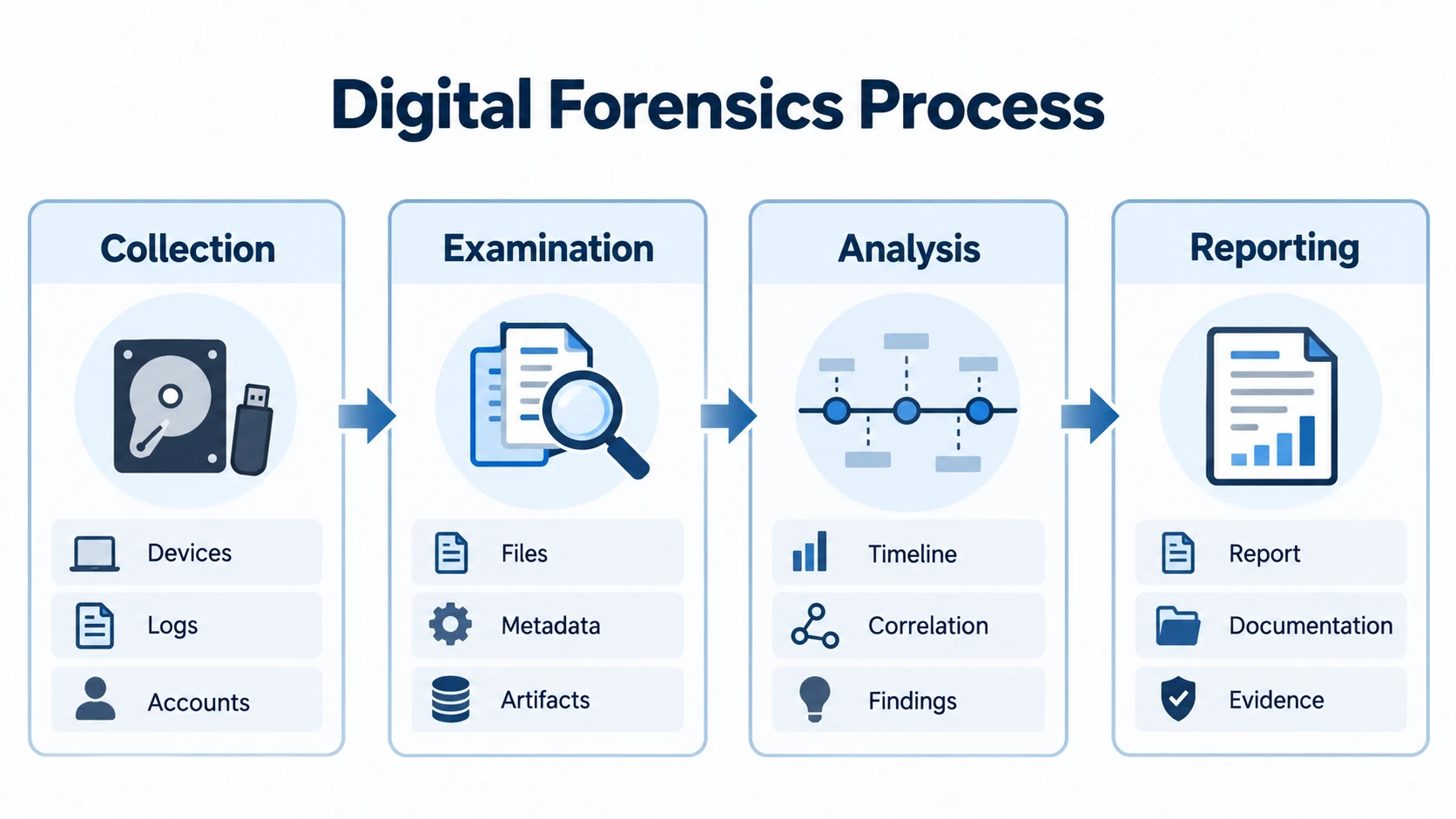
1. Collection
The first stage identifies and collects potentially relevant data.
Possible sources include:
- Internal HDDs and SSDs
- USB drives and memory cards
- Mobile devices
- Servers
- Operating-system logs
- Browser records
- Network traffic
- Cloud accounts
- Application databases
- Volatile memory
However, collection is not simply copying whatever files appear useful.
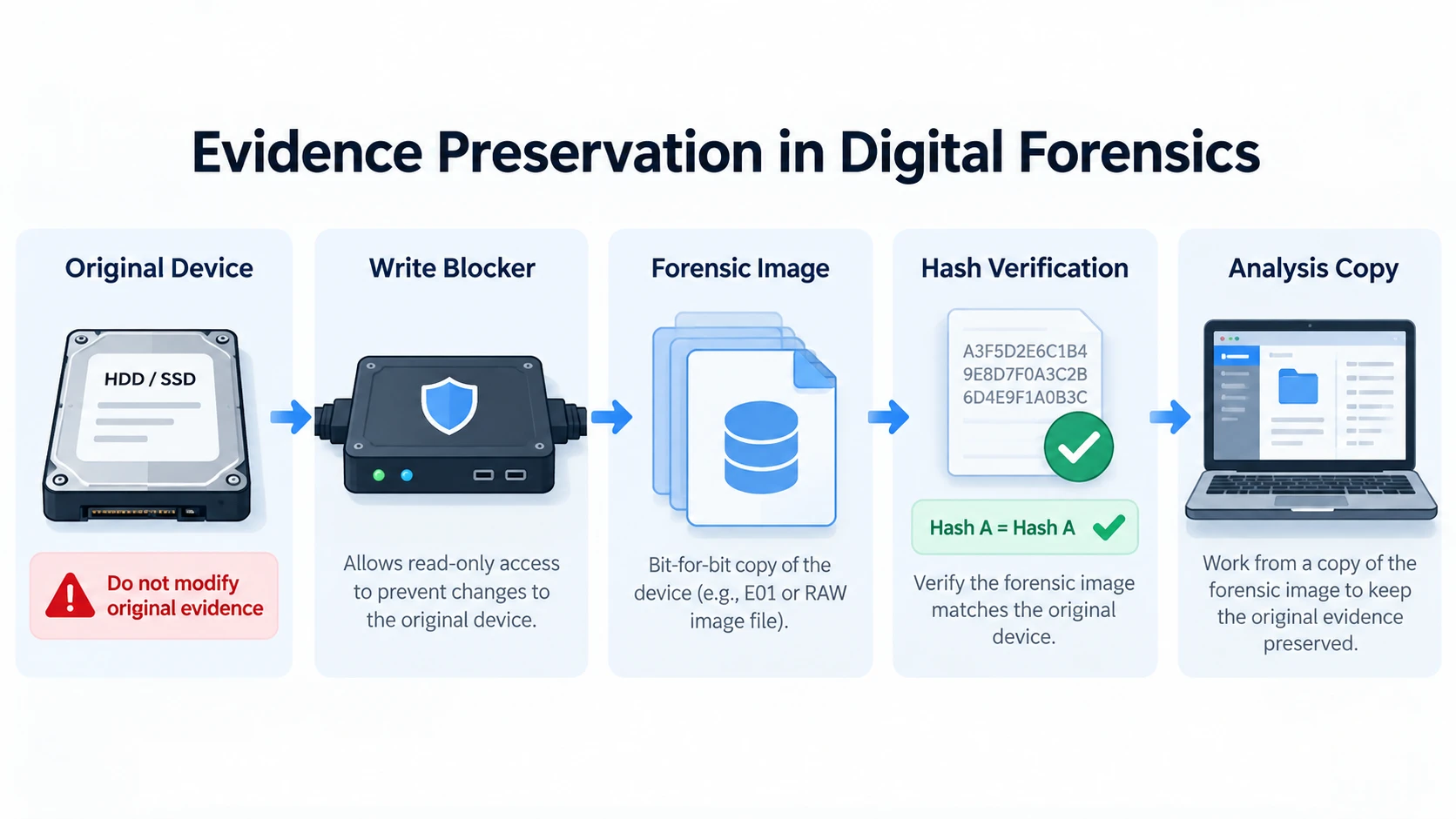
Investigators also consider how to protect the original source. For storage media, that often means creating a forensic image rather than repeatedly working on the original disk.
Our guide to data imaging explains how a sector-level image allows subsequent examination to take place on a copy while reducing unnecessary changes to the source device.
A hardware or software write blocker may also prevent the forensic workstation from modifying the storage medium.
2. Examination
After collecting the data, investigators locate information that may be relevant.
This can include:
- Existing files
- Deleted file records
- File-system metadata
- Browser history
- Registry information
- Email databases
- Event logs
- Application artifacts
- Images and videos
- Archives
- Search terms
- Timestamps
At this stage, digital forensics tools help reduce large amounts of raw data into material that investigators can examine more efficiently.
For instance, an investigator may search a disk image for documents created within a specific period, identify deleted records, or inspect metadata associated with a suspicious user account.
3. Analysis
Examination finds artifacts. Analysis tries to understand what those artifacts mean.
Suppose investigators discover a deleted spreadsheet. The file itself may be useful, but other evidence can provide more context.
They might correlate:
- File creation and modification times
- Windows logon events
- USB connection records
- Browser downloads
- Application history
- Email attachments
- Cloud synchronization logs
Together, these artifacts may help reconstruct a sequence of events.
This distinction matters because one recovered file or timestamp rarely explains an entire incident by itself.
4. Reporting
The final phase records the investigation and its findings.
A forensic report may document:
- Evidence sources
- Acquisition methods
- Tools and software versions
- Hash values
- Relevant artifacts
- Investigation timeline
- Technical limitations
- Findings and supporting evidence
Good reporting also separates observed facts from interpretation.
As a result, another qualified examiner can understand how investigators reached their findings.
What Makes Digital Evidence Forensically Reliable?
Finding useful information is only part of digital forensics. Investigators must also protect the reliability of that information.
Evidence Integrity
Digital information is easy to change.
Opening a file, starting an operating system, installing software, or writing new information to a disk may modify timestamps, logs, temporary files, or storage sectors.
For this reason, investigators often preserve the original source and perform analysis on a forensic image or working copy instead.
Chain of Custody
A chain of custody records how evidence was collected, stored, transferred, and examined.
Typical records may identify:
- The original device
- Collection date and time
- Person who collected it
- Acquisition method
- Transfers between investigators
- Storage location
- Relevant hash values
This documentation helps establish what happened to the evidence throughout the investigation.
Hash Verification
A cryptographic hash creates a value derived from the contents of digital data.
If the data changes, its resulting hash should also change. Investigators can therefore compare hash values to help verify whether a forensic image remains consistent with the copy originally acquired.
Repeatability
Another investigator should be able to understand how a result was obtained.
That is why professional digital forensics workflows document tools, settings, commands, versions, searches, and analytical decisions rather than relying on memory.
Major Types of Digital Forensics
Not every investigation examines the same type of system. Therefore, several branches of digital forensics focus on different evidence sources.
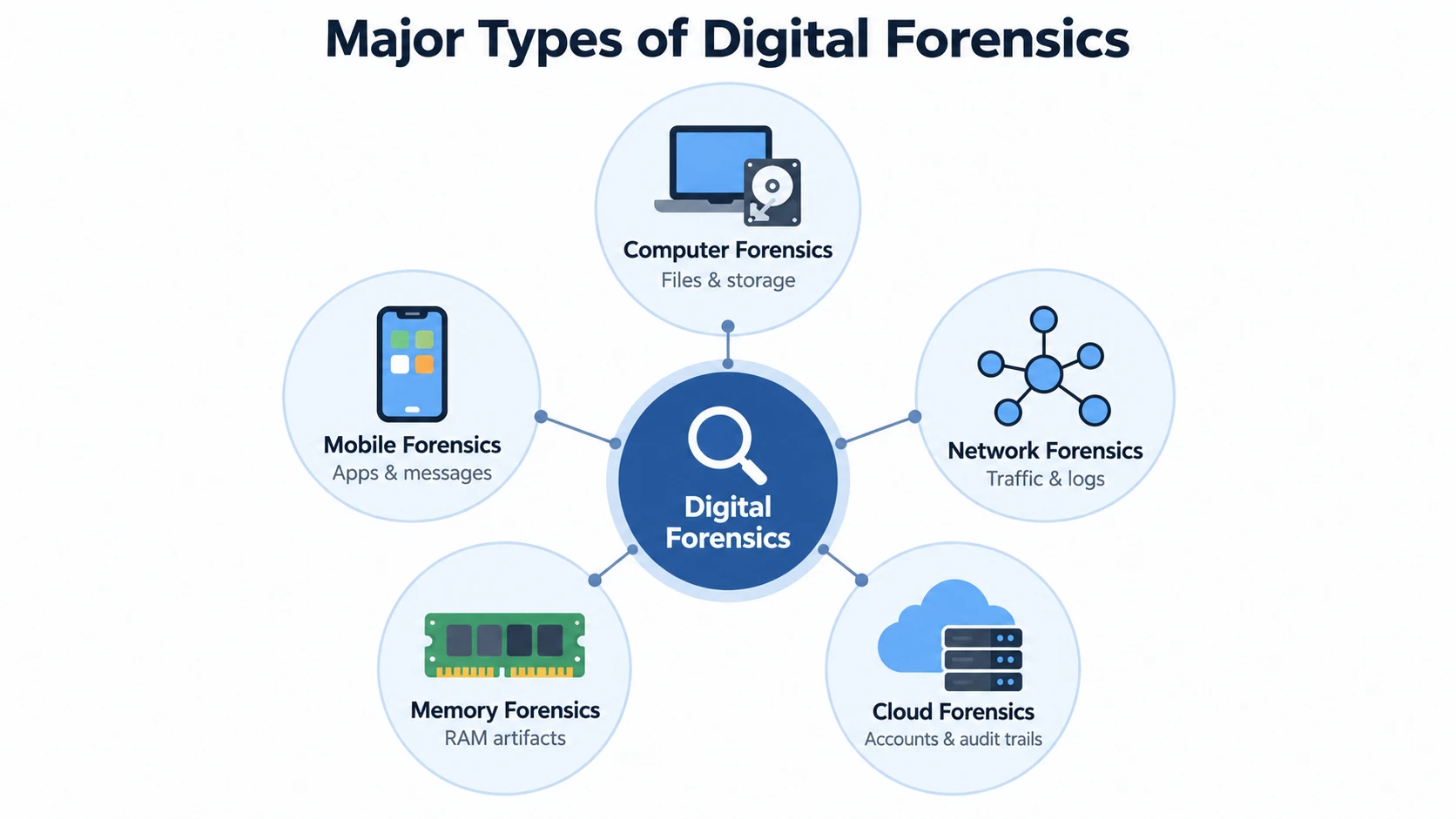
Computer Forensics
Computer forensics focuses primarily on computers and attached storage.
Evidence may include:
- Files and folders
- File-system metadata
- Windows Registry artifacts
- User accounts
- Browser records
- Installed applications
- Event logs
- Deleted data
Windows systems commonly use NTFS, which stores metadata such as file records, timestamps, and directory information.
For a deeper explanation of the underlying structure, see What Is the NTFS File System?.
Mobile Device Forensics
Mobile forensics examines smartphones, tablets, and related data.
Depending on the device and acquisition method, investigators may work with messages, photos, application data, system databases, call records, and other artifacts.
Modern encryption and secure hardware can make mobile acquisition significantly different from traditional computer storage analysis.
Network Forensics
Network forensics examines communications between systems.
Relevant evidence may include:
- Packet captures
- DNS requests
- Firewall logs
- VPN activity
- Proxy logs
- Connection records
- Network-flow data
This information can help investigators reconstruct how systems communicated during an incident.
Memory Forensics
Memory forensics examines volatile data stored in RAM.
RAM can contain information about running processes, active network connections, loaded modules, malicious code, and temporary system states.
Because this information may disappear after shutdown, investigators sometimes need to decide whether live memory collection should occur before powering off a system.
Cloud Forensics
Cloud services create another source of digital evidence.
Investigations may examine:
- Login records
- Audit histories
- File-access logs
- Version histories
- Account changes
- Cloud storage
- Administrative activity
However, available evidence often depends on the provider, service configuration, retention policy, and account permissions.
Why Digital Forensics Matters
Understanding digital forensics matters because many important events now leave electronic traces.
Cybersecurity Incidents
After malware, ransomware, unauthorized access, or another security incident, forensic analysis can help determine what happened and which systems were affected.
It can also support incident response by identifying relevant files, accounts, logs, and timelines.
Internal Investigations
Organizations may examine digital evidence when investigating suspected data theft, policy violations, unauthorized file transfers, or deleted business records.
For example, a missing folder alone may provide limited information. File-system metadata, application history, USB records, logs, and backups may provide additional context.
Legal Investigations
Electronic information can become relevant to civil, criminal, regulatory, or employment matters.
In these situations, documenting the evidence source and investigative method becomes particularly important.
Data Loss and Recovery
The principles of digital forensics also explain why users should be careful when important data disappears.
Writing additional data to an affected storage device can overwrite information that may otherwise remain recoverable.
File-system behavior matters as well. A journaling file system, for example, records structural changes to help preserve consistency. However, journaling does not mean deleted file content will always remain recoverable.
Therefore, when preserving missing information matters, users should minimize unnecessary changes to the device.
Digital Forensics vs. Data Recovery
These concepts overlap, but they solve different problems.
Digital Forensics | Data Recovery | |
Main question | What happened, and what evidence supports it? | Can the lost data be recovered? |
Primary goal | Investigation and evidence analysis | Restore accessible files |
Evidence integrity | Central requirement | Depends on the situation |
Chain of custody | Often important | Usually unnecessary for ordinary recovery |
Typical output | Findings, artifacts, timeline, report | Recovered files |
Tools | Imaging, analysis, memory, network, artifact tools | File and storage recovery tools |
The most important difference is intent.
If a family photo was accidentally deleted, the user normally cares about restoring the file.
If a document disappears during an internal investigation, the investigator may need both the document and evidence showing when it disappeared, which account interacted with it, and how investigators reached that conclusion.
Therefore, data recovery can support digital forensics, but the two terms are not interchangeable.
Where Do You Encounter Digital Forensics?
Most users do not open Windows and see a feature called “Digital Forensics.”
Instead, they encounter the concept through real situations.
Deleted or Missing Files
Deleted data may become relevant when investigators need to determine whether information existed before it disappeared.
Depending on the file system and storage device, deleted file records or file content may remain available until other data replaces them.
For ordinary recovery cases, our guide to recovering deleted data from a hard drive explains what happens after deletion and why continued use of the drive can reduce recovery possibilities.
However, recovery is never guaranteed.
SSDs add another complication because TRIM and garbage collection may remove deleted data before a recovery or forensic tool can access it.
Security Incidents
A security investigation may combine logs, malware artifacts, browser activity, memory, and network evidence to understand a compromise.
USB and External Storage Activity
Removable devices can leave traces in operating-system artifacts and logs.
These records may help investigators establish whether a storage device was connected to a computer.
Browser and Application Activity
Web browsers and applications can preserve history, caches, databases, recently opened documents, and other artifacts.
Cloud and Account Activity
Authentication logs and audit records may show account access, administrative changes, or file activity even when the local computer provides limited information.
Common Misconceptions About Digital Forensics
“Digital forensics just means recovering deleted files.”
File recovery is only one possible task.
Digital forensics can also examine logs, metadata, memory, networks, browsers, mobile devices, cloud systems, and application databases.
Its broader purpose is to identify and interpret evidence within context.
“Deleting a file permanently destroys it immediately.”
Not always.
On some storage systems, deletion changes or removes the file-system reference while some underlying data remains until overwritten.
However, SSD TRIM, garbage collection, encryption, overwriting, or secure deletion can make recovery impossible.
“Any recovery software is a forensic tool.”
Not necessarily.
Forensic applications may require controlled acquisition, evidence preservation, detailed logging, reproducibility, and validated functions.
NIST operates the Computer Forensics Tool Testing program because understanding the capabilities and reliability of forensic tools matters.
“The original disk should always be scanned directly.”
That can be inappropriate when evidentiary integrity matters.
A professional workflow may use a write blocker and create an image before analysis so the original medium remains protected.
“One recovered file proves what happened.”
A recovered file establishes only part of the picture.
Its timestamps, surrounding metadata, logs, account activity, and other artifacts may be necessary before investigators can draw broader conclusions.
Practical Relevance: What Should You Do Next?
For most readers, understanding digital forensics is enough. You do not need forensic software simply because you encountered the term.
Your next step depends on why you are examining the device.
If the computer or storage medium may contain evidence for litigation, an internal investigation, law enforcement, or another sensitive matter, avoid unnecessary changes to the original source. A trained forensic examiner may need to preserve and image the device before further analysis.
If your concern is preventing future data loss rather than investigating an event, a data backup and recovery strategy is more relevant.
If the situation is ordinary Windows data loss and there is no formal evidence-preservation requirement, this is where a recovery application becomes relevant.
Magic Data Recovery is designed for recovering deleted, formatted, RAW, or otherwise inaccessible files from Windows-accessible storage. It can scan the affected device and preview recoverable files before saving them to another location.
However, its role should remain clear: it is a data recovery tool, not a complete forensic acquisition, chain-of-custody, memory-analysis, or evidence-management platform.
That distinction helps users choose a tool based on the actual task rather than treating every recovery utility as a forensic suite.

Conclusion
Digital forensics is the structured examination of electronic information to understand events while preserving the reliability and context of the evidence.
Its core workflow moves through collection, examination, analysis, and reporting. Evidence integrity, hashing, chain of custody, documentation, and repeatability help make the findings more trustworthy.
Understanding the basics of digital forensics also explains why recovering a deleted file is only one part of a much larger process.
If you are dealing with ordinary file loss rather than formal evidence preservation, Amagicsoft’s deleted file recovery solutions hub can help you identify the appropriate recovery path.
For Windows users whose specific goal is to recover deleted, formatted, RAW, or otherwise lost files, Magic Data Recovery provides a focused recovery workflow. It does not replace professional forensic software, but it can serve the separate task of recovering lost data when formal forensic preservation is not required.
Supports Windows 7/8/10/11 and Windows Server
FAQs
What is the difference between digital forensics and computer forensics?
What types of evidence can digital forensics examine?
Can digital forensics recover permanently deleted files?
Why are hashes used in digital forensics?
Why are write blockers important in digital forensics?
Is data recovery software the same as digital forensics software?
Can I perform digital forensics on my own computer?

Eddie is an IT specialist with over 10 years of experience working at several well-known companies in the computer industry. He brings deep technical knowledge and practical problem-solving skills to every project.