
データ復旧価格:完全ガイド&価格リスト
Losing important files, photos, or business documents is stressful enough without having to guess how much recovery will cost. The データ復旧価格 can vary widely depending on what happened to the storage device and whether the problem is logical or physical.
As a general guide, DIY recovery software usually costs $0-$100, while professional logical recovery may cost several hundred dollars. More complex cases involving firmware failure, damaged read/write heads, SSD controllers, or cleanroom work can reach $1,000–$2,500 or more.
If your files were simply deleted, a drive was formatted, or a partition became inaccessible while the storage device is still working normally, a recovery tool such as Magic Data Recovery may provide a more affordable alternative to professional laboratory recovery. For clicking, grinding, physically damaged, or repeatedly disconnecting drives, however, professional ハードドライブ回復 is usually the safer option.
This guide breaks down the typical data recovery price in 2026, explains what affects recovery costs, and helps you decide whether DIY software or a professional recovery service makes more sense for your situation.
Windows 7/8/10/11およびWindows Serverをサポート
目次
Data Recovery Price: Quick Answer
The table below provides a quick estimate of common recovery costs in the U.S. market.
リカバリー・タイプ | Typical Price Range |
DIYデータ復旧ソフト | USD 0–100 |
HDD – Logical recovery | USD 100–500 |
HDD – Firmware recovery | USD 600–900 |
HDD – Mechanical recovery | USD 1,200–2,000+ |
SSD – Logical recovery | USD 200–600 |
SSD / NVMe – Firmware or advanced recovery | USD 600–2,500+ |
USB / SD card recovery | USD 150–1,800+ |
RAID / NAS recovery | USD 1,000–3,000+ |
These figures are general market estimates rather than guaranteed quotes. The final データ復旧価格 depends on the storage device, failure type, required equipment, donor parts, recovery complexity, and service provider.
データ復旧価格に影響を与えるもの
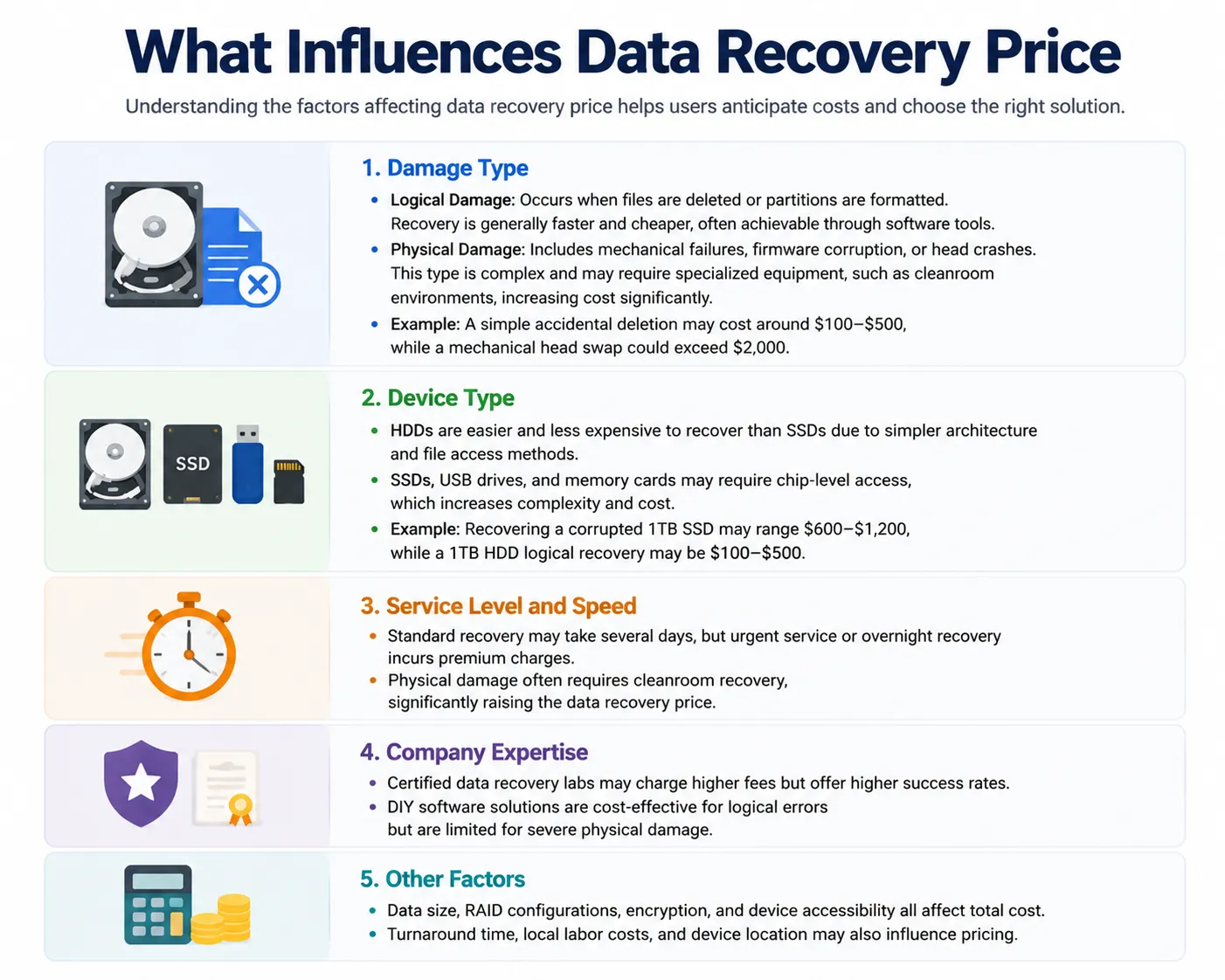
影響を与える要因を理解する データ復旧価格 ユーザーはコストを予測し、適切なソリューションを選択することができる。.
ダメージの種類
- 論理的ダメージ: 以下の場合に発生する。 ファイルが削除される または パーティションがフォーマットされている. .リカバリーは一般に、より速く、より安く、多くの場合、ソフトウェアツールによって達成可能である。.
- 物理的なダメージ: 機械的故障、ファームウェアの破損、ヘッドクラッシュなどが含まれる。このタイプは複雑で、クリーンルーム環境などの特殊な設備を必要とする場合があり、コストが大幅に増加する。.
- 例 ヘッドを交換する場合、$2,000を超えることもある。.
装置 タイプ
- HDDは、アーキテクチャやファイルアクセス方法が単純なため、SSDよりも復旧が容易でコストもかからない。.
- SSD、USBドライブ、メモリーカードは、チップレベルのアクセスが必要な場合があり、複雑さとコストが増大する。.
- 例 破損した1TB SSDの復旧は$600-$1,200、1TB HDDの論理復旧は$100-$500となる。.
サービス レベルとスピード
- 標準的な回収には数日かかるが、緊急サービスや夜間回収には割増料金がかかる。.
- 物理的な損傷はしばしばクリーンルームでの回復を必要とするため、そのコストは大幅に上昇する。 データ復旧価格.
会社概要 専門知識
- 認定データ復元ラボは、料金が高くても成功率が高い場合があります。.
- DIYのソフトウェア・ソリューションは、論理的エラーに対しては費用対効果が高いが、深刻な物理的損傷に対しては限界がある。.
その他の要因
- データサイズ、RAID構成、暗号化、デバイスアクセシビリティはすべて、トータルコストに影響する。.
- また、納期、現地の人件費、機器の設置場所なども価格設定に影響する場合がある。.
Drive Capacity and Recovery Complexity
Drive Capacity and Recovery Complexity
Capacity can affect imaging time, replacement storage, and the amount of data that needs to be processed. However, drive capacity alone does not determine the recovery price.
A 1TB HDD requiring a head replacement can cost considerably more to recover than an 8TB drive with a simple logical problem.
Other factors may include:
- RAID configuration
- 暗号化
- Donor-part availability
- Device architecture
- Number of failed disks
- File-system condition
- Amount of damaged media
- Whether the device can still be detected
Therefore, the type of failure is generally more important than simply asking how many gigabytes need to be recovered.
Service Level and Speed
Standard professional recovery may take several days or longer depending on the case.
Emergency, rush, same-day, or overnight service usually increases the final データ復旧価格 because the laboratory must prioritize the device and assign additional resources.
For non-urgent cases, choosing standard turnaround can reduce costs.
Provider Expertise and Equipment
Experienced professional laboratories may charge more because advanced cases require specialized equipment and trained technicians.
Physical HDD recovery may involve donor drives and controlled work environments. SSD and flash recovery may require specialized hardware for firmware access, NAND reading, or controller-level diagnosis.
However, higher prices do not automatically guarantee successful recovery. Ask whether the provider offers diagnostics, a written quote, and a clear policy regarding unsuccessful recovery before approving the work.
Data Recovery Price List 2026: HDD, SSD, USB & SD Card Costs
以下 データ復旧料金表 gives a more detailed overview of typical costs by storage device and failure type.
デバイス / ダメージタイプ | Typical Price Range | Common Situation |
HDD - 論理 | USD 100–500 | Deleted files, formatting, lost partitions, file-system errors |
HDD - ファームウェア | USD 600–900 | Incorrect capacity, firmware corruption, inaccessible drive |
HDD - メカニカル | USD 1,200–2,000+ | Head failure, platter damage, donor parts or cleanroom work |
SSD - 論理 | USD 200–600 | Deleted data, formatted volume, logical corruption |
SSD – Firmware / Controller | USD 600–1,500+ | Controller or firmware problems |
NVMe SSD – Advanced Recovery | USD 600–2,500+ | Complex firmware, controller, or flash-related failure |
USB / SD Card | USD 150–1,800+ | Logical recovery, controller failure, chip-level recovery |
RAID / NAS | USD 1,000–3,000+ | Multiple disks, degraded arrays, reconstruction or member failure |
These ranges should be treated as estimates. Some simple cases may cost less, while severe physical damage, unusual hardware, encrypted storage, multiple failed RAID members, or rare donor parts can push costs substantially higher.
DIY vs Professional Data Recovery Cost
One of the biggest questions is whether you actually need to pay for laboratory recovery.
The answer depends more on the condition of the storage device than on the value of the files.
オプション | Typical Cost | 最適 | 制限事項 |
DIY recovery software | USD 0–100 | Deletion, formatting, RAW drives, lost partitions | Cannot repair severe physical damage |
専門のデータ復旧ラボ | USD 100–2,500+ | Firmware, mechanical, controller, or physical failures | コストの増加とリードタイムの長期化 |
For logical problems, using recovery software first can significantly reduce the データ復旧価格.
However, DIY software should not be treated as a substitute for professional recovery when the storage device shows signs of physical failure.
When Is Professional Data Recovery Worth the Price?
Professional recovery is usually the better choice when the device itself appears physically unstable.
一般的な警告サインには以下のようなものがある:
- Clicking or grinding noises from an HDD
- The drive repeatedly disconnects
- The device does not spin normally
- The storage device was dropped or exposed to water
- The drive becomes extremely slow or stops responding
- The system consistently fails to detect the device
- SMART diagnostics report serious hardware errors
If an HDD is clicking or grinding, repeated power-on attempts can potentially worsen the damage.
In these situations, paying a higher professional データ復旧価格 may be justified because the problem is no longer simply about recovering deleted files. Technicians may first need to stabilize or repair the storage device sufficiently to create an image of the accessible data.
What Should You Check Before Paying for Recovery?
Before sending a drive to a laboratory, some basic checks can help determine whether the problem is physical or logical.
1. Check the connection
Try another compatible cable, USB port, or computer. A faulty enclosure, adapter, or cable can sometimes make a healthy drive appear inaccessible.
2. Check SMART information
SMART diagnostics may reveal reallocated sectors, read errors, temperature problems, or other signs of hardware deterioration.
3. Avoid repair operations before recovering important data
If important files are missing, avoid immediately running CHKDSK /f, formatting the drive, initializing it, or performing other operations that modify the file system.
チェックディスク /f is designed to repair file-system errors, which means it can make changes to the affected volume.
When the lost data matters, a safer order is:
recover first, repair later.
Can Data Recovery Software Reduce the Cost?
Yes, when the storage device has a logical data loss problem rather than physical damage.
For example, accidentally deleting a folder does not normally require a technician to open the hard drive. Similarly, files lost because of a quick format, missing partition, or RAW file system may still be recoverable while the underlying device remains functional.
In these situations, a recovery program such as Magic Data Recovery can provide a lower-cost alternative to sending the device directly to a laboratory.
Magic Data Recovery supports common recovery scenarios including:
- 誤って削除したファイル
- Formatted HDDs and SSDs
- パーティションの紛失やアクセス不能
- RAW storage devices
- USBメモリー
- SDおよびメモリーカード
- Documents, photos, videos, archives, and other common file types
It also allows users to scan and preview recoverable files before deciding which data to restore.
これはそうだ。 ない mean software is appropriate for every failure. If the drive is clicking, grinding, physically damaged, repeatedly disconnecting, or otherwise unstable, stop using it and consider a professional evaluation instead.
For a healthy drive with logical data loss, however, software can keep the recovery expense much closer to the  100 range rather than the hundreds or thousands of dollars associated with laboratory work.
Why Is Professional Data Recovery So Expensive?
A high データ復旧価格 usually reflects the amount of specialized work required rather than simply the number of files being recovered.
For example, a physically damaged HDD may require technicians to:
- Diagnose the exact hardware failure.
- Find a compatible donor drive.
- Replace damaged read/write heads.
- Repair or adapt firmware.
- Stabilize the drive.
- Create a sector-by-sector image.
- Reconstruct the file system.
- Extract recoverable files from the image.
SSD recovery can involve an entirely different set of problems, including failed controllers, firmware corruption, NAND degradation, encryption, or proprietary translation layers.
That is why a simple deleted-file case and a physically damaged drive can have dramatically different prices even when both devices contain the same amount of data.
How We Estimated These Data Recovery Prices
The figures in this guide are intended as general 2026 market ranges, not fixed quotes.
Professional recovery companies use different pricing models. Some publish prices according to failure type, while others provide a final quote only after diagnosing the storage device.
In general, the biggest factors affecting the price are:
- Logical vs. physical failure
- HDD vs. SSD or flash storage
- Firmware or controller problems
- Need for donor components
- RAID or multi-drive complexity
- Physical media damage
- Emergency turnaround
- Geographic location and labor costs
Because every failure is different, the most useful way to interpret a データ復旧料金表 is as a planning estimate rather than a guaranteed final cost.
How to Avoid Unnecessary Data Recovery Costs
The best way to reduce recovery costs is to avoid making the original problem worse.
After discovering missing or inaccessible data:
- Stop writing new files to the affected drive.
- 影響を受けたボリュームには、リカバリソフトウェアをインストールしないでください。.
- ファイルを別のストレージデバイスに復元する。.
- 書式の重複は避けてください。.
- Avoid running write-based repair operations before recovery.
- Do not repeatedly power on a mechanically failing HDD.
- Keep multiple backups of important files in the future.
For logical problems, acting quickly can also improve recovery chances because deleted data may remain available only until the corresponding storage areas are reused.
まとめ
について データ復旧価格 can range from almost nothing for a simple DIY recovery to several thousand dollars for complex physical failures.
For accidental deletion, formatting, lost partitions, or RAW file systems on a healthy storage device, software recovery is generally the most affordable place to start. A tool such as Magic Data Recovery can scan supported storage devices without requiring an expensive laboratory service.
Physical failures are different. If an HDD clicks, grinds, repeatedly disconnects, or shows other signs of hardware damage, continuing with software may not be appropriate. In those cases, professional ハードドライブ回復ソリューション are worth considering despite the higher cost.
Ultimately, the best way to control the データ復旧価格 is to identify the type of failure first and choose the least invasive recovery method that matches the condition of the device.
Windows 7/8/10/11およびWindows Serverをサポート
データ復旧価格に関するFAQ
How much does data recovery cost on average?
1TBのHDDのデータ復旧価格は?
標準的なデータ復旧料金表はありますか?
削除したファイルを自分で復元できますか?
Why is professional data recovery so expensive?
Why can some data recovery cases exceed $5,000?
How reliable is software recovery compared with professional labs?

バシリイは、この分野で約10年の実務経験を持つデータ復元のスペシャリストです。そのキャリアを通じて、彼は削除されたファイル、フォーマットされたドライブ、失われたパーティション、RAWファイルシステムを含む何千もの複雑なケースの解決に成功してきました。彼の専門知識は、16進エディタなどの専門ツールを使用した手動復元方法と、復元ソフトウェアを使用した高度な自動化ソリューションの両方をカバーしています。バシリの使命は、信頼できるデータ復元知識をITプロフェッショナルと一般ユーザーの双方が利用できるようにし、貴重なデジタル資産を保護できるようにすることです。.