
Data Recovery Price: Complete Guide & Price List
Losing important files, photos, or business documents is stressful enough without having to guess how much recovery will cost. The data recovery price can vary widely depending on what happened to the storage device and whether the problem is logical or physical.
As a general guide, DIY recovery software usually costs $0–$100, while professional logical recovery may cost several hundred dollars. More complex cases involving firmware failure, damaged read/write heads, SSD controllers, or cleanroom work can reach $1,000–$2,500 or more.
If your files were simply deleted, a drive was formatted, or a partition became inaccessible while the storage device is still working normally, a recovery tool such as Magic Data Recovery may provide a more affordable alternative to professional laboratory recovery. For clicking, grinding, physically damaged, or repeatedly disconnecting drives, however, professional hard drive recovery is usually the safer option.
This guide breaks down the typical data recovery price in 2026, explains what affects recovery costs, and helps you decide whether DIY software or a professional recovery service makes more sense for your situation.
Supports Windows 7/8/10/11 and Windows Server
Table of Contents
Data Recovery Price: Quick Answer
The table below provides a quick estimate of common recovery costs in the U.S. market.
Recovery Type | Typical Price Range |
DIY data recovery software | USD 0–100 |
HDD – Logical recovery | USD 100–500 |
HDD – Firmware recovery | USD 600–900 |
HDD – Mechanical recovery | USD 1,200–2,000+ |
SSD – Logical recovery | USD 200–600 |
SSD / NVMe – Firmware or advanced recovery | USD 600–2,500+ |
USB / SD card recovery | USD 150–1,800+ |
RAID / NAS recovery | USD 1,000–3,000+ |
These figures are general market estimates rather than guaranteed quotes. The final data recovery price depends on the storage device, failure type, required equipment, donor parts, recovery complexity, and service provider.
What Influences Data Recovery Price
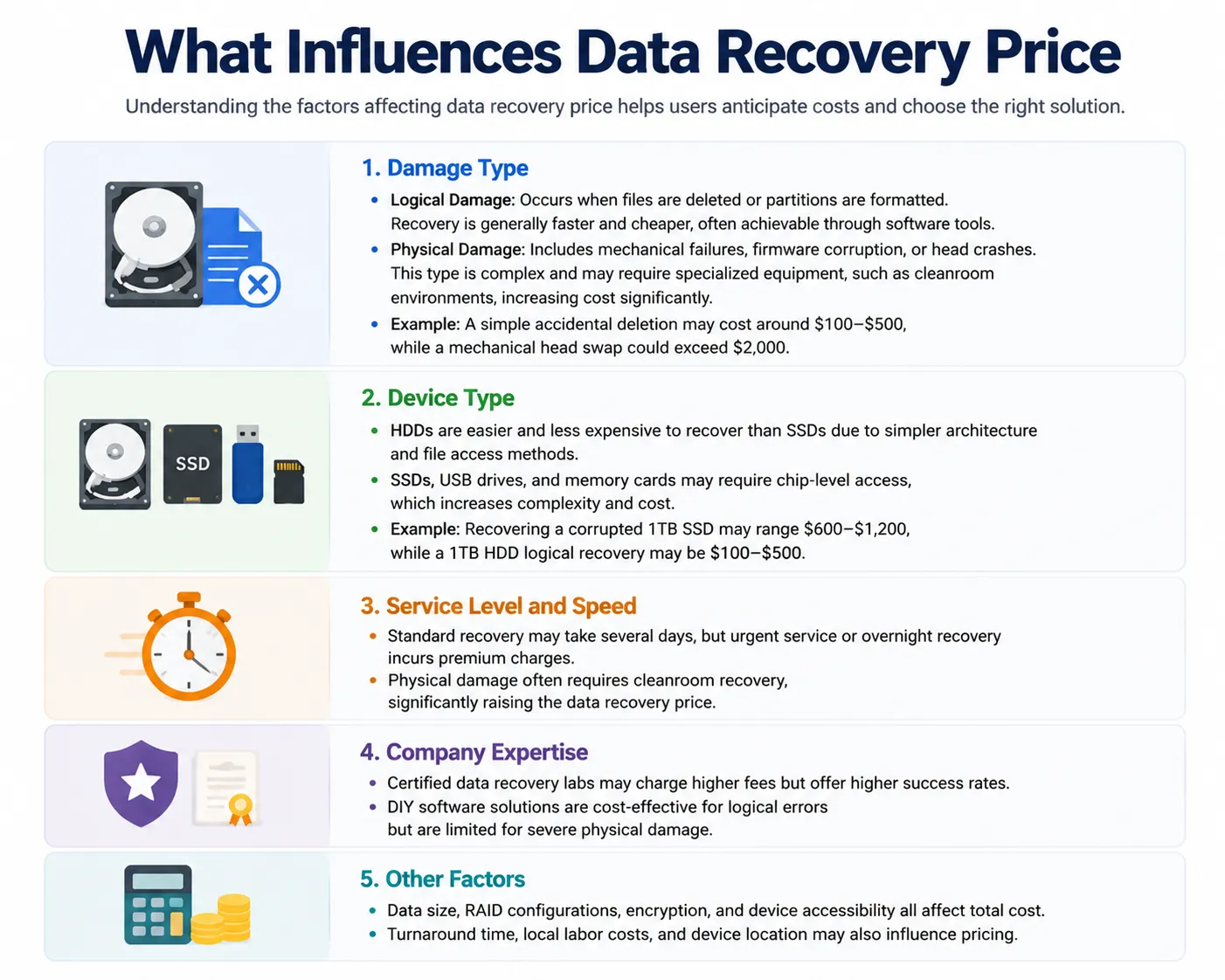
Understanding the factors affecting data recovery price helps users anticipate costs and choose the right solution.
Damage Type
- Logical Damage: Occurs when files are deleted or partitions are formatted. Recovery is generally faster and cheaper, often achievable through software tools.
- Physical Damage: Includes mechanical failures, firmware corruption, or head crashes. This type is complex and may require specialized equipment, such as cleanroom environments, increasing cost significantly.
- Example: A simple accidental deletion may cost around $100–$500, while a mechanical head swap could exceed $2,000.
Device Type
- HDDs are easier and less expensive to recover than SSDs due to simpler architecture and file access methods.
- SSDs, USB drives, and memory cards may require chip-level access, which increases complexity and cost.
- Example: Recovering a corrupted 1TB SSD may range $600–$1,200, while a 1TB HDD logical recovery may be $100–$500.
Service Level and Speed
- Standard recovery may take several days, but urgent service or overnight recovery incurs premium charges.
- Physical damage often requires cleanroom recovery, significantly raising the data recovery price.
Company Expertise
- Certified data recovery labs may charge higher fees but offer higher success rates.
- DIY software solutions are cost-effective for logical errors but are limited for severe physical damage.
Other Factors
- Data size, RAID configurations, encryption, and device accessibility all affect total cost.
- Turnaround time, local labor costs, and device location may also influence pricing.
Drive Capacity and Recovery Complexity
Drive Capacity and Recovery Complexity
Capacity can affect imaging time, replacement storage, and the amount of data that needs to be processed. However, drive capacity alone does not determine the recovery price.
A 1TB HDD requiring a head replacement can cost considerably more to recover than an 8TB drive with a simple logical problem.
Other factors may include:
- RAID configuration
- Encryption
- Donor-part availability
- Device architecture
- Number of failed disks
- File-system condition
- Amount of damaged media
- Whether the device can still be detected
Therefore, the type of failure is generally more important than simply asking how many gigabytes need to be recovered.
Service Level and Speed
Standard professional recovery may take several days or longer depending on the case.
Emergency, rush, same-day, or overnight service usually increases the final data recovery price because the laboratory must prioritize the device and assign additional resources.
For non-urgent cases, choosing standard turnaround can reduce costs.
Provider Expertise and Equipment
Experienced professional laboratories may charge more because advanced cases require specialized equipment and trained technicians.
Physical HDD recovery may involve donor drives and controlled work environments. SSD and flash recovery may require specialized hardware for firmware access, NAND reading, or controller-level diagnosis.
However, higher prices do not automatically guarantee successful recovery. Ask whether the provider offers diagnostics, a written quote, and a clear policy regarding unsuccessful recovery before approving the work.
Data Recovery Price List 2026: HDD, SSD, USB & SD Card Costs
The following data recovery price list gives a more detailed overview of typical costs by storage device and failure type.
Device / Damage Type | Typical Price Range | Common Situation |
HDD – Logical | USD 100–500 | Deleted files, formatting, lost partitions, file-system errors |
HDD – Firmware | USD 600–900 | Incorrect capacity, firmware corruption, inaccessible drive |
HDD – Mechanical | USD 1,200–2,000+ | Head failure, platter damage, donor parts or cleanroom work |
SSD – Logical | USD 200–600 | Deleted data, formatted volume, logical corruption |
SSD – Firmware / Controller | USD 600–1,500+ | Controller or firmware problems |
NVMe SSD – Advanced Recovery | USD 600–2,500+ | Complex firmware, controller, or flash-related failure |
USB / SD Card | USD 150–1,800+ | Logical recovery, controller failure, chip-level recovery |
RAID / NAS | USD 1,000–3,000+ | Multiple disks, degraded arrays, reconstruction or member failure |
These ranges should be treated as estimates. Some simple cases may cost less, while severe physical damage, unusual hardware, encrypted storage, multiple failed RAID members, or rare donor parts can push costs substantially higher.
DIY vs Professional Data Recovery Cost
One of the biggest questions is whether you actually need to pay for laboratory recovery.
The answer depends more on the condition of the storage device than on the value of the files.
Option | Typical Cost | Best For | Limitations |
DIY recovery software | USD 0–100 | Deletion, formatting, RAW drives, lost partitions | Cannot repair severe physical damage |
Professional recovery lab | USD 100–2,500+ | Firmware, mechanical, controller, or physical failures | Higher cost and longer turnaround |
For logical problems, using recovery software first can significantly reduce the data recovery price.
However, DIY software should not be treated as a substitute for professional recovery when the storage device shows signs of physical failure.
When Is Professional Data Recovery Worth the Price?
Professional recovery is usually the better choice when the device itself appears physically unstable.
Common warning signs include:
- Clicking or grinding noises from an HDD
- The drive repeatedly disconnects
- The device does not spin normally
- The storage device was dropped or exposed to water
- The drive becomes extremely slow or stops responding
- The system consistently fails to detect the device
- SMART diagnostics report serious hardware errors
If an HDD is clicking or grinding, repeated power-on attempts can potentially worsen the damage.
In these situations, paying a higher professional data recovery price may be justified because the problem is no longer simply about recovering deleted files. Technicians may first need to stabilize or repair the storage device sufficiently to create an image of the accessible data.
What Should You Check Before Paying for Recovery?
Before sending a drive to a laboratory, some basic checks can help determine whether the problem is physical or logical.
1. Check the connection
Try another compatible cable, USB port, or computer. A faulty enclosure, adapter, or cable can sometimes make a healthy drive appear inaccessible.
2. Check SMART information
SMART diagnostics may reveal reallocated sectors, read errors, temperature problems, or other signs of hardware deterioration.
3. Avoid repair operations before recovering important data
If important files are missing, avoid immediately running CHKDSK /f, formatting the drive, initializing it, or performing other operations that modify the file system.
CHKDSK /f is designed to repair file-system errors, which means it can make changes to the affected volume.
When the lost data matters, a safer order is:
recover first, repair later.
Can Data Recovery Software Reduce the Cost?
Yes, when the storage device has a logical data loss problem rather than physical damage.
For example, accidentally deleting a folder does not normally require a technician to open the hard drive. Similarly, files lost because of a quick format, missing partition, or RAW file system may still be recoverable while the underlying device remains functional.
In these situations, a recovery program such as Magic Data Recovery can provide a lower-cost alternative to sending the device directly to a laboratory.
Magic Data Recovery supports common recovery scenarios including:
- Accidentally deleted files
- Formatted HDDs and SSDs
- Lost or inaccessible partitions
- RAW storage devices
- USB flash drives
- SD and memory cards
- Documents, photos, videos, archives, and other common file types
It also allows users to scan and preview recoverable files before deciding which data to restore.
This does not mean software is appropriate for every failure. If the drive is clicking, grinding, physically damaged, repeatedly disconnecting, or otherwise unstable, stop using it and consider a professional evaluation instead.
For a healthy drive with logical data loss, however, software can keep the recovery expense much closer to the  100 range rather than the hundreds or thousands of dollars associated with laboratory work.
Why Is Professional Data Recovery So Expensive?
A high data recovery price usually reflects the amount of specialized work required rather than simply the number of files being recovered.
For example, a physically damaged HDD may require technicians to:
- Diagnose the exact hardware failure.
- Find a compatible donor drive.
- Replace damaged read/write heads.
- Repair or adapt firmware.
- Stabilize the drive.
- Create a sector-by-sector image.
- Reconstruct the file system.
- Extract recoverable files from the image.
SSD recovery can involve an entirely different set of problems, including failed controllers, firmware corruption, NAND degradation, encryption, or proprietary translation layers.
That is why a simple deleted-file case and a physically damaged drive can have dramatically different prices even when both devices contain the same amount of data.
How We Estimated These Data Recovery Prices
The figures in this guide are intended as general 2026 market ranges, not fixed quotes.
Professional recovery companies use different pricing models. Some publish prices according to failure type, while others provide a final quote only after diagnosing the storage device.
In general, the biggest factors affecting the price are:
- Logical vs. physical failure
- HDD vs. SSD or flash storage
- Firmware or controller problems
- Need for donor components
- RAID or multi-drive complexity
- Physical media damage
- Emergency turnaround
- Geographic location and labor costs
Because every failure is different, the most useful way to interpret a data recovery price list is as a planning estimate rather than a guaranteed final cost.
How to Avoid Unnecessary Data Recovery Costs
The best way to reduce recovery costs is to avoid making the original problem worse.
After discovering missing or inaccessible data:
- Stop writing new files to the affected drive.
- Do not install recovery software on the affected volume.
- Recover files to a different storage device.
- Avoid repeated formatting.
- Avoid running write-based repair operations before recovery.
- Do not repeatedly power on a mechanically failing HDD.
- Keep multiple backups of important files in the future.
For logical problems, acting quickly can also improve recovery chances because deleted data may remain available only until the corresponding storage areas are reused.
Conclusion
The data recovery price can range from almost nothing for a simple DIY recovery to several thousand dollars for complex physical failures.
For accidental deletion, formatting, lost partitions, or RAW file systems on a healthy storage device, software recovery is generally the most affordable place to start. A tool such as Magic Data Recovery can scan supported storage devices without requiring an expensive laboratory service.
Physical failures are different. If an HDD clicks, grinds, repeatedly disconnects, or shows other signs of hardware damage, continuing with software may not be appropriate. In those cases, professional hard drive recovery solutions are worth considering despite the higher cost.
Ultimately, the best way to control the data recovery price is to identify the type of failure first and choose the least invasive recovery method that matches the condition of the device.
Supports Windows 7/8/10/11 and Windows Server
FAQs About Data Recovery Price
How much does data recovery cost on average?
What is the data recovery price for a 1TB HDD?
Is there a standard data recovery price list?
Can I recover deleted files myself?
Why is professional data recovery so expensive?
Why can some data recovery cases exceed $5,000?
How reliable is software recovery compared with professional labs?

Vasilii is a data recovery specialist with around 10 years of hands-on experience in the field. Throughout his career, he has successfully solved thousands of complex cases involving deleted files, formatted drives, lost partitions, and RAW file systems. His expertise covers both manual recovery methods using professional tools like hex editors and advanced automated solutions with recovery software. Vasilii's mission is to make reliable data recovery knowledge accessible to both IT professionals and everyday users, helping them safeguard their valuable digital assets.