
Defenderから隔離されたファイルを復元する方法
Microsoft Defender が、ダウンロードしたインストーラー、ZIP アーカイブ、業務用ドキュメント、またはユーティリティを突然削除してしまうと、不安になるかもしれません。特に、そのファイルが信頼できるソースから入手したものであることが分かっている場合はなおさらです。幸いなことに、Defender によってフラグが立てられたファイルが必ずしも完全に削除されるわけではありません。多くの場合、ファイルは単に隔離され、復元することが可能です。.
もしあなたが探しているなら Windows Defenderで隔離されたファイルを復元する方法, 、すぐに復元ソフトウェアをインストールするのではなく、まずは「Windows セキュリティ」から試してみてください。通常、Microsoft Defender では、隔離領域にファイルが残っている間は、そのファイルを復元することができます。ただし、Defender によってファイルがすでに削除され、隔離領域にコピーが残っていない場合は、削除されたファイルの復元というケースになります。.
このガイドでは、これら2つの状況について順を追って説明します。保護履歴から隔離された項目を復元する方法、グラフィカルインターフェイスが機能しない場合にMicrosoftのMpCmdRunユーティリティを使用する方法、実際に削除されたファイルを復元する方法、および同じ信頼済みファイルが再び隔離されるのを防ぐ方法について学びます。.
実際に削除されてしまったファイルに関する、より広範なケースについては、当社の 削除ファイル復元 ガイド。Defender を通じて元のファイルにアクセスできなくなった場合は、, Magic Data Recovery 影響を受けたストレージデバイスをスキャンして、復元可能なデータを検出できます。.
Windows 7/8/10/11およびWindows Serverをサポート
重要 ファイルが必要だという理由だけで、Defenderが検出したファイルを復元してはいけません。まず、そのファイル、開発者、およびダウンロード元が信頼できるものであることを確認してください。.
目次
【クイック回答】Windows Defenderで隔離されたファイルを復元する方法
適切な対処法は、Microsoft Defenderが実際にどのような動作をしたかによって異なります。.
状況 | ベスト・ソリューション |
ファイルが「隔離された項目」に表示されます | Windows セキュリティを使用して復元する |
「復元」オプションが表示されないが、隔離領域は依然として存在している | MpCmdRun を使用する |
ファイルは削除され、隔離状態ではなくなりました | バックアップを確認するか、データ復元を行う |
このファイルは公式のダウンロード元から入手したものです | 最新のコピーをダウンロードする |
復元されたファイルが再度検出されました | それを確認し、信頼できる場合にのみ許可してください |
仕事用または学校用のPC | 管理者にお問い合わせください |
ほとんどの一般ユーザーにとっては、, Windows Defender の隔離からの復元 まずは「保護履歴」から確認すべきです。データ復元ソフトウェアが役立つのは、Defenderで元のファイルを復元できなくなった場合に限られます。.
Windows Defender がファイルを隔離するとどうなるのか?
復旧作業に着手する前に、検疫について理解しておくことが重要です。.
Microsoft Defender が不審なファイルを検出した場合、そのファイルを隔離し、Windows アプリケーションがそのファイルを実行したり、通常通りアクセスしたりできないようにすることがあります。この処理により、Defender がそのファイルを管理し続けながら、システムを保護します。.
したがって、隔離されたファイルは、完全に削除されたファイルとは異なります。.
「隔離」と「削除」と「消去」の違い
A 隔離されたファイル Microsoft Defenderの管理下に残っています。Defenderがまだそのファイルを保持している場合は、通常、復元することができます。.
A 削除されたファイル Defender によってすでに削除されています。この状況では、「復元」オプションが利用できなくなっている可能性があります。.
ファイルが消失する原因としては、手動での削除、他のウイルス対策ソフト、ディスクのエラー、あるいはこれとは無関係のストレージの問題などが考えられます。.
この区別は、学習する際に重要になります Windows Defenderで隔離されたファイルを復元する方法. Defenderにまだそのファイルが残っている場合は、まず復元ソフトを使う必要はありません。.
現在、マイクロソフトはWindowsユーザーに対し、「ウイルスと脅威の防止」→「保護履歴」を開き、隔離された項目をフィルタリングして、必要に応じて「復元」を選択するよう指示しています。また、マイクロソフトは公式のコマンドラインによる復旧方法として、MpCmdRunも提供しています。.
方法 1: Windows Defender から隔離されたファイルを復元する
最も簡単な方法 Windows Defender で隔離されたファイルを復元する Windowsのセキュリティ画面から行います。.
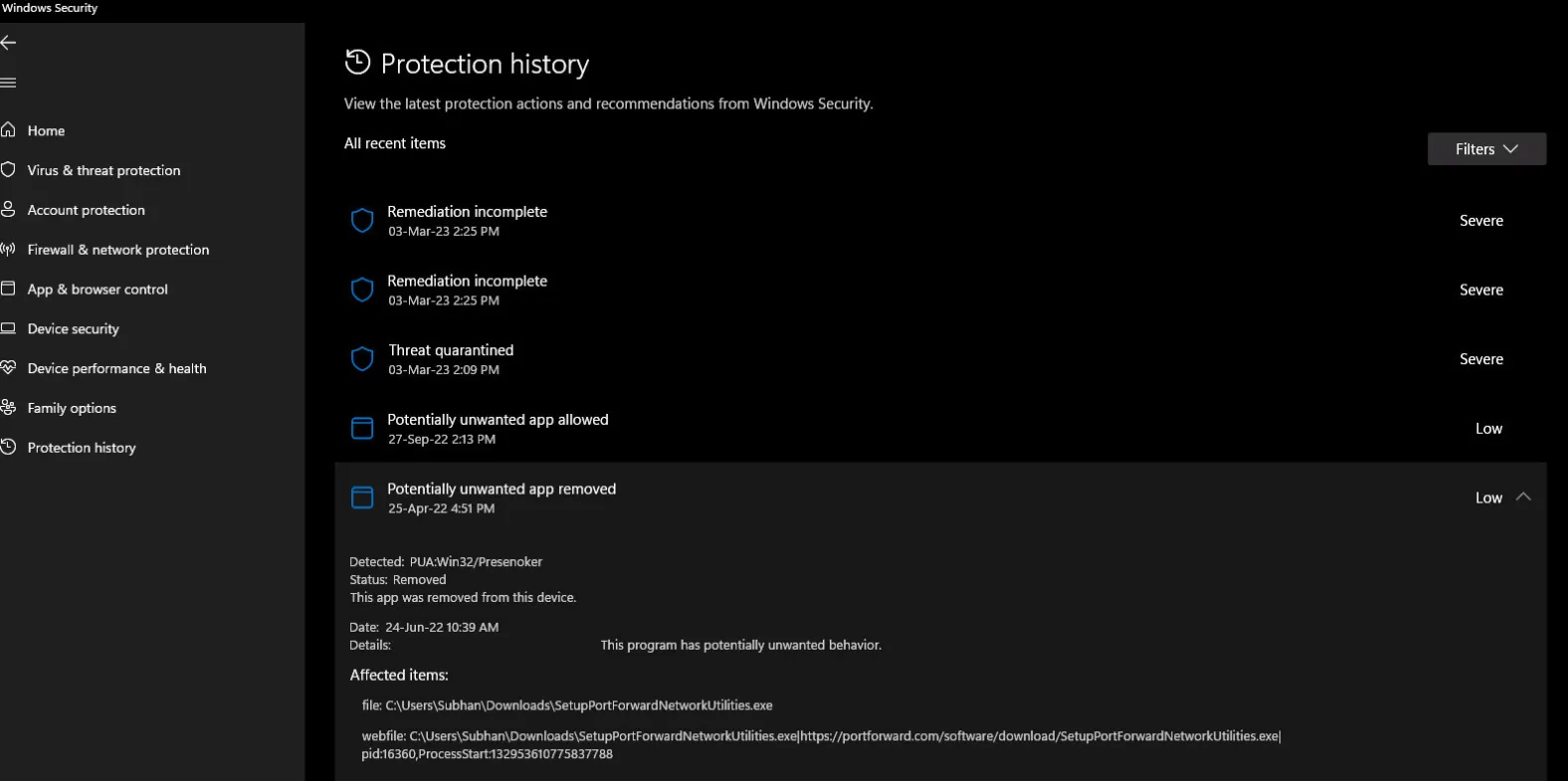
手順 1: Windows セキュリティを開く
プレス ウィンドウズ+S, タイプ:
Windowsセキュリティ
検索結果を開く。.
次に、以下を選択してください:
ウイルスと脅威からの保護
ステップ 2: 保護履歴を開く
「ウイルスと脅威からの保護」で、以下を選択します:
保護履歴
Windows には、Microsoft Defender による最近の操作が表示されます。.
多くのレコードが表示された場合は、フィルター機能を使用して、以下を選択してください:
検疫対象品目
ステップ3:正しい検出結果を見つける
失われたファイルに関連付けられている検出を開いてください。.
復元する前に、以下を確認してください:
- 元のファイルの保存場所
- 脅威名または検知名
- ファイル名
- ソースをダウンロード
- 発行元またはデジタル署名(利用可能な場合)
たとえば、Defenderが、ソフトウェア開発者の公式サイトから直接ダウンロードしたインストーラーを隔離したとします。ファイル名、デジタル署名、発行元がすべて予想通りであれば、誤検知の可能性が高くなります。.
ただし、メールの添付ファイルや出所不明のダウンロードサイトから入手した見慣れない実行ファイルは、隔離されたままにしておくべきです。.
ステップ4:「復元」を選択する
検出範囲を拡大して、以下を選択してください:
[操作] → [復元]
隔離されたコピーがまだ存在する場合、Defenderはそのファイルを元に戻すべきです。.
マイクロソフトは、隔離された脅威を復元すると、Defender が同じファイルを再度検出する可能性があることを指摘しています。検出が誤検知であると確信している場合は、新しいアラートを確認し、 デバイス上で許可する ウイルス対策ソフトの保護機能を広範囲に無効にするのではなく、.
検索を行うほとんどのユーザーにとって Windows Defenderで隔離されたファイルを復元する方法, 、これが最も安全かつ迅速な解決策です。.
方法 2: MpCmdRun を使用して Defender によって隔離されたファイルを復元する
場合によっては、ファイルが Windows のセキュリティ保護履歴, 、あるいはグラフィカルインターフェースに、期待した復元オプションが用意されていない場合。.
マイクロソフトは、次のような別の方法を提供しています。 MpCmdRun, 、Microsoft Defender アンチウイルスに付属するコマンドラインユーティリティです。.
ステップ1:管理者としてコマンドプロンプトを開く
プレス ウィンドウズ+S, 入力してください:
コマンド
右クリック コマンドプロンプト, その後、以下を選択してください:
管理者として実行する
Defenderは隔離されたデータへのアクセスを制限するため、管理者権限が重要となります。.
ステップ 2: MpCmdRun を探す
多くの Windows 環境では、Defender のコマンドラインユーティリティは次の場所に配置されています:
C:\ProgramData\Microsoft\Windows Defender\Platform\\
Microsoftのドキュメントでは、最新のDefenderプラットフォームフォルダーを使用することを推奨しています。その場所が利用できない場合、Windowsでは以下の場所も使用することがあります:
C:\Program Files\Windows Defender
ステップ 3:隔離されたファイルの一覧を表示する
コマンドプロンプトが正しいDefenderディレクトリから起動したら、次のコマンドを実行してください:
MpCmdRun.exe -Restore -ListAll
このコマンドを実行すると、Defender がまだ隔離領域に保持している項目が一覧表示されます。.
マイクロソフトは現在、まさにこの点について MpCmdRun restore Microsoft Defender アンチウイルスのワークフロー。.
ステップ 4:必要なファイルを復元する
対象を特定したら、次のコマンドを実行してください:
MpCmdRun.exe -Restore -Name
を、前の結果に表示されたファイル名に置き換えてください。.
MpCmdRun がその項目を依然として認識できる場合、通常のインターフェースでは不便な場合でも、この方法は成功する可能性があります。.
ただし、その項目が隔離リストに存在しなくなった場合、Defenderのコマンドを繰り返し実行しても、削除されたストレージデータは復元されません。その場合は、次の方法に進んでください。.
方法 3:Magic Data Recovery を使って Windows Defender によって削除されたファイルを復元する
多くの回復ガイドが曖昧にしている重要な点があります:
隔離領域の復元は、削除されたファイルの復元とは異なります。.
Defender がまだ隔離コピーを保持している場合は、Windows セキュリティまたは MpCmdRun を使用してください。しかし、Defender がすでにそのファイルを削除しており、使用可能な隔離コピーが残っていない場合は、, Windows Defenderで隔離されたファイルを復元する方法 これは、一般的な削除データの復元問題となります。.
そこで Magic Data Recovery が関係してくる。.
Magic Data Recoveryは、Defenderの隔離データベースに依存するのではなく、元のストレージデバイスをスキャンします。誤って削除してしまったファイル、フォーマット、ファイルシステムのエラー、その他のデータ損失状況によるファイルの復元に対応しています。.
また、HDD、SSD、USBドライブ、SDカード、外付けストレージ、および一般的なWindowsファイルシステムにも対応しており、5,000種類以上のファイル形式をサポートしています。.
Magic Data Recoveryはいつ使うべきか?
次のような場合に検討してください:
- Defender はすでに元のファイルを削除しました。.
- Windows Defender によって隔離されたファイル 「保護履歴」に表示されなくなります。.
- MpCmdRun は、指定された項目を一覧表示できません。.
- 利用可能なバックアップがありません。.
- そのファイルを単に再度ダウンロードするだけでは済まない。.
- 元のディスクから削除されたファイルのデータを検索する必要があります。.
Defenderの「復元」機能とは異なり、Magic Data Recoveryではアクティブな隔離レコードは必要ありません。.
手順 1:ドライブへの新規データの書き込みを停止する
ファイルが実際に削除されてしまった場合は、影響を受けたドライブ上で、不必要なダウンロード、インストール、ファイルのコピー、および大規模なWindowsの更新は避けてください。.
削除されたストレージ領域は、最終的に新しいデータによって再利用される可能性があります。.
失われたファイルが別のパーティション、USBメモリ、または外付けディスクに保存されていた場合は、可能な限り別の場所に復元ソフトウェアをインストールしてください。.
ステップ 2:元の保存場所をスキャンする
Magic Data Recoveryを起動し、失われたファイルが元々存在していたパーティションまたはストレージデバイスを選択してください。.

例えば、こうだ:
- デスクトップからファイルが消えた → 通常はWindowsのシステムパーティションをスキャンします。.
- ファイルが外付けHDDから隔離されました → その外付けHDDをスキャンしてください。.
- USBドライブからファイルが削除されました → USBデバイスをスキャンしてください。.
スキャンを開始し、ソフトウェアが削除されたファイルや紛失したファイルを検索できるようにしてください。.
ステップ 3:結果をフィルタリングしてプレビューする
ファイルが多数表示された場合は、以下の方法で検索結果を絞り込んでください:
- ファイル名
- パス
- ファイルの種類
- 拡張機能
- ファイルサイズ
復元を行う前に、可能な場合はサポートされているファイルのプレビューを表示してください。.

この手順は、元のファイル名やディレクトリ構造が一部失われてしまった場合に特に役立ちます。.
ステップ 4:ファイルを別の場所に復元する
必要なファイルを選択し、それを 別のドライブまたはパーティション.

復元したデータを、直ちに問題のあった同じ保存場所に書き戻さないでください。そうすると、復元可能な他の情報が上書きされてしまう可能性があります。.
また、期待値は現実的なものにしましょう。削除されたファイルを復元するアプリケーションであっても、すべてのファイルが復元可能であることを保証できるものはありません。ディスクの継続的な使用、上書き、保管状態、およびSSDのTRIM動作などが、結果に影響を与える可能性があります。.
この違いにより、Magic Data Recoveryは、Microsoftの組み込み復元ツールを不必要に置き換えるものではなく、実用的な代替手段となっています。.
方法 4:バックアップまたは元のソースからファイルを復元する
詳細な復元スキャンを実行する前に、別の正常なコピーがすでに存在するかどうかを確認してください。.
考えられる場所としては、次のようなものがあります:
- ワンドライブ
- ファイル履歴
- 外付けバックアップドライブ
- 別のカードリーダー
- クラウドストレージ
- 電子メールの添付ファイル
- プロジェクトのリポジトリ
- 組織のバックアップ
Defender が、本来は正規の開発元から提供されたプログラムのインストーラー、DLL、アーカイブ、またはアプリケーションのコンポーネントを削除してしまった場合、古いバージョンを復元するよりも、開発元の公式サイトから最新バージョンをダウンロードするほうが安全である可能性があります。.
これは特に実行可能ファイルに当てはまります。.
きれいに交換する方が、何とかしようとするよりも良い解決策になることがよくあります。 Windows Defenderによって削除されたファイルを復元する 古い記憶領域セクターから。.
Windows Defender で「復元」オプションが見つからないのはなぜですか?
ユーザーは頻繁に「保護履歴」を開くのですが、そこで気づくのは、 リストア が欠けている。.
いくつかの説明が考えられます。.
Defender によってファイルはすでに削除されています
Defender がその項目を「隔離」ではなく「削除済み」として報告している場合、復元できる隔離コピーが存在しない可能性があります。.
MpCmdRun を試してみてください。それでも項目が見つからない場合は、バックアップを確認するか、元のストレージデバイスをスキャンしてください。.
保護履歴にそのイベントが表示されなくなりました
マイクロソフトによると、「保護履歴」にはイベントが約2週間保存されるそうです。そのため、それより古い記録は、表示される履歴から消えてしまうことがあります。.
これは、必ずしもすべての基になる検疫対象項目がまったく同じタイミングで削除されることを意味するわけではありません。したがって、MpCmdRun を確認しておく価値は依然としてあります。.
管理者権限がありません
「保護履歴」の詳細や、Defenderの特定の操作を行うには、管理者権限が必要です。.
標準の Windows アカウントを使用している場合は、管理者アカウントでサインインするか、デバイスの所有者に助けを求めてください。.
貴組織が Microsoft Defender を管理しています
企業や学校で利用されるコンピューターでは、一元管理されたDefenderポリシーが適用される場合があります。.
IT部門が隔離、除外、またはセキュリティポリシーを管理している場合は、それらの制御を迂回しようとしないでください。その代わりに、管理者に連絡してください。.
もしDefenderが再びそのファイルを隔離したらどうなるのでしょうか?
復元されたファイルは、直ちに別の検出を引き起こす可能性があります。.
Microsoft Defender を恒久的に無効にしてこの問題を解決しないでください。.
その代わりだ:
- そのファイルの出所を確認してください。.
- 開発元やパブリッシャーを確認してください。.
- 利用可能な場合は、そのデジタル署名を検証してください。.
- ファイル名とバージョンが、想定されているソフトウェアと一致していることを確認してください。.
- Microsoft Defender の定義ファイルを更新します。.
- 誤検知であると確信している場合は、新たに検出された項目を確認してください。.
- 選ぶ デバイス上で許可する 必要に応じて。.
マイクロソフトは、実際に悪意のあるファイルの実行を許可すると、お使いのコンピュータやデータが危険にさらされる可能性があることを明確に警告しています。.
Windows Defenderの除外設定を追加すべきでしょうか?
除外設定を行うと、Defenderは指定されたファイル、フォルダ、ファイルの種類、またはプロセスをスキャンしなくなります。.
これは、繰り返し誤って識別されてしまう信頼済みアプリケーションに対処するのに役立ちますが、除外対象はできるだけ限定的にしておくべきです。.
たとえば、検証済みのアプリケーションファイルを1つ除外する場合、以下を除外する場合に比べてリスクは低くなります:
C:\ または「ダウンロード」フォルダ全体。.
ソフトウェアが、理由を説明せずにウイルス対策機能を無効にするよう指示したからといって、決して除外設定を追加してはいけません。.
誤検知が疑われる場合は、ソフトウェアの開発元に連絡するか、Microsoftに検知結果を報告することも、長期的に見ればより安全な対応策となります。.
Defenderによって隔離されたファイルを復元する前のベストプラクティス
学ぶとき Windows Defenderで隔離されたファイルを復元する方法, 、PCを保護することは、ファイルを復元することと同じくらい重要です。.
以下のルールを心に留めておいてください:
- 出所が明確なファイルのみを復元してください。.
- まずは、Microsoftの標準機能である「復元」オプションを利用することをお勧めします。.
- GUIで既存の隔離対象を復元できない場合は、MpCmdRun を使用してください。.
- 1つのファイルに対して、Defenderを恒久的に無効にしないでください。.
- Windows および Defender の定義ファイルを常に最新の状態に保ってください。.
- 重要な作業のバックアップを常に取っておきましょう。.
- ファイルが実際に削除された場合は、そのファイルが保存されていたドライブへの書き込みを最小限に抑えてください。.
- 復元したデータを別の場所に保存してください。.
- 管理対象のPCについては、セキュリティ制御を迂回するのではなく、IT部門に連絡してください。.
この手順により、復旧プロセスは実用的かつ安全に行われます。.
まとめ
に対する最良の答え Windows Defenderで隔離されたファイルを復元する方法 そのファイルがまだ隔離されているか、それともすでに削除されているかによって異なります。.
Defender がまだそのファイルを保持している場合は、まず以下から始めてください。 [Windowsのセキュリティ] → [ウイルスと脅威の防止] → [保護履歴] → [隔離された項目] → [復元]. グラフィカルインターフェイスが動作しない場合は、マイクロソフトの MpCmdRun このユーティリティは、隔離された項目を復元するためのもう1つの公式な方法を提供します。.
ファイルがDefenderから本当に消えてしまった場合は、まずバックアップを確認するか、信頼できる新しいコピーをダウンロードしてください。どちらの方法も利用できない場合は、, Magic Data Recovery Defenderの隔離データベースに頼るのではなく、ストレージデバイス自体をスキャンして削除されたデータを検索するため、試してみる価値があります。.
削除されたファイル、フォーマットされたドライブ、ファイルシステムのエラー、複数のストレージデバイス、プレビュー、フィルタリング、そして数千ものファイル形式に対応しているため、通常の Windows Defender の隔離からの復元 限界に達した。.
完全に削除されたファイルに関する詳細については、Amagicsoftの 削除ファイル復元 を案内する。.
何よりも重要なのは、重要なファイルだからといって、不審なファイルを安易に復元してはいけないということです。まずファイルを確認し、その実際の状態に応じた復元方法を選択してください。.
Windows 7/8/10/11およびWindows Serverをサポート
よくあるご質問
Windows Defenderで隔離されたファイルを復元するにはどうすればよいですか?
Windows Defenderで隔離されたファイルはどこに保存されますか?
Windows Defenderによって削除されたファイルは復元できますか?
Windows Defenderにはなぜ「復元」ボタンがないのですか?
Windows Defenderは、復元されたファイルを再び隔離しますか?
Magic Data Recoveryは、Defenderの隔離エリアから直接ファイルを復元できますか?
Windows Defenderの隔離機能は、ファイルを完全に削除しますか?
ファイルを復元する前に、Windows Defender を無効にしたほうがいいでしょうか?

Jasonは、15年以上の実務経験を持つデータ復旧およびテクニカルサポートの専門家です。 彼は第一線のユーザーと幅広く連携し、困難なデータ損失事例のトラブルシューティングを行うとともに、誤削除、ドライブのフォーマット、ファイルシステムの破損、パーティションの消失、システム障害、その他の緊急の復旧事態に対して、実用的な復旧ソリューションを提供してきました。また、バックアップと復元、ファイル修復、災害復旧にも精通しており、安全かつ信頼性が高く、技術的に正確な指導を特に重視しています。.