
FAT16 Directory Entry Structure Explained & Fix Corruption
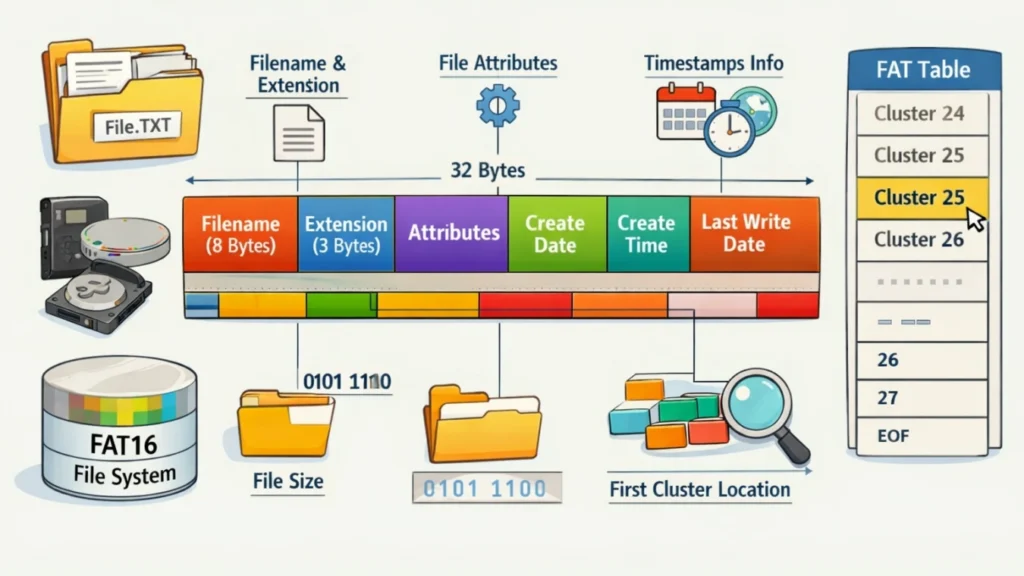
Understanding the FAT16 directory entry structure is essential for data recovery professionals and system developers. Every file and folder on a FAT16-formatted drive is governed by a 32-byte data structure that stores critical metadata.
In this guide, we break down the hex-level details of how FAT16 manages files and how this knowledge helps in successful data recovery.
Table of Contents
What Is the FAT16 Directory Entry Structure?
The FAT16 directory entry structure defines how files and folders are stored and organized on FAT16 file systems. Each file has a directory entry that contains essential metadata.
Key Components of a Directory Entry
A standard FAT16 directory entry includes:
- File name (8.3 format)
- File attributes (read-only, hidden, system, etc.)
- Creation and modification timestamps
- Starting cluster number
- File size
This structure acts like an index. The operating system reads it to locate file data on the disk.
Why It Matters
Without a valid FAT16 directory entry structure, your system cannot:
- Identify file locations
- Display file names correctly
- Access file content
Even small corruption can make entire folders inaccessible.
Common Causes of FAT16 Directory Corruption
Understanding the causes helps prevent future issues. In real-world usage, these are the most common triggers:
1. Improper Device Removal
Removing USB drives without ejecting them interrupts write operations. This often damages the FAT16 directory entry structure.
2. Power Failures
Sudden shutdowns during file transfers can leave directory entries incomplete.
3. Virus or Malware Attacks
Malicious programs may overwrite or hide directory entries.
4. Bad Sectors
Physical damage on storage devices can corrupt directory data.
5. File System Errors
Repeated read/write cycles increase the risk of logical errors over time.
Symptoms of a Damaged FAT16 Directory Entry Structure
You may notice the following signs:
- Files or folders suddenly disappear
- File names become unreadable or show strange characters
- Storage shows used space but no visible files
- “Drive not accessible” errors
- Files cannot be opened despite being listed
These symptoms indicate that the directory entries—not necessarily the file data—are damaged.
How FAT16 Directory Corruption Leads to Data Loss
The FAT16 directory entry structure acts as a map. When it breaks:
- The file allocation table still contains data clusters
- But the directory no longer points to them
- The system treats the data as “lost”
In practice, your files still exist but become invisible or inaccessible.
How to Fix FAT16 Directory Entry Structure Issues
Before using advanced tools, try these basic methods.
Method 1: Run CHKDSK
chkdsk X: /f
Pros:
- Quick and built-in
- Fixes minor logical errors
Cons:
- May overwrite directory entries
- Risk of permanent data loss
Method 2: Restore from Backup
If you maintain backups, this is the safest solution. However, many users don’t have recent backups.
Method 3: Use Data Recovery Software (Recommended)
When directory entries are severely damaged, recovery tools provide a safer approach.
Recover Data from FAT16 Corruption with Magic Data Recovery
When dealing with FAT16 directory entry structure corruption, manual fixes often fall short. This is where Magic Data Recovery becomes useful.
Why Directory Corruption Needs Specialized Tools
Standard tools rely on existing directory entries. Once those entries are damaged:
- Files cannot be indexed
- System utilities may fail
- Data becomes “orphaned”
Magic Data Recovery scans the disk at a deeper level, bypassing damaged directory structures.
Key Advantages of Magic Data Recovery
1. Recovers Files Without Directory Entries
It reconstructs files directly from raw data clusters, even when the FAT16 directory entry structure is missing.
2. Supports Multiple Storage Devices
- USB drives
- SD cards
- External hard drives
- Legacy FAT16 systems
3. User-Friendly Interface
Even non-technical users can recover files in a few steps.
4. Safe and Non-Destructive
The tool does not overwrite existing data during scanning.
Real-World Use Case
Imagine a photographer using an SD card formatted with FAT16:
- The card suddenly shows empty folders
- Storage space appears full
- Important photos seem lost
In this scenario:
- CHKDSK may worsen the issue
- Manual recovery is nearly impossible
Magic Data Recovery can scan the card, detect image signatures, and restore files—even without valid directory entries.
Step-by-Step Recovery Guide
Follow these steps to recover data safely:
1. Download and install Magic Data Recovery to your computer: Please download it from Amagicsoft website or the following download button to get the software.
Supports Windows 7/8/10/11 and Windows Server
2. Connect the Flash Drive and Launch Magic Data Recovery: Connect the drive to your computer, then run the software to select the drive from the device list.

3. Start a Scan: Click the “Search for lost data” button to search for your lost files.

4. Preview Recoverable Files: Filter by file type and preview before recovery.

5. Recover Files Safely: Save recovered files to a different storage device.

👉 If you are looking for a reliable solution to recover inaccessible files, Magic Data Recovery is worth trying.
Best Practices to Prevent Future FAT16 Corruption
Prevention is always better than recovery.
Safe Usage Tips
- Always eject external drives properly
- Avoid sudden power interruptions
- Use antivirus software
- Regularly back up important files
- Check disk health periodically
These habits reduce the risk of damaging the FAT16 directory entry structure.
Conclusion
The FAT16 directory entry structure plays a critical role in file accessibility. Once it becomes corrupted, files may appear lost—even when the data still exists.
While basic tools can fix minor issues, severe corruption requires a more reliable solution. Magic Data Recovery stands out because it recovers files without relying on damaged directory entries, making it highly effective in real-world scenarios.
If you’re dealing with inaccessible files or missing data, using a specialized recovery tool can save both time and data.
Supports Windows 7/8/10/11 and Windows Server
FAQs
What is the FAT16 directory entry structure used for?
The FAT16 directory entry structure stores metadata about files, including names, sizes, and starting locations. It allows the operating system to locate and access files efficiently. Without it, files may still exist on the disk but become inaccessible because the system cannot interpret their positions.
Can files be recovered if the directory entry is corrupted?
Yes, files can often be recovered even if the FAT16 directory entry structure is corrupted. Recovery tools scan the disk for file signatures and reconstruct data without relying on directory entries. This method works especially well when the file allocation table remains partially intact.
Is CHKDSK safe for fixing FAT16 errors?
CHKDSK can fix minor issues in the FAT16 directory entry structure, but it carries risks. In some cases, it may overwrite damaged entries, leading to permanent data loss. Therefore, it is recommended to back up data or use recovery tools before running CHKDSK.
Why do files disappear but storage space remains used?
This happens when the FAT16 directory entry structure is damaged. The file data still exists in storage clusters, but the directory no longer references it. As a result, files become invisible while the used space remains unchanged.
What devices still use FAT16 file systems?
FAT16 is commonly used in older devices such as legacy USB drives, SD cards, embedded systems, and industrial equipment. Although newer systems prefer FAT32 or exFAT, understanding the FAT16 directory entry structure remains important for compatibility and recovery scenarios.
How long does data recovery take?
Recovery time depends on storage size and damage level. A deep scan of a device with a corrupted FAT16 directory entry structure may take from several minutes to a few hours. Larger drives or heavily damaged systems require more time for accurate reconstruction.
Can I repair FAT16 without losing data?
Yes, but caution is necessary. Some repair methods may modify the FAT16 directory entry structure and cause data loss. Using non-destructive tools like Magic Data Recovery allows you to retrieve files first before attempting repairs.
What is the best solution for severe FAT16 corruption?
For severe damage, specialized recovery software is the best option. Tools like Magic Data Recovery can bypass the broken FAT16 directory entry structure, scan raw data, and restore files effectively. This approach is more reliable than manual fixes or built-in utilities.

Jason is a data recovery and technical support specialist with over 15 years of hands-on experience. He has worked extensively with frontline users, troubleshooting difficult data loss cases and providing practical recovery solutions for accidental deletion, formatted drives, damaged file systems, lost partitions, system failures, and other recovery emergencies. His expertise also includes backup and restoration, file repair, and disaster recovery, with a strong emphasis on safe, reliable, and technically accurate guidance.