
Data Recovery Privacy: Meaning, Risks, and Protection
Data recovery privacy is the protection of personal and confidential information from unauthorized access, disclosure, or misuse while lost or inaccessible files are being recovered. It covers how recovery software and technicians access storage devices, handle recovered data, and manage temporary copies.
When a hard drive fails or important files disappear, recovery may expose photographs, financial documents, or sensitive business information. Understanding these risks helps you choose appropriate safeguards before using recovery software or sending a device to a laboratory. For common storage problems, Amagicsoft’s hard drive recovery solutions provide related technical guidance.
Quick Answer: Data recovery technicians may be able to see your files, especially during verification. However, access depends on encryption, recovery methods, and the provider’s procedures. Professional laboratories should restrict unnecessary access, while local recovery software can reduce the need to transfer your device to another party.
Table of Contents
Data Recovery Privacy at a Glance
The following table summarizes the essential aspects of data recovery privacy.
Property | Description |
Category | Information privacy and data protection |
Primary purpose | Prevent unauthorized access or disclosure during recovery |
Where it applies | HDDs, SSDs, USB drives, memory cards, servers, and cloud storage |
Information involved | File contents, metadata, disk images, credentials, and recovered copies |
Main privacy risks | Unnecessary file inspection, insecure transfers, excessive retention, and unauthorized disclosure |
Common safeguards | Encryption, access controls, confidentiality agreements, and secure deletion |
Related concepts | Data security, confidentiality, data integrity, and data retention |
Main limitation | No single technical or contractual safeguard eliminates every privacy risk |
The key distinction: Recovering data and protecting its privacy are separate objectives. A recovery operation can successfully restore files while still exposing sensitive information unnecessarily.
How Does Data Recovery Privacy Work?
To understand data recovery privacy, consider what happens to information during a typical recovery operation.
Recovery is not always a simple file-copying process. Depending on the problem, software or technicians may need to examine storage sectors, reconstruct file system records, or create complete images of a device.
Each stage introduces different privacy considerations.
1. Device Access and Initial Assessment
Recovery starts when an application or technician accesses the storage device.
For logical data loss, such as accidental deletion, software may examine file system information to locate missing files.
For hardware problems, technicians first assess whether the device can communicate reliably with recovery equipment.
At this stage, privacy depends on three factors: who controls the device, whether the storage is encrypted, and what level of access the recovery process requires.
For example, an unlocked, unencrypted HDD may expose substantially more information than the individual documents the customer wants recovered.
2. Disk Imaging and Data Extraction
Professional recovery laboratories often create a sector-level disk image before extracting files. A disk image is a copy of the readable storage sectors on a device. It may contain existing files, deleted data, file system metadata, and unused storage areas.
Technicians can analyze this image while limiting repeated operations on the original drive. However, the image also becomes another copy of potentially sensitive information.
Therefore, data recovery privacy depends partly on how laboratories store, encrypt, and restrict access to these working copies.
3. File System Analysis
Recovery tools use file system structures to identify files and determine where their contents reside.
For example, Windows commonly uses NTFS, which maintains a Master File Table (MFT). According to Microsoft’s Master File Table documentation, the MFT contains records describing files, including timestamps, permissions, sizes, and locations of associated data.
When Windows deletes an NTFS file, its MFT entry may become available for reuse. However, information associated with the deleted file may remain temporarily.
Consequently, a recovery tool may discover file names and other metadata without opening the original documents.
This distinction matters because metadata can reveal sensitive information even when file contents remain unread.
4. File Verification
After recovery, technicians may inspect selected files to determine whether they appear usable.
Verification can involve checking file headers, examining structural information, or opening sample documents.
For example, a technician might open a recovered photograph to confirm that the image displays correctly. However, viewing a file exposes its contents to the person performing the check. Moreover, checking a file header does not necessarily establish that the complete file is undamaged.
Therefore, reputable providers should explain how they verify files while limiting unnecessary inspection.
5. File Delivery and Retention
Finally, the provider transfers recovered files to the customer. Delivery may involve an encrypted storage device, a secure transfer system, or another agreed method.
However, the laboratory may retain working copies temporarily to address delivery or verification problems. The privacy risks therefore continue after the recovery itself finishes.
Recovery stage | Potential exposure | Relevant safeguard |
Device intake | Customer and device information | Access restrictions and custody records |
Disk imaging | Complete readable storage contents | Encrypted storage |
File system analysis | File names and metadata | Authorized personnel access |
File verification | Selected document contents | Minimal-content inspection |
File delivery | Recovered documents | Protected transfer |
Data retention | Temporary recovery copies | Defined retention and deletion policies |
This lifecycle demonstrates why data recovery privacy involves more than preventing technicians from opening personal photographs.
What Information Can Data Recovery Technicians See?
The information accessible to technicians depends on the device’s condition, encryption state, and recovery method.
Three categories are particularly important.
File Metadata
Metadata describes files and their properties.
Examples include file names, folder paths, timestamps, file sizes, and access permissions.
For instance, a filename such as Confidential_Contract_2026.pdf may reveal useful information about a document without exposing its complete contents.
Therefore, protecting metadata is an important part of data recovery privacy.
Actual File Contents
On an accessible, unencrypted drive, technicians may technically be able to open documents, photographs, videos, and other files.
However, legitimate recovery work does not always require reading their complete contents.
For example, $300 Data Recovery publicly describes a limited verification process involving a small selection of recovered files.
Its published policy also states that staff should avoid unnecessary inspection of personal content.
These statements describe one provider’s procedures, not a universal industry standard.
Encrypted Information
Encryption changes what recovery technicians can access.
If a BitLocker-encrypted drive remains locked, its protected file contents generally cannot be read without the appropriate unlocking credentials.
However, providing a valid recovery key may allow technicians to decrypt and access that information. Microsoft’s BitLocker recovery documentation explains how recovery credentials restore access to encrypted volumes.
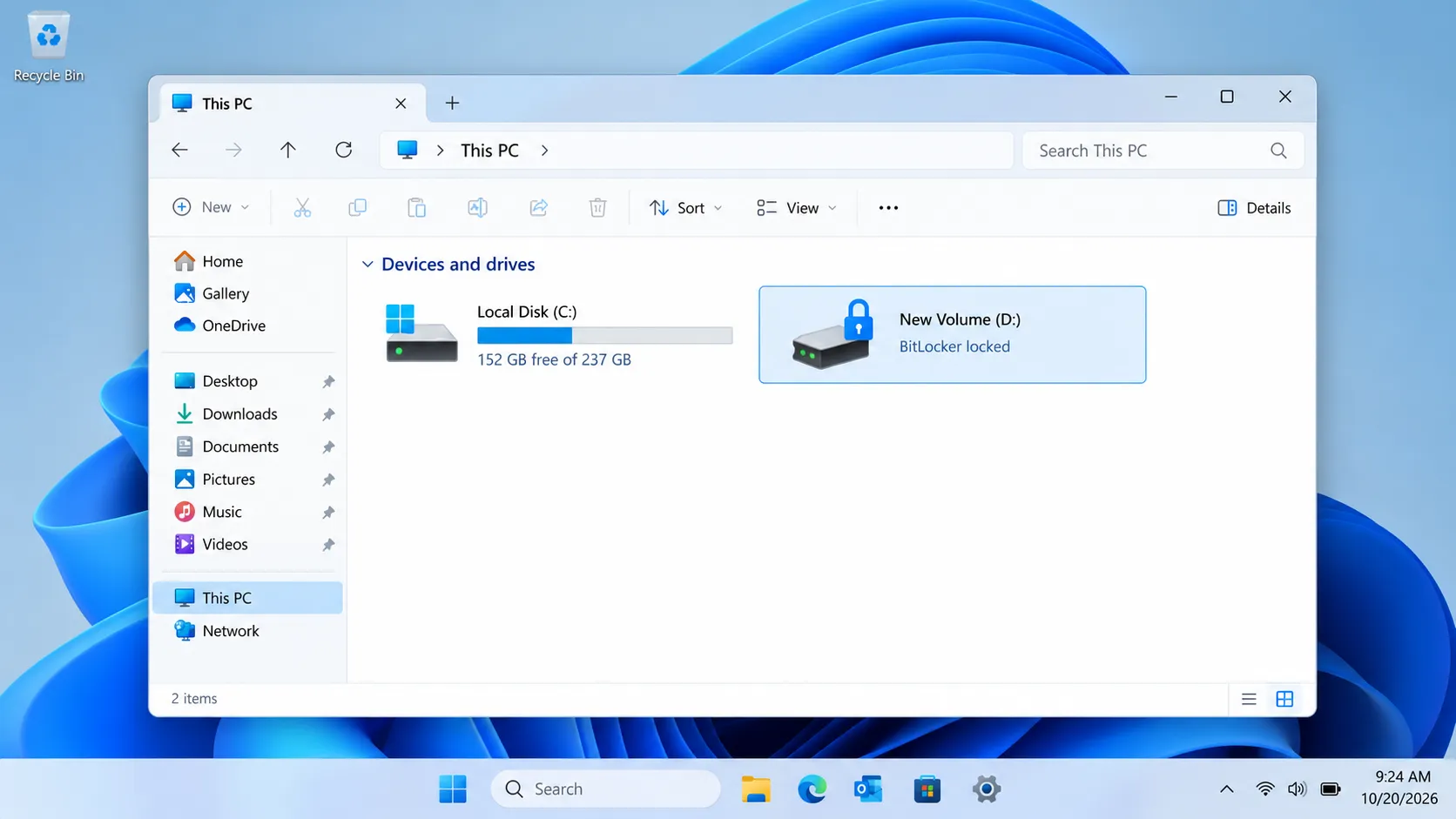
Important: Encryption does not prevent a technician from viewing files after the drive has been successfully unlocked. It primarily protects information while the storage remains encrypted and inaccessible.
Data Recovery Privacy vs. Data Security and Confidentiality
Although people often use these terms interchangeably, they describe different responsibilities.
Concept | Meaning | Example during recovery |
Data recovery privacy | Appropriate handling of personal information throughout recovery | Limiting unnecessary examination of private documents |
Data security | Protection against unauthorized access, alteration, or loss | Encrypting recovery storage |
Confidentiality | Restricting information disclosure to authorized parties | Enforcing technician access agreements |
Data integrity | Maintaining accurate and usable information | Checking recovered file contents |
Data retention | Managing how long information remains stored | Removing temporary copies after an agreed period |
These concepts overlap but are not identical.
For example, encrypting a recovery drive helps protect stored information. However, authorized users may still view its contents after unlocking it.
Similarly, a nondisclosure agreement establishes confidentiality obligations but does not physically prevent unauthorized access.
The NIST Privacy Framework provides a broader approach to identifying and managing privacy risks.
Meanwhile, NIST SP 800-53 describes security and privacy controls, including access restrictions and organizational safeguards.
Together, these sources help explain why data recovery privacy requires both technical protection and responsible information-handling procedures.
How Do Professional Data Recovery Labs Protect Privacy?
Professional recovery laboratories may combine physical security, access restrictions, encryption, and contractual safeguards.
However, implementation varies between providers.
Restricted Personnel Access
Limiting access reduces the number of people who can encounter customer information.
Relevant controls include individual user accounts, physical access restrictions, employee training, and documented handling procedures.
For example, Gillware’s published privacy protocols describe restricted facilities and confidentiality measures.
Nevertheless, customers should evaluate the provider’s current procedures instead of assuming every laboratory follows identical standards.
Confidentiality Agreements
A nondisclosure agreement (NDA) establishes obligations concerning confidential information.
Depending on its terms, it may address permitted access, disclosure restrictions, subcontractors, and data handling.
However, an NDA does not independently establish that a provider uses effective technical safeguards.
Therefore, customers should examine both the agreement and the company’s operational controls.
Encryption and Secure Delivery
Recovery laboratories may encrypt disk images, internal storage, and returned recovery devices.
Encryption helps protect information if storage media is lost or accessed without authorization.
However, encryption protection depends on how the provider manages credentials and controls access to unlocked systems.
For stronger data recovery privacy, customers should ask whether recovered files will be delivered on encrypted media and how the corresponding credentials will be transferred.
Data Retention and Secure Deletion
Recovery providers sometimes retain copies after completing a service.
For example, $300 Data Recovery publishes a minimum 14-day backup retention policy. Other laboratories may use different schedules.
Although temporary retention can assist with delivery problems, longer storage also extends the period of potential exposure.
The NIST SP 800-88 Rev. 2 Guidelines for Media Sanitization, published in September 2025, describe approaches to making stored information infeasible to access for a specified level of effort.
Importantly, ordinary file deletion does not necessarily provide the same protection as properly implemented sanitization.
Therefore, ask how the laboratory removes temporary images and recovered copies after its retention period ends.
Where Does Data Recovery Privacy Matter Most?
Data recovery privacy applies to many environments, but the consequences of unauthorized access vary.
Personal Computers
Home computers often contain family photographs, financial records, private messages, and saved credentials.
A complete disk image may expose more information than the user originally requested.
Therefore, personal-device recovery should account for both existing files and potentially recoverable deleted information.
Business Storage Devices
Company computers may contain customer databases, contracts, employee information, or intellectual property.
Before outsourcing recovery, organizations should review vendor agreements, access permissions, and relevant data protection obligations.
Furthermore, they should determine whether subcontractors will participate in recovery or verification.
Healthcare and Sensitive Records
Medical records and other sensitive information may require additional safeguards.
For example, certain healthcare relationships in the United States require specific contractual and technical protections under HIPAA.
However, obligations depend on the organization, information involved, and service provider’s role.
A general confidentiality statement should not replace a review of applicable requirements.
Remote and Cloud-Based Recovery
Remote recovery may involve remote-control sessions, network transfers, uploaded storage images, or support logs.
Here, data recovery privacy depends partly on what information leaves the device, who receives it, and how long the provider retains it.
A network connection alone does not prove that file contents have been uploaded.
Is Local Recovery Software More Private Than Professional Recovery?
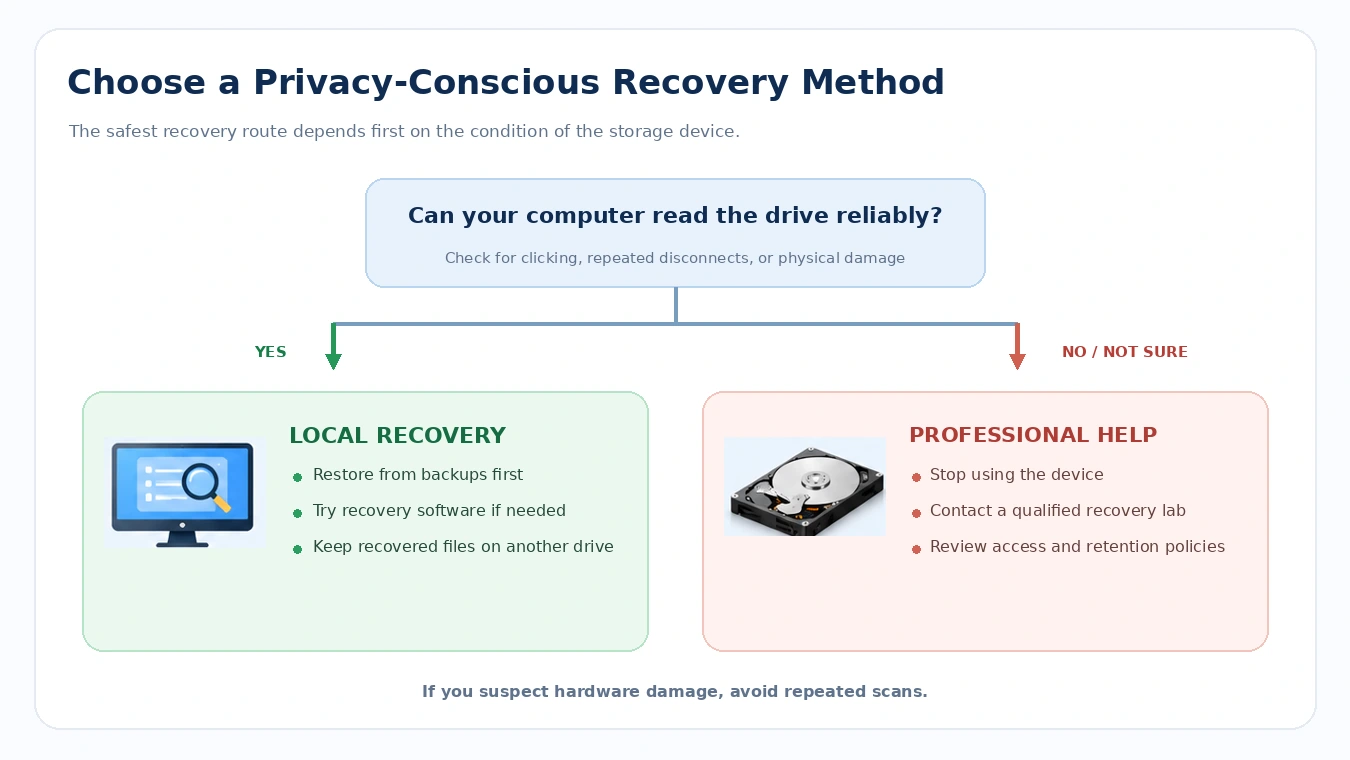
Local recovery software may reduce third-party exposure because users retain physical control over their storage devices.
However, its privacy characteristics depend on how the application operates.
Consideration | Local recovery software | Professional laboratory |
Device possession | Usually remains with the user | Often transferred to the provider |
File inspection | User reviews recovery results | Technicians may inspect samples |
Disk imaging | Depends on the tool and workflow | Common in professional recovery |
Network transmission | Depends on the software | Depends on laboratory procedures |
Physical hardware repair | Not available | May be available |
Privacy responsibilities | User and software provider | User and recovery company |
For data recovery privacy, the key advantage of local software is reducing unnecessary human access to the original device.
However, local scanning does not automatically mean an application makes no network connections.
Some software may collect licensing information, diagnostics, or usage data independently of its recovery functions.
Therefore, users should review software permissions and privacy policies before installation.
For example, the official Magic Data Recovery product page states that the application uses zero cloud uploads. Separately, Amagicsoft’s privacy policy describes certain account, device, and usage information collected across its services.
These represent different categories of data processing. The publisher’s cloud-upload statement should not be interpreted as independent verification that every type of network communication is absent.
Common Misconceptions About Data Recovery Privacy
Several assumptions can create an inaccurate sense of security.
Myth 1: Technicians Can Only See the Files I Want Recovered
Not necessarily.
A disk image may contain information from the entire readable device, including files unrelated to the recovery request.
Therefore, access controls should apply to the complete recovery environment.
Myth 2: A Cleanroom Guarantees File Privacy
A cleanroom primarily controls environmental contamination during sensitive hardware operations.
It does not automatically establish confidentiality or secure information handling.
Privacy requires separate controls such as restricted access, encryption, and appropriate data retention.
Myth 3: An NDA Eliminates All Privacy Risks
An NDA creates contractual obligations but cannot eliminate technical vulnerabilities or human error.
Consequently, effective privacy protection also requires operational safeguards.
Myth 4: Local Recovery Software Never Transmits Information
Not always.
A program may process recoverable files locally while separately communicating with licensing or diagnostic services.
Therefore, review its published practices rather than assuming local processing means complete network isolation.
Myth 5: Deleting Recovered Copies Immediately Guarantees Privacy
Normal deletion may leave recoverable information on some storage devices.
Additionally, deleting recovery copies before verifying successful delivery can create another data-loss problem.
A better approach is to verify the recovered files, follow an appropriate retention policy, and use a suitable sanitization method afterward.
When Should You Take Action to Protect Data Recovery Privacy?
Understanding data recovery privacy helps users choose an appropriate recovery method without unnecessary risk.
The following situations require different responses.
Situation | Appropriate first step | Privacy consideration |
Files remain in Recycle Bin | Restore them directly | No external recovery provider needed |
A previous backup exists | Restore from the backup | Consider local or cloud storage practices |
Unsaved document | Check the application’s AutoRecover files | Temporary information may not be permanent |
Permanently deleted files | Check backups, then consider recovery software | Avoid unnecessary third-party access |
Locked BitLocker drive | Locate authorized recovery credentials | Keep recovery keys restricted |
Physically damaged storage | Stop using the device and consult a specialist | Review laboratory privacy procedures |
Start with built-in recovery features and existing backups. For deleted files, see Amagicsoft’s guide to recovering files from the Recycle Bin.
If your storage is encrypted, the BitLocker file recovery guide explains relevant recovery considerations.
For devices showing mechanical failure, repeated scanning may worsen the damage. Professional assessment may therefore be preferable.
What Should You Ask Before Using a Recovery Laboratory?
Before submitting a device containing sensitive information, ask:
- Who can access my original device and recovered files?
- Will you create a complete disk image?
- Can you limit verification of sensitive documents?
- Will subcontractors handle any recovery data?
- How are disk images and recovered files protected?
- How long will you retain temporary copies?
- Can you provide written confidentiality and deletion terms?
These questions help turn data recovery privacy from a general promise into specific practices you can evaluate. For additional guidance, see how to choose a data recovery specialist.
Practical Guide: Recover Deleted Files While Keeping Control of Your Drive
If Windows recovery options and backups cannot restore deleted files, local software may offer another approach.
For compatible, readable Windows storage devices, Magic Data Recovery can scan for potentially recoverable files without requiring you to hand the device to a laboratory.
Unlike Recycle Bin or File History, it searches for recoverable storage information rather than relying solely on previously preserved copies.
How to Use Magic Data Recovery
Step 1: Download and Install Magic Data Recovery
Download the software from the official website. Install it on a different drive or partition to avoid overwriting deleted data.
Supports Windows 7/8/10/11 and Windows Server
Step 2: Select the Drive Containing Your Deleted Files
Launch the application, identify the original storage partition, and begin scanning.
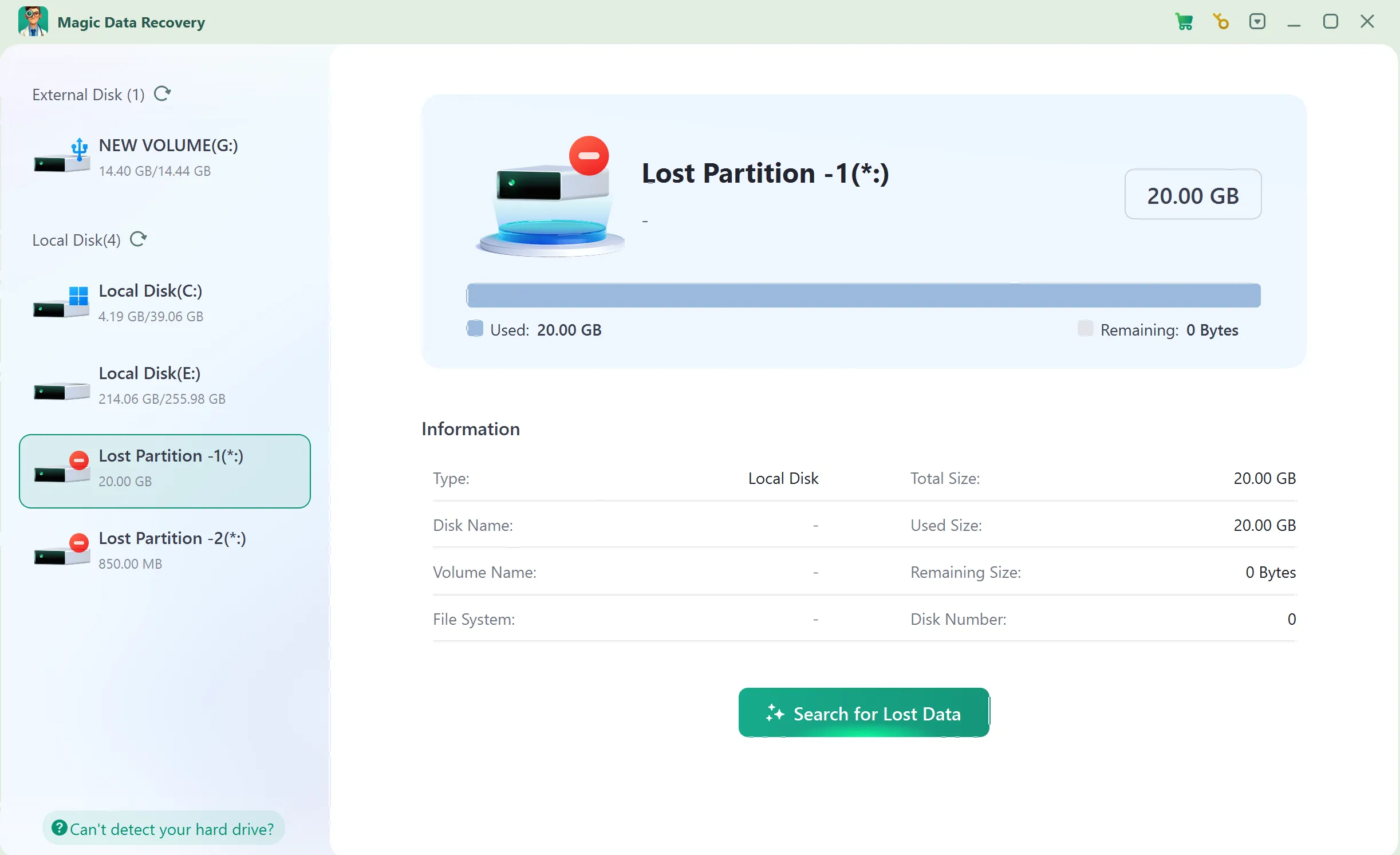
Step 3: Scan for Lost or Deleted Files
Allow the software to search for recoverable documents, photographs, and other files.
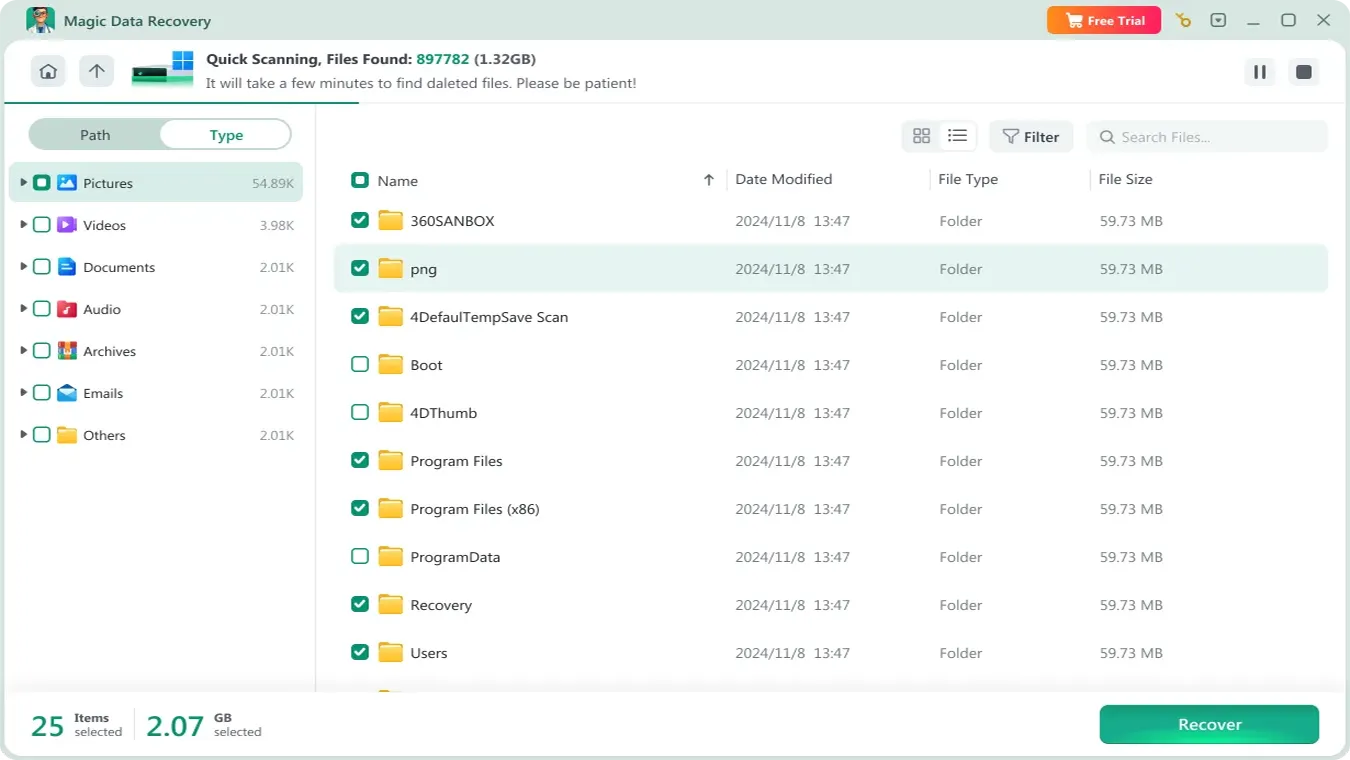
Step 4: Preview Files Before Recovery
Inspect relevant files using Preview when supported. Some damaged files may not display correctly.

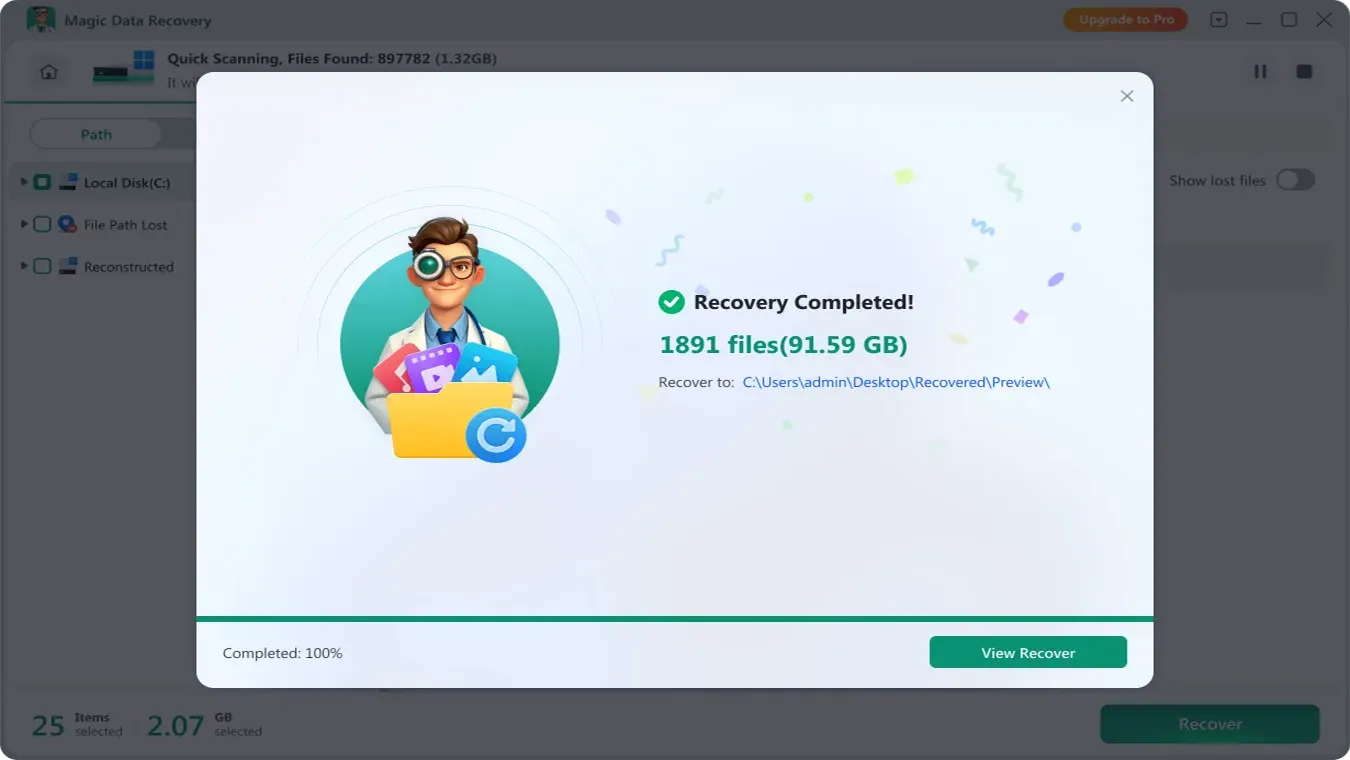
Step 5: Recover Files to a Safe Location
Select the required files and save them to another drive. Verify the recovered contents afterward.
Recovery limitation: Overwritten data may be permanently unavailable. On SSDs, TRIM can also prevent deleted-file recovery. Moreover, recovery software cannot repair physically damaged hardware. For additional information about SSD-specific risks, see why files disappear from SSDs.
Conclusion
Data recovery privacy protects personal information throughout the recovery lifecycle, from initial device access to the removal of temporary copies.
Its effectiveness depends on several complementary measures: restricted access, appropriate encryption, controlled file verification, secure delivery, and documented retention policies.
Users should first consider built-in recovery features and existing backups. When those methods cannot restore deleted files, local tools such as Magic Data Recovery may reduce the need to transfer a functioning storage device to another party. Further HDD-related guidance is available through Amagicsoft’s hard drive solutions.
However, physically damaged storage may require professional assistance. In such cases, evaluate the laboratory’s confidentiality and information-handling procedures before submitting your device.
Ultimately, successful recovery should restore access to information without creating unnecessary privacy risks.
Supports Windows 7/8/10/11 and Windows Server
FAQ
Can a data recovery technician see my private files without opening them?
Can a recovery lab retrieve data from an encrypted drive without my password?
Does data recovery software upload personal documents to the internet?
Does signing a nondisclosure agreement guarantee data recovery privacy?
How long can a data recovery company retain my recovered files?
Is permanently deleting a file enough to prevent its recovery?
Is DIY recovery more private than sending a drive to a professional?

Vasilii is a data recovery specialist with around 10 years of hands-on experience in the field. Throughout his career, he has successfully solved thousands of complex cases involving deleted files, formatted drives, lost partitions, and RAW file systems. His expertise covers both manual recovery methods using professional tools like hex editors and advanced automated solutions with recovery software. Vasilii's mission is to make reliable data recovery knowledge accessible to both IT professionals and everyday users, helping them safeguard their valuable digital assets.