
AnyRecover Data Recovery Review: Features, Pricing, Pros and Cons
AnyRecover data recovery looks appealing when a missing folder contains both work documents and family photos. Yet choosing a recovery tool involves more than checking supported formats. The useful questions are whether it fits your device, lets you assess your files, and offers a license that makes sense for one recovery job.
This review combines our October 21, 2026 USB recovery tests with official features, purchase terms, and limitations. It also considers Magic Data Recovery as a Windows alternative. For a broader explanation of recovery options, start with our deleted file recovery guide.
Editorial disclosure: Amagicsoft develops Magic Data Recovery. Our laboratory tested both applications on October 21, 2026, using the same Windows computer and matching USB datasets. Each application completed one run per loss scenario. Prices and public documentation were also checked on October 21, 2026.
Table of Contents
AnyRecover Data Recovery: Quick Verdict
AnyRecover data recovery restored all 47 deleted test files and their folders. After quick formatting, it saved all 47 files, but one DOC document contained unreadable text and resisted repair; the original folder structure did not return. Magic restored 47 usable files in both scenarios, although two filenames changed after formatting.
Here is the practical shortlist:
- For a Mac or mixed-device requirement: Evaluate AnyRecover, then confirm the exact desktop and mobile modules included in your chosen plan.
- For one Windows computer: Compare Magic Data Recovery if deletion, formatting, or file system errors caused the loss. It preserved folders better in our quick-format test; its listed PRO plans also cost less here.
- For a small, one-time job: Check backups and the actual trial export allowance before paying. A free scan alone does not establish a free recovery option.
- Seek professional assessment: The drive clicks, disconnects repeatedly, or cannot read reliably.
Neither application earns an automatic recommendation because it lists more file formats.
What Is AnyRecover Data Recovery?
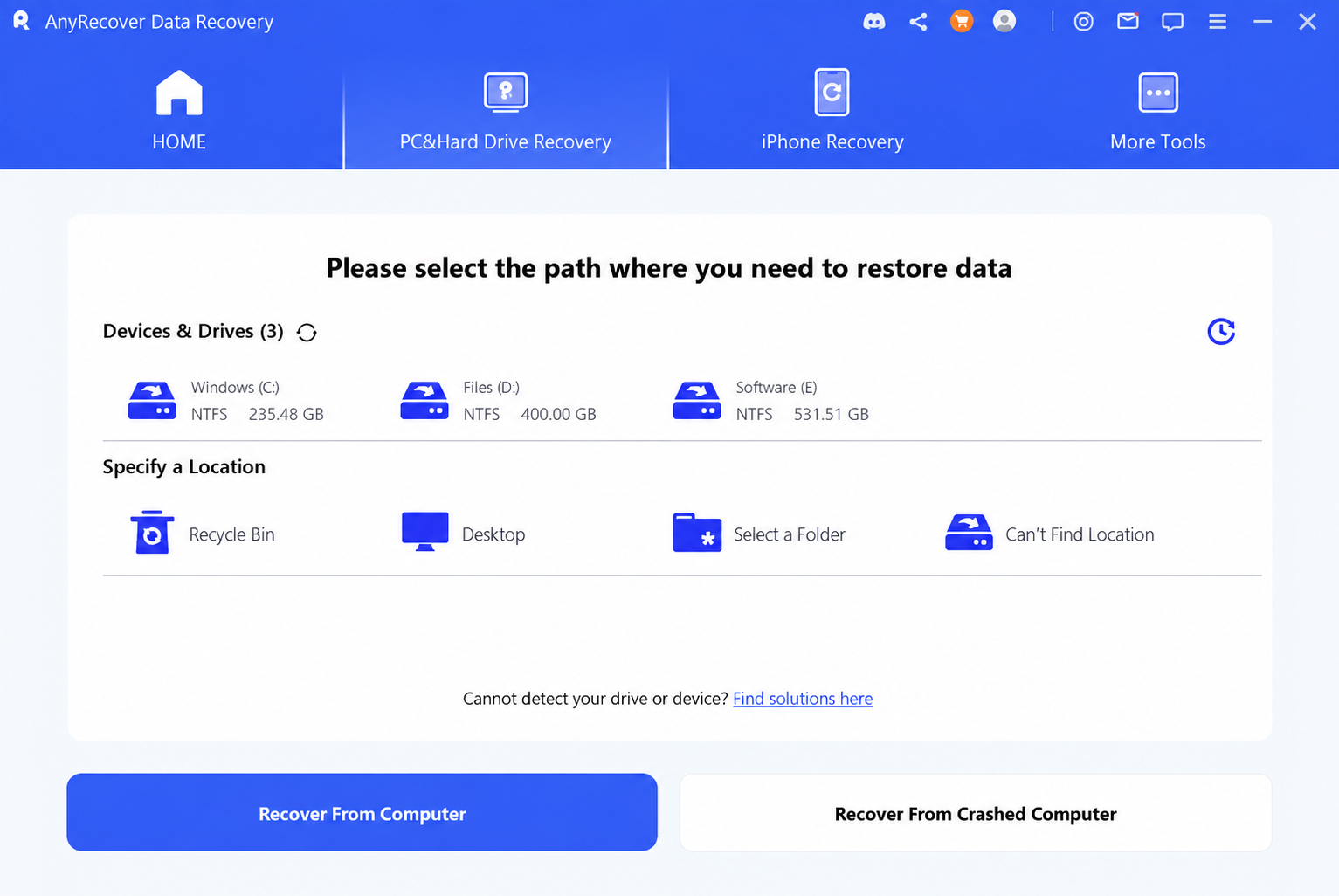
AnyRecover data recovery is commercial recovery software within a product family that covers computer storage, mobile devices, messaging data, and repair tools. Its desktop functions target missing documents, photos, videos, archives, and other files.
The distinction between the product family and the desktop module matters. A page advertising phone recovery does not establish that a computer-only license includes that function. Likewise, a repair feature in the interface may involve another module.
This review focuses on computer file recovery. Mobile and repair features matter here only when they affect the purchase decision.
How We Tested AnyRecover Data Recovery
Our laboratory compared AnyRecover data recovery with Magic Data Recovery on October 21, 2026. Both installers came from their respective official websites that day. The results refer to those downloads, rather than an assumed version number.
Test condition | Shared setup |
Computer | Same Windows 10 22H2 PC |
Source media | Two ThinkBook BU100 32GB USB flash drives |
File system | exFAT on both drives |
Dataset | Matching files and folders, approximately 300MB per drive |
Documents | 30 files, including DOC, Excel, and PDF |
Images | 15 files, including JPG, PNG, and WEBP |
Video | Two files: one MP4 and one MOV |
License status | Paid full versions of both applications |
Scan procedure | Full scan in both applications; wait until completion |
Destination | Other drives, separate from the source USB drives |
Repetitions | One run per application per scenario |
For deletion, we selected the files and used the normal right-click Delete command. Before the formatting scenario, we performed a full format on each USB drive and copied the matching dataset onto it again. We then quick-formatted through Windows’ right-click Format dialog, keeping exFAT.
The intervening full format reset the media before the new dataset. It was not the loss operation being evaluated: the formatting results below concern the subsequent quick format.
We checked all 47 recovered files individually. Document inspection included body text, tables, and images; video checks involved complete playback. We also checked folder preservation and filename changes. These are functional checks, not byte-for-byte hash verification.
We selected Magic because it addresses overlapping Windows recovery tasks and because Amagicsoft develops it. The comparison uses the same criteria for both applications. It does not rank the whole market or establish performance on Mac, SSDs, failing hardware, or file system error scenarios.
AnyRecover Data Recovery Test Results
Scenario | Software | Full-scan time | Files saved | Files passing our checks | Original folders | Filename observations |
Ordinary deletion | AnyRecover | Approx. 33 min | 47/47 | 47/47 | Restored | No filename issues reported |
Ordinary deletion | Magic Data Recovery | Approx. 27 min | 47/47 | 47/47 | Restored | No filename issues reported |
Quick format | AnyRecover | Approx. 37 min | 47/47 | 46/47 | Not restored | No separate filename assessment reported |
Quick format | Magic Data Recovery | Approx. 32 min | 47/47 | 47/47 | Restored | One DOC and one MOV filename contained unexpected characters |
Deleted Files: Both Tools Restored the Dataset
In the deletion test, AnyRecover data recovery restored all files and folders. Magic produced the same usable-file result and completed its scan about six minutes sooner.
Both applications lacked preview support for some tested formats. Those files nevertheless opened after recovery. We did not record a format-by-format preview count, so this test does not establish which product previews more formats.
Quick Format: Folder Preservation and One Damaged Document
After quick formatting, AnyRecover data recovery saved all 47 files, but that did not mean all 47 were usable. One DOC document contained garbled text, and a repair attempt did not resolve the problem. The original folder structure also did not return.
Magic restored all 47 files and the folders. All files passed our checks, but one DOC filename and one MOV filename contained unexpected characters. We did not establish the cause of those name changes. A changed filename and damaged file content are different outcomes.
What These Results Can—and Cannot—Tell You
For this dataset, AnyRecover data recovery matched Magic on usable deleted files. Magic showed an advantage after quick formatting in folder preservation and usable-file count. Its full scans also finished sooner in both runs.
Each scenario ran once on two matching-model drives, rather than repeated trials on the same cloned source. Unit-to-unit variation may affect timing. The dataset contained only 47 files, so these results do not establish a universal recovery rate or prove that either application will behave the same way on another device.
AnyRecover Data Recovery Features: What Matters
Recovery After Deletion and Formatting
The official site advertises recovery from deleted-file, formatted-drive, and corrupted-storage scenarios. It also lists common removable devices and internal storage.
These advertised AnyRecover data recovery scenarios do not promise results on an individual drive. For example, a quick-formatted USB drive with no subsequent writes presents a different problem from a drive that someone formatted and then filled with new files.
A recovery application may find surviving file system records or recognizable file content. It cannot recreate original bytes that new data has overwritten.
AnyRecover Data Recovery Scan Modes
AnyRecover advertises quick and deep scanning. In general, a quick scan looks for accessible file records, while deeper analysis searches more extensively for remaining content.
A deeper scan can help when folder information no longer survives. However, results may lose original names or paths. Large devices, slow connections, and difficult reads can also extend the process.
Do not judge AnyRecover data recovery by its largest “files found” number. Duplicate entries, incomplete fragments, and unusable files can inflate that total.
Preview Before Recovery
Preview can help distinguish a useful result from a filename that merely looks familiar. The official documentation describes scanning and previewing before purchase.
However, a preview does not prove that every part of a file works. A photograph thumbnail says little about an entire video, and one visible worksheet does not establish that every formula survives.
For a meaningful check, open recovered files in their normal applications. Play videos beyond the opening seconds, inspect several document pages, and extract important archives.
File Recovery Versus File Repair
The wider AnyRecover range includes repair features. Recovery retrieves missing file content; repair attempts to make existing damaged content usable.
Those tasks can overlap, but one does not guarantee the other. A recovered MP4 may still contain damaged frames. Conversely, a repair utility cannot repair a missing file that the recovery process never retrieved.
Before buying AnyRecover data recovery for a damaged document, confirm whether you need recovery, repair, or both—and whether the selected plan covers them.
AnyRecover Data Recovery Pricing and License Terms
The official individual purchase page displayed the following USD offers on October 21, 2026:
Plan | Displayed offer | Crossed-out reference price | Listed device allowance | Billing |
1 month | $59.99 | $79.99 | 3 devices + 2 PCs | Automatic renewal |
1 year | $79.99 | $99.99 | 3 devices + 2 PCs | Automatic renewal |
Lifetime | $99.99 | $159.99 | 5 devices + 3 PCs | One-time purchase |
Source: AnyRecover official purchase page.
Treat these as displayed offers, not permanent prices. Verify taxes, currency, included modules, and the renewal amount at checkout. The device labels above follow the seller’s wording; confirm how they apply to your computers and phones.
The cheapest AnyRecover data recovery plan may not offer the lowest total cost. Someone who leaves a monthly subscription running can spend more than intended. A lifetime license only makes sense if the included functions suit future needs.
Is AnyRecover Data Recovery Free?
We used paid full versions of both applications for the recovery tests. Those results do not establish either product’s free recovery allowance.
A free download does not necessarily include free file recovery. Official materials confirm evaluation through scanning and preview, but the pages reviewed did not establish one consistent current free export allowance.
Older reviews describe a small free allowance. A more recent review reports no free recovery. These accounts may concern different releases or packages, so neither establishes what your current installer allows.
Before purchasing AnyRecover data recovery, test the installed trial. Try previewing the exact file type you need and check whether saving requires payment. Do not assume an allowance from an older article still applies.
Refunds and Cancellation
AnyRecover publishes a conditional 30-day refund policy. Its accepted circumstances include certain unresolved technical problems and duplicate purchases. It also lists exclusions, including some purchases of the wrong product or version.
Read the official refund policy before payment. Cancelling automatic renewal and requesting a refund are separate actions.
AnyRecover Data Recovery Pros and Cons
Pros | Cons and tradeoffs |
Windows and Mac recovery options | Confirm the exact platform and module coverage before purchase |
Restored all 47 deleted files and folders in our test | Some tested formats lacked preview support, although the saved files opened |
Saved all 47 files after quick formatting | One DOC was unusable, and original folders did not return in that run |
Monthly, annual, and lifetime choices | Monthly and annual plans renew automatically |
Broader recovery and repair ecosystem | Extra functions can complicate a simple desktop purchase |
The strongest reason to consider AnyRecover data recovery is a match between its scope and your needs. The main purchasing concern is evaluation: establish what you can verify before committing to a license.
How to Use AnyRecover Data Recovery Safely
Follow the official user guide for version-specific screens.
- Check the Recycle Bin, cloud copies, and backups first.
- Stop writing to the affected drive and install the software elsewhere.
- Select the correct source device and run the scan.
- Filter and preview relevant files where the format allows it.
- Save recovered files to a separate device.
- Open the saved files in their normal applications and inspect the content.
A missing preview does not automatically mean a file is unrecoverable. Both tools demonstrated that distinction in our test. Microsoft also advises minimizing computer use after deletion to reduce overwrite risk.
AnyRecover Data Recovery vs. Magic Data Recovery
For a Windows-only recovery job, comparing a focused alternative can prevent paying for functions you will never use.
Decision factor | AnyRecover | Magic Data Recovery |
Desktop platform | Windows and Mac options | Windows |
Relevant scenarios | Deleted, formatted, and corrupted-storage recovery | Deletion, formatting, and file system error recovery |
Evaluation | Free scan and preview advertised; verify current export limits | Scan and preview workflow; verify current trial recovery limits |
Displayed individual prices | $59.99 monthly; $79.99 yearly; $99.99 lifetime | $49.95 yearly; $69.95 perpetual |
License allowance | Varies by plan; see pricing table | One computer for the listed PRO plans |
Main tradeoff | Broader scope requires careful package selection | Does not replace a Mac or mobile recovery application |
Deleted-file test | 47/47 usable; folders restored; approx. 33 min | 47/47 usable; folders restored; approx. 27 min |
Quick-format test | 46/47 usable; folders not restored; approx. 37 min | 47/47 usable; folders restored; two changed filenames; approx. 32 min |
Sources: AnyRecover pricing and Magic Data Recovery pricing. Displayed offers checked October 21, 2026.
AnyRecover Data Recovery: Fit, Strengths, and Limitations
Best fit: Users who need a Mac option or can make practical use of the selected package’s additional modules.
Documented strengths: Computer recovery, scan-and-preview evaluation, and a choice of subscription or lifetime licensing.
Main limitations: Monthly and annual renewal requires attention. The current trial export allowance needs verification, and desktop compatibility does not establish equal features across platforms.
Observed results: All 47 deleted files passed our checks, with folders restored. After quick formatting, 46 of 47 saved files passed; one DOC was unusable, and original folders did not return. Full scans took approximately 33 and 37 minutes respectively. Some tested formats lacked preview support.
Magic Data Recovery: Fit, Strengths, and Limitations
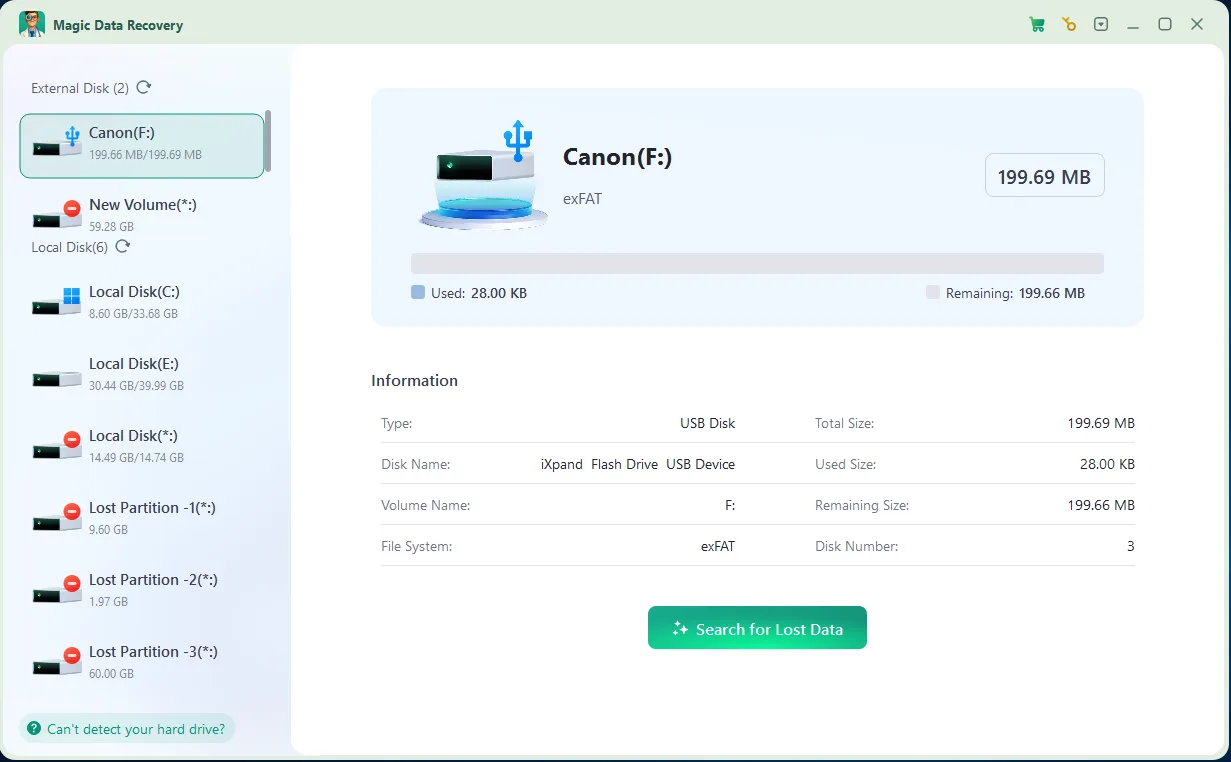
Best fit: Windows users recovering files after deletion, formatting, or file system errors on readable storage.
Documented strengths: Common storage-device support, a scan-preview-recover workflow, and lower listed individual prices in this comparison.
Main limitations: The listed PRO plans cover one computer. It does not replace Mac or mobile recovery software. Its current trial export allowance also needs verification.
Observed results: All 47 files passed our checks in both scenarios, with folders restored. After quick formatting, one DOC and one MOV filename contained unexpected characters. Full scans took approximately 27 and 32 minutes respectively. Some tested formats lacked preview support.
Choosing Between the Two
Magic Data Recovery addresses a common problem: Windows still detects the storage device, but files disappeared after deletion, formatting, or a file system error. Its scan-and-preview workflow helps users inspect results before choosing what to save.
Consider an external drive that asks for formatting even though it contains invoices and photographs. Avoid accepting that prompt merely to make the drive usable. If the device reads reliably, a recovery scan offers a way to look for surviving files before attempting changes.
The product’s practical appeal is its focus on Windows recovery, support for common storage media, and lower displayed PRO prices in this comparison. Those differences can make it a better fit for a single-computer task.
Our quick-format results support considering Magic when folder preservation matters. They do not demonstrate a universal advantage. Both tools restored the entire deleted dataset, and Magic also showed a filename limitation after formatting.
When AnyRecover Is the Better Fit
Choose AnyRecover data recovery for further evaluation when you need a Mac option or a confirmed bundle of additional functions. A Windows-only alternative cannot replace those requirements.
If you only need one Windows folder, compare the available evaluation results and license terms first. The more useful product is the one that fits the task and produces verifiable files.
When Neither Recovery Tool Is the Right Choice
Do not keep switching applications when the hardware shows signs of failure. Clicking, repeated disconnections, and unstable reads call for professional assessment.
Software also has firm limits:
- Overwritten content: A new file can replace the original bytes.
- SSD TRIM: Deleted content may become unavailable even without deliberate new file saves.
- Secure erasure: Recovery software cannot reverse effective sanitization.
- Locked encryption: A scanner does not replace a required password or recovery key.
An intact backup often offers a simpler route. Restore that copy before purchasing another application.
Conclusion: Is AnyRecover Data Recovery Worth It?
AnyRecover data recovery performed well on ordinary deletion in our USB test: all 47 files passed inspection, and the folders returned. Quick formatting exposed a limitation: the software saved every file, but one DOC was unusable and the original folders did not return.
For deletion, formatting, or file system errors on Windows, we recommend considering Magic Data Recovery. In our quick-format test it restored the folders and 47 usable files, although two filenames changed. That result, its Windows focus, and lower listed prices explain the recommendation. File system error recovery remains a documented use case, not a tested scenario in this review.
If you are still choosing a recovery method, use our deleted file recovery guide. Protect the source, recover to another device, and judge success by files that open correctly.
Supports Windows 7/8/10/11 and Windows Server
FAQs
Is AnyRecover Data Recovery legitimate?
Is AnyRecover completely free?
How much does AnyRecover cost?
Can AnyRecover Data Recovery restore formatted files?
Is AnyRecover safe to use?
Why do recovered files fail to open?
What is a Windows alternative to AnyRecover?
Can AnyRecover recover files from a damaged hard drive?

Jason is a data recovery and technical support specialist with over 15 years of hands-on experience. He has worked extensively with frontline users, troubleshooting difficult data loss cases and providing practical recovery solutions for accidental deletion, formatted drives, damaged file systems, lost partitions, system failures, and other recovery emergencies. His expertise also includes backup and restoration, file repair, and disaster recovery, with a strong emphasis on safe, reliable, and technically accurate guidance.