
How to Recover Files Deleted from OneDrive: Step-by-Step Guide
A folder deleted on a laptop can disappear from OneDrive and other connected devices soon afterward. That does not always mean every copy is gone. To recover files deleted from OneDrive, start with the web Recycle Bin, then check the device and any independent backups.
Recovery depends on what OneDrive still retains and whether the file ever existed locally. A deleted cloud file may remain restorable within the applicable retention period. A downloaded copy may have a separate recovery path. An online-only placeholder, however, is not a complete local copy.
For now, avoid further cleanup and check the correct OneDrive account. This guide helps identify the remaining copies, choose a suitable recovery method, and verify the result. For other deletion scenarios, see our deleted file recovery guide.
Table of Contents
Before Recovery: Protect Any Remaining Copies
Do not empty either Recycle Bin, reset OneDrive, or reinstall Windows while investigating the deletion. If ongoing changes are spreading between devices, pause OneDrive sync on affected computers. Pausing cannot reverse a deletion that has already synced.
If another computer may still hold an intact offline copy, keep it disconnected while checking. Copy usable files to independent storage before reconnecting.
When local disk recovery may be necessary, minimize use of the original drive. Save downloads, software installations, and recovered files elsewhere. Prefer another physical drive rather than another folder on the same disk.
Quick Answer: Choose the Right OneDrive Recovery Method
Open OneDrive on the web, select Recycle bin, choose the deleted items, and select Restore. If they are missing, use the situation below to decide what to check next.
Situation | What to check first | Main limitation |
Deleted file appears in OneDrive Recycle Bin | Restore it online | The item must still be retained |
File was deleted from a downloaded local folder | Windows Recycle Bin or Mac Trash | A cloud deletion does not necessarily leave an item here |
Work or school file is missing from the first bin | Second-stage recycle bin and IT administrator | Access and retention depend on the organization |
Many files were deleted or changed together | Restore your OneDrive, if available | It undoes a batch of changes and has a limited window |
File exists but contains the wrong content | Version History | An appropriate earlier version must exist |
File is permanently deleted but was backed up | Independent backup or another preserved copy | The backup must contain the actual file content |
No retained copy exists, but the file was downloaded locally | Local disk recovery | Overwriting and SSD TRIM may prevent recovery |
File was always online-only | Cloud recovery, owner, or administrator | Local software cannot recover content never stored locally |
These methods recover different copies. Checking one empty bin does not establish that every recovery route has failed.
Confirm Deletion Before Scanning a Drive
First, search OneDrive online by filename or part of the name. Confirm the signed-in email address: personal and work accounts have separate storage and separate bins.
If the file appears online but is missing in File Explorer, follow our OneDrive files disappeared guide. That situation calls for account, path, or sync checks before deleted-file recovery.
If the file belonged to someone else, ask the owner to check the original location. Losing access to a shared folder is different from deleting a file you own.
Finally, establish whether the file was downloaded. OneDrive Files On-Demand can display names and thumbnails without keeping complete file content on the computer. A blue cloud icon indicates an online-only file; opening it downloads it, while Always keep on this device keeps it available locally. Microsoft explains these file states here.
Method 1: Restore Deleted Files from OneDrive Recycle Bin
Best for: Files that were uploaded to OneDrive and are still in its web Recycle Bin.
This is usually the quickest way to restore OneDrive deleted files because it uses the retained cloud copy without scanning a disk.
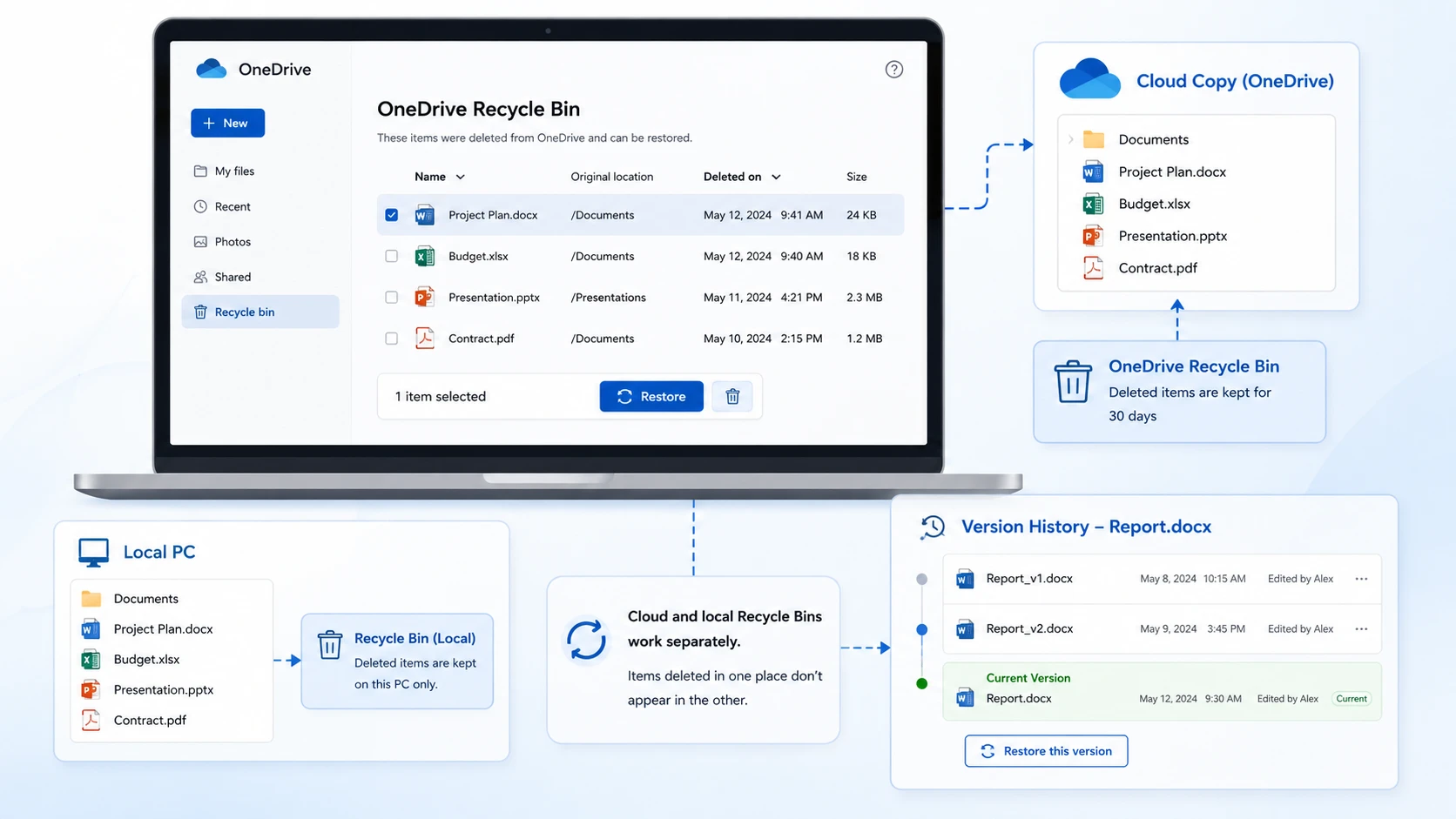
- Sign in to OneDrive with the account that owned the files.
- Open Recycle bin in the navigation pane.
- Select the required files or folders.
- Select Restore.
- Open the original folder online and check the restored content.
For Personal Vault files, use Show Personal Vault items and unlock the vault if prompted. Otherwise, deleted vault items may not be visible.
How Long Does OneDrive Keep Deleted Files?
Microsoft documents these usual retention periods:
Account type | Usual Recycle Bin period | Important distinction |
Personal Microsoft account | 30 days | Do not wait until the deadline to restore |
Work or school account | 93 days, unless the administrator changed the setting | The first and second stages share the retention period |
Check Microsoft’s OneDrive restoration guidance and, for organizational accounts, confirm the applicable settings with IT.
Expected result: The items return to their original location. Open important files rather than relying only on their filenames.
If they are absent: Check the local bin and, for work or school accounts, the second-stage bin. An empty personal OneDrive bin does not provide the same administrator recovery route as an organizational account.
Method 2: Check Windows Recycle Bin or Mac Trash
Best for: Downloaded files deleted locally through a normal deletion operation.
The device bin and OneDrive web bin are separate. A file missing from one may still be in the other.
On Windows, open Recycle Bin, find the item, right-click it, and select Restore. On a Mac, open Trash, locate the file, and select Put Back.
Check the restored file locally. Resume sync only after confirming the unwanted deletion has stopped, then verify the cloud copy separately.
Limitation: Files deleted from the cloud and deleted online-only files do not appear in the computer’s Recycle Bin or Trash, according to Microsoft’s recovery instructions. Shift+Delete bypasses the Windows bin; it should not be treated as proof that the OneDrive web bin is also empty.
If this fails: Look for an existing backup before attempting local disk recovery.
Method 3: Check the Second-Stage Bin for Work or School Accounts
Best for: Organizational OneDrive items removed from the first-stage bin but still retained in the second stage.
Personal OneDrive accounts do not have this same two-stage recovery workflow.
- Open the work or school OneDrive web Recycle bin.
- Look for second-stage recycle bin near the bottom of the page.
- If accessible, select the missing items and restore them.
- If the option or items are unavailable, contact the Microsoft 365 administrator.
Moving between stages does not start a fresh 93-day period. The retention clock runs from the original deletion, as explained in Microsoft’s site collection Recycle Bin documentation.
Give IT the filename, original path, owner account, and approximate deletion time. Ask whether organizational retention or a configured backup preserves another copy. Those protections must already apply; they are not automatically available for every account.
Expected result: A retained item returns to its location, or IT identifies another applicable recovery route.
If this fails: Check independent backups and whether complete file content existed on a local device. Avoid assuming that Microsoft Support can restore every permanently deleted item.
Method 4: Use Restore Your OneDrive for a Batch of Changes
Best for: Many deletions or unwanted changes within the last 30 days, with eligible Microsoft 365 access.
For one deleted document, restoring that item is usually more precise. A full rollback also reverses useful changes made after the selected point.
- Sign in to OneDrive online.
- For an eligible personal account, open Settings → Options → Restore your OneDrive. For work or school accounts, look under Settings → Restore OneDrive.
- Choose a date or custom time before the incident.
- Review the activity chart and selected actions.
- Preserve any newer files needed, then confirm Restore.
Files created after the restore point move to the Recycle Bin. This feature cannot recover files permanently purged from the OneDrive Recycle Bin. See Microsoft’s Restore your OneDrive instructions.
If malware caused the changes, secure affected devices before restoring and resuming synchronization.
Expected result: Selected changes are reversed. Check the affected folders and important recent work.
If unavailable or unsuccessful: Try an independent backup or administrator recovery where applicable.
Method 5: Restore an Earlier Version When the File Still Exists
Best for: A document, image, or other file that remains present but has been overwritten or changed incorrectly.
Version History addresses changed content, not the absence of a permanently deleted file.
- Find the existing file in OneDrive online.
- Right-click it and select Version history.
- Review the available versions and dates.
- Select the menu beside the required version and choose Restore.
- Open the file and verify its contents.
Microsoft’s Version History guide explains that this feature supports multiple file types, not just Office documents. Available history depends on the file and applicable settings.
Expected result: The selected earlier version becomes the current version.
If there is no usable version: Check a separate backup. Repeatedly reopening Version History will not create missing historical copies.
Method 6: Recover OneDrive Files from an Independent Backup
Best for: Files captured by File History, Time Machine, an external backup, or a configured organizational backup before deletion.
A known, usable backup is preferable to scanning for uncertain remnants. However, a backup must contain the actual file data. Do not assume that backing up a folder of online-only placeholders captured its cloud contents.
Windows File History or Previous Versions
- Connect the backup drive, if required.
- Right-click the folder that originally contained the file.
- Select Restore previous versions.
- Choose a snapshot from before the deletion and inspect it.
- Use Restore to, where available, to recover into a separate location.
These options require prior protection of the relevant files. Turning on File History now cannot recreate a backup from before deletion. Microsoft’s File History instructions also explain how to inspect versions before restoring.
Other Copies to Check
Browse the relevant date in a Mac Time Machine backup or another backup application. Also check an external drive, an email attachment, a previously exported project, or a colleague’s authorized copy.
Expected result: A complete file opens from the backup destination.
If no copy exists: Local recovery is an option only if the file’s content previously existed on accessible local storage.
Method 7: Recover Deleted Local Copies with Magic Data Recovery
Best for: Deleted Windows files that were downloaded or created locally, have no usable retained copy, and were stored on a drive that remains stable and readable.
Magic Data Recovery scans local storage. For OneDrive recovery, its role is to look for the former downloaded or synced copy. It cannot scan Microsoft’s cloud servers or reconstruct an online-only file that was never downloaded.
The product supports recovery scenarios involving deletion, formatting, and file system errors. In this article, the relevant question is narrower: does the drive still contain usable data from the deleted OneDrive file?
Select the Original Storage Location
Common sync folder names include:
C:\Users\YourName\OneDriveC:\Users\YourName\OneDrive - OrganizationName- Desktop, Documents, or Pictures redirected into OneDrive
These are examples. Check the actual folder path, especially if OneDrive was moved to another drive. Scan the drive that held the file content, not an unrelated disk or the OneDrive website.
Scan, Preview, and Recover to Another Drive
1. Prepare another physical drive for recovered files.
2. Download and install Magic Data Recovery away from the affected drive where practical. For valuable files deleted from a system drive, consider assessing that drive from another computer with qualified assistance.
Supports Windows 7/8/10/11 and Windows Server
3. Launch the software and select the original drive or partition.

4. Start the scan and review the results.
5. Search by filename or filter by file type where available. Folder names may be missing from some results.
6. Preview supported files and compare their contents and sizes.

7. Recover the selected items to the separate drive.

8. Open the saved files in their usual applications.
For example, a spreadsheet created locally and deleted before upload has no cloud copy to restore. Local recovery may still be worth assessing. This is an illustrative scenario, not a tested recovery result.
What Local Recovery Cannot Promise
A found filename does not establish that the contents are intact. New writes may overwrite deleted data, and SSD TRIM can make deleted content unavailable even when little time has passed. Preview is a useful check, but opening the saved file provides stronger confirmation.
Neither Magic Data Recovery nor another local tool can recover data that never existed on the scanned drive. Do not keep trying scanners for an exclusively cloud-only file.
If local recovery fits the case, review Magic Data Recovery, check the current license terms, and assess the results before relying on this route.
What If OneDrive Deleted Files Are Not in Recycle Bin?
Work through this checklist before concluding that the files are permanently lost:
- Verify the owner account and search OneDrive online.
- Show Personal Vault items if relevant.
- Check the owner’s storage for a shared file.
- Check the local bin for a locally deleted downloaded copy.
- Check the second-stage bin and IT recovery options for work or school accounts.
- Inspect an independent backup or preserved offline copy.
- Consider local disk recovery only where full file content existed.
Restore your OneDrive is useful for eligible batch incidents, but it does not bypass permanent deletion. Likewise, Version History applies to an existing file rather than serving as an alternative recycle bin.
A new file that was deleted before its first upload requires local or backup recovery. Deleting an already uploaded file while offline is different: a cloud copy may still exist until the queued deletion synchronizes. Preserve any intact copy before reconnecting the affected device.
Verify Recovered Files Before Resuming Normal Use
A successful recovery means the needed content is usable, not merely that a name appears in a list.
- Open documents and check essential pages, formulas, and attachments.
- Inspect photos at full size and play videos beyond the first few seconds.
- Test archives by extracting their contents.
- Check the file version and date against the work needed.
Keep a verified copy outside the active sync folder. Resume synchronization after the deletion or malware issue is resolved, then confirm the online files and a second device where appropriate. Do not delete recovery output until the independent copy is verified.
When to Stop DIY Recovery
Stop repeated scans if the local drive clicks, disconnects, overheats, or cannot be read consistently. A storage recovery specialist may help with a damaged local device, but cannot retrieve a cloud-only file simply by examining the computer.
For an important organizational file, escalate promptly to IT. If a personal cloud-only file has been permanently purged and no independent copy exists, local recovery software has no source content to recover.
Do not format, initialize, or run file system repair commands to try to reverse a OneDrive deletion. Such operations address storage problems and can alter the local recovery source.
Reduce the Risk of Another OneDrive Deletion
Keep at least one independent backup of important files. OneDrive offers useful recovery protections, but synchronized deletion can affect connected devices, and retained items have limits. An external backup or a separately configured backup service provides another recovery source.
For critical folders, use Always keep on this device when local storage permits, then verify that the backup application captures the actual contents. Local availability alone is not an independent backup because deletion can still synchronize.
Test restoration periodically. Recover a sample document from backup, open it, and confirm that recent work is included. A backup plan becomes useful only when its restore process works.
Finally, distinguish deleting a file from freeing local space. For cloud files that should remain online, use the relevant Free up space option instead of deleting them. Review shared-folder permissions and keep account recovery details current so access problems do not delay restoration.
Conclusion
To recover files deleted from OneDrive, first locate a retained copy: the web Recycle Bin, local bin, organizational second-stage bin, or an independent backup. Use Version History for changed content and a full OneDrive rollback only when the batch recovery conditions apply.
If those routes fail and complete file content previously existed on a readable Windows drive, Magic Data Recovery can help assess the remaining local data. Save recovery output elsewhere and verify it before restarting normal use. For broader guidance, visit our deleted file recovery.
Supports Windows 7/8/10/11 and Windows Server
FAQs
Can I recover deleted OneDrive files after 30 days?
Does Shift+Delete also bypass the OneDrive web Recycle Bin?
Can recovery software restore online-only OneDrive files?
Will deleting a OneDrive file remove it from other computers?
Why are deleted Personal Vault files missing from the Recycle Bin?
Can I restore a folder that someone else shared with me?
Does Restore Your OneDrive recover permanently purged files?
Should I reset OneDrive to recover deleted files?

Jason is a data recovery and technical support specialist with over 15 years of hands-on experience. He has worked extensively with frontline users, troubleshooting difficult data loss cases and providing practical recovery solutions for accidental deletion, formatted drives, damaged file systems, lost partitions, system failures, and other recovery emergencies. His expertise also includes backup and restoration, file repair, and disaster recovery, with a strong emphasis on safe, reliable, and technically accurate guidance.