
Data Rescue Review and Discover Magic Data Recovery

Losing important files can create immediate pressure. However, choosing recovery software too quickly may cause further damage, especially if you install it on the affected drive. This data rescue review explains what Data Rescue 6 can do, where it has limitations, how its licensing works, and how to use it without overwriting recoverable data.
We also compare it with Magic Data Recovery for Windows users. No tool can guarantee 100% hard drive recovery. Results depend on drive health, the file system, SSD TRIM, and whether new data has overwritten the original sectors.
Supports Windows 7/8/10/11 and Windows Server
Table of Contents
Data Rescue Review: Quick Verdict
Data Rescue 6 is a capable data recovery software tool for Windows and macOS. It offers Quick Scan, Deep Scan, file preview, drive cloning, scan management, and advanced sector-level features. Therefore, it suits users who need more control than a basic undelete program provides.
This Data Rescue 6 review also identifies two drawbacks. The standard license costs $79 and lasts 30 days, while some advanced options may confuse beginners. Prosoft Engineering currently offers new users up to 1GB of free recovery, and the professional license costs $399 per year. The company also states that sales are final, so users should preview files before buying.
Best for: Windows and Mac users who need cloning, deep scanning, or advanced controls.
Less suitable for: users seeking a low-cost lifetime license or a beginner-first interface.
What Data Rescue Is Known For
Data Rescue, developed by Prosoft Engineering, has been one of the best-known data recovery programs on the market for both Windows and macOS users. It’s designed to help users recover accidentally deleted files, lost partitions, and data from corrupted drives.
Some of the main highlights often mentioned by users include:
Reliable file scanning and deep recovery: Data Rescue offers both quick and deep scan modes for recovering files in different scenarios.
Professional-grade options: It includes features like disk cloning and advanced search capabilities that can be useful for technicians or IT admins.
Cross-platform availability: The software supports both macOS and Windows, which makes it flexible for multi-device users.
Overall, Data Rescue is a respected product for users who need a reliable, professional data recovery tool.
However, as data recovery needs have become more common among non-technical users, many people now look for a simpler, more intuitive recovery tool that provides equally strong results — and that’s where Magic Data Recoverycomes in.
Data Rescue Review: Pricing and Free Trial
An honest data rescue review must explain the full cost:
- Data Rescue free trial: scan and preview files, plus up to 1GB of recovery for new users.
- Standard license: $79 for unlimited recovery and software access for 30 days.
- Professional license: $399 per year.
One license covers both Windows and Mac, which can add value in a mixed-device environment. However, users with one small recovery job may find the 30-day license expensive. Since Prosoft states that sales are final, complete the scan and preview process first.
Data Rescue Pros and Cons
The following Data Rescue pros and cons summarize this data rescue review.
Pros
- Supports Windows and macOS.
- Includes Quick Scan and Deep Scan.
- Previews supported files before recovery.
- Offers drive cloning for unstable devices.
- Works with internal drives, USB devices, and memory cards.
- Includes advanced scan and virtual RAID controls.
- Gives eligible new users up to 1GB of free recovery.
Cons
- The $79 standard license lasts only 30 days.
- Advanced controls may overwhelm beginners.
- Deep Scan may lose original names and folder paths.
- Recovery depends on whether the sectors remain intact.
- Software cannot solve mechanical drive failure.
- Users should verify support for newer macOS releases.
Introducing Magic Data Recovery: A Simpler Way to Bring Your Data Back
Magic Data Recovery is an all-in-one data recovery solution designed for both home and professional users who want to recover files quickly and safely.
Its focus is on simplicity, compatibility, and precision — giving you the ability to recover thousands of file types with just a few clicks.
✨ Key Highlights of Magic Data Recovery
Supports 5000+ file types: including photos, videos, documents, archives, and databases.
Works on multiple devices: from hard drives and SSDs to USB flash drives, SD cards, and digital cameras.
Intuitive user interface: clean, step-by-step design that even beginners can use confidently.
Deep and Quick Scan modes: to handle both simple deletions and complex recovery scenarios such as formatted or damaged partitions.
Free version available: allows users to preview recoverable files before purchase.
Magic Data Recovery provides a smooth, guided experience that eliminates the technical complexity often found in advanced recovery tools — making it ideal for users who value both power and ease of use.
Step-by-Step: How to Use Magic Data Recovery
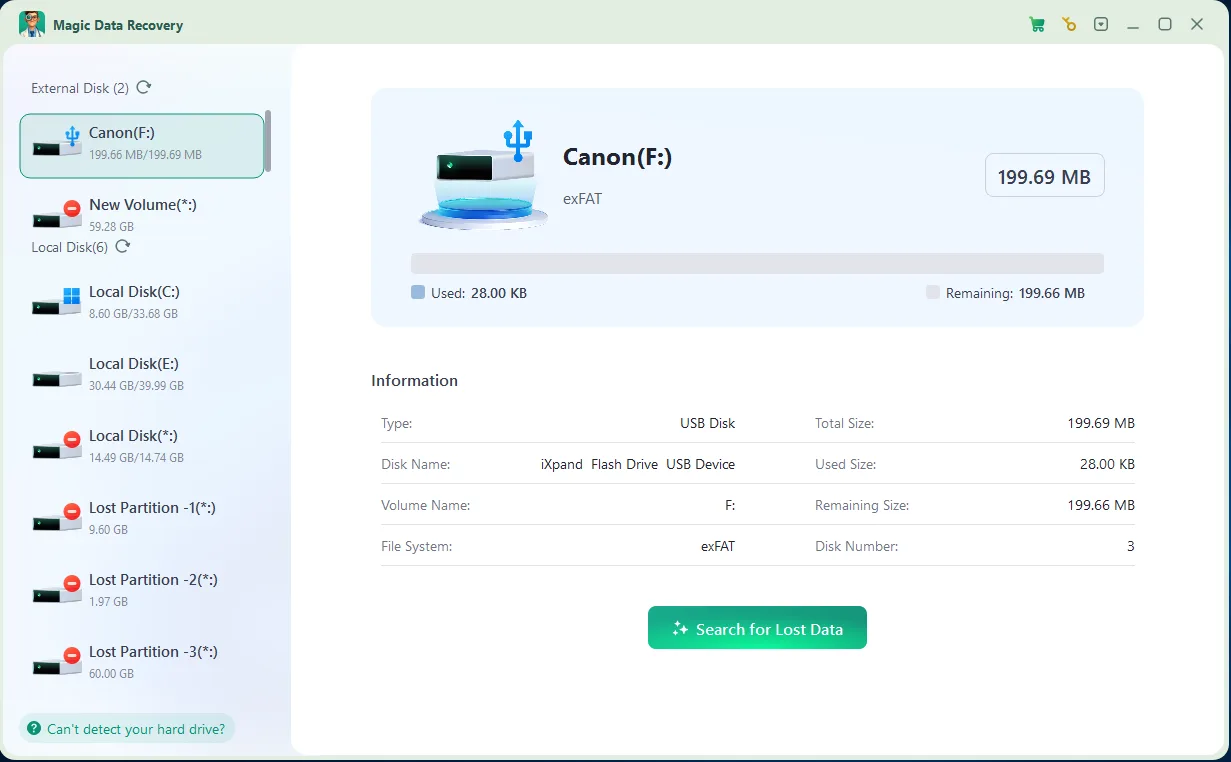
Recovering deleted or lost files with Magic Data Recovery is fast and straightforward. Below are the essential steps to get started.
1. Download and Install: Get Magic Data Recovery from the official website and install it on your computer.
Supports Windows 7/8/10/11 and Windows Server



When to Use Magic Data Recovery
Magic Data Recovery is versatile enough for a wide range of data loss scenarios:
Accidental deletion: Files emptied from the Recycle Bin or removed using Shift + Delete.
Formatted drives or SD cards: Recover data after accidentally formatting a USB or camera card.
Corrupted partitions: Retrieve data from disks that no longer open or show errors.
System crashes and power failures: Restore documents lost due to unexpected shutdowns.
External devices: USB drives, memory cards, and portable SSD recovery.
No matter the scenario, Magic Data Recovery is built to handle everyday data loss cases with efficiency and accuracy.
Final Thoughts
So, is Data Rescue worth it? Data Rescue 6 remains useful for logical data loss. Quick Scan, Deep Scan, preview, cloning, and advanced mode provide more flexibility than many beginner-only tools. One license also covers Windows and Mac.
Still, the $79 standard license lasts only 30 days. Run the trial, preview several high-value files, and verify operating-system compatibility before paying. This Data Rescue for Windows review supports the product for users who need advanced controls, while this Data Rescue for Mac review recommends checking current macOS support carefully.
For common Windows recovery, we recommend Magic Data Recovery as an accessible alternative. It focuses on deleted files, formatted drives, RAW partitions, and inaccessible storage while keeping the workflow clear. Its preview, broad format support, and limited free HDD recovery option help users evaluate the result.
The final lesson from this data rescue review is simple: stop using the affected drive before new data overwrites the files.
Supports Windows 7/8/10/11 and Windows Server
FAQ:
Can Magic Data Recovery recover files from a formatted or damaged drive?
Is Magic Data Recovery free to use?
How long does a data recovery scan take with Magic Data Recovery?
Can Data Rescue recover a formatted drive?
Is Data Rescue worth $79?
What Is the Best Data Rescue Alternative?
Is Data Rescue 6 free?

Erin Smith is recognized as one of the most professional writers at Amagicsoft. She has continually honed her writing skills over the past 10 years and helped millions of readers solve their tech problems.