
How to Find My Facebook Password
For many users, forgetting login credentials creates immediate frustration. Therefore, when people search for how to find my Facebook password, they usually want to see the existing password instead of resetting it. However, Facebook does not provide a direct way to display passwords due to strict security policies. So, what can you actually do?
Fortunately, there are still practical solutions. If your password was saved on your device, you can recover it directly before resetting your Facebook password. In this guide, you will learn how password storage works, explore real solutions, and understand why Magic Recovery Key works best in different scenarios.
Supports Windows 7/8/10/11 and Windows Server
Table of Contents
How to Find My Facebook Password: What You Need to Know First
Before trying any method, you should understand a key fact. Facebook stores passwords in encrypted form. Therefore, you cannot directly view them inside your account. Instead, the platform only allows password resets to protect user data.
However, this does not mean recovery is impossible. If your password was saved locally, you can still retrieve it. In fact, most solutions for how to find my Facebook password depend on browser or device storage rather than Facebook itself. As a result, your success depends on whether your device stored the password earlier.
How to Find My Facebook Password (3 Proven Methods)
Different users face different situations. Therefore, choosing the right method is essential. Below are three effective ways to solve the problem.
Method 1: How to Find FB Password Using a Recovery Tool
If you want the fastest and most efficient solution for how to find fb password, this method is the best choice.
Why This Method Works
Modern browsers store login credentials locally. In addition, they encrypt passwords but still allow authorized access. Because of this, recovery tools can scan and display saved data.
Therefore, instead of searching manually, you can retrieve passwords directly.
Recover Password with Magic Recovery Key
When it comes to efficiency, Magic Recovery Key offers a clear advantage.
Core Benefits:
- Web Browser PassView scans all saved credentials quickly
- Supports Chrome, Edge, and Firefox simultaneously
- Displays passwords in a readable format
- Reduces manual steps significantly
Practical Scenario:
For example, you logged into Facebook months ago and saved your password. Now you cannot remember it. Instead of resetting your account, you can scan your browser and recover it instantly.
Why This Method Is Better:
- It checks multiple browsers at once
- It avoids missing stored data
- It simplifies the process for beginners
How to Use Magic Recovery Key to Find Facebook Password
If you want a straightforward way to handle how to find fb password, follow these steps:
Step 1: Download and install Magic Recovery Key.
Supports Windows 7/8/10/11 and Windows Server
Step 2: Launch the program and select Web Browser PassView. It will scan your system and list all saved passwords it can find.

Step 3: View the list of recoverable passwords. Then, locate your Facebook account and export the password you need.
Method 2: How to View My Password in Facebook via Browser
If you prefer a manual approach, you can check your browser settings.
Steps (Chrome Example)
- Open Settings
- Go to Autofill → Password Manager
- Search for Facebook
- Click the eye icon
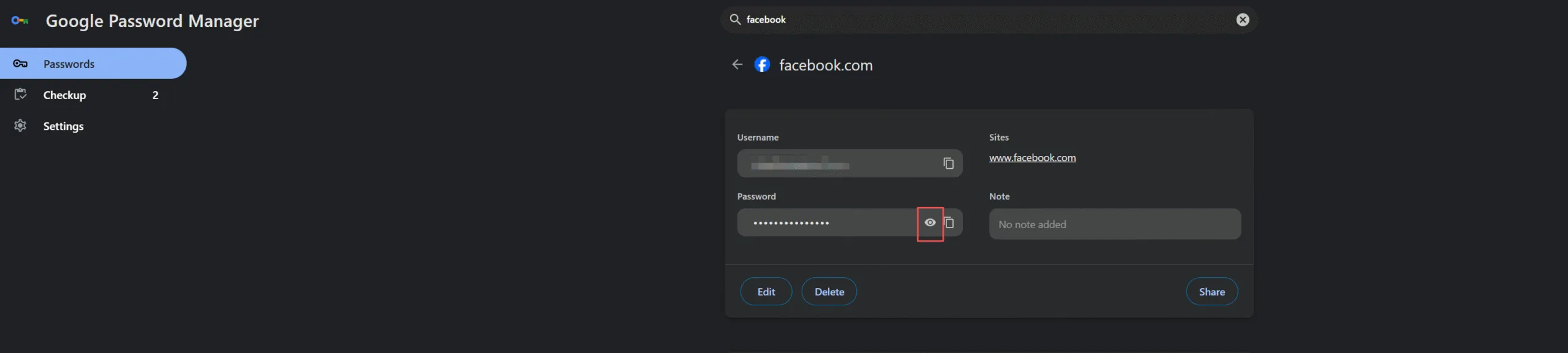
Similarly, Edge and Firefox offer the same functionality.
However, this method has limitations. For example, you must know which browser stored the password. In addition, you need to check each browser separately. Therefore, it can take more time compared to automated tools.
Method 3: How to Check My Password in FB on Mobile
Mobile devices also store passwords securely. Therefore, you can retrieve saved credentials on your phone.
This method works for users searching for: how to check my password in fb
iPhone
- Settings → Passwords → Search Facebook
Android
- Google Password Manager → Search Facebook
Important Note:
You must verify your identity before viewing any password. Otherwise, the system will not display it.
How to Find My Facebook Password Without Saving It
If your password was not saved, recovery becomes impossible.
In this situation:
- No local data exists
- No tool can retrieve the password
Therefore, you cannot find Facebook password without saved credentials. Instead, you must move to the reset option.
How to Reset Facebook Password (When Recovery Fails)
Steps
1. Go to the Facebook login page
2. Click “Forgot Password”
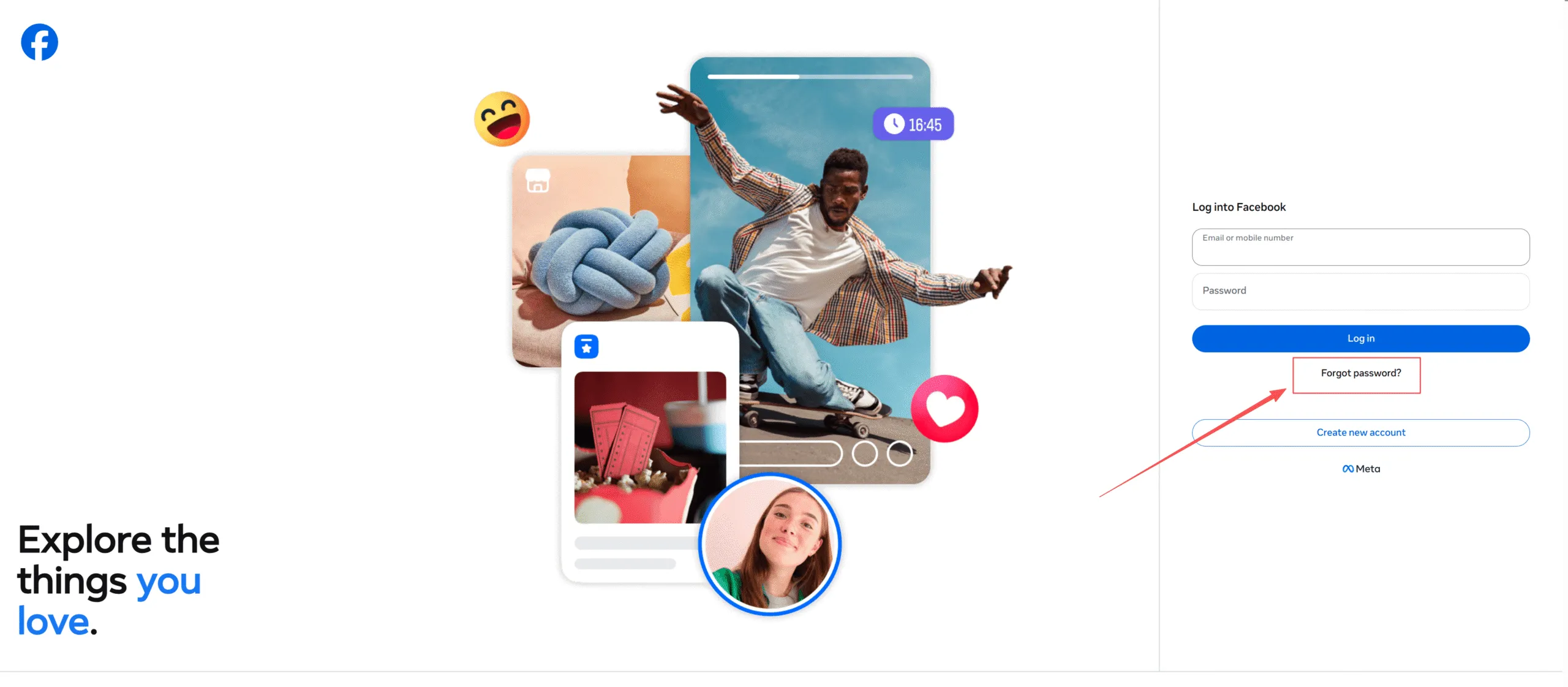
3. Enter your email or phone number

4. Verify your identity
5. Create a new password
Although this method restores access, it does not allow you to see your original password. Therefore, it should be considered a fallback solution.
Why You Cannot Directly See Your Facebook Password
Facebook uses encryption to protect user accounts. As a result, passwords are never stored in plain text.
This means:
- You cannot view passwords directly
- Facebook does not display them
- Security risks are reduced
Therefore, understanding this limitation explains why how to find my Facebook password requires external solutions.
Is It Safe to Use Password Recovery Tools?
Many users worry about safety. However, reliable tools follow strict security practices.
For example, Magic Recovery Key:
- Works locally on your device
- Does not upload your data
- Only scans saved credentials
At the same time, you should always download software from official sources. In addition, avoid unknown tools to reduce risks. As a result, you can use recovery tools safely when needed.
Tips to Avoid Losing Your Facebook Password Again
To prevent future issues, you should follow these best practices.
- Use a trusted password manager
- Enable two-factor authentication
- Save passwords on secure devices
- Keep backup login methods
As a result, you will reduce the chance of searching for how to find my Facebook password again.
Conclusion
When users search for how to find my Facebook password, they usually expect a direct answer. However, Facebook does not allow password viewing due to security reasons. Therefore, recovery depends on whether your password was saved.
Among all methods, recovering saved credentials offers the most efficient solution. In particular, Magic Recovery Key simplifies the process by scanning browsers, displaying results clearly, and reducing manual effort. As a result, it stands out as a reliable and practical password recovery option for users who want quick access without unnecessary steps.
Supports Windows 7/8/10/11 and Windows Server
FAQ
Can I find my Facebook password without resetting it?
Yes, but only if your password was saved on your device. In that case, you can retrieve it using a browser password manager or a recovery tool. However, if the password was never saved, Facebook does not provide any way to view it, so resetting becomes necessary.
How do I see my Facebook password if I am logged in?
Even if you are logged in, Facebook does not display your password. However, you can check your browser or mobile password manager. These tools store saved credentials and allow you to reveal them after identity verification, which provides a practical workaround.
Is using a password recovery tool safe?
Yes, reliable tools are safe when used properly. They usually work locally and do not upload your data. However, you should always download software from official websites and avoid unknown programs to ensure your personal information stays protected.
Why can’t Facebook show my password directly?
Facebook encrypts passwords to protect user accounts. Because of this, passwords are not stored in readable form. This design improves security and prevents unauthorized access, even though it means users cannot directly view their passwords.
What should I do if I never saved my password?
If your password was not saved, it cannot be recovered. In this situation, you need to reset it using your email or phone number. Although this creates a new password, it allows you to regain access quickly and securely.

Vasilii is a data recovery specialist with around 10 years of hands-on experience in the field. Throughout his career, he has successfully solved thousands of complex cases involving deleted files, formatted drives, lost partitions, and RAW file systems. His expertise covers both manual recovery methods using professional tools like hex editors and advanced automated solutions with recovery software. Vasilii's mission is to make reliable data recovery knowledge accessible to both IT professionals and everyday users, helping them safeguard their valuable digital assets.