
Dr Fone Data Recovery Guide

Losing photos, messages, WhatsApp chats, contacts, or videos from a phone can feel urgent, especially when the missing data is not in your gallery, Recently Deleted folder, or cloud backup. That is why many users search for dr fone data recovery when they need a practical way to recover data from iPhone or Android devices.
This guide explains what dr fone recovery can do, when it may help, where its limits are, and how to use it more safely. You will also learn what to do when your data loss problem is not on a phone, but on a Windows computer, USB drive, SD card, or external hard drive.
Table of Contents
What Is Dr Fone Data Recovery?
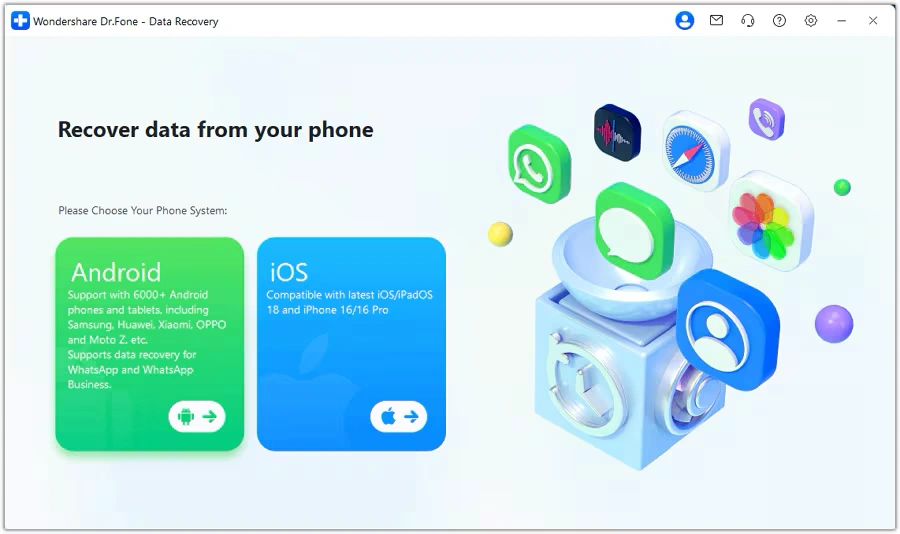
dr fone data recovery refers to Wondershare Dr.Fone’s mobile recovery solution for iOS and Android devices. It is designed for common phone data loss cases, including accidental deletion, phone system issues, damaged devices, app data loss, and missing files after an update.
Unlike traditional desktop recovery software that scans hard drives or USB devices, Dr.Fone focuses mainly on smartphones and tablets. For iPhone users, it may scan the device, iTunes backups, iCloud-related data, and local backup sources. For Android users, it may help recover items such as photos, videos, contacts, messages, call logs, WhatsApp data, audio, and documents, depending on device model and data condition.
In simple terms, dr fone recovery is best understood as a phone data recovery and mobile management toolkit, not a universal data recovery program for every device.
When Should You Use Dr Fone Recovery?
You may consider dr fone data recovery when the lost files are on an iPhone, iPad, Android phone, or Android tablet. It can be useful in everyday cases such as:
- You deleted photos or videos by mistake.
- Important messages or contacts disappeared.
- WhatsApp chats or attachments are missing.
- Your phone had an update failure or system crash.
- You want to preview recoverable data before restoring.
- You need to extract selected data instead of restoring a full backup.
However, you should act quickly. After data loss, every new photo, app update, download, or message may write new data to the device. Once old data is overwritten, no recovery software can reliably bring it back.
How Dr Fone Data Recovery Works on iPhone
For iOS devices, dr fone data recovery usually works through three recovery paths: direct device scan, backup extraction, and cloud-related recovery.
First, the software may scan your iPhone or iPad from a computer. This helps locate data that still exists in accessible storage areas or system records. Second, it may check iTunes or local backups, which is useful when your device is damaged, lost, or reset. Third, it may help access iCloud backup or synced data when available.
A major advantage is selective recovery. Instead of restoring the entire iPhone and overwriting current files, users can preview recoverable items and choose what they want to recover. This is especially helpful when you only need several photos, one contact list, or a few message threads.
Still, iOS has strict privacy and storage rules. Deleted files are not always available for deep recovery, especially after the device has continued to run for days or weeks. For best results, stop using the device as soon as possible and check whether you have iCloud, iTunes, Finder, or app-specific backups.
How Dr Fone Data Recovery Works on Android
For Android users, dr fone recovery focuses on files and app data commonly stored on phones, SD cards, and internal storage. Depending on the phone model and permissions, it may scan for photos, videos, audio files, contacts, text messages, call history, WhatsApp messages, attachments, documents, and APK-related files.
Android recovery results vary because Android devices differ by brand, system version, storage encryption, and app behavior. Some devices allow broader access, while others restrict deleted-data scanning. If files were stored on a removable SD card, recovery may be easier than recovering from encrypted internal storage.
Before using dr fone data recovery on Android, check three things. First, confirm whether the files are in Trash, Recently Deleted, Google Photos, Google Drive, or a messaging app backup. Next, stop saving new files to the phone. Finally, use a stable USB connection and avoid disconnecting the device during scanning.
Dr Fone Data Recovery Review: Strengths and Limits
A useful dr fone data recovery review should not only list features. It should also explain realistic recovery conditions.
The main strengths are clear. Dr.Fone offers a beginner-friendly interface, supports both iOS and Android, provides preview before recovery, and includes other phone tools such as transfer, backup, repair, and unlock modules. This makes it convenient for users who want one mobile toolkit instead of several separate programs.
At the same time, recovery is never guaranteed. Some third-party reviews praise Dr.Fone as a broad mobile toolkit, while others report limited results for permanently deleted files. This difference is not unusual in mobile recovery. Phones use encryption, sandboxed apps, automatic syncing, and active storage cleanup, so recoverability depends on the device, file type, backup status, and overwrite condition.
Therefore, dr fone recovery is a good option to try when you need mobile data recovery, but it should not be presented as a certain fix for every deleted file.
Dr Fone Data Recovery vs Manual Recovery Methods
Before installing any recovery tool, try safe manual methods first. They may solve the problem without scanning the device.
Method | Best For | Main Limit |
Recently Deleted folder | Photos and videos deleted recently | Usually time-limited |
iCloud or Google backup | Synced photos, contacts, app data | Requires backup enabled before loss |
iTunes/Finder backup | Full iPhone restore or extraction | Full restore may overwrite current data |
App backup | WhatsApp, LINE, notes, documents | Depends on app settings |
dr fone data recovery | Selective mobile recovery and preview | Results depend on device and overwrite status |
Manual recovery is often faster when backups exist. However, dr fone recovery becomes more useful when you want to preview data, recover selectively, or check multiple recovery sources in one workflow.
How to Use Dr Fone Data Recovery Safely
Follow these steps to improve your chance of recovery:
Step 1: Stop Using the Phone
Do not take new photos, install apps, download files, or update the system. This reduces the risk of overwriting deleted data.
Step 2: Check Built-In Recovery Options
Look in Recently Deleted, Trash, iCloud, Google Photos, Google Drive, WhatsApp backup, and local phone backup. If the missing files are there, restore them directly.
Step 3: Install Dr.Fone on a Computer
Use the official Dr.Fone download source and install the software on a Windows or Mac computer. Then connect your iPhone or Android device with a reliable USB cable.
Step 4: Choose the Correct Recovery Mode
Select the option that matches your case. For iPhone, this may include recovery from the device, iTunes backup, iCloud backup, or local backup. For Android, choose the relevant file types and scan source.
Step 5: Preview Before Recovery
Preview the scan results carefully. Recover only the files you need. This avoids unnecessary exports and helps you confirm whether the tool found the right data.
Step 6: Save Data to a Safe Location
When possible, export recovered data to your computer first. This gives you a separate copy before transferring files back to the phone.
Tips to Improve Recovery Success
To get better results from dr fone data recovery, follow these practical tips:
- Act immediately after data loss.
- Avoid factory reset unless you already have a backup.
- Keep your phone charged during scanning.
- Use the original USB cable if possible.
- Do not install unknown recovery apps directly on the phone.
- Check cloud sync and app backups before deep scanning.
- Review supported file types before buying a paid module.
These steps do not guarantee recovery, but they reduce avoidable mistakes.
Is Dr Fone Recovery Worth Trying?
dr fone recovery is worth considering if your lost data is on an iPhone or Android device and you want a guided, user-friendly recovery process. It is especially helpful when you need selective recovery, backup extraction, or a mobile toolkit that also handles transfer, repair, and device management tasks.
However, it is not the right tool for every data loss situation. If your missing files are on a Windows PC, formatted USB drive, corrupted SD card, external hard drive, or RAW partition, you need desktop data recovery software instead of mobile recovery software.
For Windows PC Data Loss: Try Magic Data Recovery

If the data loss happens on a Windows computer or storage device, Magic Data Recovery is a more suitable solution. It is designed for deleted files, formatted drives, file system errors, RAW partitions, and storage corruption. It supports common file systems such as FAT/FAT32, NTFS, exFAT, and EXT2/3/4, making it useful for hard drives, SSDs, USB drives, memory cards, and external disks.
For example, if you lost files from a Windows partition, formatted an external drive, or need to recover data from a disk with file system errors, Magic Data Recovery fits the problem better than dr fone data recovery. It focuses on computer and storage-device recovery, while Dr.Fone focuses on mobile devices.
If you are looking for an efficient Windows data recovery solution, try Magic Data Recovery before writing new data to the affected drive.
Supports Windows 7/8/10/11 and Windows Server
Conclusion
dr fone data recovery is a practical option for iPhone and Android users who need to recover deleted or missing mobile data, preview recoverable files, and restore selected items without relying only on full-device backups. It works best when you act quickly, avoid overwriting data, and choose the correct recovery path.
For phone data loss, dr fone recovery is worth trying because it combines mobile recovery, backup extraction, and phone management in one toolkit. For Windows PC, USB drive, SD card, or external drive recovery, Magic Data Recovery is the better recommendation because it targets desktop storage problems, formatted drives, file system errors, and multiple file systems.
FAQs
What is dr fone data recovery used for?
dr fone data recovery is used to recover lost or deleted data from iPhone and Android devices. It can help with photos, videos, contacts, messages, WhatsApp data, documents, and backup files, depending on the device and data condition. It is mainly a mobile recovery solution, not a full Windows hard drive recovery tool.
Is dr fone recovery safe to use?
dr fone recovery is generally safe when downloaded from the official Wondershare source and used correctly. For safer results, install it on your computer, connect your phone with a stable cable, and preview files before recovery. Avoid using unofficial installers, because they may contain unwanted software or outdated versions.
Can dr fone data recovery recover permanently deleted photos?
dr fone data recovery may recover deleted photos if the data still exists in device storage, backup files, cloud sync, or app records. However, permanently deleted photos cannot always be recovered, especially if new data has overwritten them. Check Recently Deleted, iCloud, Google Photos, and backups before scanning.
Does dr fone recovery work without backup?
dr fone recovery may work without a traditional backup in some cases, especially if the device still contains recoverable data fragments or synced cloud data. However, recovery without backup is less predictable. If you have iCloud, iTunes, Finder, Google, or app-specific backups, your chance of finding usable files improves.
Is dr fone data recovery for iPhone or Android?
dr fone data recovery supports both iPhone and Android recovery scenarios. For iPhone, it may work with device scans, iTunes backups, iCloud data, and local backups. For Android, it may scan for photos, videos, contacts, messages, call logs, WhatsApp files, and documents, depending on model and permissions.
Why can dr fone recovery fail to find my files?
dr fone recovery can fail when deleted files have been overwritten, the phone storage is encrypted, the app data is restricted, or no backup exists. Mobile systems often clean unused data quickly. To improve results, stop using the phone immediately and scan before installing new apps or saving new files.
What is the difference between dr fone data recovery and Magic Data Recovery?
dr fone data recovery focuses on iOS and Android devices, while Magic Data Recovery focuses on Windows computers and storage devices. Use Dr.Fone for phone photos, messages, contacts, and app data. Use Magic Data Recovery for deleted files, formatted drives, RAW partitions, USB drives, SD cards, and external disks.
Can I use dr fone recovery for Windows computer files?
dr fone recovery is not the best choice for Windows computer file recovery because it mainly targets mobile devices. If you lost files from a PC, hard drive, SSD, USB drive, or memory card, use Magic Data Recovery instead. It supports common file systems and storage-related data loss scenarios.

Jason is a data recovery and technical support specialist with over 15 years of hands-on experience. He has worked extensively with frontline users, troubleshooting difficult data loss cases and providing practical recovery solutions for accidental deletion, formatted drives, damaged file systems, lost partitions, system failures, and other recovery emergencies. His expertise also includes backup and restoration, file repair, and disaster recovery, with a strong emphasis on safe, reliable, and technically accurate guidance.