
Best Buy Hard Drive Recovery Review & Cost

Losing access to your critical data can instantly disrupt your work and personal life. Whether it is a compilation of family photos, crucial business documents, or a massive project file, a sudden storage failure causes immediate panic. In these stressful moments, most people immediately think of driving to the nearest retail electronics store for a best buy hard drive recovery service.
While taking your device to a local store sounds like the most straightforward hard drive recovery option, you must weigh the actual expenses, turnaround times, and privacy implications beforehand. This comprehensive guide breaks down how the Geek Squad process operates, analyzes real-world user experiences, and introduces a powerful home solution called Magic Data Recovery that might save you hundreds of dollars.
Supports Windows 7/8/10/11 and Windows Server
Table of Contents
How Does Best Buy Hard Drive Recovery Work?
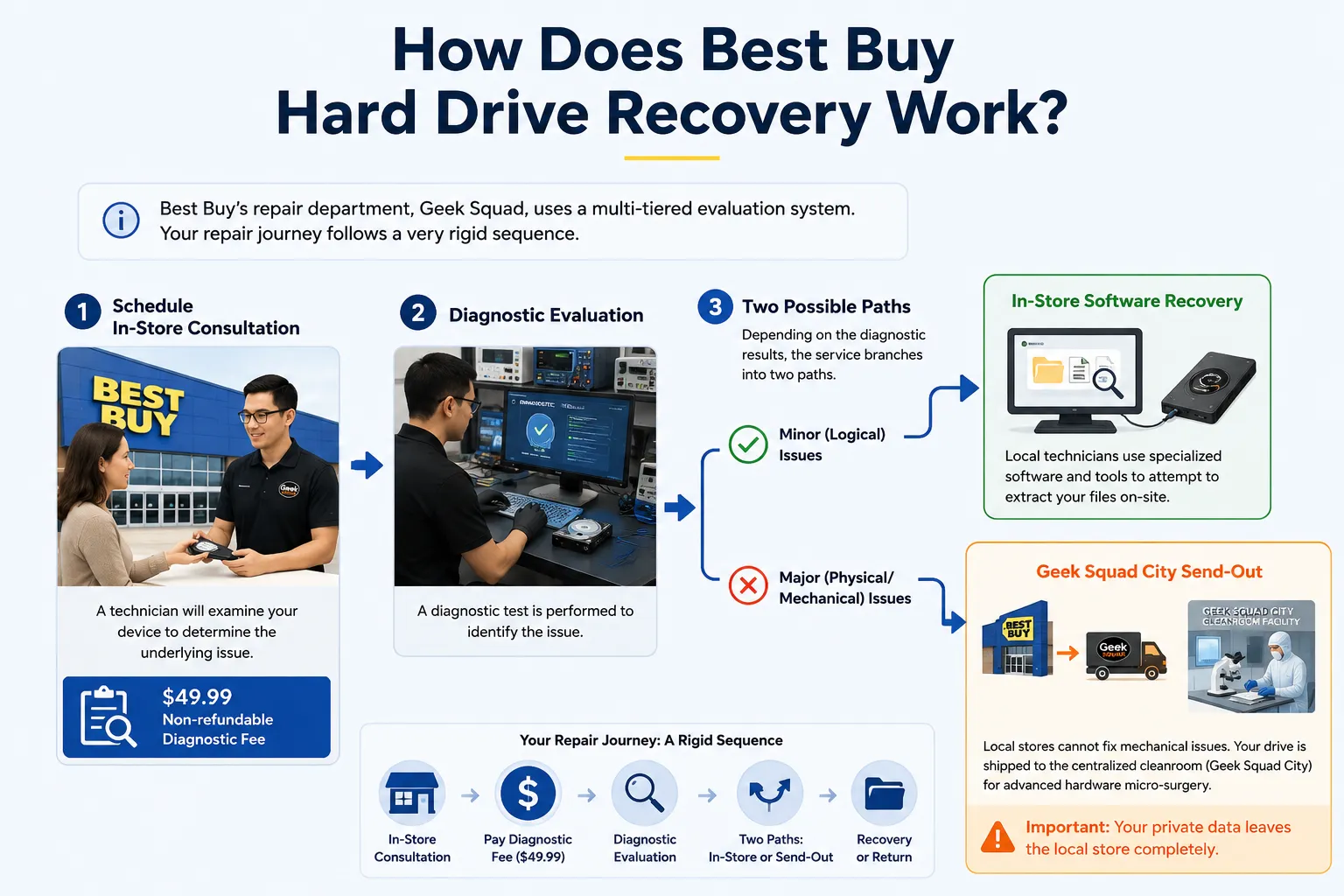
To begin with, you need to understand the structural workflow of Best Buy’s repair department, famously known as the Geek Squad. Their tech support infrastructure handles data loss through a multi-tiered evaluation system. Consequently, your repair journey follows a very rigid sequence.
First, you must schedule an in-store consultation at a local branch. A technician will look at your device to determine the underlying issue. It is crucial to note that they charge a non-refundable $49.99 diagnostic fee just to assess the drive.
Second, depending on what the diagnostic test reveals, the service branches into two distinct paths:
- In-Store Software Recovery: If the issue is minor, local technicians will connect your storage device to their specialized station and attempt to extract files using retail utilities.
- Geek Squad City Send-Out: If your drive suffers from mechanical problems, the local store cannot fix it. Therefore, they will ship your drive to their centralized cleanroom facility, often referred to as Geek Squad City, for advanced hardware micro-surgery. Ultimately, this means your private data leaves the local store completely.
Decoding the Best Buy Hard Drive Recovery Cost
Budgeting for data retrieval requires a clear understanding of tier-based pricing structures. Many users visit the store expecting a flat, affordable rate, only to face unexpected financial hurdles when requesting a best buy hard drive recovery.
Tier 1: The Initial Assessment
As mentioned, the entry point for a best buy hard drive recovery attempt is the $49.99 diagnostic fee. You must pay this amount upfront. Even if the technicians conclude that your data is completely unrecoverable, Best Buy retains this fee to cover their labor time.
Tier 2: Level 1 Software Recovery
If your files are retrievable through standard software procedures at the local precinct, the overall price typically ranges from $200 to $350. This flat rate covers the execution of the transfer. However, you will also need to purchase a new storage drive from them to hold the recovered data if you do not bring an empty one.
Tier 3: Level 2 & 3 Cleanroom Services
When a hard drive has failed mechanically, the price escalates dramatically. Advanced lab interventions involving component replacement can cost anywhere from $450 to $1,500+. Consequently, the final bill can become a major financial burden.
Service Level | Estimated Price Range | Turnaround Time |
Initial Lab Diagnosis | $49.99 (Upfront / Fixed) | 24 – 48 Hours |
Basic Software Recovery | $200 – $350 | 2 – 5 Days |
Advanced Cleanroom Labs | $450 – $1,500+ | 2 – 4 Weeks |
Critical Insights from a Best Buy Hard Drive Recovery Review
Analyzing third-party forum threads or browsing technical support communities reveals mixed sentiments from real consumers. While some customers praise the convenience of dropping off a physical device, several recurring pain points stand out in almost every best buy hard drive recovery review.
The Long Turnaround Time
In-store software transfers usually take anywhere from two to five days depending on their queue. However, if your media must travel to the centralized offsite laboratory, you will likely be forced to wait two to four weeks. This extended delay can be devastating if you rely on that specific hardware for daily business operations.
Unexpected Financial Risks
Furthermore, a major complaint on technology forums highlights the rigid pricing policy. If the cleanroom technicians spend hours rebuilding a drive but only manage to save corrupted, unreadable system files instead of your actual target photos, you may still face the full bill for the labor attempts. Thus, you bear a significant financial risk.
Data Privacy Worries
Leaving a storage medium containing highly confidential financial records, personal photos, or proprietary business data at a retail store introduces inherent security anxieties. Although Best Buy enforces strict employee compliance policies, data privacy advocates often remind users that shipping hardware to an external facility multiplies the potential points of data exposure.
The Vital Diagnostic: Physical vs. Logical Damage for Best Buy Hard Drive Recovery
To choose the smartest fix for your situation, you must accurately diagnose the nature of your drive failure before committing to a best buy hard drive recovery. Data corruption generally falls into one of two categories: physical destruction or logical errors.
When You Should Choose Best Buy Hard Drive Recovery (Physical Damage)
Physical damage occurs when the internal mechanical components suffer structural breakdown. For example, if your hard drive makes a distinct clicking, grinding, or scraping sound, the read/write heads are likely scraping against the magnetic platters.
Similarly, if your device was dropped on a concrete floor, exposed to liquid submersion, or fails to spin entirely, software cannot help you. In these severe scenarios, bypassing DIY methods and utilizing a professional cleanroom facility like Best Buy’s laboratory is the correct, necessary path.
When You Should Avoid Best Buy Hard Drive Recovery (Logical Damage)
On the other hand, logical damage happens when the mechanical structure remains perfectly healthy, but the software architecture crumbles. Common examples include:
- Accidentally formatting a partition or deleting an important folder.
- A sudden operating system crash converting your file system into an inaccessible RAW format.
- Malware or virus infections wiping out files unexpectedly.
If your computer still recognizes the drive icon in Disk Management even though you cannot open the folders, your hardware is structurally sound. Therefore, paying hundreds of dollars to a retail store for logical issues is completely unnecessary because you can easily initiate a safe home data recovery alternative right from your desk.
The Smart Alternative to Best Buy Hard Drive Recovery: Magic Data Recovery
If your drive is spinning normally but your files are missing, utilizing a specialized software solution will save you time, money, and stress. This is where Magic Data Recovery serves as the ideal alternative to a costly best buy hard drive recovery.
Magic Data Recovery is a robust, Windows-based utility explicitly designed to handle complex logical data loss scenarios. Instead of leaving your sensitive computer equipment at a public retail counter, this application empowers you to run deep-sector scans completely offline.
Why it beats retail services: You maintain 100% control over your data storage device throughout the entire process, eliminating third-party security threats entirely.
Key Features
- Absolute Privacy Security: Your private media files never leave your sight. Because the utility operates locally on your machine without external cloud transfers, your data remains fully confidential.
- High-Efficiency Deep Scanning: The program uses sophisticated reconstruction algorithms to read damaged file allocation tables, successfully identifying files that standard operating systems label as gone forever.
- Risk-Free Trial Structure: Unlike Best Buy’s non-refundable diagnosis charge, this software lets you scan your drive and preview recoverable items for free. Furthermore, it provides a generous 500MB free file restoration limit so you can salvage essential documents without spending a dime.
Practical Scenario Example
Imagine an office administrator who accidentally formats an internal storage drive containing five years of tax spreadsheets. Sending it away for a best buy hard drive recovery means losing access to that drive for a week and spending at least $200.
By choosing this desktop software instead, the administrator plugs the drive into a Windows PC, executes a deep scan, previews the spreadsheets, and recovers the files within an hour. If you are looking for a more efficient and affordable solution to rescue your missing files right now, you should try Magic Data Recovery.
Step-by-Step Guide: How to Recover Your Hard Drive at Home
Executing an in-home restoration using a professional tool is remarkably simple. These chess-move instructions will ensure a safe deployment without risking further data degradation, completely bypassing the need for a best buy hard drive recovery.
1. Download and Install Magic Data Recovery
First, download the installation package of Magic Data Recovery below. You must install the software on a healthy drive partition that is completely separate from the affected drive. This smart approach prevents accidental overwriting and protects your lost data from being destroyed.
Supports Windows 7/8/10/11 and Windows Server
2. Select the Target Hard Drive to Scan
Launch the program to view the storage dashboard. From the main interface, carefully choose the specific hard drive or lost partition where your files disappeared. Once selected, initiate the scanning process.

3. Scan the Hard Drive for Lost Files
The software automatically performs a comprehensive Advanced Scan to search through the deep sectors of your storage device. Meanwhile, the system lists all recoverable files in real-time as the scanning progress advances toward completion.

4. Preview Files Before Recovery
Next, utilize the built-in preview function to examine the content of your found files. This crucial verification step ensures you recover only the specific documents, photos, or spreadsheets you actually need.

5. Recover Files to a Safe Location: Final restoration.
Finally, select the checkboxes next to your target files and click the restore button to save them. You must choose a different drive or alternative storage device as the destination. Never restore data to the same compromised hard drive, because doing so risks immediate data corruption.

Conclusion on Best Buy Hard Drive Recovery
When evaluating your options for a best buy hard drive recovery, you must let the actual type of damage guide your ultimate decision. If your drive has been crushed, burned, or produces severe mechanical noises, paying for Geek Squad’s specialized laboratory cleanroom infrastructure is your only realistic hope.
Conversely, for deleted files, formatted disks, or unexpected partition errors, traditional retail send-outs are both slow and unnecessarily expensive. Downloading a dedicated software utility gives you instant clarity without any upfront financial commitments.
By utilizing the 500MB free restoration limit provided by Magic Data Recovery, you can securely verify your data’s recoverability from the comfort of your home before spending a single dollar. If you are looking for a more efficient and secure hard drive solution, try Magic Data Recovery today.
Supports Windows 7/8/10/11 and Windows Server
FAQs About Best Buy Hard Drive Recovery
How much does a Best Buy hard drive recovery cost?
The total expense depends entirely on the severity of the damage. You must pay a flat $49.99 upfront diagnostic fee. Following that assessment, basic software extraction costs between $200 and $350, while advanced mechanical cleanroom laboratory services range from $450 to over $1,500.
Does Geek Squad charge if they cannot recover data?
Yes, partially. Geek Squad always keeps the initial $49.99 diagnostic fee regardless of the recovery outcome. However, for advanced cleanroom repairs, pricing structures vary, and you might still owe labor fees even if the lab technicians only retrieve corrupted or completely unreadable system files.
How long does a best buy hard drive recovery take?
Simple in-store software recoveries usually take between two and five days depending on their current queue. However, if your drive suffers from physical failure and requires offsite cleanroom micro-surgery at Geek Squad City, the entire shipping and restoration process typically lasts from two to four weeks.
Can Best Buy recover data from a formatted hard drive?
Yes, Best Buy can resolve formatting issues, but doing so via their in-store service will cost you $200 to $350. Because formatting is a purely logical issue rather than a physical one, you can easily save money by using home software alternatives instead.
Is it safe to leave my private data with Geek Squad?
While Best Buy maintains strict internal employee data privacy policies, leaving your device at a retail counter introduces inherent security anxieties. Shipping hardware to an offsite lab multiplies the potential points of data exposure, making offline DIY recovery software a much safer choice for confidential files.
Why should I choose software over Best Buy hard drive recovery?
Software provides instant, private, and cost-effective relief for logical drive errors. Instead of paying a $49.99 diagnostic fee and waiting days for a retail store, tools like Magic Data Recovery let you scan immediately at home for free, offering a 500MB free recovery limit.

Vasilii is a data recovery specialist with around 10 years of hands-on experience in the field. Throughout his career, he has successfully solved thousands of complex cases involving deleted files, formatted drives, lost partitions, and RAW file systems. His expertise covers both manual recovery methods using professional tools like hex editors and advanced automated solutions with recovery software. Vasilii's mission is to make reliable data recovery knowledge accessible to both IT professionals and everyday users, helping them safeguard their valuable digital assets.