
We Recover Data Review & DIY Alternative

When people search for we recover data, they usually want to know whether a professional hard drive recovery company can help restore their lost files. In most cases, this search points to a physical data recovery service or a lab-based recovery provider, not a downloadable software tool.
This difference matters. A physical data recovery service usually requires users to send in a damaged drive, SSD, RAID device, memory card, or other storage media for inspection. Technicians may need to repair hardware, handle the device in a controlled environment, or use specialized tools to extract data.
However, not every data loss case needs physical service. If your device still appears on your computer and the files were lost because of deletion, formatting, partition loss, or file system errors, DIY data recovery software may offer a faster first step. Therefore, this guide explains when a lab-based service makes sense, when software recovery is more practical, and why Magic Data Recovery can be a useful WeRecoverData alternative for logical data loss.
Supports Windows 7/8/10/11 and Windows Server
Table of Contents
What Is WeRecoverData?
WeRecoverData is generally understood as a professional physical data recovery service. Unlike recovery software that users install and run at home, this type of service usually works through a lab-based process. Users send their storage device to the provider, and technicians inspect the media to determine whether data can be recovered.
This service model may suit serious cases, such as physically damaged hard drives, failed SSDs, RAID failures, damaged memory cards, or storage devices that no longer appear on a computer. In these situations, software may not access the device safely.
However, users who search for we recover data may not always need a physical recovery service. If the data loss comes from accidental deletion, formatting, RAW partition errors, or lost partitions, a software solution may be a better first step.
WeRecoverData Review: When Should You Choose a Recovery Service?
A professional data recovery service is often the better choice when hardware damage exists. For example, if a hard drive makes clicking, grinding, or beeping sounds, you should stop using it immediately. Also, if your computer cannot detect the device, software may not access the lost data.
A recovery service may help with complex cases such as damaged hard drives, failed SSDs, RAID failures, server crashes, and business-critical data loss. These situations often require special tools, cleanroom handling, or technical inspection.
You should consider a recovery service when:
- The device has physical damage.
- The drive makes unusual noises.
- The storage device does not appear on the computer.
- A RAID system or business server fails.
- The lost files have high legal, financial, or business value.
- You cannot risk further damage.
However, this option may cost more and take longer. You may also need to ship your device. For that reason, many users who search we recover data also look for a WeRecoverData alternative before making a final decision.
WeRecoverData vs DIY Recovery Software: Which One Fits Your Case?
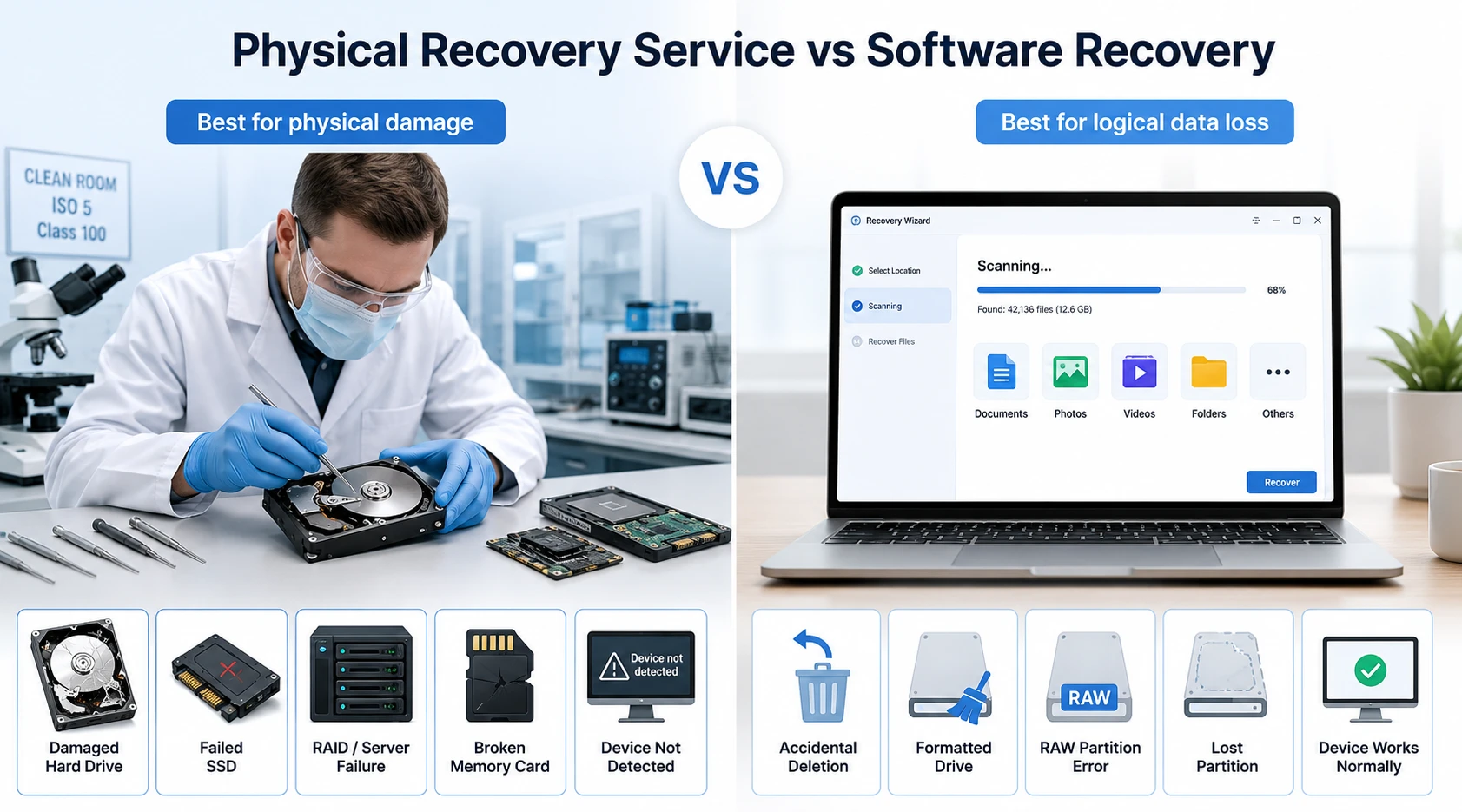
The main difference is simple: WeRecoverData represents a physical data recovery service, while Magic Data Recovery is DIY data recovery software.
A physical service usually requires device inspection, manual recovery work, and professional hardware-level handling. This option is better when the storage device has physical damage or cannot be detected by the computer.
By contrast, Magic Data Recovery works when the device still connects normally. It helps users scan the storage device, preview recoverable files, and restore selected data without sending the device away.
Recovery Need | Better Option |
Clicking or physically damaged drive | WeRecoverData |
Failed SSD that cannot be detected | WeRecoverData |
RAID or server failure | WeRecoverData |
Accidentally deleted files | Magic Data Recovery |
Formatted drive | Magic Data Recovery |
Lost partition | Magic Data Recovery |
RAW drive or file system error | Magic Data Recovery |
SD card or USB file loss | Magic Data Recovery |
Best We Recover Data Alternative: Magic Data Recovery
Magic Data Recovery is a practical WeRecoverData alternative for logical data loss cases. It helps users scan storage devices, preview recoverable files, and restore selected data without complicated settings.
The tool is useful when you accidentally delete files, format a drive, lose a partition, or cannot access files because of common file system issues. It supports everyday recovery needs, including documents, photos, videos, audio files, compressed files, and other common file types.
Why Magic Data Recovery Solves the Main Problem
The biggest problem behind a we recover data search is uncertainty. Users often do not know whether they need a lab or a software tool. Magic Data Recovery gives them a safer first check when the device still works.
For example, you may delete an important work folder and empty the Recycle Bin. You may format a drive before backing it up. You may also find that photos no longer appear on an SD card. In these cases, Magic Data Recovery can scan the device and help you check whether the files remain recoverable.
Key Advantages of Magic Data Recovery
Magic Data Recovery focuses on a clear recovery process. It does not require users to understand complex file system details before starting.
Its main advantages include:
- A simple interface for beginners.
- Support for common storage devices.
- Recovery for deleted, formatted, and lost files.
- File preview before recovery.
- A local recovery process for users who value privacy.
- A practical workflow for photos, videos, documents, and other files.
Therefore, this Magic Data Recovery review section does not position the tool as a replacement for every lab service. Instead, it recommends the software for logical data loss, where a software-first approach makes sense.
How to Recover Data with Magic Data Recovery
If your device still appears on your computer and the data loss comes from deletion, formatting, or partition issues, Magic Data Recovery can help you start the recovery process quickly. Follow the steps below to scan your device, preview lost files, and recover them to a safe location.
Step 1: Download and Install Magic Data Recovery
First, download Magic Data Recovery from the official website. Then, install it on a drive different from the affected device. This helps prevent accidental overwriting and protects the lost data before recovery.
Supports Windows 7/8/10/11 and Windows Server
Step 2: Select the Drive to Scan
Launch the program and go to the main interface. Next, choose the drive or partition where your files were deleted or lost. After that, start the scan to let Magic Data Recovery search for recoverable data.

Step 3: Scan the Drive for Deleted Files
The software will run an Advanced Scan to look for lost files. During the scan, Magic Data Recovery lists recoverable files as they appear, so you can check the results while the process continues.

Step 4: Preview Deleted Files Before Recovery
Next, use the preview feature to check file content before restoring anything. This step helps you confirm whether the files are usable and ensures that you only recover the data you actually need.

Step 5: Recover Files to a Safe Location
Finally, select the files you want to restore and save them to another drive or storage device. Do not recover files to the same location where data loss happened, because this may overwrite other lost files or cause data corruption.

WeRecoverData Comparison: Service or Magic Data Recovery?
The best recovery option depends on your device condition and the value of your lost files. A service works better for serious physical damage. Meanwhile, Magic Data Recovery works better for many logical data loss situations.
Situation | Better Choice |
Accidental file deletion | Magic Data Recovery |
Quick formatting | Magic Data Recovery |
Lost photos on an SD card | Magic Data Recovery |
USB drive file loss | Magic Data Recovery |
Clicking hard drive | Professional recovery service |
Physically damaged SSD | Professional recovery service |
RAID failure | Professional recovery service |
Business-critical server data loss | Professional recovery service |
This comparison gives users a clearer we recover data decision path. If the device still works and you need a fast first attempt, Magic Data Recovery is worth trying. However, if the hardware has obvious damage, a service may reduce the risk.
Common Scenarios Magic Data Recovery Can Help Fix
Magic Data Recovery can help in many real-life situations. For instance, you may delete a folder and empty the Recycle Bin before realizing the mistake. You may format a drive during setup. You may also lose videos, photos, or documents after a partition problem.
In these cases, the software scans the device and searches for recoverable file records. As a result, it can help with recover formatted drive, recover SD card data, and recover USB drive files tasks.
However, no recovery method can promise success in every situation. Overwritten data, severe corruption, and physical damage can all affect the result. A trustworthy WeRecoverData solution should explain these limits clearly.
Conclusion
WeDataRecovery offers a professional hard drive recovery solution that makes sense for damaged drives, failed SSDs, RAID problems, and business-critical data. However, many everyday data loss cases do not need a lab right away.
If you need to recover deleted files, restore a formatted drive, recover files from an SD card, or fix common logical data loss, Magic Data Recovery offers a practical first step. It helps you scan your device, preview recoverable files, and save selected data to a safe location.
That is why Magic Data Recovery is worth trying as a balanced WeRecoverData alternative. It does not overpromise, and it does not replace professional labs for physical damage. Instead, it gives ordinary users a clear, efficient, and beginner-friendly way to recover lost files when software recovery is the right choice.
Supports Windows 7/8/10/11 and Windows Server
FAQs About WeRecoverData and Data Recovery Software
Is WeRecoverData a service or software?
Is Magic Data Recovery a good WeRecoverData alternative?
Can I recover deleted files by myself?
When should I avoid DIY recovery software?
Can Magic Data Recovery recover formatted drive data?
Can I recover SD card data with Magic Data Recovery?
Where should I save recovered files?

Vasilii is a data recovery specialist with around 10 years of hands-on experience in the field. Throughout his career, he has successfully solved thousands of complex cases involving deleted files, formatted drives, lost partitions, and RAW file systems. His expertise covers both manual recovery methods using professional tools like hex editors and advanced automated solutions with recovery software. Vasilii's mission is to make reliable data recovery knowledge accessible to both IT professionals and everyday users, helping them safeguard their valuable digital assets.