
GPTパーティションエントリ:構造、配列、およびGUIDフィールド
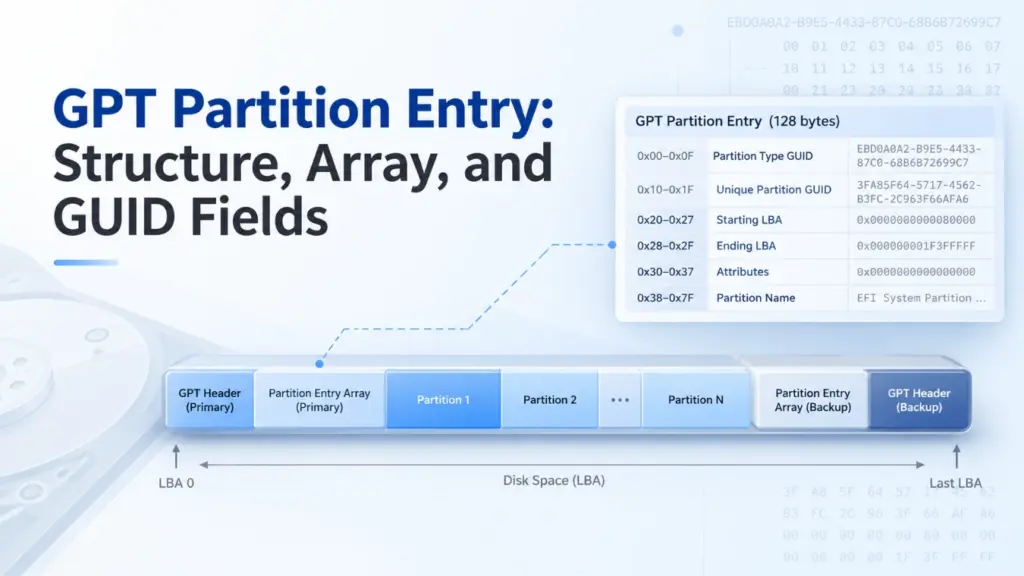
A GPTパーティションエントリ GUIDパーティションテーブル(GPT)ディスク上の1つのパーティションを記述するレコードです。このレコードには、パーティションのタイプ、一意のGUID、開始および終了の論理ブロックアドレス(LBA)、属性、および名前が記載されています。通常、 GPTパーティションエントリの構造 128バイトを占めています。これらのフィールドをデコードすることで、パーティションの位置を特定し、そのサイズを算出し、メタデータに不備がないかを確認することができます。.
このガイドは、UEFI仕様2.10に準拠しており、Windows 10、Windows 11、およびWindows Serverを実例として使用しています。基礎となるGPTフォーマットは、他の互換性のあるオペレーティングシステムにも適用されます。以下のバイト単位の例はすべて合成データであり、実際のディスクから取得したものではありません。.
目次
GPTパーティションエントリとは何ですか?
A GPTパーティションエントリ パーティションの識別情報と境界を定義するものであり、パーティション内のファイルは含まれていません。その位置づけを理解するには、次の3つの構造を区別してください:
構造 | 保存される内容 |
GPTヘッダー | 配列の位置、要素数とサイズ、使用可能なLBA範囲、およびチェックサム |
GPTパーティションエントリ配列 | 未使用のスロットを含む、パーティションレコードのシーケンス |
GPTパーティションエントリ | あるパーティションのGUID、境界、属性、および名前 |
このエントリは、オペレーティングシステムに論理ブロックの領域を指定します。その領域には、NTFS、FAT32、exFAT、その他のファイルシステム、あるいは従来のファイルシステムを持たないデータが格納されている場合があります。.
ディスクの全体的なレイアウトについては、Amagicsoftの GUIDパーティションテーブル(GPT)の概要.
GPTパーティションエントリの構造:6つのフィールドとそのオフセット
UEFI仕様書 2.10、第5.3.3節 標準の128バイトを定義する GPTパーティションエントリの構造:
フィールド | 相対オフセット | 長さ | 意味 |
|
| 16バイト | 想定されるパーティションの種類 |
|
| 16バイト | この特定のパーティションの識別子 |
|
| 8バイト | 最初の論理ブロック |
|
| 8バイト | 最後の論理ブロック(当該ブロックを含む) |
|
| 8バイト | 64ビット属性マスク |
|
| 72バイト | UTF-16LE コードユニットとして保存された名前 |
これらのオフセットは、の先頭から始まります。 1件, 、ディスクの先頭ではありません。また、128 バイトは一般的なエントリサイズであり、唯一の有効なサイズというわけではありません。UEFI 2.10 では、, パーティションエントリのサイズ 等しくなければならない 128 × 2^n, 非負の整数 n. より大きなエントリの場合、オフセットを超えるバイトは 0x7F は予約済みであり、必ずゼロでなければなりません。.
2つのGUIDフィールド
パーティションタイプGUID そのエントリがどのようなパーティションを表しているかをソフトウェアに伝えます。. 一意のパーティションGUID 特定のパーティションを識別します。たとえば、2つのベーシックデータパーティションが同じタイプGUIDを共有することはあっても、一意のパーティションGUIDを共有してはなりません。.
どちらのフィールドもGPTディスク識別子ではありません。 ディスクGUID GPTヘッダーに属する。.
LBAの境界とパーティションサイズ
A GPTパーティションエントリ 両方のエンドポイントを、符号なしのリトルエンディアンの64ビット整数として格納します。なぜなら、 EndingLBA 包括的な場合、ブロック数と容量を次のように計算します:
ブロック数 = 終了LBA − 開始LBA + 1
バイト単位のサイズ = ブロック数 × 論理ブロックサイズ
パーティションがLBA 2048からLBA 4095まで続く場合、そのパーティションは2,048ブロックにまたがります。 論理ブロックが 512 バイトの場合、そのサイズは 1 MiB になります。論理ブロックが 4096 バイトの場合、そのサイズは 8 MiB になります。LBA が常に 512 バイトを表すとは決して想定しないでください。.
属性とパーティション名
について 属性 このフィールドには64ビットのマスクが格納されます。 UEFIでは、ビット0を「必須パーティション」、ビット1を「ブロックI/Oプロトコルなし」、ビット2を「レガシーBIOSブート可能」と定義しています。UEFI 2.10では、ビット3~47は予約されており、ビット48~63はパーティションタイプごとに異なります。.
対象となる Windows パーティションの種類については、, マイクロソフトのGPTパーティション情報に関するドキュメント 読み取り専用(ビット 60)、シャドウコピー(61)、隠しファイル(62)、およびデフォルトのドライブ文字なし(63)などの上位ビットフラグを定義しています。これらの Windows での意味を、すべてのパーティションタイプに無差別に適用しないでください。.
パーティション名 36個のUTF-16コードユニット(72バイト)で構成されています。より短い名前にはヌル終端が使用されます。重要な点として、このGPT名は、ファイルシステム内に保存されているボリュームラベルとは異なります。を読み込むと、 GPTパーティションエントリ それだけでは、マウントされたボリュームに対して Windows が表示するラベルは決定されません。.
GPTパーティションエントリ配列の仕組み
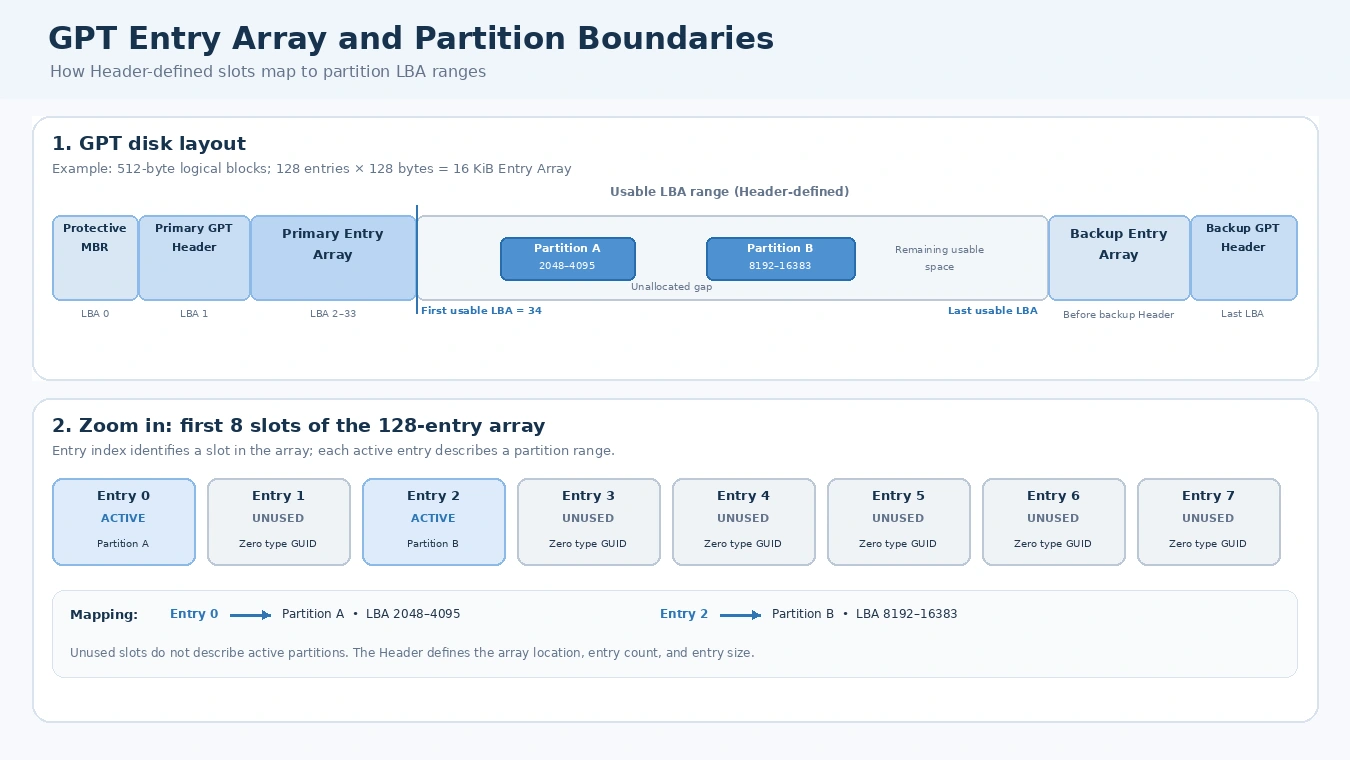
について GPTパーティションエントリ配列 同じサイズのスロットを連続して保持しています。そのGPTヘッダーには、次のように指定されています。 PartitionEntryLBA, パーティションエントリ数, そして パーティションエントリのサイズ. したがって、ソフトウェアは、特定のレコードを確実に特定する前に、ヘッダーを読み取ります。.
配列 bytes = パーティションエントリ数 × パーティションエントリのサイズ
配列の論理ブロック数 = ceiling(配列のバイト数 ÷ 論理ブロックサイズ)
UEFI 2.10 では、エントリ・アレイ用に少なくとも 16,384 バイトの領域が必要です。一般的な構成では、128 バイトずつ 128 スロットが使用されます。 したがって、512バイトの論理ブロックディスクでは32ブロック、4096バイトのディスクでは4ブロックを占有することになります。ただし、128という数は普遍的なパーティションの制限値ではありません。エントリ数はヘッダーで指定されます。.
未使用のスロットにはゼロが設定されています パーティションタイプGUID; 適切に管理された配列では、その配列の他のバイトもすべてゼロであるはずです。したがって、利用可能なスロットが128個ある場合、 ない つまり、128個のアクティブなパーティションがあるということです。.
インデックスから特定のエントリを検索する
項目を検索するには i, そこで i 0から開始する場合は、次のように指定してください:
絶対バイトオフセット = (PartitionEntryLBA × 論理ブロックサイズ)+(i × パーティションエントリのサイズ)
たとえば、次のような場合を想定すると PartitionEntryLBA = 2, SizeOfPartitionEntry = 128, そして i = 5.
論理ブロックサイズ | 算出された絶対オフセット | ディスク上の位置 |
512バイト |
| LBA 3、バイト 128 |
4096バイト |
| LBA 2、640バイト目 |
これらは、提示された例に基づく計算であり、2つの物理的なデバイスの観測結果ではありません。同じ GPTパーティションエントリ デバイスの論理ブロックサイズが変更されると、インデックスは異なるLBAに位置することがあります。.
プライマリアレイとバックアップアレイ
従来のGPTディスクでは、プライマリヘッダーはLBA 1に、バックアップヘッダーは最後のLBAに配置されます。プライマリエントリ配列は通常、プライマリヘッダーの直後に続き、バックアップエントリ配列はバックアップヘッダーの前に配置されます。これらの位置は、固定されたセクター範囲ではなく、それぞれのヘッダーフィールドに基づいて決定されます。.
私たちの GPTヘッダーの構造とCRC32に関するガイド これらのヘッダーフィールドと、2つの配列の関係について詳しく説明しています。.
GPTパーティションタイプGUIDと一意のパーティションGUIDの比較
A GPT パーティションタイプの GUID パーティションの用途を記述します。一意のパーティション GUID は特定のパーティションを識別し、ディスク GUID は GPT ディスクを識別します。これら 3 つの識別子は関連していますが、互いに置き換え可能というわけではありません。.
Windowsに関連する一般的なタイプGUIDには、次のようなものがあります:
パーティションの種類 | GUID 型 |
EFIシステムパーティション |
|
マイクロソフト・リザーブド |
|
マイクロソフトの基本データ |
|
Microsoft リカバリ |
|
GUID型は ない ファイルシステムを直接特定することはできません。たとえば、Microsoft Basic Dataパーティションには、NTFS、FAT32、またはexFATが格納されている可能性があります。そのファイルシステムを判別するには、ソフトウェアがパーティション内のデータを検査する必要があります。.
同様に、すべてのGPTディスクにEFIシステムパーティションがあるわけではありません。通常のGPTデータディスクでは、EFIシステムパーティションが必要ない場合もあります。.
ディスクをコピーする際、一意の識別子が重複していることも問題になる可能性があります。UEFIでは、GPTに対応したコピーソフトウェアを使用して、適切な新しいディスクGUIDおよび一意のパーティションGUIDを生成する必要があります。一方、RAWクローンでは識別子がそのまま保持される可能性があるため、完全なコピーであってもGUIDが新たに生成されているとは決して想定しないでください。.
16進数からGPTパーティションエントリをデコードする
この記事で紹介されている具体的な技術的な例は以下の通りです:合成された GPTパーティションエントリ UEFIフィールドレイアウトに基づいて構築されています。単一のエントリとしては内部的に一貫性がありますが、完全なGPTディスクイメージでも、実環境での実験でもありません。.
フィールド | デコードされた例 |
タイプ | マイクロソフトの基本データ |
GUID 型 |
|
一意のGUID |
|
LBAの開始位置 | 2048 |
LBAの終了 | 4095 |
属性 |
|
パーティション名 |
|
WinHexによるキャプチャやデバイスからの読み取りではなく、合成された基本データパーティションのエントリです。このエントリは内部的に一貫性がありますが、完全なディスクレイアウトやGPTヘッダーのCRCは確認されていません。.
手順 1: タイプ GUID をデコードする
最初の16バイトは次のとおりです:
A2 A0 D0 EB E5 B9 33 44 87 C0 68 B6 B7 26 99 C7
ディスク上のGUIDの表現では、最初の4バイト、2バイト、および2バイトの各構成要素について、リトルエンディアンのバイト順が使用されます。したがって:
A2 A0 D0 EBになる。EBD0A0A2.E5 B9になる。B9E5.33 44になる。4433.- 残りの8バイトは、以下の出力を生成します。
87C0-68B6B72699C7.
この値全体は、Microsoft Basic データ型の GUID です。Microsoft の GUID representation specification for the underlying encoding.
Step 2: Decode the LBA fields
At relative offset 0x20, the bytes 00 08 00 00 00 00 00 00 represent decimal 2048 in little-endian order.
で 0x28, FF 0F 00 00 00 00 00 00 represents decimal 4095. Therefore, this GPTパーティションエントリ describes 2,048 logical blocks, not 2,047.
If the device exposes 512-byte logical blocks, the starting byte offset equals 2048 × 512 = 1,048,576. If it exposes 4096-byte blocks, the corresponding offset is 8,388,608.
Step 3: Decode attributes and name
The example’s attribute bytes are all zero, so no attribute bits are set. At relative offset 0x38, the name starts with 44 00 41 00 54 00 41 00, which decodes to データ in UTF-16LE.
A hex editor’s ASCII column may show D.A.T.A. because it treats the zero bytes as nonprintable characters. However, those periods are not part of the partition name.
Together, these steps let you move from raw bytes to a readable GPTパーティションエントリ without treating GUID text, LBA values, and UTF-16LE text as if they shared one encoding.
How to Validate a GPT Partition Entry
A decoded GPTパーティションエントリ is not necessarily a valid description of the disk. Check its fields against the GPT Header and other active entries.
チェック | 確認すべき事項 | なぜそれが重要なのか |
Active slot |
| All-zero type marks an unused slot |
LBA order |
| Rejects reversed or empty ranges |
Usable range | Both endpoints fall between | Keeps partitions out of reserved GPT space |
Overlap | Active entries describe disjoint ranges | Avoids conflicting partition descriptions |
Identifiers | Appropriate nonduplicate Unique Partition GUIDs | Avoids identity conflicts |
Reserved bits | Required reserved bits and bytes are zero | Checks compliance with the entry format |
These checks reveal metadata consistency, not the original cause of a failure. A GPTパーティションエントリ is only one part of a broader disk-layout check. A boundary can be invalid even when its two 64-bit fields decode without error.
CRC32 checks cover the whole Entry Array
GPT does not store a CRC32 in each entry. Instead, the Header stores PartitionEntryArrayCRC32, calculated over exactly パーティションエントリ数 × パーティションエントリのサイズ bytes. This range includes unused entry slots, but excludes any logical-block padding after the declared array length.
If software modifies a GPTパーティションエントリ, it must update the Array CRC32 and then the corresponding Header CRC32. A matching checksum means that the bytes agree with the recorded checksum. It does ない prove the partition boundaries, identifiers, or file system are correct.
For a complete integrity review, also compare the primary and backup GPT metadata. However, do not assume that a backup always preserves an older partition layout.
GPT validity is not file-system validity
A GPTパーティションエントリ may accurately point to a partition whose NTFS or exFAT structures are damaged. Conversely, a deleted entry may leave much of the underlying data untouched. The partition table and the file system occupy different structural layers, so they require different checks.
Missing or Corrupted GPT Partition Entry: What Changes?
An unused slot, a deleted partition definition, and a damaged record are not identical:
- Unused: Its type GUID is zero, and a properly cleared slot has zero values in the remaining fields.
- 削除済み: A partitioning operation removes the definition from the active GPT layout. Depending on what else the operation does, the old file-system data may remain.
- 破損: A record contains inaccurate or conflicting information, such as an incorrect LBA boundary or GUID.
Windows may show the affected region as Unallocated or fail to mount a volume. Still, those symptoms alone cannot identify which GPTパーティションエントリ field changed.
A valid backup array can sometimes help determine the intended layout. Yet a normal deletion may update both arrays, and an outdated backup may contain obsolete addresses. Therefore, restoring a record solely because it appears in a backup is unsafe.
If important data is at risk, avoid formatting, initializing, running destructive partition commands, or rewriting GPT metadata before preserving the source. If the drive repeatedly disconnects or reports serious read errors, stop unnecessary access.
GPT Partition Entry vs. MBR Partition Entry
について GPTパーティションエントリ provides more metadata than an MBR partition record, which occupies only 16 bytes.
特徴 | ジーピーティー | マスタブートレコード |
Typical entry size | 128 bytes | 16バイト |
パーティションの種類 | 128-bit GUID | 8-bit type code |
Partition identifier | Unique Partition GUID | No equivalent per-entry GUID |
Range | 64-bit starting and ending LBAs | 32-bit starting LBA and sector count |
名称 | UTF-16LE field | No partition-name field |
Built-in metadata redundancy | Primary and backup structures | No built-in backup partition table |
MBR supports extended partitions to provide additional logical volumes. GPT instead uses an array whose slot count is declared in the Header. See the MBRパーティションテーブル for its record format.
GPT vs. MBR: See the Structural Difference
Compare the disk layouts and inspect the structure of each partition record.
GPTディスクのレイアウト
Modern structurePrimary and backup metadata; partition records live in arrays.
Common GPT layout. Exact array locations and sizes are defined by the headers.
MBR disk layout
Legacy structureThe first sector contains boot code and four partition-table entries.
Conceptual MBR layout. Extended partitions are optional.
Partition record fields: 128 bytes vs. 16 bytes
Record size at a common scale
At this shared scale, one GPT entry is eight times the size of one MBR entry. The colored field blocks in the two cards below are interactive.
GPT partition entry · 128 bytes (common)
Six defined fields describe type, identity, boundaries, attributes, and name.
MBR partition entry · 16 bytes
Four slots are stored in the MBR sector. Each slot uses a compact legacy record.
What changes when you use GPT instead of MBR?
| 特徴 | ジーピーティー | マスタブートレコード |
|---|---|---|
| Record size | 128 bytes is common; Header defines entry size and count. | 16 bytes per entry; four top-level slots in the MBR. |
| パーティションの種類 | 128-bit GUID | 8-bit type code |
| 対応について | 64-bit starting and ending LBA | 32-bit starting LBA and sector count |
| Partition count | Depends on the Entry Array size | Four primary-table slots; one may be an extended partition |
| Metadata redundancy | Primary and backup GPT metadata | No built-in backup partition table |
GPT is not simply a larger partition record. It uses a Header-defined array, GUID-based identifiers, 64-bit LBA boundaries, and backup metadata. MBR uses a compact 16-byte record and a four-slot table in the first sector.
Teaching example based on the GPT format defined by UEFI and the legacy MBR partition-record layout. The diagrams summarize structure; they do not read or modify a disk.
まとめ
A GPTパーティションエントリ connects a partition’s identity to its logical-block range. Its six fields explain what the partition is meant to be, where it resides, and which attributes apply. By combining the GPTパーティションエントリの構造, Header-defined array offsets, GUID decoding, and boundary checks, you can interpret GPT metadata without confusing it with the file system or assuming that a valid CRC32 proves the data is healthy.
よくある質問
GPTのパーティションエントリはすべて、正確に128バイトですか?
128 × 2^n バイト。ヘッダーの パーティションエントリのサイズ このフィールドは、パーサーに実際のサイズを伝えます。したがって、常に正確に128バイト先へジャンプするパーサーは、それより大きなエントリを誤って読み取ってしまう可能性があります。.GPTパーティションエントリ配列には、128個以上のパーティションを格納できますか?
GPTパーティションタイプのGUIDから、そのパーティションがNTFSであるかどうかがわかりますか?
なぜGUIDは16進エディタで逆順に表示されるのですか?
GPTパーティション名はボリュームラベルと同じものですか?
GPTパーティションエントリは、CRC32の検証に合格しても、実際には誤っている可能性はあるのでしょうか?
GPTパーティションエントリを削除すると、ファイルは消去されますか?

バシリイは、この分野で約10年の実務経験を持つデータ復元のスペシャリストです。そのキャリアを通じて、彼は削除されたファイル、フォーマットされたドライブ、失われたパーティション、RAWファイルシステムを含む何千もの複雑なケースの解決に成功してきました。彼の専門知識は、16進エディタなどの専門ツールを使用した手動復元方法と、復元ソフトウェアを使用した高度な自動化ソリューションの両方をカバーしています。バシリの使命は、信頼できるデータ復元知識をITプロフェッショナルと一般ユーザーの双方が利用できるようにし、貴重なデジタル資産を保護できるようにすることです。.