
Best Video Data Recovery Software (2026)
Losing videos can feel permanent—especially when they disappear after formatting a drive or encountering a system error. Many users search for the best video data recovery software, but most guides only provide generic lists without real testing or comparison.
This guide takes a different approach. We evaluate the best video recovery software using real-world scenarios such as deleted files, formatted drives, and corrupted file systems. More importantly, we explain which tool works best for your specific situation.
If you want a reliable way to recover videos—not just theoretically but practically—this guide will help you choose the right video recovery software.
Table of Contents
Why You Need Best Video Data Recovery Software
Videos are complex data structures. Unlike images or documents, video files are large and often stored in fragments across a storage device.
Common causes of video loss include:
- Accidental deletion
- Formatting SD cards or hard drives
- File system corruption
- Virus or malware attacks
- Sudden power failures
In many cases, videos are not erased immediately. Instead, their storage references are removed. The best video data recovery software scans the device at a deeper level to locate and rebuild these lost fragments.
How We Tested the Best Video Recovery Software
To ensure credibility, we focused on real recovery performance—not marketing claims.
Test Scenarios
- Deleted video recovery
- Formatted drive recovery
- File system error recovery
- Corrupted video recovery
Evaluation Criteria
- Recovery success rate
- Video playability after recovery
- Scan depth and speed
- Supported video formats
- Ease of use
👉 All tools were evaluated based on whether recovered videos were actually playable, not just detected.
Quick Comparison of the Best Video Data Recovery Software
Software | Best For | Recovery Depth | Video Integrity | Ease of Use | Price |
Magic Data Recovery | Deep recovery & complex cases | ⭐⭐⭐⭐⭐ | ⭐⭐⭐⭐⭐ | ⭐⭐⭐⭐⭐ | $49.95 ~ $69.95 |
Disk Drill | Mac users | ⭐⭐⭐⭐ | ⭐⭐⭐⭐ | ⭐⭐⭐⭐⭐ | $119 ~ $199 |
EaseUS | Beginners | ⭐⭐⭐⭐ | ⭐⭐⭐⭐ | ⭐⭐⭐⭐ | $69.95 ~ $149.95 |
Recoverit | Video repair | ⭐⭐⭐⭐ | ⭐⭐⭐⭐⭐ | ⭐⭐⭐⭐ | $105.99 ~ $169.99 |
Recuva | Free recovery | ⭐⭐⭐ | ⭐⭐⭐ | ⭐⭐⭐⭐ | Free |
Video Recovery Software Comparison: Which One Performs Better?
Recovery Capability Comparison
Scenario | Magic Data Recovery | Disk Drill | EaseUS | Recoverit | Recuva |
Deleted Videos | ⭐⭐⭐⭐⭐ | ⭐⭐⭐⭐ | ⭐⭐⭐⭐ | ⭐⭐⭐⭐ | ⭐⭐⭐ |
Formatted Drives | ⭐⭐⭐⭐⭐ | ⭐⭐⭐ | ⭐⭐⭐⭐ | ⭐⭐⭐⭐ | ⭐ |
File System Errors | ⭐⭐⭐⭐⭐ | ⭐⭐⭐ | ⭐⭐⭐ | ⭐⭐⭐⭐ | ⭐ |
Corrupted Videos | ⭐⭐⭐⭐ | ⭐⭐⭐ | ⭐⭐⭐ | ⭐⭐⭐⭐⭐ | ⭐ |
Real-World Performance Insights
In real-world testing, differences become more obvious:
- Magic Data Recovery consistently performs better in formatted drives and file system error scenarios.
- Recuva is effective only for recently deleted files and fails in deeper recovery situations.
- EaseUS offers balanced performance but may struggle with fragmented video reconstruction.
- Recoverit excels at repairing damaged videos after recovery.
- Disk Drill provides a smooth experience but lacks deep recovery power.
Ease of Use vs Recovery Power
There is often a trade-off:
- Tools like Recuva prioritize simplicity but lack depth
- Tools like Magic Data Recovery focus on recovery accuracy and completeness
If your videos are important, deeper recovery capabilities matter more than interface simplicity.
Pricing vs Value
- Free tools → limited recovery depth
- Mid-tier tools → balanced performance
- Advanced tools → higher recovery success
👉 For complex data loss, investing in a more capable tool like Magic Data Recovery often delivers better results.
Top 5 Best Video Recovery Software (Detailed Review)
1. Magic Data Recovery (Best Overall)
Magic Data Recovery is one of the most reliable options among the best video data recovery software, especially for complex scenarios.

Core Problems It Solves
- Recovering videos after formatting
- Fixing file system error data loss
- Restoring large fragmented video files
Key Advantages
- Deep scan for fragmented data
- Strong recovery in formatted environments
- High video integrity after recovery
- Wide format support
Real Scenario Example
For instance, when an SD card is formatted, many tools only detect files without restoring playable videos. Magic Data Recovery reconstructs video fragments, making recovery usable.
Why It’s More Reliable
- Better performance in complex cases
- Consistent recovery results
- Less corruption after recovery
👉 If you are dealing with serious data loss, this is a more dependable solution.
If you are looking for a more efficient solution, you can try Magic Data Recovery.
Supports Windows 7/8/10/11 and Windows Server
2. Disk Drill (Best for Mac Users & Simple Recovery)
Disk Drill is a well-known option among Mac users and is often listed among the best video recovery software for its clean interface and smooth workflow.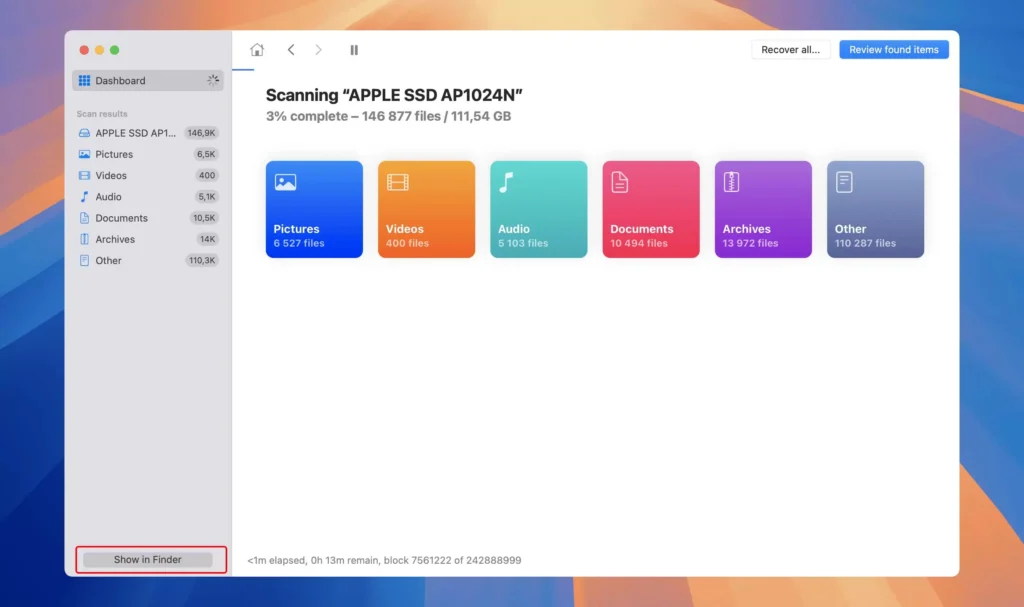
Best Use Cases
- Recovering recently deleted videos
- Mac-based recovery scenarios
- Users who prefer a simple interface
Pros
- Clean and intuitive user interface
- Strong preview feature before recovery
- Supports multiple storage devices (USB, SD cards, HDD)
Cons
- Limited performance in formatted drive recovery
- Struggles with fragmented or large video files
- Higher pricing compared to similar tools
Practical Insight
In real-world use, Disk Drill performs well for basic recovery tasks. However, when dealing with formatted drives or file system errors, its recovery depth is noticeably weaker than tools like Magic Data Recovery.
3. EaseUS Data Recovery (Best for Beginners)
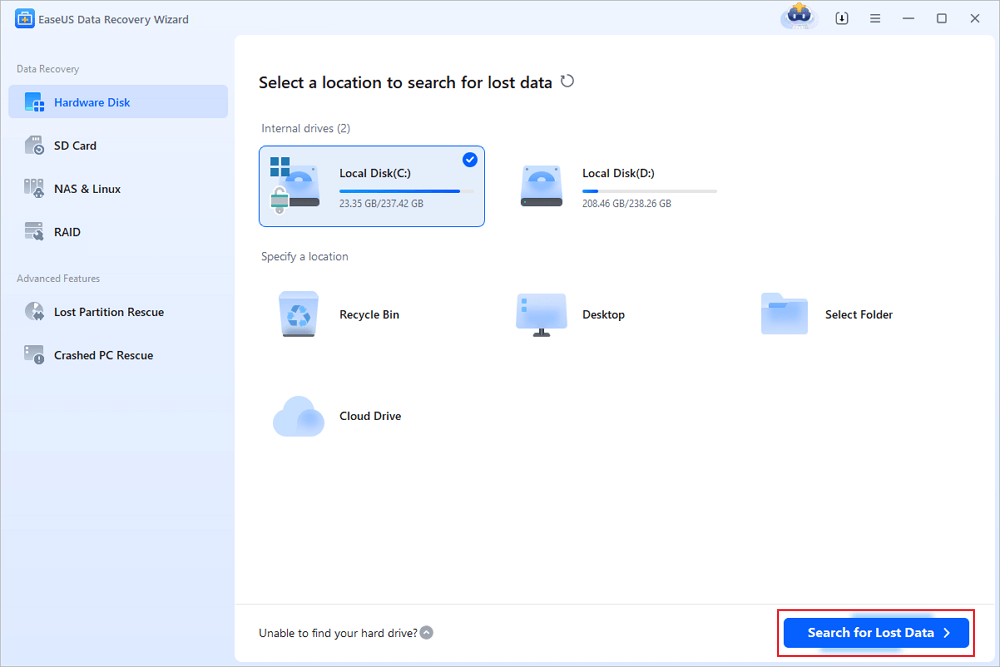
EaseUS is one of the most popular tools in the best video data recovery software category, especially for users who want a straightforward recovery process.
Best Use Cases
- First-time users
- Recovering deleted videos from PCs
- Quick recovery with minimal setup
Pros
- User-friendly step-by-step interface
- Stable performance in standard recovery scenarios
- Wide compatibility with Windows systems
Cons
- Expensive licensing for full recovery
- Deep scan results can be inconsistent
- Less effective for heavily fragmented video files
Practical Insight
EaseUS offers a balanced experience. However, when videos are lost due to formatting or partition damage, it may fail to fully reconstruct playable files—something more advanced tools handle better.
4. Wondershare Recoverit (Best for Video Repair Features)
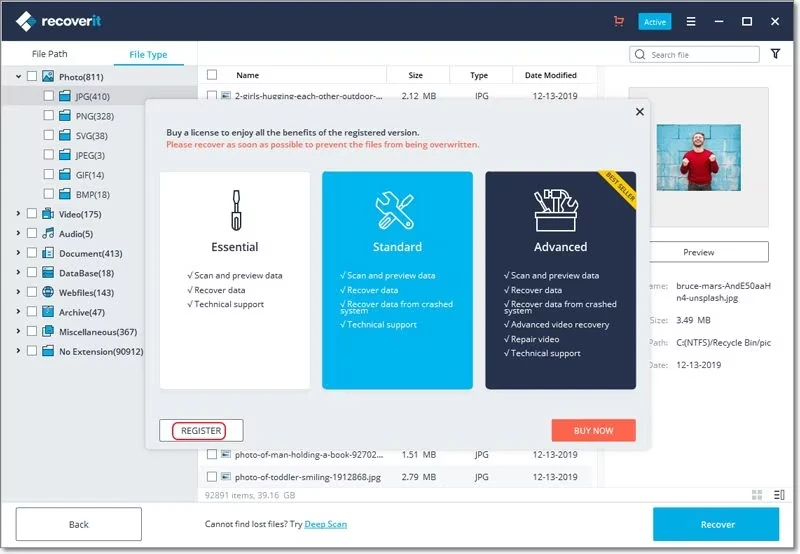
Recoverit stands out because it combines recovery with video repair capabilities, making it unique among the best video recovery software options.
Best Use Cases
- Repairing corrupted video files
- Recovering partially damaged videos
- Users dealing with playback issues
Pros
- Built-in video repair functionality
- Supports a wide range of video formats
- Suitable for fixing corrupted files after recovery
Cons
- Slower scanning compared to competitors
- Higher cost for advanced features
- Recovery performance is average in deep scan scenarios
Practical Insight
Recoverit is particularly useful when recovered videos are not playable. However, its raw recovery capability is not as strong as tools focused on deep scanning, such as Magic Data Recovery.
5. Recuva (Best Free Option for Basic Recovery)
Recuva is a lightweight and free tool often recommended for simple recovery tasks.
Best Use Cases
- Recovering recently deleted videos
- Budget users
- Quick recovery without advanced needs
Pros
- Completely free to use
- Lightweight and fast installation
- Simple interface
Cons
- Very limited deep recovery capabilities
- Cannot handle formatted drives effectively
- Poor performance with large video files
Practical Insight
Recuva works well for recently deleted files. However, once data loss becomes more complex—such as formatting or corruption—it is no longer sufficient. In these cases, more advanced tools are required.
Which Best Video Recovery Software Is Right for You?
Choose based on your situation:
- Deleted videos → Recuva, Magic Data Recovery
- Formatted drives → Magic Data Recovery, EaseUS
- Corrupted videos → Magic Data Recovery, Recoverit
- SD card recovery → Disk Drill, Magic Data Recovery
👉 For complex recovery, deeper tools perform significantly better.
Free vs Paid Best Video Data Recovery Software
Free tools are suitable for simple cases. However:
- Limited scan depth
- Lower success rates
- Restricted file recovery
Paid tools offer:
- Deep scanning
- Better reconstruction
- Higher reliability
Conclusion
Choosing the best video data recovery software requires more than checking feature lists. Real performance depends on recovery depth, data reconstruction ability, and stability.
Among all tested tools, Magic Data Recovery stands out for its strong performance in complex scenarios such as formatted drives and file system errors. It delivers more consistent and usable recovery results compared to many alternatives.
If your videos are valuable and require reliable recovery, Magic Data Recovery’ video recovery solution is a practical and effective choice.
Supports Windows 7/8/10/11 and Windows Server
FAQs
What is the best video recovery software for formatted drives?
The best video data recovery software for formatted drives should support deep scanning and data reconstruction. Tools like Magic Data Recovery perform better because they can rebuild fragmented video files and recover data even after partition changes.
Can corrupted video files be repaired after recovery?
Yes, some tools include repair features. However, recovery quality matters first. If the software restores complete data, videos are more likely to be playable without repair.
How can I recover deleted videos safely?
Install a trusted recovery tool, scan the device, preview files, and recover them to a different storage location. Avoid writing new data to prevent overwriting.
What is the difference between deep scan and quick scan?
Quick scan finds recently deleted files, while deep scan searches the entire storage structure. Deep scan is essential for formatted or corrupted drives.
Why do some tools fail to recover videos?
Some tools lack advanced reconstruction algorithms. Videos require fragment rebuilding, which basic tools cannot handle effectively.
Is free video recovery software reliable?
Free tools work for simple deletion cases. However, they often fail in complex scenarios such as formatting or file system errors.
Can I recover videos from an SD card?
Yes, many tools support SD card recovery. Success depends on how quickly recovery is attempted and whether data has been overwritten.
What factors affect video recovery success rate?
Key factors include overwrite status, file fragmentation, storage condition, and software capability. Advanced tools improve recovery chances significantly.

Jason is a data recovery and technical support specialist with over 15 years of hands-on experience. He has worked extensively with frontline users, troubleshooting difficult data loss cases and providing practical recovery solutions for accidental deletion, formatted drives, damaged file systems, lost partitions, system failures, and other recovery emergencies. His expertise also includes backup and restoration, file repair, and disaster recovery, with a strong emphasis on safe, reliable, and technically accurate guidance.