
How to Obtain CD Keys for Windows 10 (Free and Effective Methods)
Many users discover activation issues after reinstalling Windows, changing hardware, or buying a second-hand PC. Without valid cd keys windows 10, features such as personalization, system updates, and security protections may be limited.
This guide explains safe and practical ways to obtain or recover a Windows license key. You will learn:
- When free generic keys actually work
- How to recover an existing license from your own system
- When Microsoft support is the best option
- Why a dedicated Windows 10 product key finder can save time and avoid mistakes
You can download the Windows 10 product key finder (Magic Recovery Key) from the button below first.
Supports Windows 7/8/10/11 and Windows Server
Table of Contents
What Are CD Keys for Windows 10?
A Windows 10 CD key (also called a product key) is a 25-character code used to activate the operating system. It confirms that your Windows copy is genuine and legally licensed.
Common situations where a CD key is required
- Reinstalling Windows on the same PC
- Replacing a motherboard or hard drive
- Activating Windows after an upgrade
- Recovering a lost or forgotten license
Understanding which method applies to your situation is essential before choosing a solution.
Is It Possible to Get CD Keys Windows 10 for Free?
Yes — but with important limitations.
Microsoft provides generic Windows 10 product keys for installation and testing purposes. These keys allow Windows to install successfully, but they do not always grant permanent activation.
When free generic keys can be useful
- Installing Windows before purchasing a license
- Testing compatibility on new hardware
- Temporary activation for troubleshooting
When they do not work
- Long-term personal use
- Transferring licenses between devices
- Activating OEM-restricted systems
Common Generic Windows 10 Product Keys
⚠️ These keys are provided by Microsoft for installation purposes only.
Windows 10 Professional Key
W269N-WFGWX-YVC9B-4J6C9-T83GX
Windows 10 Professional N Product Key
MH37W-N47XK-V7XM9-C7227-GCQG9
Windows 10 Enterprise Key
NPPR9-FWDCX-D2C8J-H872K-2YT43
Windows 10 Enterprise N Key
DPH2V-TTNVB-4X9Q3-TJR4H-KHJW4
Windows 10 Education Key
NW6C2-QMPVW-D7KKK-3GKT6-VCFB2
Windows 10 Home N
AKJUS-WY2CT-JWBJ2-T68TQ-YBH2V
Windows 10 Enterprise 2015 LTSB N
JAHSU-QMPVW-D7KKK-3GKT6-VCFB2
Windows 10 Pro for Workstations
AKSIU-WY2CT-JWBJ2-T68TQ-YBH2V
Windows Pro N for Workstations
SJUY7-NFMTC-H88MJ-PFHPY-QJ4BJ
Windows 10 Pro Education
AJUYS-8C467-V2W6J-TX4WX-WT2RQ
Windows 10 Enterprise N
AJSU7-GRT3P-VKWWX-X7T3R-8B639
Windows 10 Enterprise Key
ALSOI-MHBT6-FXBX8-QWJK7-DRR8H
Windows 10 Enterprise S
8UY76-TNFGY-69QQF-B8YKP-D69TJ
Windows 10 Enterprise G N
AJSUY-NPHTM-C97JM-9MPGT-3V66T
Windows 10 Pro Education N
ALSOI-4C88C-JK8YV-HQ7T2-76DF9
Using generic keys is a temporary solution, not a replacement for a valid license.
How to Find Your Existing Key Using a Windows 10 Product Key Finder
If Windows was already activated on your computer before, the safest approach is to recover your original key instead of searching for new cd keys windows 10.
Why product key recovery works
Windows stores license information inside the system registry. Specialized tools can read this data without modifying your system.
Recovering Windows 10 Keys with Magic Recovery Key
Magic Recovery Key by Amagicsoft is a lightweight and reliable Windows 10 product key finder designed for everyday users.
Core problems it solves
- Lost or forgotten Windows product keys
- Activation issues after reinstallation
- Accessing licenses on older systems
Key advantages
- Supports Windows 7 / 8 / 10 / 11 and Windows Server
- Read-only scanning (no system changes)
- Clear, copy-ready license display
How it works (step-by-step)
1. Download and install Magic Recovery Key.
Supports Windows 7/8/10/11 and Windows Server

3. Open Registry Keys → Local.
4. Locate your Windows 10 product key.
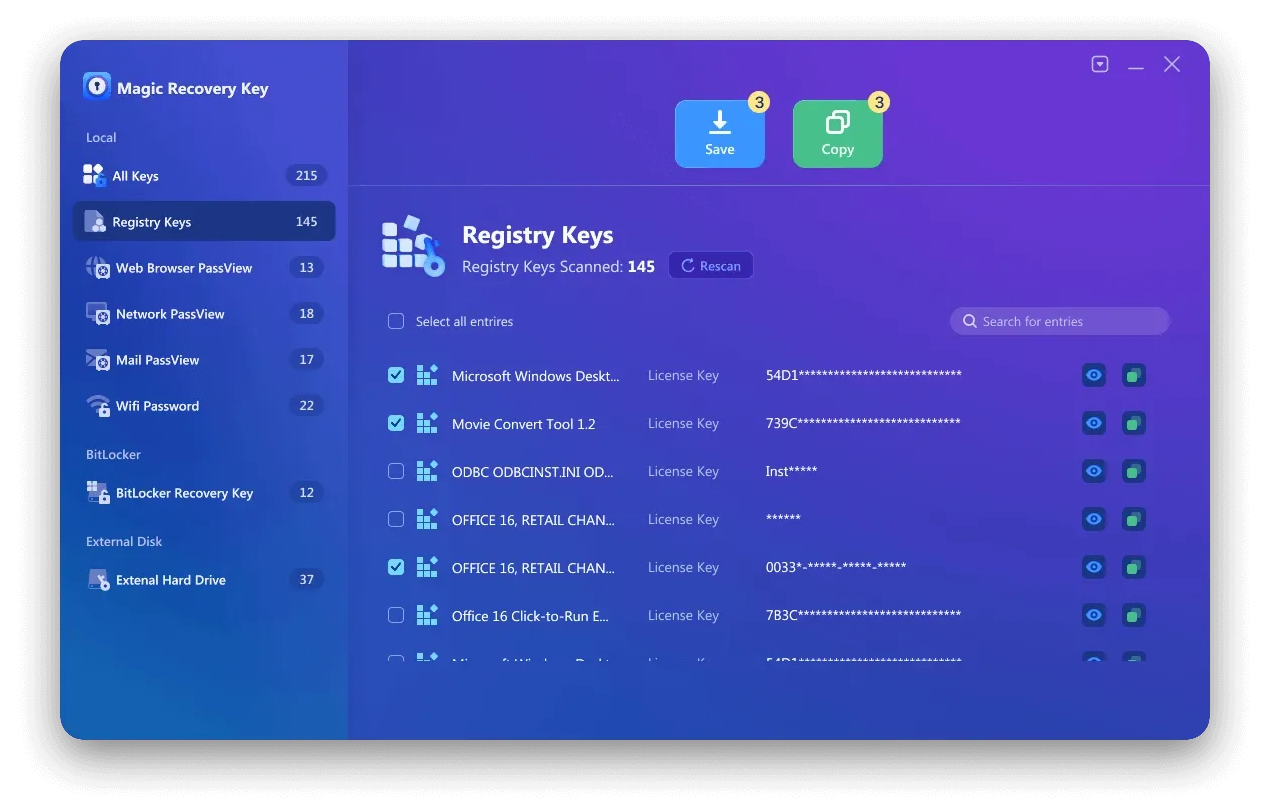
5. Copy or save it securely.
Real-world usage scenario
A common case is reinstalling Windows after a disk failure. Instead of contacting support or buying another license, users can recover their existing key within seconds.
If you want a fast and low-risk solution, Magic Recovery Key is a practical option worth trying.
If you are looking for a more efficient and reliable solution, you may want to try Magic Recovery Key.
Contacting Microsoft Support: When Recovery Is Not Possible
Sometimes, recovering a key locally is not enough.
Microsoft support is recommended when:
- You purchased Windows digitally
- Your license is linked to a Microsoft account
- Hardware changes caused activation failure
Preparation tips
- Keep proof of purchase
- Know your Microsoft account details
- Have device information ready
Microsoft can often reassign or reactivate licenses after verification.
Common Mistakes to Avoid When Searching for CD Keys
- Downloading keys from unverified websites
- Using cracked or modified activators
- Reusing keys across multiple devices
These methods may cause activation errors, system instability, or security risks.
Conclusion
Finding the right cd keys windows 10 depends on your situation.
- Generic keys help with installation, not permanent activation
- Magic Recovery Key helps recover what you already own
- Microsoft support helps when licenses are account-based
Among these options, Magic Recovery Key stands out for users who want a safe, fast, and non-technical way to retrieve existing licenses without unnecessary risks.
Supports Windows 7/8/10/11 and Windows Server
FAQs
Are free Windows 10 CD keys legal?
Can I reuse my old Windows 10 key?
What is the safest Windows 10 product key finder?
Do generic keys activate Windows permanently?
Can I recover a key after reinstalling Windows?
Is it risky to use third-party key tools?
What if my motherboard was replaced?
Should I buy a new key if I lost mine?

Erin Smith is recognized as one of the most professional writers at Amagicsoft. She has continually honed her writing skills over the past 10 years and helped millions of readers solve their tech problems.