
How to Fix: Your Microsoft 365 License Will Be Deactivated Soon

Many users are suddenly interrupted by the warning “Your Microsoft 365 license will be deactivated soon” while working in Word, Excel, or Outlook.
Microsoft often shows this message without a clear explanation, leaving users confused, anxious, and worried about losing access to essential documents.
In reality, An expired subscription does not always cause this issue. In many cases, it relates to backend license changes, account synchronization problems, or administrative adjustments.
Table of Contents
What Does “Your Microsoft 365 License Will Be Deactivated Soon” Mean?
The warning Your Microsoft 365 license will be deactivated soon indicates that Microsoft cannot verify your license status at that moment.

This does not always mean:
- Your subscription has expired
- Your account is invalid
- Your Office installation is broken
Instead, it often signals a temporary license validation issue between Microsoft servers and your account.
Common Causes of Microsoft 365 License Deactivation
1. License Changes by Administrators
According to Microsoft support documentation and community reports, this issue frequently occurs when:
- Users are moved between license groups
- Subscriptions change (e.g., Office 365 E3 → Microsoft 365 E3)
- License plans are removed and re-added
- Service plans are modified within a subscription
These changes can temporarily break license synchronization, triggering Your Microsoft 365 license will be deactivated soon.
2. Account Sign-In or Sync Issues
In some cases, Office apps fail to refresh authentication tokens properly.
This leads to false Product Deactivated Office 365 fix alerts, even when the license is valid.
3. Expired or Disabled Subscription
If the subscription is truly expired, Microsoft will eventually restrict access.
This commonly happens in:
- Company-managed accounts
- Education licenses
- Trial subscriptions
How to Fix “Product Deactivated Office 365” Errors
Method 1: Reactivate Microsoft 365
- Click Reactivate in the warning message
- Sign in using the licensed Microsoft account
- Restart all Office applications
This is the fastest fix and often resolves temporary issues.
Method 2: Sign Out and Sign Back In
If reactivation fails:
- Open any Office app
- Go to Account → Sign Out
- Close all Office apps
- Restart the computer
- Sign in again
This forces Microsoft 365 to refresh license credentials.
Method 3: Contact Your Administrator
For enterprise or school accounts:
- Confirm the license is still assigned
- Ask if recent changes were made
- Verify the correct service plans are enabled
Many Product Deactivated Office 365 fix cases originate from admin-level changes.
How to Activate Expired Microsoft Office for Free (Legal Explanation)

However, users can legally regain access by:
- Renewing the subscription
- Switching to Microsoft Office Online (free web version)
- Using an existing valid license key
Avoid unofficial activators—they risk data loss and security issues.
Related Microsoft Issue: Windows 11 24H2 Audio Bug
Microsoft has confirmed a separate issue affecting Windows 11 24H2 devices using Dirac Audio and the cridspapo.dll file.
What Happens?
- Audio devices disappear
- Speakers and Bluetooth audio stop working
- Apps cannot detect audio hardware
Microsoft has applied a compatibility hold to affected devices from upgrading.
Why You Should Back Up Microsoft Product Keys
License-related issues highlight one major risk:
Most users don’t know where their product keys are stored.
If you reinstall Windows or Office:
- Activation may fail
- Keys may be lost
- Recovery becomes difficult
This is where a reliable lost key recovery solution matters.
Why We Recommend Magic Recovery Key
Core Problem It Solves
Magic Recovery Key helps recover and back up:
Key Advantages
- Easy to use, no technical knowledge required
- Supports Windows 7/8/10/11 and Windows Server
- Works even when Office is deactivated
- Read-only recovery, no system risk
Real-World Use Case
Imagine reinstalling Windows after a system crash.
With Magic Recovery Key, you already have:
- Your Office license
- Your Windows activation key
- No need to search emails or accounts
Why It’s More Reliable Than Alternatives
- No online activation hacks
- No modification of system files
- Trusted recovery-based approach
If you are looking for a safer way to protect your licenses, Magic Recovery Key is a practical solution.
If you want a more efficient and secure solution, consider trying Magic Recovery Key.
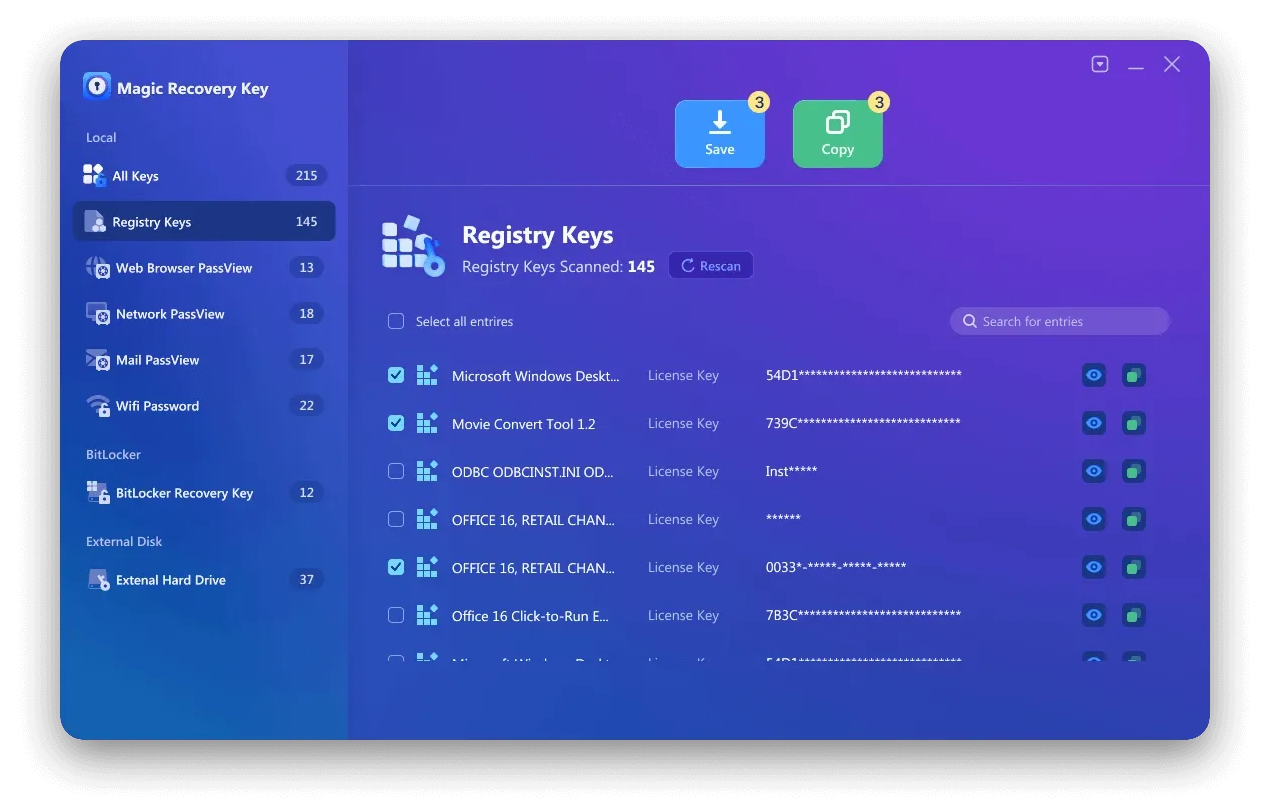
How to Use Magic Recovery Key (Simple Steps)
Supports Windows 7/8/10/11 and Windows Server

3. View detected software keys.
4. Copy or save the required serial numbers.
Conclusion
The warning Your Microsoft 365 license will be deactivated soon is often caused by license synchronization issues rather than real expiration.
By understanding:
- Why it happens
- How to fix Product Deactivated Office 365 errors
- How to prevent future activation problems
You can avoid unnecessary interruptions.
Most importantly, saving your product keys with Magic Recovery Key adds a critical layer of protection and saves time when issues occur.
Supports Windows 7/8/10/11 and Windows Server
FAQs
Why does the message “Your Microsoft 365 license will be deactivated soon” appear?
Does this warning mean my Microsoft 365 subscription has expired?
How can I fix “Product Deactivated Office 365” without reinstalling Office?
Why does this issue happen more often on work or school accounts?
Is there a legal way to activate expired Microsoft Office for free?
Can Windows updates cause Microsoft 365 to show deactivation errors?
Why should I back up my Microsoft product keys in advance?
How does Magic Recovery Key help prevent future license problems?

Erin Smith is recognized as one of the most professional writers at Amagicsoft. She has continually honed her writing skills over the past 10 years and helped millions of readers solve their tech problems.