
EaseUS Data Recovery Review & Best Alternative

Supports Windows 7/8/10/11 and Windows Server
Table of Contents
What Is EaseUS Data Recovery?
Why People Search for EaseUS Data Recovery Wizard
Most users do not search for recovery software out of curiosity. They search because something already went wrong. Common cases include:
- Deleted files from Recycle Bin
- Formatted hard drives or USB drives
- RAW or inaccessible partitions
- File system errors after unsafe removal
- Data loss after reinstalling Windows
- Virus or malware damage
- Missing files after a system crash
EaseUS officially markets EaseUS recovery for many of these situations. That makes it a reasonable first option to research. However, choosing a recovery tool should not depend on brand recognition alone. You also need to look at cost, scan workflow, preview quality, and how quickly you can move from problem to recovery.
EaseUS Data Recovery Review: Strengths and Weaknesses
Where EaseUS Data Recovery Wizard Performs Well
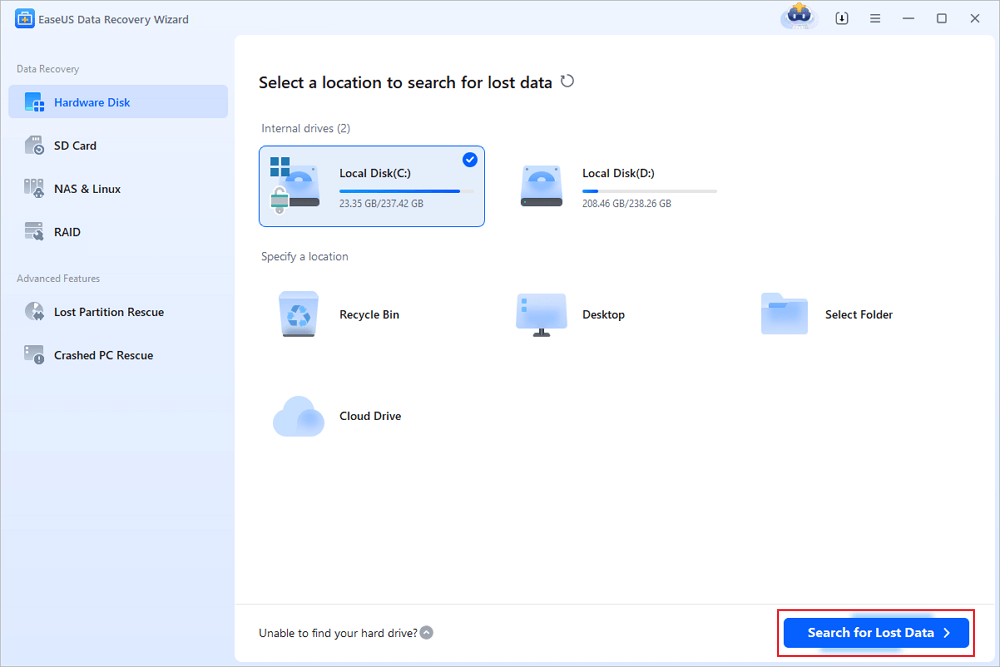
The biggest strength of EaseUS Data Recovery Wizard is accessibility. Recent reviews consistently describe it as easy to use. The interface is straightforward, the scan process is guided, and file filtering helps narrow results. EaseUS also offers preview and deep scan options, which matter when you are trying to recover photos, videos, or office documents from a large drive.
Another plus is scenario coverage. Official EaseUS materials clearly state that the tool is designed for deleted, formatted, partition-loss, RAW, inaccessible, and virus-related data loss. That range is useful for users who want one tool for several problems instead of separate utilities.
Where EaseUS Recovery Feels Less Competitive
That said, high visibility does not always mean best value. Third-party reviewers point out two recurring issues: price and speed. Digital Trends says the software is not the most affordable option. TechRadar calls it easy to use but slow and expensive for single users. Another recent review also says the scan speed is acceptable rather than class-leading, and that pricing rises quickly once the free limit is no longer enough.
Pricing is one of the biggest friction points. EaseUS states that EaseUS Data Recovery Wizard costs $69.95, and review coverage lists paid options around $70 monthly, $100 yearly, and $150 lifetime, depending on plan and promotion. The free version is also limited to smaller recoveries.
EaseUS Data Recovery Portable: Is It the Best Search Intent Match?
Many users search for EaseUS data recovery portable because they want a recovery tool that is easy to launch, quick to install, and simple to use in urgent situations. In practice, this search intent is often less about a literal portable edition and more about convenience. Users want a lightweight tool that does not waste time with a complex setup.
This is where the conversation becomes more practical. If your priority is getting started fast, scanning quickly, and recovering files with minimal friction, a lighter alternative can be the better fit.
Why Magic Data Recovery Is a Better Practical Alternative
Magic Data Recovery fits the real-world needs. Its positioning is simple: help users recover lost data without a steep learning curve. The official product page highlights a lightweight installer, a three-step workflow, and support for recovery from HDDs, SSDs, USB drives, SD cards, and other devices.

More importantly, Magic Data Recovery is also positioned for common loss scenarios that users actually face. Amagicsoft’s recovery pages describe support for deleted files, formatted drives, RAW states, file system issues that trigger format prompts, partition-related errors, malware damage, and data loss after OS-related disk operations.
1. Lower Published Pricing
For cost-sensitive users, pricing can decide everything. Magic Data Recovery publicly lists a 1-year plan (no subscription) at $49.95 and a lifetime plan at $69.95. That is significantly easier to justify than the pricing commonly associated with EaseUS Data Recovery Wizard, especially for users who only need a reliable Windows recovery tool for personal use.
2. Faster Path From Download to Recovery
When files disappear, users want momentum. Magic Data Recovery emphasizes a lightweight installer and a direct 3-step process: install, scan, preview, and recover. By contrast, review coverage of EaseUS data recovery often praises usability but still flags scan speed as a drawback in some cases. That makes Magic Data Recovery the more practical choice for users who value a quicker start and a simpler workflow.
3. Easier for Non-Technical Users
A good recovery tool should reduce panic, not add to it. Magic Data Recovery is designed around a beginner-friendly flow with minimal setup friction. The product page explicitly says no technical expertise is required, which matches what ordinary users need after accidental deletion or a formatting mistake.
4. Strong Coverage for Everyday Recovery Scenarios
Many recovery articles focus too much on brand names and not enough on user situations. Magic Data Recovery is easier to recommend because its use cases are clear and practical:
- Deleted files from PC or USB
- Formatted HDD, SSD, or SD card
- RAW and inaccessible drives
- File system errors that trigger a reformat prompt
- Data loss after Windows reinstall or disk operations
- Virus- or malware-related corruption
That makes it a stronger solution-focused recommendation rather than just a familiar software name.
Supports Windows 7/8/10/11 and Windows Server
EaseUS Data Recovery vs Magic Data Recovery
Choose EaseUS Data Recovery Wizard if:
You want a familiar brand, broad platform recognition, and a recovery tool that many review sites already know. It remains a capable option for common file loss scenarios.
Choose Magic Data Recovery if:
You want better value, quicker setup, simpler steps, and a recovery experience that feels less heavy for everyday Windows users. Its official pricing is lower, the workflow is more direct, and the product messaging aligns closely with the most common recovery problems people are trying to solve.
How to Recover Lost Files Safely
No matter which tool you choose, follow these best practices:
Stop using the affected drive
New writes can overwrite recoverable data and reduce your success rate.
Do not install recovery software on the same damaged drive
Install it on another partition, another internal drive, or an external device whenever possible. Recovery guides commonly recommend this because overwriting is the enemy of successful restoration.
Preview files before recovery
Preview helps confirm quality, format, and file integrity.
Save recovered files to a different location
Never restore files back to the same problem drive during the first recovery attempt.
Conclusion
EaseUS data recovery is still a credible option. It is well-known, user-friendly, and built for many common data loss scenarios. However, that does not automatically make it the best choice for every user. Recent review coverage repeatedly highlights the same trade-offs: it can be expensive, and scan performance is not always the fastest.
That is why Magic Data Recovery stands out as the better recommendation for many users. It addresses the core pain points directly: lower cost, fast setup, a simple workflow, and practical support for deleted, formatted, RAW, file-system-error, reinstall-related, and virus-damaged data loss scenarios. If you are looking for a more efficient solution than EaseUS Data Recovery Wizard, Magic Data Recovery is the tool I would recommend first. If you are searching for a faster and more cost-effective recovery experience, it is worth trying Magic Data Recovery.
Supports Windows 7/8/10/11 and Windows Server
FAQs
Is EaseUS Data Recovery good for deleted files?
Yes, EaseUS data recovery is commonly used for deleted file recovery. Official EaseUS pages say it supports deleted files, empty Recycle Bin recovery, and several related loss scenarios. It is a solid option for basic recovery needs, especially when the storage device is still healthy and the data has not been overwritten.
Is EaseUS Data Recovery Wizard free?
There is a free edition, but it has limits. EaseUS states that its free version is suitable for smaller recoveries, and review sources note a recovery cap before users need a paid plan. That makes it useful for testing, but less practical when you need to recover a larger amount of important data.
Why do people look for EaseUS data recovery portable?
In many cases, users want something fast and lightweight rather than a specific “portable” build. They are usually looking for a recovery tool that launches quickly, installs easily, and starts scanning with minimal setup. That is why workflow simplicity matters just as much as brand recognition when comparing recovery tools.
Is Magic Data Recovery cheaper than EaseUS recovery?
Based on published pricing, yes. Magic Data Recovery lists a 1-year plan at $49.95 and a lifetime plan at $69.95. EaseUS commonly appears at $69.95 on official pricing-related pages, while review coverage also mentions higher monthly, yearly, and lifetime plan levels. For personal users, Magic is the more budget-friendly option.
Can Magic Data Recovery recover formatted drives?
Yes. Amagicsoft’s recovery content explicitly describes formatted drive recovery and explains that formatted HDDs, USB drives, SD cards, RAW disks, and file system error cases can often still be scanned and restored if the data has not been overwritten. That makes it suitable for one of the most common recovery scenarios.
Which is easier to use: EaseUS Data Recovery Wizard or Magic Data Recovery?
Both tools are designed for non-technical users, but Magic Data Recovery has a stronger “quick-start” advantage. Its official page centers on a lightweight installer and a three-step recovery process. EaseUS is also considered user-friendly, yet some reviews still mention slower scanning or a less favorable price-to-value balance.
Can these tools recover data after a virus attack or system reinstall?
EaseUS officially states support for virus attacks, OS crashes, and related unexpected disasters. Magic Data Recovery’s recovery pages also describe scenarios involving file system damage, RAW drives, malware-related corruption, and data loss after disk or OS operations. Success depends on whether the lost data has been overwritten and whether the drive has physical damage.
Why recommend Magic Data Recovery over EaseUS data for many users?
The recommendation comes down to practical value. Magic Data Recovery is easier to justify for users who want lower cost, faster setup, and a simple recovery path for common Windows data-loss scenarios. EaseUS data recovery remains reputable, but Magic is often the more efficient choice when solving everyday file loss problems matters more than brand familiarity.

Jason is a data recovery and technical support specialist with over 15 years of hands-on experience. He has worked extensively with frontline users, troubleshooting difficult data loss cases and providing practical recovery solutions for accidental deletion, formatted drives, damaged file systems, lost partitions, system failures, and other recovery emergencies. His expertise also includes backup and restoration, file repair, and disaster recovery, with a strong emphasis on safe, reliable, and technically accurate guidance.