
GPT Header: Structure, Backup & CRC32
A GPT header is a metadata structure that describes a disk’s GUID Partition Table. It identifies the disk, locates the partition entry array, defines usable disk boundaries, and stores checksums used to detect metadata corruption. GPT maintains primary and backup headers for redundancy. Understanding their byte layout and CRC32 fields helps explain how partition information is validated and why a damaged header does not necessarily mean the underlying files are lost.
Table of Contents
What Is a GPT Header?
The GPT header is part of the GUID Partition Table (GPT), the disk partitioning scheme defined by the UEFI specification.
Unlike the older Master Boot Record (MBR) scheme, GPT maintains two copies of its partition metadata: one near the beginning of the disk and another near the end.
Each GPT header contains information required to locate and interpret its associated partition entry array, including:
- A signature identifying the GPT format.
- The GPT header revision and size.
- The header’s own location and the alternate header’s location.
- The first and last usable logical block addresses.
- A unique disk identifier.
- The location and dimensions of the partition entry array.
- CRC32 checksums for metadata integrity.
The GPT header does not directly store filenames, folder structures, or file contents. Those belong to file systems inside the partitions.
For an overview of the partitioning scheme, see GPT (GUID Partition Table). The official definitions are provided in the UEFI Specification, Section 5.3.
Where Is the GPT Header Located?
GPT places its primary and backup metadata at opposite ends of a disk.
For a conventional GPT disk:
Location | Contents |
LBA 0 | Protective MBR |
LBA 1 | Primary GPT Header |
Following LBAs | Primary Partition Entry Array |
Usable LBA range | Space available for partitions |
LBAs before the final block | Backup Partition Entry Array |
Last LBA | Backup GPT Header |
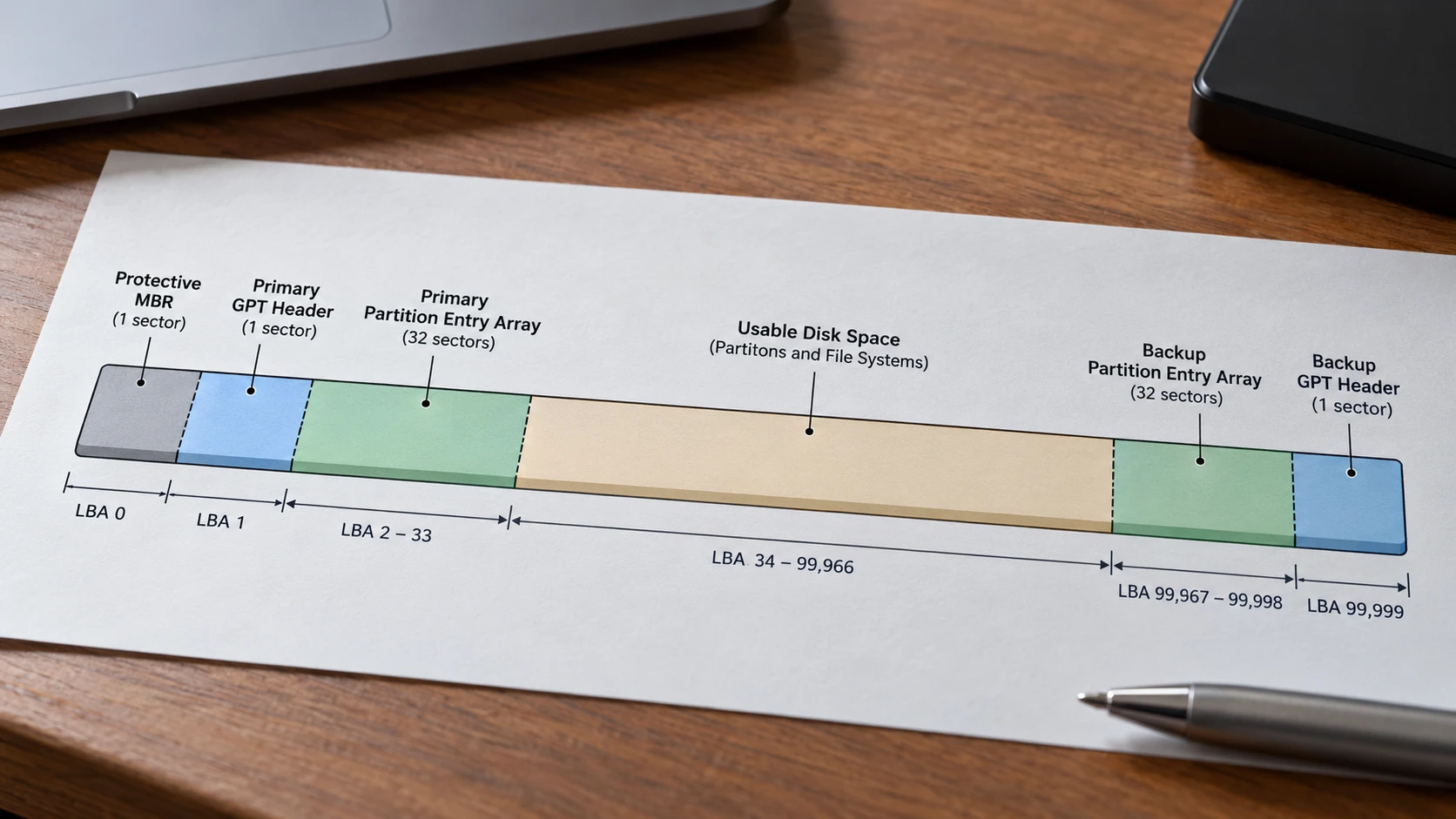
The protective MBR helps prevent legacy MBR-only tools from treating the GPT disk as unallocated.
It is different from the GPT header itself. For a comparison with traditional partition metadata, see MBR Partition Table.
Logical Sectors and Byte Addresses
GPT uses logical block addresses (LBAs), not absolute byte offsets, to identify its structures.
To convert an LBA into a byte offset:
Byte offset = LBA × Logical block size
For example:
- On a disk with 512-byte logical blocks, the primary header begins at byte offset
512(0x200). - On a disk with 4,096-byte logical blocks, the primary header begins at byte offset
4096(0x1000).
The header typically occupies 92 bytes within a logical block, although the format permits larger headers up to the logical block size.
A 92-byte header should not be confused with a 512-byte sector. The remaining bytes of a 512-byte header block are reserved and must be zero.
GPT Header Structure: Fields, Offsets, and Sizes
The GPT header structure is defined in UEFI Specification 2.10, Table 5.5.
The following offsets are relative to the beginning of the GPT header, not to the beginning of the disk.
Field | Offset (Hex) | Size | Purpose |
Signature |
| 8 bytes | Identifies the GPT header |
Revision |
| 4 bytes | GPT format revision |
HeaderSize |
| 4 bytes | Header length in bytes |
HeaderCRC32 |
| 4 bytes | Checksum of the header |
Reserved |
| 4 bytes | Must be zero |
MyLBA |
| 8 bytes | Location of this header |
AlternateLBA |
| 8 bytes | Location of the other header |
FirstUsableLBA |
| 8 bytes | First usable partition block |
LastUsableLBA |
| 8 bytes | Last usable partition block |
DiskGUID |
| 16 bytes | Unique disk identifier |
PartitionEntryLBA |
| 8 bytes | Start of the associated entry array |
NumberOfPartitionEntries |
| 4 bytes | Number of entry slots |
SizeOfPartitionEntry |
| 4 bytes | Size of each entry |
PartitionEntryArrayCRC32 |
| 4 bytes | Checksum of the entry array |
The defined fields occupy offsets 0x00 through 0x5B, totaling 92 bytes. Bytes from 0x5C to the end of the logical block are reserved.
Signature and Revision
A valid GPT header begins with the ASCII signature EFI PART.
The eight bytes are:
45 46 49 20 50 41 52 54
The standard GPT revision 1.0 is represented by the little-endian bytes:
00 00 01 00
These represent the numeric value 0x00010000. The GPT header revision is not the same as the UEFI specification version.
The commonly used header size is 92 bytes, encoded as:
5C 00 00 00
Disk GUID and Byte Order
The DiskGUID field occupies 16 bytes, beginning at offset 0x38.
It identifies the GPT disk. It is different from the unique partition GUID stored inside each individual partition entry.
A GUID also introduces an important detail when interpreting raw hexadecimal data: its first three components use little-endian byte order, while its final eight bytes retain their displayed order.
For example, the illustrative GUID:
f0e1d2c3-b4a5-4c6d-8e9f-102030405060
is stored as:
C3 D2 E1 F0 A5 B4 6D 4C 8E 9F 10 20 30 40 50 60
Reading all 16 raw bytes directly from left to right would produce an incorrect textual GUID.
Partition Entry Array Fields
Three fields define the partition entry array:
PartitionEntryLBAidentifies where the array starts.NumberOfPartitionEntriesdefines its entry count.SizeOfPartitionEntrydefines the size of each entry.
The array byte length is calculated as:
Array size = Number of entries × Entry size
For an array containing 128 entries, each 128 bytes:
128 × 128 = 16,384 bytes
With 512-byte logical blocks:
16,384 ÷ 512 = 32 logical blocks
This is the partition entry array’s reserved space, not the space occupied by actual file data.
The current UEFI specification defines the entry size as 128 × 2^n bytes, where n is a nonnegative integer. Typical GPT disks use 128-byte entries.
Each slot in the partition entry array describes one partition through its type GUID, unique partition GUID, LBA boundaries, attributes, and name. For a field-by-field explanation of the GPT partition entry structure, including byte offsets and GUID encoding, see our GPT Partition Entry: Structure, Array, and GUID Fields guide.
Primary and Backup GPT Headers: What Changes?
The primary and backup GPT headers have the same field structure, but they do not contain identical bytes.
Their locations and some internal pointers differ.
Consider an illustrative GPT disk with:
- 100,000 logical blocks, numbered
0through99,999. - A logical block size of 512 bytes.
- An entry array containing 128 slots of 128 bytes each.
- A 32-block partition entry array at each end.
The layout is:
Structure | Primary GPT | Backup GPT |
Header LBA |
|
|
MyLBA |
|
|
AlternateLBA |
|
|
PartitionEntryLBA |
|
|
Entry array extent |
|
|
FirstUsableLBA |
|
|
LastUsableLBA |
|
|
Header size | 92 bytes | 92 bytes |
These positions follow directly from the disk size and the two 32-block partition entry arrays.
For example:
Backup array start = Last LBA − Array blocks
99,999 − 32 = 99,967
The final usable block must precede that backup array:
99,967 − 1 = 99,966
Both headers therefore describe the same usable disk range but point to different physical locations for their partition entry arrays.
This arrangement allows GPT-aware software to check the backup metadata when the primary copy is damaged.
However, the presence of two copies does not guarantee that either copy is valid or current.
Worked Example: Decoding the GPT Header from Hexadecimal Bytes
The following example uses deliberately constructed GPT metadata, not bytes captured from a physical disk.
It describes the same 100,000-block disk used above.
The example contains zero populated partitions. All 128 partition entry slots are zero-filled, allowing both entry array checksums to be calculated from a completely defined input.
Step 1: Identify the Header
At the beginning of the primary header, the first 16 bytes are:
45 46 49 20 50 41 52 54 00 00 01 00 5C 00 00 00
Split the sequence by field:
Byte range | Hex bytes | Decoded meaning |
|
|
|
|
| Revision |
|
| Header size: 92 bytes |
The signature, revision, and header size match the expected format.
That establishes a plausible header, but it does not by itself prove that the GPT is valid.
Step 2: Decode the Location Fields
The primary header contains:
Field | Stored bytes | Decoded value |
MyLBA |
|
|
AlternateLBA |
|
|
FirstUsableLBA |
|
|
LastUsableLBA |
|
|
PartitionEntryLBA |
|
|
These values use little-endian byte order.
For example, the bytes 9F 86 01 00 00 00 00 00 represent 0x000000000001869F, or decimal 99,999.
The backup header reverses MyLBA and AlternateLBA and changes PartitionEntryLBA to 99,967.
Step 3: Compare the Header Checksums
For this specific synthetic example, using the DiskGUID shown earlier and a zero-filled 16,384-byte partition entry array, the calculated values are:
Checksum | Primary GPT | Backup GPT |
HeaderCRC32 |
|
|
PartitionEntryArrayCRC32 |
|
|
The header checksums differ because the headers contain different location fields.
The partition entry array checksums match because the two arrays contain identical zero-filled bytes.
These are calculated example values, not universal GPT checksum constants. A different disk GUID, partition layout, or metadata change would produce different results.
How GPT Header CRC32 Validation Works
GPT uses two separate CRC32 checksums to detect changes in its partition metadata:
HeaderCRC32verifies the GPT header itself.PartitionEntryArrayCRC32verifies the associated partition entry array.
Both use the standard CRC-32 algorithm, but they cover different byte ranges.
HeaderCRC32: How the Checksum Is Calculated
The HeaderCRC32 field occupies four bytes at header-relative offset 0x10.
According to the UEFI Specification, the checksum must be calculated with this field temporarily set to zero.
The verification process follows five steps:
- Read the header. Obtain the GPT header bytes from a disk image and determine the
HeaderSizefield at offset0x0C. - Record the stored CRC32. Read the four bytes at offsets
0x10–0x13as a little-endian 32-bit value. - Zero the checksum field. In a temporary copy, replace these four bytes with
00 00 00 00. - Calculate CRC32. Compute the standard CRC-32 checksum over exactly
HeaderSizebytes. - Compare the results. If the calculated value matches the stored value, the header passes its CRC32 integrity check.
For a standard 92-byte GPT header, the calculation covers offsets 0x00–0x5B, not the entire 512-byte logical sector.
A standard CRC-32 calculator or Python’s zlib.crc32() can perform the calculation. The algorithm uses the reflected polynomial 0xEDB88320, an initial register value of 0xFFFFFFFF, and a final XOR of 0xFFFFFFFF.
Example: Verifying a GPT Header CRC32
Consider the synthetic GPT header used earlier in this article.
Item | Value |
HeaderSize |
|
Stored HeaderCRC32 |
|
Stored bytes |
|
CRC field during calculation |
|
Calculated CRC32 |
|
Validation result | Match |
The calculated checksum matches the stored value, indicating that the example header passes its CRC32 check.
If even one covered byte changes without updating the stored checksum, the calculation will generally produce a different result.
Important: Always perform the calculation on a temporary copy or read-only working data. Do not overwrite checksum bytes on the original disk.
0x76EF8C67 in little-endian order. Select Zero to see how the input is prepared.0xEDB88320 · Init 0xFFFFFFFF · Final XOR 0xFFFFFFFF. Teaching sample, not captured disk data.PartitionEntryArrayCRC32: Validating Partition Entries
The second checksum, PartitionEntryArrayCRC32, is stored at header-relative offset 0x58.
Unlike HeaderCRC32, it covers the partition entry array rather than the header.
Its calculation length is:
NumberOfPartitionEntries × SizeOfPartitionEntry
For an array containing 128 entries of 128 bytes each:
128 × 128 = 16,384 bytes
To verify this checksum, calculate CRC32 over the entire 16,384-byte array and compare the result with the checksum stored in the GPT header.
No checksum field needs to be zeroed within the partition entry array.
The primary and backup arrays must be checked separately because they occupy different locations. Any unused padding after the array’s final entry is excluded from the calculation.
Why Both Checksums Matter
The two checksums answer different questions:
- HeaderCRC32: Do the header bytes match the checksum stored in the header?
- PartitionEntryArrayCRC32: Do the partition entry bytes match the checksum stored in the header?
A GPT header may pass its own CRC32 check while its partition entry array is corrupted.
Similarly, both checksums may pass even when partition boundaries are logically incorrect or the metadata is outdated.
CRC32 verifies metadata integrity, not disk health or file recoverability. Additional checks are necessary to determine whether partition entries are consistent and the underlying file systems remain accessible.
How to Check Whether a GPT Header Is Valid
UEFI specifies that GPT-aware software must check the header signature, header CRC, MyLBA, and the CRC of the associated partition entry array. For the primary GPT, it must also examine the alternate header.
A practical inspection should include these additional consistency checks:
Check | Expected condition | Why it matters |
Signature |
| Identifies the structure |
Header size | At least 92 bytes; no larger than a logical block | Defines the checksum range |
HeaderCRC32 | Matches recalculated CRC32 | Detects header-byte changes |
MyLBA | Matches the physical header location | Detects misplaced metadata |
AlternateLBA | Points to the other header | Supports redundant layout validation |
PartitionEntryLBA | Points to an array within disk bounds | Prevents invalid array addressing |
PartitionEntryArrayCRC32 | Matches actual array bytes | Detects entry-array corruption |
Usable LBA range | Ordered, in bounds, and outside metadata regions | Checks layout consistency |
Primary/backup metadata | Consistent where required | Detects conflicting copies |
Passing these checks does not verify individual file systems or files. Partition entry boundaries also need to be checked for validity and overlap.
The UEFI GPT validation requirements provide the normative basis for deciding whether GPT metadata is valid.
What Happens When a GPT Header Is Corrupted?
The consequences depend on which metadata remains usable.
Primary Header Damaged, Backup Valid
If the primary GPT is invalid, GPT-aware software must examine the header at the last logical block and validate its associated partition entry array.
A valid backup can provide the metadata necessary to reconstruct the primary copy, subject to the platform’s recovery policies.
Such a repair writes partition metadata and should not be attempted casually on a disk containing important, unsecured data.
Backup Header Damaged, Primary Valid
The primary partition layout may still be readable.
However, the backup needs restoration to preserve GPT redundancy.
An apparently accessible disk can therefore still have damaged backup metadata.
Both Headers Invalid
If neither header is valid, the disk has no valid GPT header under the UEFI validation rules.
This does not necessarily mean that every partition or file has been physically erased.
Partition metadata, file system metadata, and file contents occupy different areas of the disk.
When important files are involved, preserve the original disk and distinguish lost partition data recovery from rewriting the partition table.
Valid Header but Incorrect Partition Information
A structurally valid header is not sufficient to establish that its partition entries describe the current disk correctly.
For example, stale GPT metadata can remain at the end of a disk after legacy partitioning software changes the disk layout.
A valid-looking backup must therefore be evaluated alongside the protective MBR, current disk capacity, partition entries, and other available evidence.
UEFI specifically warns against relying on stale GPT structures after a disk has been reformatted to legacy MBR.
How to Inspect a GPT Header Safely
For detailed analysis, use a disk image or a hexadecimal viewer with read-only access.
- Confirm the correct physical disk and its reported logical block size.
- If the disk has important data, capture a suitable image before modifying any metadata. An unstable or failing disk requires an appropriate acquisition approach.
- Open the image in a hex editor without enabling write operations.
- Locate the primary header at LBA
1, corresponding to byte offsetLogicalBlockSize × 1. - Check the signature at offset
0x00and interpret the other fields using the header-relative offsets. - Determine the last LBA from the image or disk capacity, then inspect the backup header.
- Compare field values, header checksums, and the associated partition entry arrays.
Windows Disk Management and PowerShell’s Get-Disk can identify the disk’s partition style, but their ordinary summary views do not provide a complete byte-level GPT header validation.
Do not initialize, format, or run DiskPart clean merely because a disk reports an invalid or missing partition. Likewise, CHKDSK is a file system repair tool, not a general GPT header reconstruction method.
Limitations and Important Edge Cases
Several conditions affect GPT header interpretation.
Different logical block sizes. A 4Kn disk uses 4,096-byte logical blocks. The primary header remains at LBA 1, but its absolute byte offset differs from that on a 512-byte logical-sector disk.
Larger GPT headers. A header may exceed 92 bytes within the permitted logical block size. CRC32 must use the actual validated HeaderSize, not an assumed constant.
Disk resizing or cloning. If a disk is enlarged, the old backup header may no longer be at the final LBA. GPT metadata must be evaluated against the current device size before making corrections.
CRC32 is not cryptographic authentication. Matching checksums do not prove that metadata is authentic or free from deliberate manipulation.
Physical media problems. Read errors, intermittent connections, or controller failures can prevent reliable inspection. Repeated attempts on failing hardware may make recovery more difficult.
These limitations explain why GPT validation requires several related checks rather than a single signature or checksum comparison.
Conclusion
The GPT header provides the location, boundaries, identifiers, and integrity information required to interpret a GUID Partition Table. Its structure is defined by explicit byte offsets, and its primary and backup copies provide redundant metadata at opposite ends of a disk.
Correct analysis requires more than locating EFI PART. The header CRC32, partition entry array CRC32, LBA pointers, usable boundaries, and primary/backup consistency must be evaluated together.
Understanding these relationships makes it possible to recognize valid GPT metadata, identify inconsistencies, and distinguish partition-table corruption from actual loss of file data.
FAQ
What is the GPT header signature?
EFI PART. In hexadecimal, it is 45 46 49 20 50 41 52 54. It appears at the beginning of both primary and backup headers. Finding this sequence alone does not establish that the entire GPT is valid.How many bytes is a GPT header?
HeaderSize field defines its actual length, which must be at least 92 bytes and no greater than the logical block size. The remaining bytes of the logical block are reserved.Where are the primary and backup GPT headers stored?
1. The backup header is stored at the disk's last logical block. Each header's MyLBA identifies its own location, while AlternateLBA identifies the other header.Why do primary and backup GPT headers have different CRC32 values?
MyLBA, AlternateLBA, and usually PartitionEntryLBA. Since these bytes are covered by HeaderCRC32, the calculated checksums will generally differ even when both headers accurately describe the same disk.Can a GPT header pass CRC32 validation while the disk is damaged?
Can a damaged GPT header be recovered from the backup?
Is the GPT Disk GUID the same as a partition GUID?
DiskGUID field in the GPT header identifies the disk. Individual partition entries contain separate identifiers, including a partition type GUID and a unique partition GUID. These values have different roles and should not be confused.
Vasilii is a data recovery specialist with around 10 years of hands-on experience in the field. Throughout his career, he has successfully solved thousands of complex cases involving deleted files, formatted drives, lost partitions, and RAW file systems. His expertise covers both manual recovery methods using professional tools like hex editors and advanced automated solutions with recovery software. Vasilii's mission is to make reliable data recovery knowledge accessible to both IT professionals and everyday users, helping them safeguard their valuable digital assets.