
Recovery Excel File Deleted: Step-by-Step Guide
If you are looking for recovery excel file deleted solutions, you are not alone. Many users only realize the importance of their Excel files after they are accidentally deleted or emptied from the Recycle Bin. However, in most cases, deleted files are not immediately erased and can still be recovered.
In this guide, you will learn how to recover deleted Excel file step by step. Additionally, we will cover scenarios where users need to recover deleted excel file not in recycle bin and even recover permanently deleted excel files. More importantly, when built-in methods fail, you will discover a reliable solution like Magic Data Recovery that works in real-world data loss situations.
Supports Windows 7/8/10/11 and Windows Server
Table of Contents
Why Deleted Excel Files Can Still Be Recovered
To better understand recovery excel file deleted, it helps to know what happens after deletion.
When you delete a file, the system removes its reference instead of erasing the data itself. As a result, the file remains on the disk temporarily. However, once new data overwrites that space, recovery becomes much harder.
Therefore:
- Act as soon as possible
- Avoid saving new data to the same drive
- Choose the right recovery method early
How to Recover Deleted Excel Files Using Basic Methods
If the file was deleted recently, you should start with simple solutions. In many cases, these methods can restore your file within minutes.
Check the Recycle Bin First
First, open the Recycle Bin and search for your Excel file. Then, restore it with a right-click.
This is the easiest way to handle recovery excel file deleted, especially if you did not use Shift + Delete.
Use AutoRecover in Excel
Next, open Excel and go to “File” → “Info” → “Manage Workbook.” From there, you can access unsaved or auto-recovered files.
Although this feature mainly helps with unsaved documents, it still supports some deleted Excel file scenarios.

Restore from Cloud Storage
If you use OneDrive or Google Drive, you can restore previous versions easily. Simply open the file online and check Version History.
Because cloud platforms save multiple versions automatically, this method often works when local recovery fails.
How to Recover Deleted Excel Files Not in the Recycle Bin
If the file is not in the Recycle Bin, you need more advanced solutions. Many users face this situation when trying to recover deleted excel file not in recycle bin.
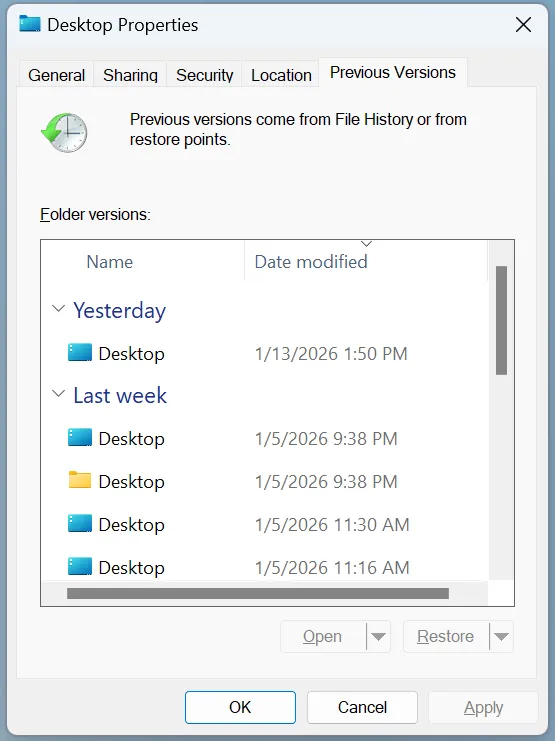
Restore Previous Versions
Right-click the folder where the file was stored and select “Restore previous versions.” Then, choose a version created before deletion.
This method works well if backup features were enabled earlier.
Search for Temporary Excel Files
Excel often creates temporary files during editing. You can search for:
.tmpfiles.asdfiles- Excel-related temporary names
Although results vary, this method can help recover partial data.
How to Recover Permanently Deleted Excel Files
If you used Shift + Delete or emptied the Recycle Bin, standard methods may no longer work. However, it is still possible to recover permanently deleted excel files.
Since the data remains on disk until overwritten, specialized recovery tools can scan storage sectors directly and rebuild lost files.
Best Solution for Recovering Deleted Excel Files: Magic Data Recovery
When built-in methods fail, a professional tool becomes the most reliable option for recovery excel file deleted cases.
Magic Data Recovery is designed to handle complex scenarios that standard tools cannot resolve.
Why Magic Data Recovery Is Effective
Compared with system tools, it offers:
- Deep scanning at the disk sector level
- Recovery after permanent deletion
- Support for corrupted or RAW drives
- File preview before recovery
As a result, it works well for both recover deleted excel file not in recycle bin and permanent deletion scenarios.
How to Recover Deleted Excel Files with Magic Data Recovery
Step 1: Download and Install Magic Data Recovery
Download Magic Data Recovery and install it on a different drive to prevent overwriting.
Supports Windows 7/8/10/11 and Windows Server
Step 2: Select the Location
Choose the partition where the file was deleted.

Step 3: Perform a Scan
The tool automatically performs an Advanced Scan and lists recoverable files.

Step 4: Preview and Recover
Preview the files, confirm their content, and recover them safely.

When You Should Use This Tool
This solution is especially useful when:
- Files are not found in the Recycle Bin
- Files were permanently deleted
- The drive becomes corrupted
- You need reliable recovery results quickly
Common Mistakes to Avoid During Excel File Recovery
Even with the right method, mistakes can reduce recovery success. Therefore, you should avoid:
- Writing new data to the affected drive
- Running repair tools before recovery
- Delaying recovery attempts
- Installing software on the same disk
Instead, act quickly and follow safe recovery practices.
Conclusion
In most cases, recovering a deleted Excel file is possible if you act quickly and use the correct method. Start with simple options such as the Recycle Bin or AutoRecover. Then, move to advanced solutions when needed.
However, when files are permanently deleted or missing, a professional tool becomes essential. Magic Data Recovery provides a reliable way to recover deleted Excel files through deep scanning and accurate detection. Therefore, it remains a practical choice for users who want safe and effective recovery results.
Supports Windows 7/8/10/11 and Windows Server
FAQs About Recovery Excel File Deleted
Can I recover permanently deleted Excel files after emptying the Recycle Bin?
Yes, you can recover permanently deleted Excel files if the data has not been overwritten. Recovery tools scan disk sectors and locate remaining data. However, you should stop using the affected drive immediately to avoid overwriting and improve success rates.
How to recover deleted Excel file not in recycle bin?
You can recover deleted Excel file not in recycle bin by using backup features such as Previous Versions or File History. If no backup exists, a recovery tool can scan the disk directly and locate lost files beyond standard system methods.
What is the best way to recover deleted Excel files?
The best method depends on the situation. For recent deletions, use Recycle Bin or AutoRecover. For permanent deletion, professional recovery tools provide deeper scanning and more reliable results.
Why does Excel file recovery sometimes fail?
Recovery may fail if the original data has been overwritten. In addition, incorrect recovery steps or disk damage can reduce success rates. Therefore, acting quickly and using the correct tools is critical.
Can I recover Excel files after formatting a drive?
Yes, formatting does not immediately erase data. Recovery tools can scan the disk and reconstruct files. However, success depends on how much new data has been written after formatting.
Is it safe to use data recovery software?
Yes, reliable data recovery software is safe when used properly. You should install it on a different drive and avoid writing new data to the affected disk.
How long does Excel file recovery take?
Recovery time depends on disk size and scan type. Quick scans take minutes, while deep scans may take longer. However, deeper scans provide more accurate results.

Vasilii is a data recovery specialist with around 10 years of hands-on experience in the field. Throughout his career, he has successfully solved thousands of complex cases involving deleted files, formatted drives, lost partitions, and RAW file systems. His expertise covers both manual recovery methods using professional tools like hex editors and advanced automated solutions with recovery software. Vasilii's mission is to make reliable data recovery knowledge accessible to both IT professionals and everyday users, helping them safeguard their valuable digital assets.