
FoneDog Review: Does It Really Work?
When files disappear from a computer hard drive, many users search for FoneDog as a quick solution. At first, FoneDog data recovery seems simple and effective. However, during actual use, problems such as missing files, failed scans, or incomplete recovery often appear.
Therefore, this guide focuses on real hard drive recovery scenarios. It explains how the tool works, where it performs well, and why it may not be suitable for disk-level recovery. In addition, it introduces a more reliable solution—such as Magic Data Recovery—when data loss becomes complex and standard recovery methods fall short.
Supports Windows 7/8/10/11 and Windows Server
Table of Contents
What Is FoneDog Data Recovery?
This software is designed to recover deleted data. It supports files such as documents, photos, and videos.
In general, FoneDog data recovery focuses on basic file retrieval. That means it works best when files are recently deleted and still exist in the file system.
However, it does not perform deep disk-level reconstruction. As a result, its effectiveness on hard drives remains limited.
How FoneDog Data Recovery Works on Hard Drives
To evaluate its performance, it is important to understand its mechanism.
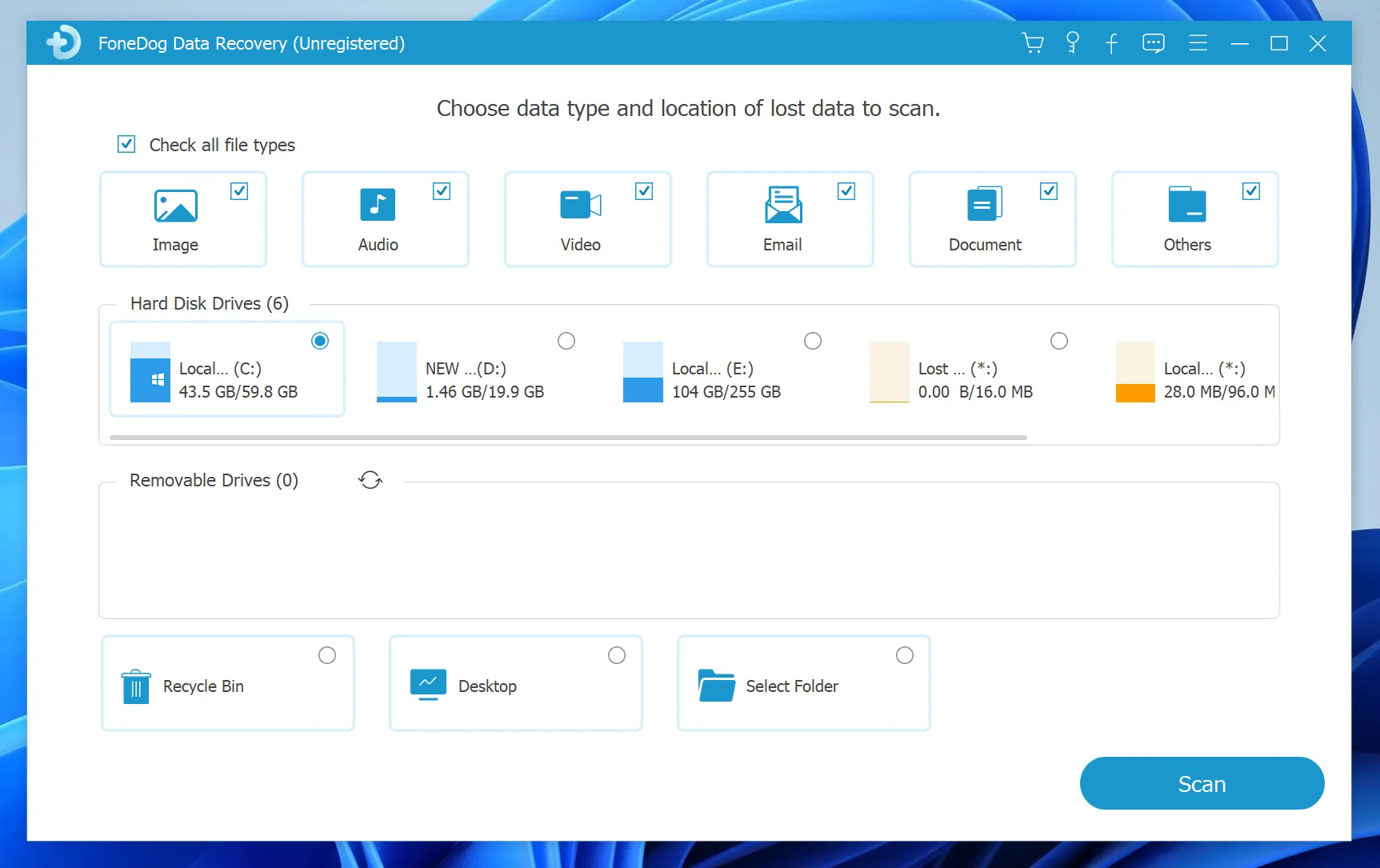
First, the software scans accessible file system areas. Then, it identifies recoverable files based on existing metadata. Finally, it allows users to preview and restore selected files.
However, several limitations affect results:
- It relies on file system structures
- Overwritten files cannot be restored
- Corrupted partitions reduce recovery success
Therefore, this program works only when the file system remains intact.
Key Features of FoneDog
Although this program includes useful features, they mainly support simple recovery tasks.
Supported File Types
- Documents
- Images and videos
- Basic file formats
Storage Compatibility
- Internal hard drives
- External storage devices
Preview Function
Users can preview files before recovery, which helps confirm file integrity.
However, these features do not address deeper disk issues.
Pros and Cons of FoneDog Data Recovery
Advantages
- Easy-to-use interface
- Fast scanning for simple cases
- Supports common file types
Disadvantages
- Limited deep recovery capability
- Cannot handle RAW or corrupted drives
- Free version only supports preview
- Cannot recover overwritten data
Because of these limitations, FoneDog data recovery may not meet expectations in serious hard drive failures.
Common Problems with FoneDog
Even though the tool is simple, users often encounter issues:
- Scan finds no files on damaged drives
- Files appear but cannot be opened
- Recovery results are incomplete
- Corrupted partitions are not detected
These issues occur because the software does not analyze raw disk sectors.
Best Alternative to FoneDog Data Recovery for Hard Drives
When this software cannot handle complex disk issues, a more advanced tool becomes necessary. This is where Magic Data Recovery stands out.
Unlike basic recovery tools, it works at the disk level.
Why Magic Data Recovery Is More Effective
- Deep scan based on raw disk sectors
- Recovers data from RAW or corrupted drives
- Supports lost partitions and formatted disks
- Works on HDD, SSD, USB, and SD cards
Real Scenario
For example, if a hard drive becomes RAW or a partition disappears, basic tools cannot detect files. However, Magic Data Recovery scans the disk structure directly and reconstructs lost data.
Therefore, it provides a more reliable solution for serious data loss.
How to Recover Data with Magic Data Recovery
When FoneDog data recovery fails in hard drive scenarios, switching to a deeper recovery method becomes essential. Fortunately, the process is straightforward.
Step 1: Download and Install Magic Data Recovery
First, install the software on a different location from the affected drive. This helps prevent overwriting recoverable data.
Supports Windows 7/8/10/11 and Windows Server
Step 2: Select the Lost Drive or Partition
Next, open the program and choose the drive or partition where your files were lost. Then, start the scan.

Step 3: Perform a Deep Scan
After that, the software performs an advanced scan automatically. Meanwhile, recoverable files appear as the scan progresses.

Step 4: Preview Files Before Recovery
Once scanning completes, preview files to verify their content. This ensures accurate recovery.

Step 5: Recover Files to a Safe Location
Finally, save recovered files to a different location. This prevents overwriting and improves recovery success.

Therefore, this workflow offers a safer and more effective approach for hard drive recovery.
Conclusion
FoneDog works for simple HDD recovery scenarios. However, it becomes ineffective when facing deeper issues such as corrupted partitions or RAW drives.
Therefore, while this program may help in basic situations, it is not a complete solution for disk recovery. For more advanced cases, Magic Data Recovery provides a more reliable and comprehensive approach, especially when dealing with serious hard drive failures.
Supports Windows 7/8/10/11 and Windows Server
FAQs
Is FoneDog safe to use?
Yes, it is generally safe to install and use. However, safety does not guarantee recovery success. The outcome depends on storage conditions and whether data has been overwritten. Therefore, acting quickly after data loss is more important than relying solely on the tool.
Can FoneDog recover permanently deleted files?
It depends on whether the data has been overwritten. If the storage space remains unchanged, recovery may be possible. However, once new data replaces the original files, this program cannot restore them.
Is FoneDog data recovery free?
No, the free version only supports scanning and previewing. To recover files, you need to purchase the full version. This limitation is common among data recovery tools.
What is the best alternative to FoneDog?
For deeper recovery needs, tools like Magic Data Recovery provide better results. They scan storage at a lower level and can recover data from corrupted or inaccessible drives, not just simple deletions.
Can FoneDog data recovery fix damaged storage devices?
No, it cannot repair hardware or severe file system corruption. In such cases, using a more advanced recovery solution is necessary. Tools that work at the disk level offer better chances of retrieving lost data.

Vasilii is a data recovery specialist with around 10 years of hands-on experience in the field. Throughout his career, he has successfully solved thousands of complex cases involving deleted files, formatted drives, lost partitions, and RAW file systems. His expertise covers both manual recovery methods using professional tools like hex editors and advanced automated solutions with recovery software. Vasilii's mission is to make reliable data recovery knowledge accessible to both IT professionals and everyday users, helping them safeguard their valuable digital assets.