コンテンツへスキップ
amagicsoftロゴアイコン
  • ホーム
  • 製品紹介
    • Magic Data Recovery
    • Magic Recovery Key
  • 店舗
  • ブログ
  • もっと見る
    • Amagicsoftについて
    • お問い合わせ
    • プライバシーポリシー
    • 利用規約
    • ライセンス契約
    • 返金ポリシー
  • 日本語
    • English
    • 한국어
    • Deutsch
    • Français
    • Español
    • 繁體中文
削除されたファイルの復元

Windowsで削除されたファイルを復元する実証済みの方法
2025年12月28日 Vasilii コメントはまだない
Windowsから削除されたファイルを復元する実証済みの方法

誤って重要なファイルを削除してしまう from your computer can be a nightmare, especially when they seem to be lost forever. Whether it’s a document, photo, or video, the panic sets in once you have emptied the Recycle Bin . Fortunately, permanently deleted files aren’t always gone for good. In this guide, we’ll walk you through how to recover Windows deleted files efficiently, using both built-in Windows tools and third-party solutions like Magic Data Recovery.

Magic Data Recoveryをダウンロード

Windows 7/8/10/11およびWindows Serverをサポート

ファイルが復元できるかどうか心配ですか? 調べる  下記のクイック・チェックで数秒以内に確認できます。.

データ復旧アセスメント
データ復旧の検証 ▼

データ復旧アセスメント

3つの簡単な質問に答えるだけで、回復の可能性が推定できる

1.どのようなデータ損失が発生しましたか?
事故による削除
フォーマット
パーティション損失
システム・クラッシュ
2.紛失後、新しいデータを書きましたか?
はい
いいえ
不明
3.データ損失はどこで発生しましたか?
HDD
SSD
USBドライブ
SDカード
リカバリーソフトウェアのダウンロード

目次

How to Recover Deleted Files from Windows: Proven Methods

Method 1: Check the Recycle Bin

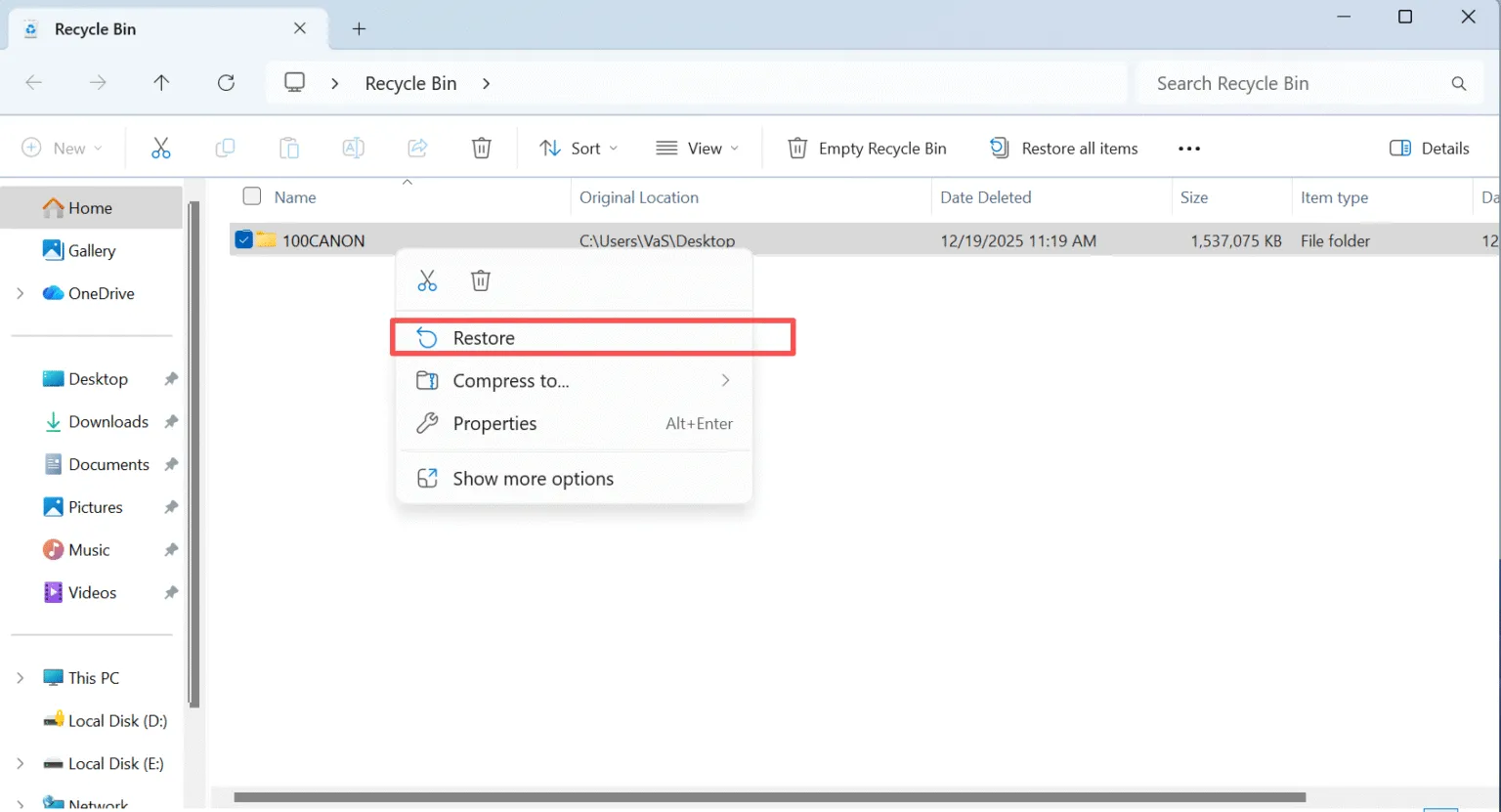
If you’ve accidentally deleted a file, the first place to check is the Recycle Bin. Windows moves deleted files to the Recycle Bin, where they remain until manually emptied.

  • Open the Recycle Bin by double-clicking its icon on your desktop.
  • 検索 for the file you want to recover.
  • 右クリック the file and select リストア to return it to its original location.
windows-recover-deleted-files-from-recycle-bin

If the file isn’t in the Recycle Bin, don’t panic. There are still ways to retrieve it.

Method 2: Use Windows File History

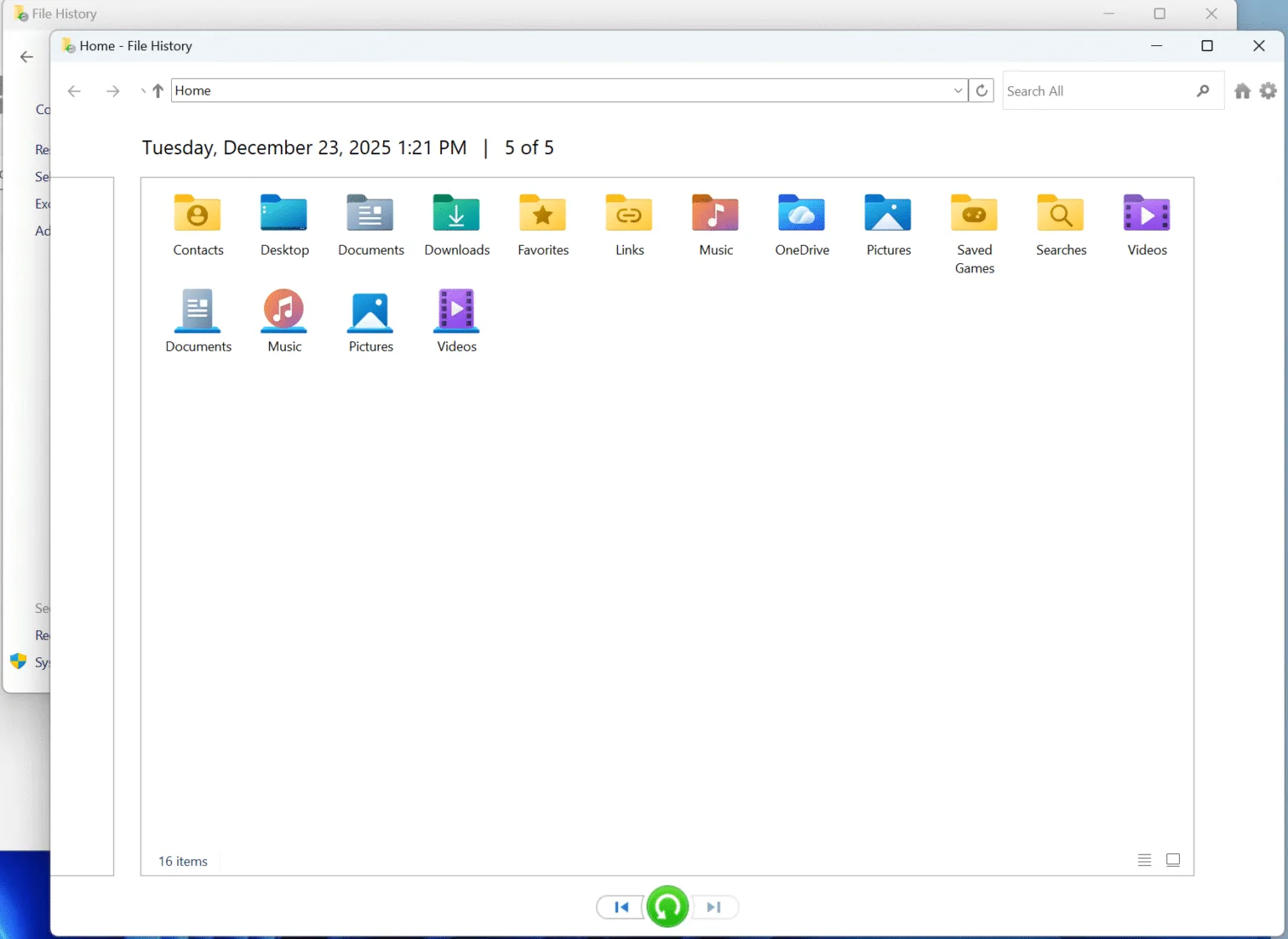
Windows offers a built-in tool called ファイル履歴, which can help you restore lost files.

  • コントロールパネルを開く and navigate to System and Security — File History.
  • 選択 Restore personal files. You will see all the backups if you made before data loss.
  • Select and restore the files you need.
file-history

If you haven’t set up ファイル履歴 previously, this method won’t work. But if you have it enabled, this is one of the easiest ways to restore files.

Method 3: Recover Using a Backup

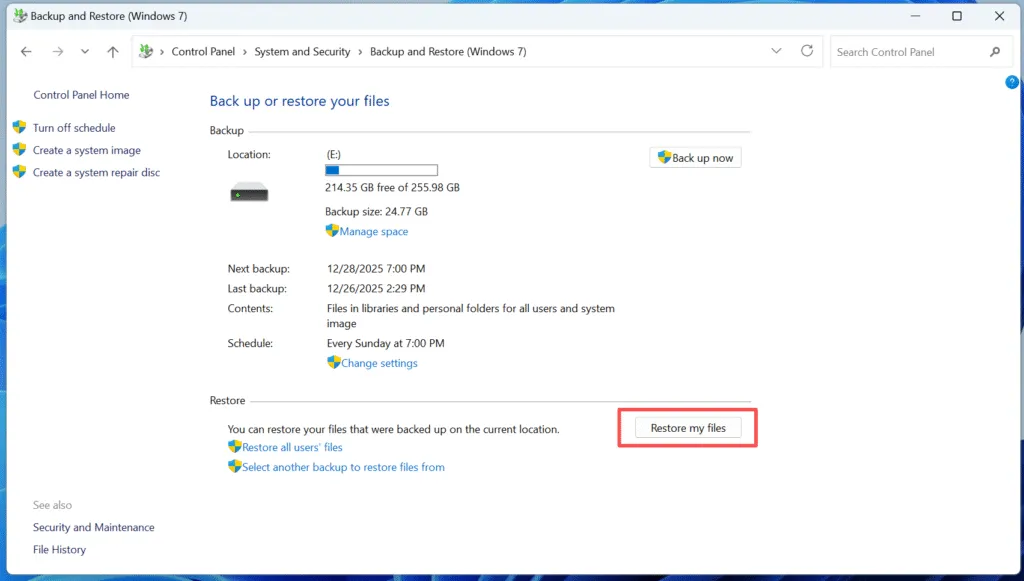
If you’ve been diligent about backing up your files using Windowsバックアップ, you can restore your deleted files from a previous backup.

  • オープン コントロールパネル and go to システムとセキュリティ > Backup and Restore (Windows 7).
  • クリック ファイルの復元 and follow the prompts to select your backup and recover the files you need.
windows-recover-deleted-files-from-backups

Method 4: Use Data Recovery Software After Permanent deletion

もしあなたが permanently deleted your files (i.e., emptied the ごみ箱 or used Shift + Delete), recovery can be more challenging. Magic Data Recovery is an excellent tool to help you recover deleted files that are no longer in the Recycle Bin.

Recover Windows Deleted Files Using Magic Data Recovery

Magic Data Recovery is a powerful tool that can scan your computer for 永久に削除されたファイル and restore them in just a few steps. Here’s how to use it:

ステップ1: Magic Data Recoveryのダウンロードとインストール

ダウンロードする Magic Data Recovery from the official website and installing it on a drive different from the one where your deleted files were located. This ensures that you don’t accidentally overwrite the deleted files, which could make recovery more difficult.

Magic Data Recoveryをダウンロード

Windows 7/8/10/11およびWindows Serverをサポート

ステップ2:スキャンする外付けハードドライブを選択する

On the main interface, select the hard drive where you deleted files and start a scan.

マジック・デート・リカバリー

ステップ 3: ドライブをスキャンして削除されたファイルを探す

The software will automatically perform an Advanced Scan. During this scan, it will detect all the files that can be recovered, including those that are permanently deleted.

スキャン待ち

ステップ4:復元前に削除されたファイルをプレビューする

Once the scan is complete, use the Preview function to see the content of the files found. This step ensures that you recover only the files you actually need, saving you time and storage.

プレビューファイル

ステップ5:ファイルを安全な場所に復元する

Finally, select the files you wish to recover and choose a different drive to save them. DO NOT save the files to the original drive, as this could overwrite the lost files.

ファイルの回復

Why Magic Data Recovery Is Your Best Option to Recover Windows Deleted Files

While there are many options available for recovering deleted files, Magic Data Recovery stands out due to its unique features and ease of use.

  • Advanced Scan Technology: Unlike many other tools, Magic Data Recovery uses advanced scanning algorithms to detect deleted files that might have been overlooked by less powerful software.
  • プレビュー機能: You can preview files before recovery, ensuring that you don’t waste time recovering unnecessary data.
  • Multiple File Formats Supported: The software can recover over 5,000 file formats, including photos, documents, videos, and more.
  • Safe and Secure: Magic Data Recovery does not overwrite your files during the scanning process, reducing the risk of permanent data loss.

If you’re serious about recovering lost data, Magic Data Recovery offers the best balance of speed, reliability, and ease of use.

まとめ

Recovering deleted files from Windows doesn’t have to be a daunting task. While you can use built-in tools like the ごみ箱 or File History, but they only works if you haven’t emptied the Recycle Bin or you made backups before data loss. The most effective solution for data loss is a reliable third-party tool like Magic Data Recovery. This software makes it easy to recover files that seem lost forever, ensuring that your data stays safe and secure.

Magic Data Recoveryをダウンロード

Windows 7/8/10/11およびWindows Serverをサポート

Windows Recover Deleted Files – FAQs

1.How to recover permanently deleted files from Windows?

To recover permanently deleted files from Windows, you can use data recovery software like Magic Data Recovery or check for backups and previous versions.

2.誤って削除してしまったファイルを復元するには?

You can recover accidentally deleted files from the Recycle Bin, File History, or by using a data recovery tool like Magic Data Recovery.

3.Is it possible to recover deleted files in Windows 10?

Yes, deleted files in Windows 10 can be recovered using tools like Magic Data Recovery, Windows File History, or previous backups.

4.Where do permanently deleted files go on Windows?

Permanently deleted files usually don’t go to the Recycle Bin. They are typically marked as free space and can be recovered using data recovery software.

5.永久に削除されたファイルを復元できますか?

Yes, Magic Data Recovery can recover permanently deleted files as long as they haven’t been overwritten by new data.

6.永久に削除されたファイルは実際に削除されますか?

No, permanently deleted files aren’t truly gone. They remain on your hard drive until new data overwrites them. Magic Data Recovery can recover these files before that happens.

7.Where to find deleted files if not in the recycle bin?

If deleted files aren’t in the Recycle Bin, they can be found by using file recovery software like Magic Data Recovery.

8.最近削除されたものは永遠に消えますか?

Files deleted from the Recently Deleted folder in OneDrive or Dropbox can still be recovered with the help of file recovery tools like Magic Data Recovery.
  • Magic Data Recovery
Vasilii

バシリイは、この分野で約10年の実務経験を持つデータ復元のスペシャリストです。そのキャリアを通じて、彼は削除されたファイル、フォーマットされたドライブ、失われたパーティション、RAWファイルシステムを含む何千もの複雑なケースの解決に成功してきました。彼の専門知識は、16進エディタなどの専門ツールを使用した手動復元方法と、復元ソフトウェアを使用した高度な自動化ソリューションの両方をカバーしています。バシリの使命は、信頼できるデータ復元知識をITプロフェッショナルと一般ユーザーの双方が利用できるようにし、貴重なデジタル資産を保護できるようにすることです。.

投稿ナビゲーション

前へ
次のページ

検索

カテゴリー

  • ビットロッカーのリカバリ
  • 削除されたファイルの復元
  • ディスクの問題修正
  • ドキュメントの復元
  • フォーマットファイルの復元
  • ハードディスク・ドライブ復旧
  • ライセンスキーの回復
  • 紛失ファイルの復元
  • メモリーカード復元
  • ニュース
  • パスワード復旧
  • フォトリカバリー
  • SSDリカバリー
  • USBドライブ復元
  • ユーザーガイド
  • ビデオ・リカバリー
  • ウィキ
  • Windowsの問題修正

最近の投稿

  • SDカードから削除されたファイルを復元 無料
    2026年にSDカードから削除されたファイルを無料で復元する方法
  • Windowsから削除されたファイルを復元する実証済みの方法
    Windowsで削除されたファイルを復元する実証済みの方法
  • SDドライブが認識されない 6つの実証済みの修理方法
    SDドライブが認識されない:6つの実証済みの修理方法

タグ

CHKDSKとディスクツール ディスク修復 エラーのトラブルシューティング どのように Magic Data Recovery Magic Recovery Key WiKi

関連記事

SDカードから削除されたファイルを復元 無料
削除されたファイルの復元

2026年にSDカードから削除されたファイルを無料で復元する方法

2025年12月28日 Smith, Erin コメントはまだない

SDカードから重要な写真、ビデオ、またはドキュメントを失うと、特にファイルが誤って削除された場合、またはフォーマット後に失われた場合は、イライラすることがあります。幸いなことに、多くの場合、信頼できる復元ツールを使用して、SDカードから削除されたファイルを無料で復元することが可能です。このガイドでは、SDカードのデータ復元がどのように機能するか、無料の復元が可能な場合、およびどのツールが最高の無料のSDカード復元ソフトウェアとして適格であるかについて説明します。また、削除されたSDカードファイルをステップバイステップで復元する方法と、Magic Data Recoveryのような専門的なソリューションが必要になる場合についても説明します。ダウンロード Magic Data Recovery Windows 7/8/10/11とWindows Serverをサポート [...]の表

削除したDropboxファイルを30日後に復元する方法
削除されたファイルの復元

削除したDropboxファイルを30日後に復元する方法

2025年12月27日 Vasilii How to Restore Deleted Dropbox Files After 30 Days はコメントを受け付けていません

Dropbox から誤って重要なファイルを削除してしまうと、特にそのファイルが「最近削除したファイル」セクションになくなっていることに気づいたときには、ストレスが溜まります。多くのユーザーが Dropbox の削除済みファイルの復元を探し始めるのは、30 日間の復元期限が過ぎてからです。良いニュースは、削除された Dropbox ファイルが永遠に失われるとは限らないということです。ファイルの削除方法、削除からどのくらい時間が経過しているか、ファイルがローカル デバイスに同期されているかどうかによって、復元方法が異なります。このガイドでは、Dropbox の公式ソリューション、削除した Dropbox ファイルを 30 日後に復元する方法、そして実用的な実際の復元方法について説明します。クラウドベースのオプションが失敗した場合は、[...]をクリックしてください。

永久に削除された写真を復元
フォトリカバリー

永久に削除された写真を復元する方法:完全ガイド

2025年12月27日 Smith, Erin How to Restore Permanently Deleted Photos: Complete Guide はコメントを受け付けていません

特に、ごみ箱から削除された写真、フォーマット後に失われた写真、ファイルシステムエラーの影響を受けて永久に削除された写真を復元する必要がある場合、重要な画像を失うとイライラすることがあります。多くの場合、永久に削除された写真の復元は不可能だと思われています。実際には、削除された写真は新しいデータが上書きするまでストレージデバイスに残っていることがよくあります。適切な方法とツールを使えば、多くの場合、復元は可能です。このガイドでは、写真の削除がどのように機能するのか、どのような復元オプションが存在するのか、そしてMagic Data Recoveryのような専門的なソリューションを使用することが最も現実的な選択になる場合について説明します。ダウンロード Magic Data Recovery Windows 7/8/10/11およびWindows [...] をサポートします。

amagicsoftロゴアイコン

当社のビジョンは、世界的に有名なソフトウェア ブランドおよびサービス プロバイダーとなり、一流の製品とサービスをユーザーに提供することです。

製品紹介
  • Magic Data Recovery
  • Magic Recovery Key
ポリシー
  • 利用規約
  • プライバシーポリシー
  • 返金ポリシー
  • ライセンス契約
会社概要
  • Amagicsoftについて
  • お問い合わせ
  • 店舗
フォローする

著作権©2025 Amagicsoft。無断複写転載を禁じます。

  • 利用規約
  • プライバシーポリシー