
Eassos Recovery Review: Best Alternative
Losing important files can be stressful. You may delete a folder by mistake, format a USB drive too quickly, or find that a partition suddenly becomes RAW or inaccessible. In these moments, many users search for eassos recovery or eassos because they want a practical way to recover lost data without sending the drive to a repair shop.
This guide reviews eassos recovery, explains what eassos data recovery tools can do, and shows when another solution may be easier for everyday users. In the second half, we compare eassos data recovery with Magic Data Recovery, a data recovery tool that supports deleted files, formatted drives, file system errors, corrupted partitions, and other common data loss situations.
The goal is simple: help you choose the safer and more suitable recovery option before you write new data to the affected drive.
Supports Windows 7/8/10/11 and Windows Server
Table of Contents
What Is Eassos Recovery?
Eassos recovery usually refers to data recovery tools from Eassos, a software brand related to file recovery, partition recovery, disk utilities, and backup solutions. Users often search for eassos when they need to restore deleted files, recover a formatted drive, or access data from a RAW or damaged partition.
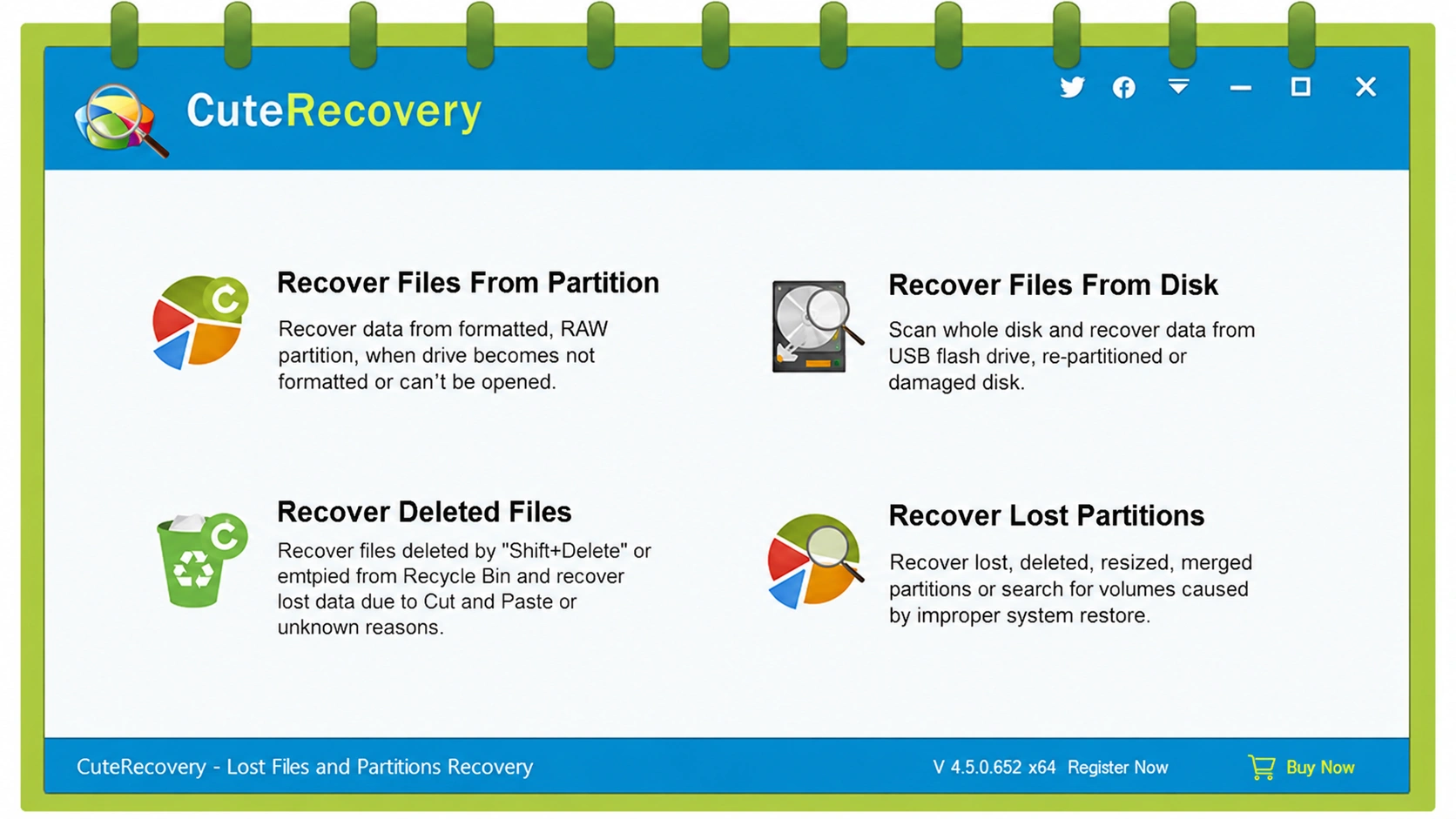
One important point is that product names can be confusing. Some older pages mention Eassos Recovery or EassosRecovery Free, while the official Eassos site now states that “EassosRecovery Free” has been renamed to “CuteRecovery Free.” The core purpose remains similar: helping users recover deleted, formatted, or lost data from hard disks, USB drives, memory cards, and other storage devices.
So, when people search for eassos recovery, they may actually mean one of several related tools, including CuteRecovery, DiskGenius, or other Eassos data recovery programs.
What Can Eassos Data Recovery Do?
Eassos data recovery tools focus on several common recovery needs. They can help users restore files deleted with Shift + Delete, files removed from the Recycle Bin, data from RAW or inaccessible partitions, and files lost from hard drives, external drives, USB drives, SD cards, digital cameras, and servers. Eassos also states that its recovery programs support hundreds of file formats, including photos, videos, audio files, documents, and emails.
In practical terms, eassos recovery may help in cases such as:
- You emptied the Recycle Bin and later needed a deleted document.
- You formatted a USB drive before copying files elsewhere.
- A partition became RAW and Windows asked you to format it.
- A memory card stopped showing photos after a camera error.
- A hard drive partition disappeared after repartitioning.
However, recovery results depend on the drive condition, file system, overwrite status, and whether you stop using the affected device quickly.
Pros and Cons of Eassos Recovery
Before choosing any data recovery software, it is important to look beyond the feature list. Eassos Recovery offers useful recovery capabilities for common data loss situations, such as deleted files, formatted drives, and inaccessible partitions. However, like any recovery tool, it also has limitations that users should understand before installation. The following section explains the main advantages and drawbacks of Eassos Recovery to help you decide whether it fits your recovery needs.
Pros of Eassos Recovery
Eassos recovery has several useful strengths. First, it supports both file recovery and partition recovery, which makes it broader than simple deleted-file tools. Second, the wizard-style interface can help beginners follow a guided process instead of dealing with command-line tools. Third, some Eassos-related tools include file preview, which helps users confirm whether a file is recoverable before saving it.
Another advantage is device coverage. Third-party pages list support for PCs, external hard drives, SSDs, SD cards, USB flash drives, and common file systems such as NTFS, FAT32, FAT16, and exFAT.
Cons of Eassos Recovery
Still, eassos recovery has limitations. The biggest issue is clarity. Product names have changed over time, and users may not know whether they should download Eassos Recovery, CuteRecovery, DiskGenius, or another Eassos tool.
Also, many ranking pages are simple download pages. They mention features, but they rarely explain safety steps, overwrite risks, SSD limitations, or what to do when the disk has physical damage. This can leave users with incomplete guidance.
Finally, some users may prefer a more modern interface and a more direct workflow for deleted files, formatted drives, and file system error recovery. That is where Magic Data Recovery becomes worth considering.
Eassos Data Recovery vs Magic Data Recovery
Both eassos data recovery and Magic Data Recovery aim to recover lost files, but they are not identical in user experience, clarity, and recovery workflow.
Comparison Point | Eassos Data Recovery | Magic Data Recovery |
Main purpose | File recovery and partition recovery | Recover deleted, formatted, corrupted, and file-system-error data |
Best for | Users who need Eassos ecosystem tools or partition-related recovery | Users who want a clear, guided recovery workflow |
Common scenarios | Deleted files, RAW partitions, lost partitions, formatted drives | Deleted files, formatted drives, file system errors, corrupted partitions, inaccessible devices |
Interface | Wizard-style, but product naming may confuse users | Clear scan-preview-recover workflow |
File preview | Available in some Eassos tools | Supports preview before recovery |
Device support | Hard drives, USB drives, SD cards, external drives | HDDs, SSDs, USB drives, SD cards, memory cards, and other media |
User difficulty | Suitable for beginners and technical users depending on product | Designed for ordinary users and IT users |
Risk control | Depends on user following safe recovery steps | Emphasizes safe location saving and avoiding original-drive writes |
Eassos recovery is useful if you already know which Eassos product fits your case. However, Magic Data Recovery may be easier if your main goal is to recover deleted, formatted, or file-system-error data without comparing several related tools.
Supports Windows 7/8/10/11 and Windows Server
Why Magic Data Recovery Is a Strong Eassos Alternative
If you are searching for eassos recovery because files were deleted, a disk was formatted, or a partition became inaccessible, Magic Data Recovery offers a simpler path.

Magic Data Recovery is designed to recover deleted, formatted, or otherwise lost files from hard drives, SSDs, USB flash drives, memory cards, and other storage media. Its official user guide describes a practical workflow: select the drive, scan for lost files, preview recoverable items, and save them to a safe location that is not the original drive.
The product solves several core pain points:
- It helps when files are permanently deleted.
- It supports formatted disks and partitions.
- It handles file system errors and corruption.
- It can scan HDDs, SSDs, USB drives, and memory cards.
- It offers preview and filtering to help users find important files faster.
For example, if your USB drive asks to be formatted before use, you should avoid formatting it again. Instead, you can scan the device with Magic Data Recovery, preview the found files, and recover them to another healthy disk.
If you accidentally formatted a work drive, Magic Data Recovery can run a deeper scan to look for lost documents, photos, videos, and archives. If a file system error causes a partition to appear RAW, the software can help locate recoverable data before you try risky repair commands.
This makes Magic Data Recovery a practical alternative to eassos data recovery for users who want a direct and less confusing recovery experience.
When Should You Choose Eassos Recovery?
Choose eassos recovery if:
- You already use Eassos products.
- You need both file recovery and partition recovery options.
- You are comfortable choosing between Eassos-related tools.
- You want to explore CuteRecovery or DiskGenius.
- You need a wizard-based recovery process.
For technical users, Eassos tools may provide useful recovery and disk-management options. However, beginners should read the product page carefully before downloading, because different Eassos tools may target different recovery needs.
When Should You Choose Magic Data Recovery?
Choose Magic Data Recovery if:
- You want a cleaner recovery workflow.
- You mainly need deleted file recovery.
- You need formatted drive recovery.
- You face file system error recovery.
- You want to preview files before restoring them.
- You prefer clear steps instead of choosing between multiple product names.
For ordinary users, the biggest advantage is simplicity. You do not need to understand partition tables, file signatures, or RAW file systems in detail. You only need to select the affected device, scan, preview, and recover files to a safe destination.
If you are looking for a more efficient solution, you can try Magic Data Recovery as an eassos recovery alternative.
Supports Windows 7/8/10/11 and Windows Server
Practical Recovery Tips Before You Start
No matter which tool you choose, keep these tips in mind:
- Do not run CHKDSK before recovering important files from a damaged partition.
- Do not format the drive again after accidental formatting.
- Do not save recovered files to the original disk.
- Do not install software on the affected partition.
- Use preview to check file quality before recovery.
- Recover the most important files first.
- Back up recovered files immediately after restoration.
These steps reduce risk and help you avoid common mistakes. Data recovery software can help, but it cannot undo every type of data loss. If files were overwritten, securely erased, or lost from a physically failing drive, recovery may be limited.
Conclusion: Is Eassos Recovery Still Worth It?
Eassos recovery can still be useful for users who want file recovery, partition recovery, RAW partition recovery, or recovery from removable storage devices. The Eassos ecosystem includes tools that cover many common data loss cases.
However, product naming and older download pages may confuse users who simply want to recover lost files quickly. If you need a clearer solution for deleted files, formatted drives, file system errors, corrupted partitions, or inaccessible storage devices, Magic Data Recovery is a strong alternative.
It is not recommended because of exaggerated promises. It is recommended because it focuses on the real problems users face: finding lost files, previewing them, reducing recovery mistakes, and saving them safely to another location.
If you are searching for eassos recovery but want a more straightforward tool, Magic Data Recovery is worth trying.
Supports Windows 7/8/10/11 and Windows Server
FAQs
What is Eassos Recovery?
Eassos recovery usually refers to Eassos-related data recovery tools that help users restore deleted, formatted, or lost files. These tools may support hard drives, USB drives, SD cards, RAW partitions, and lost partitions. However, product names have changed over time, so users should check the official Eassos product page before downloading.
Is Eassos Recovery free?
Some Eassos-related tools have free or trial versions, but the exact limits may depend on the current product name and edition. For example, EassosRecovery Free has been renamed CuteRecovery Free. Before using eassos recovery, check the official pricing, recovery limits, and whether preview or actual recovery requires an upgrade.
Can Eassos Data Recovery recover formatted drives?
Yes, eassos data recovery tools are designed to handle formatted drives, RAW partitions, corrupted partitions, and lost files. However, recovery success depends on whether new data has overwritten the original files. For the best chance, stop using the formatted drive immediately and save recovered files to another storage device.
Is Magic Data Recovery better than Eassos Recovery?
Magic Data Recovery may be better for users who want a simpler scan-preview-recover workflow. Eassos recovery can be useful for file and partition recovery, but product naming may confuse beginners. If your main problem involves deleted files, formatted drives, or file system errors, Magic Data Recovery offers a more direct solution.
Can Magic Data Recovery recover files after file system errors?
Yes. Magic Data Recovery supports recovery from file system errors, corrupted partitions, RAW-like access issues, formatted disks, and deleted-file scenarios. It scans the affected storage device and helps users preview recoverable files before saving them to a safe location. This makes it useful when Windows cannot open a drive normally.
Should I save recovered files to the same drive?
No. You should never save recovered files to the same drive where the data was lost. Doing so may overwrite remaining recoverable data. Whether you use eassos recovery or Magic Data Recovery, always restore files to another healthy disk, external drive, or separate partition.
What should I do before using data recovery software?
Stop using the affected drive first. Then avoid formatting, reinstalling software, copying new files, or running repair commands too early. Install the recovery tool on another drive, scan the affected device, preview files, and recover important data to a different location. These steps reduce overwrite risk.
Can data recovery software recover everything?
No data recovery software can guarantee complete recovery. Results depend on overwrite status, drive health, file system damage, SSD TRIM behavior, and the type of data loss. Tools like eassos recovery and Magic Data Recovery can help in many common cases, but physically damaged drives may require professional recovery service.

Jason is a data recovery and technical support specialist with over 15 years of hands-on experience. He has worked extensively with frontline users, troubleshooting difficult data loss cases and providing practical recovery solutions for accidental deletion, formatted drives, damaged file systems, lost partitions, system failures, and other recovery emergencies. His expertise also includes backup and restoration, file repair, and disaster recovery, with a strong emphasis on safe, reliable, and technically accurate guidance.