
How to Perform SIM Card Data Recovery
Have you accidentally deleted vital contacts, critical business phone numbers, or text messages from your smartphone? If so, you are likely looking for a reliable way to perform sim card data recovery. Losing touch with clients, friends, or family members creates immense stress. Consequently, many users immediately search for quick software fixes online to resolve this painful issue.
However, the internet is flooded with misleading tools promising instant results. This comprehensive guide will explain the technical reality of modern sim card recovery. Furthermore, we will show you a highly effective, alternative solution to retrieve deleted backup data on hard drives safely.
Table of Contents
The Reality of Modern SIM Card Data Recovery
When users experience data loss, they often assume their contacts still live on the physical SIM card chip. Years ago, older mobile phones stored exactly 250 contacts and a few dozen SMS text messages directly onto the SIM hardware. Consequently, basic recovery tools could extract that information easily.
Today, the technical landscape has changed completely. Modern iOS and Android smartphones treat the SIM card primarily as an authentication key for your cellular network. Because of advanced security protocols and storage limitations, your phone now saves contacts and messages directly to its internal flash memory or synchronizes them with cloud services.
Therefore, hardware-based sim card data recovery tools that claim to scan a modern micro-SIM or nano-SIM chip via a USB reader usually fail completely. Instead, successful sim card recovery relies on finding where that data was previously synchronized, exported, or backed up on a local computer.
Why Restoring Local Backups is the Best Way for SIM Card Recovery
Since modern operating systems regularly sync data, your lost information is rarely gone forever. Have you ever connected your smartphone to your Windows PC or Mac to manage files? If the answer is yes, you likely have hidden historical backups, exported database logs, or forgotten contact lists saved on your hard drive.
Common Local Storage Formats for Mobile Data:
- CSV Files (
.csv): Comma-Separated Values spreadsheets, which are standard when you manually export contacts from Google Contacts, Outlook, or old phone management suites. - VCF Files (
.vcf): Virtual Contact Files (vCards) used universally by Apple and Android to transfer address books. - Database Backups: Local iTunes or Android desktop manager folders that contain cached communication histories.
If you accidentally cleared your phone or formatted your device, these local desktop files might have been deleted or overwritten. Fortunately, target software can scan your computer’s hard drive to retrieve these invaluable backup files, effectively achieving your goal of sim card data recovery.
Step-by-Step Guide: How to Recover SIM Card Data
When you discover that your mobile contacts or messages are missing, the recovery path depends entirely on your past backup habits. To help you navigate this process efficiently, we have broken down the solution into three common real-world scenarios.
Scenario 1: First, Check for Automatic Cloud Backups (No Software Needed)
Before downloading any tools, you should always check the built-in safety nets provided by modern smartphone operating systems. If your device was connected to the internet, your missing data might still exist in the cloud ecosystem.
- For Android Users (Google Contacts): Log into Google Contacts via any web browser. Navigate to the left-hand sidebar and click on the “Bin” or “Trash” folder. Google preserves deleted contacts here for exactly 30 days, allowing you to restore them with a single click.
- For iOS Users (iCloud): Log into iCloud.com using your Apple ID. Go to Data Recovery in your account settings and select Restore Contacts. This method pulls your address book back from an earlier automated cloud snapshot.
- Contact Your Carrier: Alternatively, if you desperately need communication logs rather than contact names, you can contact your mobile provider. Most network carriers maintain strict historical records of text message timestamps and call logs for billing purposes.
Scenario 2: If Local Backups Ever Existed
If you have ever synced your mobile phone with a computer, or manually exported your address book as a spreadsheet in the past, those files might be hiding on your hard drive. Even if you accidentally deleted these local backup files, you can easily deploy a professional scanning solution to retrieve deleted data.
This is where Magic Data Recovery serves as an essential solution for your overall sim card recovery strategy.
What is Magic Data Recovery?
Magic Data Recovery is a highly sophisticated, user-friendly data retrieval application. While the software does not interface with physical SIM card hardware directly, it solves the core problem of sim card recovery by locating and restoring lost backup databases, .csv spreadsheets, and .vcf address books from your computer storage.
Key Advantages of This Tool:
- Deep Scanning Capabilities: It thoroughly analyzes file allocation tables to locate fragmented or deeply buried mobile backup directories.
- Targeted File Filtering: You can easily filter search results by specific extensions like CSV or VCF, saving hours of sorting time.
- Risk-Free Preview: The software allows you to view found data before purchasing a license, ensuring your required file is intact.
- High Reliability: Unlike sketchy hardware tools, this software uses standard read-only scanning practices that will never corrupt your existing system files.
Helpful Tip: If you are dealing with critical data loss, stop saving new files to your computer immediately. This best practice prevents your system from overwriting the deleted contact databases before the software can scan them.

Scenario 3: If You Have No Backups
What happens if you have never synced your phone to the cloud and have never created a single backup on your computer? In this worst-case scenario, your last remaining option is to attempt a direct physical scan of the micro-SIM or nano-SIM card chip itself.
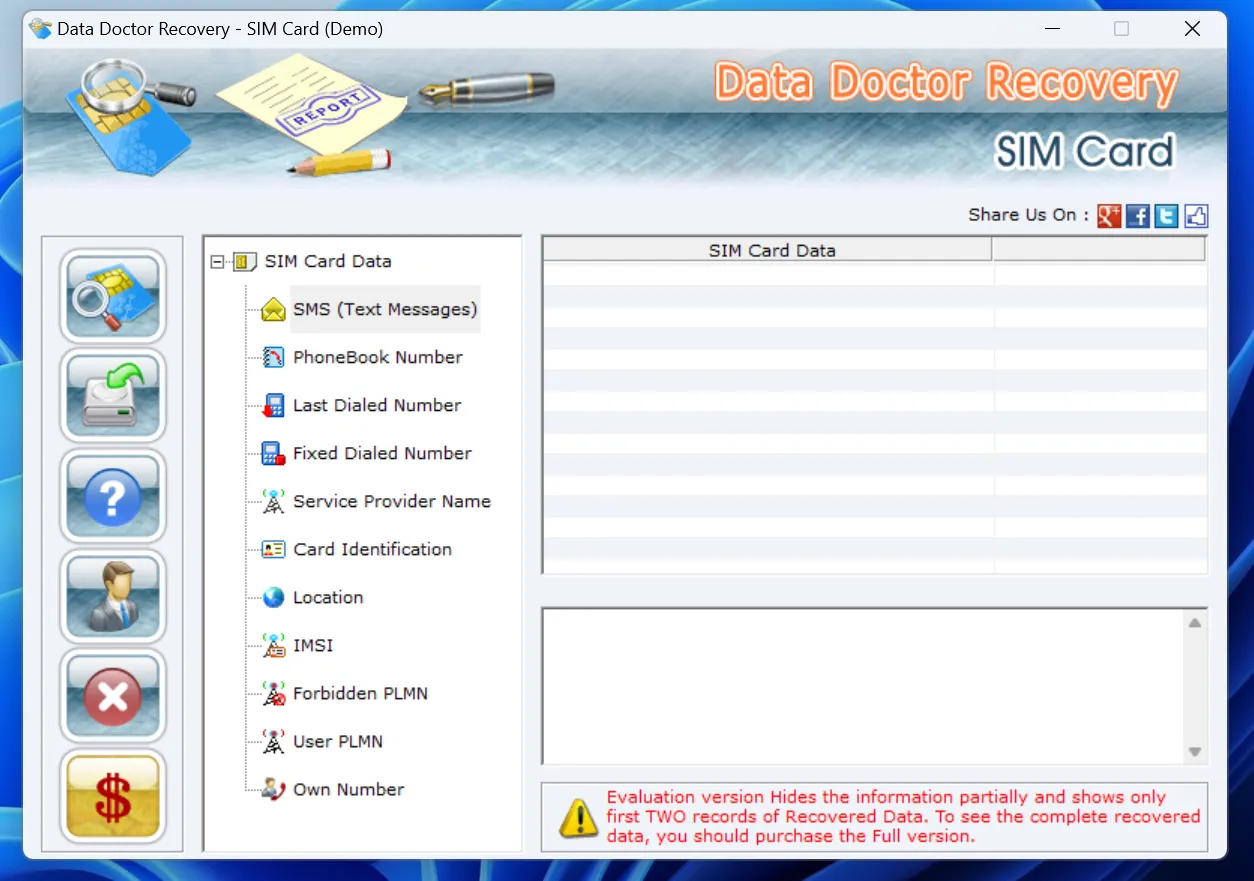
To achieve this type of sim card data recovery, you must step away from standard file-recovery tools and use specialized hardware-targeted software like Data Doctor Recovery – SIM Card.
How to Perform Physical SIM Card Hardware Recovery:
- Acquire a USB SIM Card Reader: You cannot simply insert the SIM card into a phone for this process. Instead, you must purchase a specialized PC-compatible USB SIM card reader hardware adapter.
- Connect the Hardware: Remove the SIM card from your mobile device, place it securely into the card reader, and plug the adapter into an open USB port on your Windows PC.
- Run Dedicated Hardware Software: Open Data Doctor Recovery – SIM Card. Unlike software that scans standard computer hard drives, this specific utility sends low-level commands directly to the SIM card integrated circuit chip.
- Extract Internal Memory Logs: The software reads the unencrypted storage sectors of the card to pull raw text strings, such as older SMS logs or fixed dialed numbers (FDN) that were physically saved to the chip memory.
Note: Due to the tight encryption standards on modern 4G and 5G SIM cards, physical chip scanning has a lower success rate compared to backup restoration. Therefore, checking cloud or desktop archives remains the most reliable path.
Proactive Tips to Prevent SIM Card Data Loss
The most efficient way to handle future sim card recovery issues is to prevent them from happening in the first place. Implementing a clean, automated backup routine protects your personal and professional network from unexpected hardware failures.
Strategy | Frequency | Best Practice |
Cloud Synchronization | Continuous | Enable automatic background syncing for contacts on iOS or Android. |
Local Manual Export | Every 3 Months | Export your full address book as a .csv file and save it to your PC. |
Storage Protection | Ongoing | Use tools like Magic Data Recovery to keep your desktop backup storage safe. |
Conclusion: Choosing the Right Tool for SIM Card Recovery
In conclusion, attempting a direct physical sim card data recovery process on modern smartphones is generally ineffective due to chip encryption. Instead, the ultimate key to a successful sim card recovery lies in scanning your local desktop storage for missing backup databases and address book spreadsheets. By using a trustworthy tool like Magic Data Recovery, you can scan your computer thoroughly, finding for essential deleted backup or contact files, and restore your digital life with minimal effort.
Supports Windows 7/8/10/11 and Windows Server
FAQs Regarding SIM Card Recovery
Can I directly scan a nano-SIM card using data recovery software?
No, modern smartphones do not store accessible user contact data or messages directly on the physical SIM card chip due to hardware encryption. Therefore, standard software cannot read the card directly. Instead, you must focus on recovering deleted backup files from your computer to restore that missing information.
How do I find deleted text messages for sim card data recovery?
You should scan your computer for old mobile backup logs or iTunes folders where your phone previously synchronized. Specialized desktop software can easily extract these hidden communication databases. Consequently, you can retrieve your texts without needing to access the physical encrypted SIM card chip itself.
What is the best file format to use when backing up mobile contacts?
The industry standard formats are .csv and .vcf. These files are highly portable, easy to read, and universally accepted by both Windows and macOS platforms. Furthermore, they are the easiest file types to recover with software if your local computer drive faces an unexpected data loss event.
Why do most online sim card recovery tools fail to work?
Most online tools fail because they rely on outdated technology from older mobile networks. Modern phone systems isolate the SIM card for security and network authentication purposes only. As a result, these cheap software programs cannot bypass the security walls to scan for contacts, making computer backup recovery much more reliable.
Does Google Contacts keep a history for sim card data recovery?
Yes, Google Contacts automatically saves your deleted information in a hidden folder called the "Bin" or "Trash." This cloud storage preserves your deleted contacts for exactly 30 days. Therefore, you can log in via any desktop browser to restore your contact list before attempting deeper software recovery methods.
How can I request call logs from my carrier for sim card recovery?
You can log into your official mobile network carrier portal or contact their customer service department directly. Most providers maintain comprehensive archives of your text timestamps and call logs for billing verification. Consequently, they can provide official PDF documents containing your historical communication data upon your legal request.

Vasilii is a data recovery specialist with around 10 years of hands-on experience in the field. Throughout his career, he has successfully solved thousands of complex cases involving deleted files, formatted drives, lost partitions, and RAW file systems. His expertise covers both manual recovery methods using professional tools like hex editors and advanced automated solutions with recovery software. Vasilii's mission is to make reliable data recovery knowledge accessible to both IT professionals and everyday users, helping them safeguard their valuable digital assets.