How to Find the Best SSD Data Recovery Software in 2026

the-best-data-recovery-software-in-2025
In 2026, Solid State Drives (SSDs) have become the norm in most computing devices, from laptops and desktops to gaming consoles. Their faster read and write speeds, lower power consumption, and increased durability have made them a favorite among users. However, like any storage device, SSDs are not immune to data loss. Whether it’s due to accidental deletion, formatting, a virus attack, or hardware failure, losing data from an SSD can be a nightmare. This is where SSD data recovery software comes to the rescue. But with so many options available in the market, how do you find the best one for your needs? In this article, we’ll explore the key factors to consider when choosing SSD data recovery solution and introduce you to Magic Data Recovery, a top – tier option in 2026.

Supports Windows 7/8/10/11 and Windows Server
PAGE CONTENT:

Understanding SSDs and Data Loss

Before delving into data recovery software, it’s essential to understand how SSDs work and why data loss occurs. SSDs use NAND flash memory to store data, which is different from the spinning disks in traditional Hard Disk Drives (HDDs). This technology allows for faster access times and better performance. However, certain features like the TRIM command, which is designed to improve SSD performance by deleting data that is no longer in use, can make data recovery more challenging.

Common reasons for data loss on SSDs include:

Accidental Deletion: One of the most common causes. A simple click in the wrong place can result in the loss of important files.
Formatting: Whether it’s a mistaken format during a system setup or a formatting attempt to fix a problem, it can wipe out all data on the SSD.
Virus and Malware Attacks: Malicious software can corrupt or delete files on the SSD, rendering them inaccessible.
Hardware Failure: Over time, SSDs can experience hardware issues, such as controller failures or bad sectors, leading to data loss.

Key Factors to Consider When Choosing SSD Data Recovery Software

Recovery Rate: The most crucial factor is the software’s ability to actually recover your data. Look for software with a high success rate in recovering deleted, formatted, or lost data. This can often be determined by reading user reviews and testimonials. A good data recovery software should be able to handle different types of data loss scenarios, whether it’s a simple file deletion or a more complex situation like a corrupted file system.

Ease of Use: You don’t want to be stuck with a complex piece of software that requires technical expertise to operate. The best SSD data recovery software should have a user – friendly interface that guides you through the recovery process step – by – step. Even if you’re not a tech – savvy person, you should be able to use the software with ease.
Preview Feature: A preview feature allows you to see the files that the software has found before actually recovering them. This is useful as it helps you confirm that the software has indeed located the files you need. It also gives you an idea of the file quality and whether the recovery process will be successful.

Magic Data Recovery: A Leading Option in 2026

Magic Data Recovery stands out as one of the best SSD data recovery software options in 2026. Here’s why:

High Recovery Rate

Magic Data Recovery has a proven track record of recovering data from SSDs in even the most challenging situations. Whether your data was lost due to accidental deletion, formatting, or a virus attack, this software has a high chance of retrieving your files. Its advanced algorithms are designed to scan the SSD thoroughly and find lost data, even in cases where other software may fail.

User – Friendly Interface

The software features an intuitive interface that makes the recovery process a breeze. Even if you’re a beginner, you can easily navigate through the different options and start the recovery process. The step – by – step wizard guides you through each stage, from selecting the SSD to be scanned to previewing and recovering the files.

Wide Compatibility

Magic Data Recovery is compatible with all major Windows operating systems. It also supports a variety of SSD types, whether it’s a SATA SSD, NVMe SSD, or mSATA SSD. Additionally, it can handle a vast range of file types, ensuring that you can recover all your important data, regardless of the format.

Preview Before Recovery

One of the standout features of Magic Data Recovery is its preview function. Before you start the recovery process, you can preview the files that the software has found. This gives you the confidence that the files are intact and that the recovery will be successful. You can preview documents, photos, videos, and other file types to confirm their integrity.

How to Use Magic Data Recovery

Using Magic Data Recovery is a straightforward process:
1. Download and Install: Visit the official Magic Data Recovery website and download the software. Follow the installation instructions to set it up on your computer.

Supports Windows 7/8/10/11 and Windows Server
2. Launch the Software: Once installed, launch Magic Data Recovery. The user – friendly interface will greet you.
Run the Magic Data Recovery to search for lost overwritten file
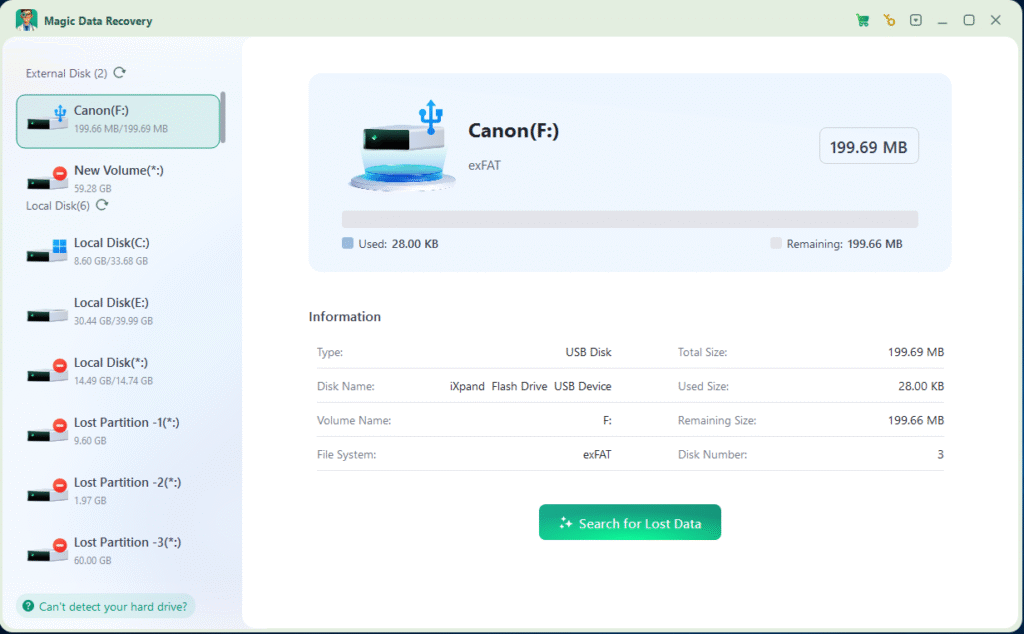
3. Select the SSD to Search for lost data: Choose the SSD from which you want to recover data. The software will detect all the connected storage devices.
Search for lost data
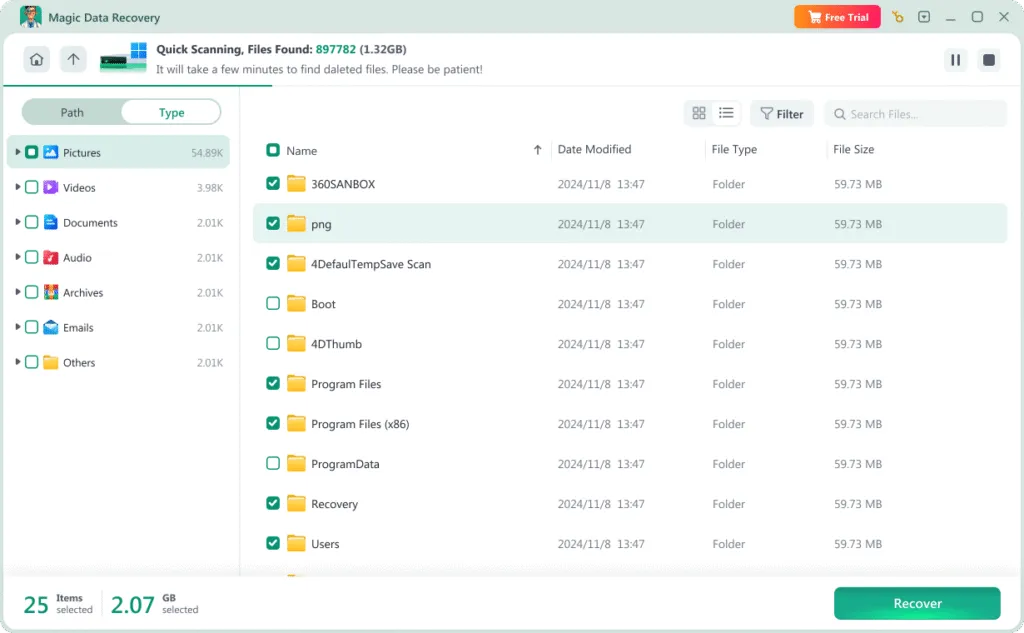
4. Preview the Files: After the scan is complete, you can preview the files that the software has found. This allows you to select only the files you need to recover.
Preview files on the SD card recovery program

5. Recover the Data: Select the files you want to recover and choose a destination to save them. Make sure to choose a location other than the original SSD to avoid overwriting the data.

Save the recovered overwritten files

Conclusion

In 2026, with the increasing prevalence of SSDs in our computing devices, having a reliable SSD data recovery software is a must. When choosing the best software for your needs, consider factors such as recovery rate, ease of use, compatibility, scanning options, preview features, and customer support. Magic Data Recovery checks all these boxes and stands out as an excellent choice for recovering data from SSDs. Whether you’re a home user who has accidentally deleted important files or a business that needs to recover crucial data, Magic Data Recovery can help you get your data back from storage devices quickly and efficiently.

Supports Windows 7/8/10/11 and Windows Server

FAQ

What are the common reasons for data loss on SSDs?

Common reasons include accidental deletion (a simple wrong click leading to loss of important files), formatting (mistakenly formatting during system setup or to fix a problem, which wipes all data), virus and malware attacks (corrupting or deleting files to make them inaccessible), and hardware failure (such as controller failures or bad sectors over time).

What key factors should I consider when choosing SSD data recovery software?

Key factors include recovery rate (high success rate in handling different data loss scenarios, checked via user reviews), ease of use (user-friendly interface guiding step-by-step, even for non-tech-savvy users), and preview feature (allowing to see found files, confirm needed ones, and assess recovery success).

Why is Magic Data Recovery considered a leading SSD data recovery software in 2026?

It stands out due to its high recovery rate with a proven track record in challenging situations, user-friendly interface with a step-by-step wizard for beginners, wide compatibility with major Windows systems, various SSD types, and many file formats, as well as a useful preview function to check files before recovery.

Can SSD data be recovered after formatting?

Yes, SSD data can sometimes be recovered after formatting, depending on whether TRIM has been enabled and how much new data has been written. If TRIM has not erased the blocks yet, professional SSD data recovery software may still scan and restore lost files. Stop using the drive immediately to improve recovery chances.

Does TRIM make SSD data recovery impossible?

TRIM can significantly reduce the chances of data recovery because it permanently clears deleted data blocks. However, recovery may still be possible in certain situations, such as when TRIM is disabled, unsupported, or not yet executed. Acting quickly after data loss is crucial to maximize recovery success.

Is it safe to use SSD data recovery software?

Yes, reputable SSD data recovery software is safe when downloaded from official sources. Most tools perform read-only scans, meaning they do not overwrite or modify existing data on your drive. Always avoid installing recovery software on the same SSD where data was lost.

How long does SSD data recovery take?

Recovery time depends on the SSD size, scan mode, and amount of data stored. A quick scan may take only minutes, while a deep scan on a large-capacity SSD can take several hours. More severe data loss scenarios typically require longer scanning and processing time.

What should I do immediately after losing data on an SSD?

Stop using the SSD immediately to prevent overwriting lost data. Avoid saving new files, installing software, or running disk optimization tools. If possible, disconnect the drive and use reliable recovery software on another computer to scan the SSD and attempt file restoration safely.

Erin Smith is recognized as one of the most professional writers at Amagicsoft. She has continually honed her writing skills over the past 10 years and helped millions of readers solve their tech problems.