
FAT File Allocation Table: Definition, Architecture, Use Cases & Repair Guide
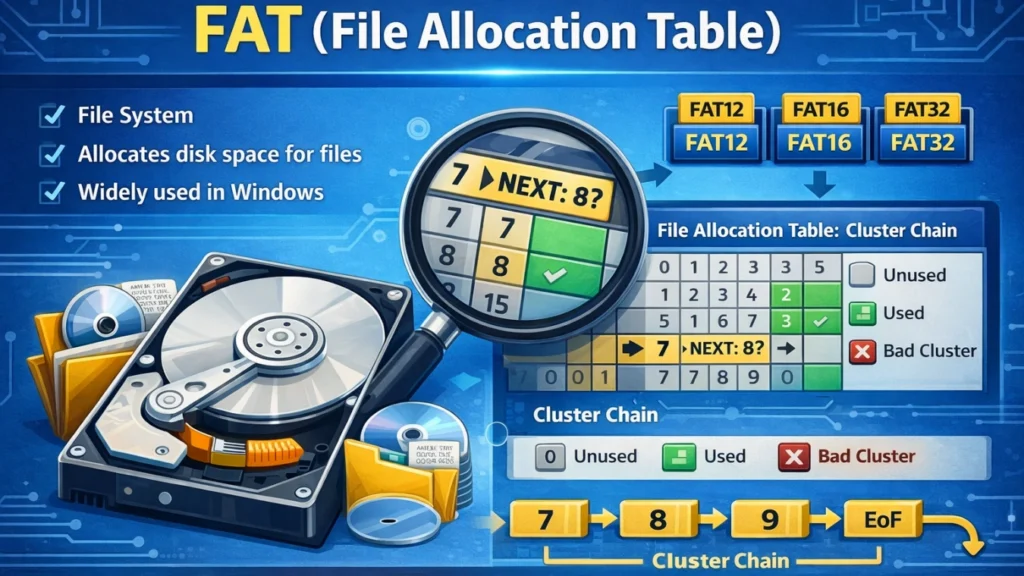
Table of Contents
Introduction
The fat file allocation table definition describes one of the earliest and most widely adopted methods for organizing files on digital storage devices. Although modern file systems such as NTFS and ext4 dominate desktop and server environments, the fat file allocation table (FAT) remains deeply embedded in removable storage, embedded systems, and cross-platform devices.
USB flash drives, SD cards, digital cameras, and firmware-level storage still rely on FAT because of its simplicity and broad compatibility. However, this simplicity also introduces structural limitations and a higher risk of file system corruption.
This article serves as a wiki-style technical reference that explains what the FAT file allocation table is, how it works internally, why it is still used today, and how FAT-related errors occur. It also outlines safe repair strategies and explains how data recovery becomes possible when FAT corruption leads to data loss.
FAT File Allocation Table Definition
The fat file allocation table definition refers to a file system data structure that records how storage clusters are allocated and linked together to form files.
In a FAT-based file system:
- The storage medium is divided into fixed-size units called clusters
- Each cluster corresponds to an entry in the FAT file allocation table
- The table stores the status of each cluster and points to the next cluster in a file
Instead of storing file locations directly, FAT uses a chain-based approach that allows files to occupy non-contiguous areas of the disk.
This design was revolutionary at the time of its introduction and remains easy to implement across hardware platforms.
Historical Development of the FAT File Allocation Table
The fat file allocation table was first introduced by Microsoft in 1977 for floppy disk storage. Over time, it evolved to support larger disks and more complex storage environments.
Major FAT Variants
- FAT12 – Designed for floppy disks, using 12-bit cluster entries
- FAT16 – Expanded cluster addressing for early hard drives
- FAT32 – Increased cluster count and improved efficiency
- exFAT – Optimized for flash storage and large files
Each version reflects hardware limitations and storage demands of its era.
Why the FAT File Allocation Table Is Still Used
Despite its age, the fat file allocation table remains relevant for several practical reasons:
- Universal operating system support
- Minimal processing overhead
- Simple implementation for firmware and embedded devices
- Predictable on-disk structure
Manufacturers often choose FAT for removable media where compatibility outweighs advanced features.
How the FAT File Allocation Table Works
Cluster-Based Storage Model
In a FAT file system, the disk is divided into clusters, each containing one or more sectors. The FAT file allocation table acts as a map that records how these clusters are used.
Each FAT entry can represent:
- The next cluster number in a file
- An end-of-file (EOF) marker
- A free cluster
- A bad or unusable cluster
File Read Process Using FAT
When an operating system opens a file on a FAT-formatted device, it follows a specific process:
- Read the directory entry to locate the starting cluster
- Look up the starting cluster in the FAT
- Follow the cluster chain until an EOF marker is reached
- Assemble file data in logical order
If any link in this chain is missing or corrupted, the file becomes inaccessible.
Internal Structure of a FAT File System
A standard FAT file system consists of four main regions:
1. Boot Sector
The boot sector stores essential parameters such as:
- Cluster size
- Number of FAT tables
- File system type
Damage to this area can prevent the system from recognizing the partition.
2. FAT Region
The FAT region contains one or more copies of the fat file allocation table. Multiple copies exist to provide redundancy in case of partial corruption.
3. Root Directory Area
This area stores metadata for files and folders, including:
- File names
- Attributes
- Starting cluster numbers
4. Data Area
The data area contains the actual file contents stored in clusters.
Advantages of the FAT File Allocation Table
The fat file allocation table offers several advantages that explain its continued use:
- Straightforward architecture
- Low memory requirements
- Fast access on small volumes
- Excellent cross-platform compatibility
These characteristics make FAT suitable for portable and constrained environments.
Limitations and Design Constraints of FAT
Although useful, FAT has significant limitations:
- No journaling or transaction logging
- Increased fragmentation over time
- Limited error recovery capabilities
- FAT32 file size limit of 4 GB
These constraints increase the likelihood of file system errors under real-world usage conditions.
FAT File Allocation Table vs Inode-Based File Systems
Unlike FAT, inode-based file systems such as ext4 store file metadata separately from allocation data.
Feature | FAT File Allocation Table | Inode-Based Systems |
Allocation method | Linked clusters | Indexed blocks |
Fragmentation risk | High | Low |
Fault tolerance | Limited | Strong |
Scalability | Low | High |
This comparison highlights why FAT is rarely used for large or mission-critical storage.
Common FAT File Allocation Table Errors
Errors involving the fat file allocation table often manifest as:
- RAW or unrecognized partitions
- Missing or unreadable files
- Cross-linked cluster chains
- Invalid directory entries
- Boot sector read failures
These symptoms indicate structural damage within the file system.
Technical Causes of FAT Corruption
FAT corruption typically results from:
- Interrupted write operations
- Sudden power loss
- Unsafe device removal
- Flash memory wear
- Malware interference
Because FAT lacks journaling, it cannot recover automatically from incomplete operations.
FAT Partition Repair: What Repair Tools Actually Do
Logical Repair Utilities
Tools such as CHKDSK or fsck attempt to:
- Rebuild directory structures
- Mark bad clusters
- Remove invalid FAT entries
However, these tools prioritize file system consistency over data preservation.
As a result, they may delete orphaned files or truncate damaged clusters.
When FAT Repair Leads to Data Loss
In many cases, repairing a corrupted fat file allocation table causes files to disappear. This happens because:
- Cluster chains cannot be reconstructed
- Directory entries reference invalid clusters
- Repair tools discard inconsistent metadata
At this stage, data recovery becomes the safer approach.
Recovering Data from FAT File Allocation Table Corruption
Data recovery focuses on extracting file content without relying on the damaged FAT structure.
Recovery Strategy Explained
Recovery software scans the raw data area to:
- Identify file signatures
- Reassemble cluster sequences
- Reconstruct directory structures when possible
This approach avoids further modification of the file system.
Using Magic Data Recovery for FAT File System Damage

Supports Windows 7/8/10/11 and Windows Server
Core Capabilities
- Supports FAT12, FAT16, FAT32, and exFAT
- Performs deep scans independent of FAT entries
- Uses read-only access to protect original data
- Handles accidental formatting and RAW partitions
Typical Use Scenarios
- Corrupted SD cards in cameras
- USB drives showing as unformatted
- FAT partitions damaged after power loss
In these cases, recovery software offers a controlled alternative to repeated repair attempts.
Best Practices to Prevent FAT File System Errors
To reduce the risk of FAT corruption:
- Always eject removable media properly
- Avoid interrupting file transfers
- Maintain regular backups
- Replace aging flash storage
Preventive maintenance remains more effective than post-failure recovery.
Conclusion
The fat file allocation table definition explains a foundational file system concept that continues to influence modern storage design. While FAT offers unmatched simplicity and compatibility, it lacks the resilience of modern file systems.
Understanding how the fat file allocation table works helps users diagnose errors, choose appropriate repair strategies, and avoid unnecessary data loss. When corruption occurs and repair tools prove insufficient, controlled recovery methods—such as those provided by Magic Data Recovery—offer a safer path to retrieving important data.
Supports Windows 7/8/10/11 and Windows Server
FAQs
What is the FAT file allocation table?
What does FAT stand for in file systems?
Why is the FAT file system still used?
What happens when the FAT file allocation table is corrupted?
Can FAT file system errors be repaired safely?
How does data recovery work without FAT entries?
Is FAT more fragile than modern file systems?
Should I recover data before formatting a FAT partition?

Jason is a data recovery and technical support specialist with over 15 years of hands-on experience. He has worked extensively with frontline users, troubleshooting difficult data loss cases and providing practical recovery solutions for accidental deletion, formatted drives, damaged file systems, lost partitions, system failures, and other recovery emergencies. His expertise also includes backup and restoration, file repair, and disaster recovery, with a strong emphasis on safe, reliable, and technically accurate guidance.